Introduction
Have you ever used MySQL and been required to work with time value? You'll need a dependable method to manage time value in your database if you're creating a program that tracks time-based data. The time function in MySQL is useful in situations like that. In this article, we'll explore the syntax and usage of the Time function in MySQL and provide real-world examples to demonstrate its usefulness. By the end of this article, you'll have a solid understanding of how to use the Time function in your MySQL applications.
What is TIME() Function in MySQL?
When given a time/datetime expression, MySQL's TIME() function may extract the time component. The TIME() function will return "00:00:00" if the expression is neither a time nor a datetime value. The TIME() function will give a NULL result if the expression is NULL.
Syntax
TIME(expression)
The time value obtained from the expression argument by the TIME() function reflects the time. The result that is returned is a time value in the format "hh:mm:ss," where "hh" stands for the hour, "mm" for the minute, and "ss" for the second.
Example
TIME('11:11:15') -- Returns the time value '11:11:15'
TIME('03:30 PM') -- Returns the time value '15:30:00'
TIME(8, 30, 0) -- Returns the time value '08:30:00'
TIME(NOW()) -- Returns the current time value
- TIME('11:11:15')- This example converts the string value '11:11:15' to a time value in 'hh:mm:ss' format. The function returns the time value '11:11:15'.
- TIME('03:30 PM')- This example converts the string value '03:30 PM' to a time value in 'hh:mm:ss' format. In this case, MySQL assumes that the input string is in a standard time format of 'hh:mm:ss AM/PM', and converts it to a 24-hour format time value '15:30:00'.
- TIME(8, 30, 0)- This example creates a time value from separate hour, minute, and second values. In this case, the function returns the time value '08:30:00'.
- TIME(NOW())- This example returns the current time value as reported by the server.
Example
When the TIME() function in MySQL returns a null value.
SELECT TIME('Hello'); -- Returns NULL, as 'Hello' cannot be converted to a time value.
SELECT TIME('2022-05-03'); -- Returns NULL, as '2022-05-03' is not in a recognized time format.
SELECT TIME('25:30:00'); -- Returns NULL, as '25' is not a valid hour value.
SELECT TIME('2022-05-03 00:00:00'); -- Returns NULL, as there is no time component in the input value.
SELECT TIME(NULL); -- Returns NULL, as there is no input value to convert.
- SELECT TIME('Hello')- This example tries to convert the string value "Hello" to a time value, but the function returns NULL since it cannot be identified as a valid time value.
- SELECT TIME('2022-05-03')- This example tries to convert the string value "2022-05-03" to a time value, but the function returns NULL since the value is not a valid time format.
- SELECT TIME('25:30:00')- The method returns NULL in this example because the string value '25' is not an acceptable hour value (valid values are 0-23).
- SELECT TIME('2022-05-03 00:00:00')- This example tries to convert the text value '2022-05-03 00:00:00' to a time value. However, as the input value contains a time component, the function returns NULL.
- SELECT TIME(NULL)- This example attempts to convert a NULL value to a time value, but the function returns NULL since there is no input value to convert.
Example
Create a table named Student.
CREATE TABLE Student (
    stuEnterId INT AUTO_INCREMENT,
    stuId INT NOT NULL,
    studentName VARCHAR(20) NOT NULL,
    EnterAt TIME NOT NULL,
    PRIMARY KEY(stuEnterId)
);
The value provided by the TIME Function will be the value in the EnterAt column.
INSERT INTO
Student(stuId, studentName, EnterAt)
VALUES
(101, 'Ram', TIME (now()));
Now, examining the Student table
select * from Student;
Output
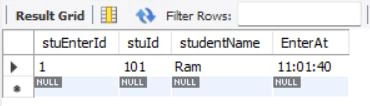
Usage of the Time function in MySQL
There are three main things you can do with the Time function.
- From a date and time value, subtract the time component. With a date and time like "2023-05-03 14:25:00," for example, you can use the TIME() function to obtain only the time component, which is "14:25:00."
- Create a time value from a string representation of a time, such as "14:25:00," so you can use it in calculations and comparisons.
- Once you have a time value, you can manipulate it using other functions like DATE_ADD() and DATE_SUB() to add or subtract time. You can also compare time values to see if one is greater, lower, or equal to the other.
In general, the TIME() function is helpful when working with time values in MySQL since it enables you to conduct operations on time values, such as extracting only the time portion, converting texts to time values, and performing computations and comparisons.
Time Zone in MySQL
To store date and time values along with information about the time zone, MySQL uses a specific data type called TIMESTAMP WITH TIME ZONE. When a date and time value are used to extract the time, MySQL will modify the outcome based on the current time zone. This implies that the outcome may vary based on where you are. When working with date and time values in MySQL, it's critical to be aware of time zones.
A TIMESTAMP WITH TIME ZONE value of '2023-05-03 14:25:00-04:00', For example, which equals 2:25 p.m. in New York with a 4-hour time zone offset. We would hope for the outcome to be "14:25:00," which is the same as the input value if we used the TIME() function to extract the time part in New York.
Conclusion
This article covered all the essential MySQL time functions, making it easy to locate and use them. With this guide, you can quickly extract, manipulate, and convert time values in MySQL.
FAQs
Q. Can the TIME() function be used to perform time calculations?
A. Yes, you can perform time calculations by adding or subtracting a specific amount of time from a given value using the TIME() function in conjunction with other time functions like DATE_ADD() and DATE_SUB().
Q. What is the difference between the TIME() and TIMEDIFF() functions in MySQL?
A. The TIME() function is used to extract the time portion of a datetime value or to convert a string value to a time value, while the TIMEDIFF() function is used to calculate the difference between two-time values.
Q. Can I compare time values using comparison operators like > and <?
A. Yes, you can compare time values in MySQL using comparison operators like >, <, =, and so on.


Join the conversation! Your thoughts help the community grow.