

Getting Started:
Creating a ASP.NET Application:
- Open Visual Studio 2010.
- Go to File => New => Project
- Select Web in installed templates
- Select ASP.NET Web Application
- Enter the Name and choose the location.
Click OK.
And now using mouse right click Add New Linq to SQL Classes from installed Data template.
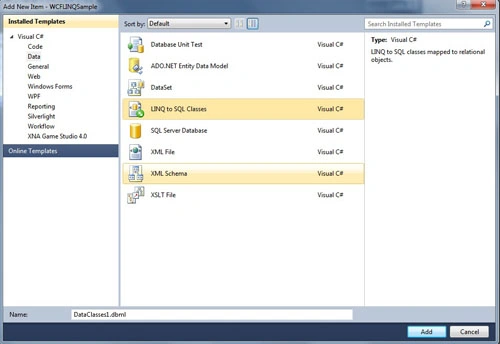
Image 1.
Now drag and drop data table using server explorer.
Note - You can rename table name also using double click.
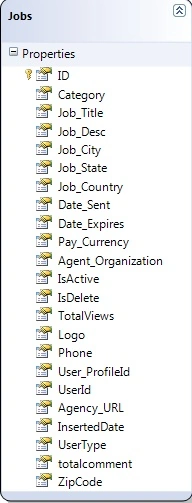
Image 2.
After adding tables as you can see in web.config there is a connection string that has been added automatically.
<add name="ApplicationServices" connectionString="data source=.\SQLEXPRESS;Integrated Security=SSPI;AttachDBFilename=|DataDirectory|\aspnetdb.mdf;User Instance=true"
providerName="System.Data.SqlClient" />
</connectionStrings>
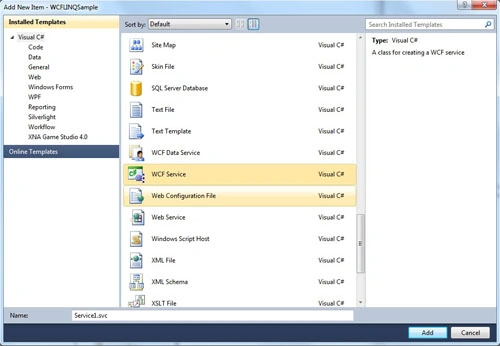
Image 3.
Service1.svc
public void DoWork()
{
}
//This function gets all active events
public IEnumerable<Events> GetLatestEvents()
{
DataClasses1DataContext _context = new DataClasses1DataContext();
var dateTime = DateTime.Now.ToString();
var events = (from r in _context.Jobs
orderby r.InsertedDate descending
select new Events
{
Title = r.Job_Title,
Description = r.Job_Desc,
City = r.Job_City,
State = r.Job_State,
Country = r.Job_Country,
StartingOn = DateTime.Parse(r.Date_Sent),
ExpiringOn = DateTime.Parse(r.Date_Expires)
});
return events.AsEnumerable();
}
[ServiceContract]
public interface IService1
{
[OperationContract]
void DoWork();
IEnumerable<Events> GetLatestEvents();
}
public class Events
{
string title;
string description;
string category;
string city;
string state;
string country;
DateTime startingOn;
DateTime expiringOn;
[DataMember]
public string Title { get { return title; } set { title = value; } }
public string Description { get { return description; } set { description = value; } }
public string Category { get { return category; } set { category = value; } }
public string City { get { return city; } set { city = value; } }
public string State { get { return state; } set { state = value; } }
public string Country { get { return country; } set { country = value; } }
public DateTime StartingOn { get { return startingOn; } set { startingOn = value; } }
public DateTime ExpiringOn { get { return expiringOn; } set { expiringOn = value; } }
}
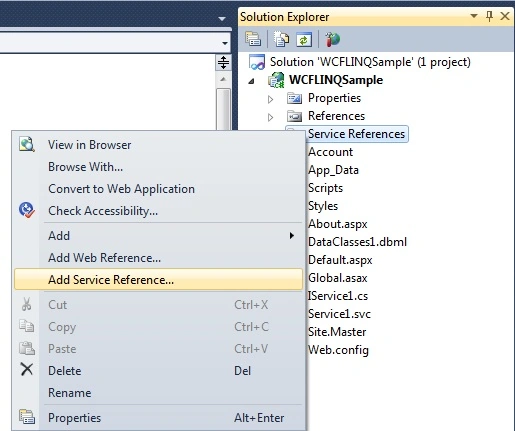
Image 4.
After adding a service refrence to the application, a service model is added in web.config which has all service details and properties.
Join the conversation! Your thoughts help the community grow.