

If you want to look at the previous articles, please visit the links given below.
- Day 1 - Jumpstart .NET Core
- Day 2 - Building .NET Core Basic Application With Visual Studio 2017
- Day 3 - Building .NET Core Basic Application With Static Files
- Day 4 - Read Configuration Files in .NET Core Application
- Day 5 - Create Shared Library or Packages in .Net Core Application
- Day 6 - Route Concept in .Net Core Application
- Day 7 - Route Concept With MVC Pattern
- Day 8 - URL Rewriting Middleware in Asp.Net Core
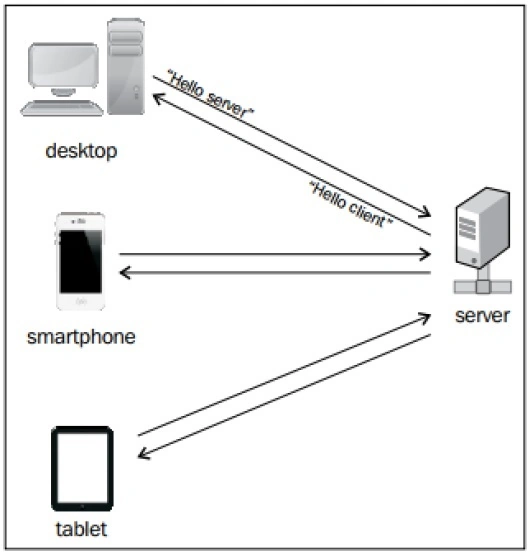
How Web Socket works
Web Socket actually provides a persistent or steady connection between a server and a client so that both the sides can send data to the other side any time. The client establishes a WebSocket connection through a process known as the WebSocket Handshake. This process starts with the client sending a regular HTTP request to the server.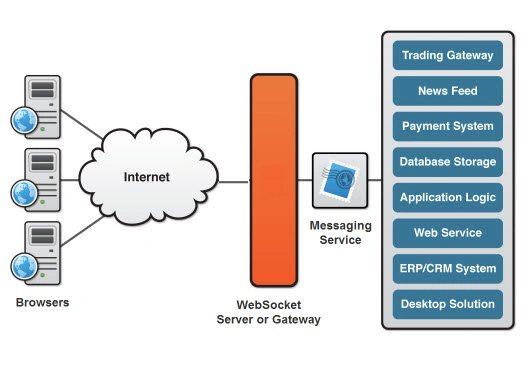
A brief history of Real-Time Web Applications
In the early ages of web development, web sites were basically developed to mainly fulfill only idea i.e. client can send request of fetching any type of data to the Server and on the other hand, Sever must fulfill the request to send back those data to the client. But in the year of 2005, with the introduction of AJAX, this basic concept of web application changed.
When to use it
Web Socket is an advanced technology that makes it possible to establish an interactive connection between server and client browser’s. With this technology or API, we can send message to a server from client and also can receive an event driven response without having any TCP or HTTP protocol use. ASP.NET SignalR provides a richer application model for real-time functionality, but it runs only on ASP.NET, not ASP.NET Core. A Core version of SignalR is under development. But you might have to develop features that SignalR would provide, such as:
- Support for a broader range of browser versions by using automatic fallback to alternative transport methods.
- Automatic reconnection when a connection drops.
- Support for clients calling methods on the server or vice versa.
- Support for scaling to multiple servers.
How to use it
- Install the Microsoft.AspNetCore.WebSockets package from Nuget Package Manager.
- Configure the middleware.
- Accept WebSocket requests.
- Send and receive messages
Configure the middleware
Add the WebSockets middleware in the Configure method of the Startup.cs class.
- app.UseWebSockets();
The following settings can be configured,
KeepAliveInterval
How frequently to send "ping" frames to the client, to ensure proxies keep the connection open.
ReceiveBufferSize
The size of the buffer used to receive data. Only advanced users would need to change this, for performance tuning based on the size of their data.
- var wsOptions = new WebSocketOptions()
- {
- KeepAliveInterval = TimeSpan.FromSeconds(120),
- ReceiveBufferSize = 4 * 1024
- };
- app.UseWebSockets(wsOptions);
Accept WebSocket requests
Somewhere later in the request life cycle check if it's a Web Socket request and accept the Web Socket request. This example is from later in the Configure method,
- app.Use(async (context, next) =>
- {
- if (context.Request.Path == "/ws")
- {
- if (context.WebSockets.IsWebSocketRequest)
- {
- WebSocket webSocket = await context.WebSockets.AcceptWebSocketAsync();
- await Echo(context, webSocket);
- }
- else
- {
- context.Response.StatusCode = 400;
- }
- }
- else
- {
- await next();
- }
- });
Send and receive messages
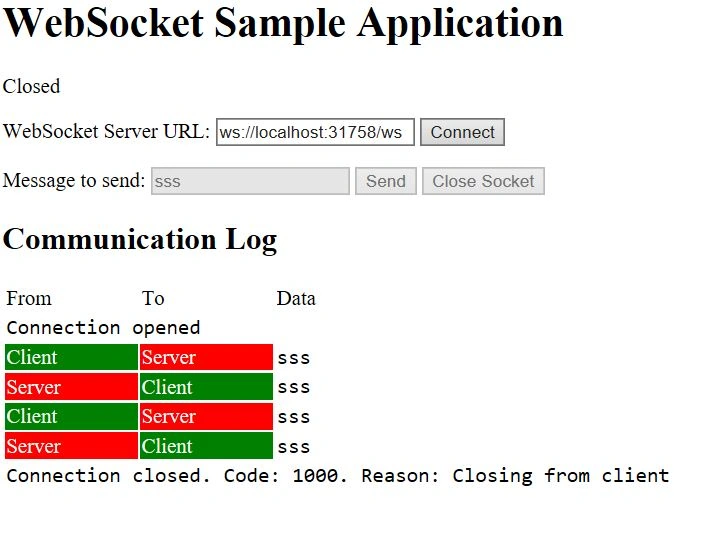
When we want to transfer message from server to client or vice versa, then we need to call AcceptWebSocketAsync method to upgrades the TCP connection to a WebSocket connection and it gives us a WebSocket object. Use the WebSocket object to send and receive messages. The code receives a message and immediately sends back the same message. It stays in a loop doing that until the client closes the connection.
- private async Task Echo(HttpContext context, WebSocket webSocket)
- {
- var buffer = new byte[1024 * 4];
- WebSocketReceiveResult wsresult = await webSocket.ReceiveAsync(new ArraySegment<byte>(buffer),
- CancellationToken.None);
- while (!result.CloseStatus.HasValue)
- {
- await webSocket.SendAsync(new ArraySegment<byte>(buffer, 0, result.Count), wsresult.MessageType,
- wsresult.EndOfMessage, CancellationToken.None);
- wsresult = await webSocket.ReceiveAsync(new ArraySegment<byte>(buffer), CancellationToken.None);
- }
- await webSocket.CloseAsync(result.CloseStatus.Value, result.CloseStatusDescription,
- CancellationToken.None);
- }
When you accept the Web Socket before beginning this loop, the middleware pipeline ends. Upon closing the socket, the pipeline unwinds, that is, the request stops moving forward in the pipeline when you accept a Web Socket, just as it would when you hit an MVC action. But when you finish this loop and close the socket, the request proceeds back up the pipeline.
Program.cs- using System;
- using System.Collections.Generic;
- using System.IO;
- using System.Linq;
- using System.Threading.Tasks;
- using Microsoft.AspNetCore.Hosting;
- namespace Prog8_WebSocket
- {
- public class Program
- {
- public static void Main(string[] args)
- {
- var host = new WebHostBuilder()
- .UseKestrel()
- .UseContentRoot(Directory.GetCurrentDirectory())
- .UseIISIntegration()
- .UseStartup<Startup>()
- .Build();
- host.Run();
- }
- }
- }
- using Microsoft.AspNetCore.Builder;
- using Microsoft.AspNetCore.Hosting;
- using Microsoft.AspNetCore.Http;
- using Microsoft.Extensions.DependencyInjection;
- using Microsoft.Extensions.Logging;
- using System;
- using System.Net.WebSockets;
- using System.Threading;
- using System.Threading.Tasks;
- namespace Prog8_WebSocket
- {
- public class Startup
- {
- public void ConfigureServices(IServiceCollection services)
- {
- }
- public void Configure(IApplicationBuilder app, IHostingEnvironment env, ILoggerFactory loggerFactory)
- {
- loggerFactory.AddConsole(LogLevel.Debug);
- if (env.IsDevelopment())
- {
- app.UseDeveloperExceptionPage();
- }
- app.UseWebSockets();
- var webSocketOptions = new WebSocketOptions()
- {
- KeepAliveInterval = TimeSpan.FromSeconds(120),
- ReceiveBufferSize = 4 * 1024
- };
- app.UseWebSockets(webSocketOptions);
- app.Use(async (context, next) =>
- {
- if (context.Request.Path == "/ws")
- {
- if (context.WebSockets.IsWebSocketRequest)
- {
- WebSocket webSocket = await context.WebSockets.AcceptWebSocketAsync();
- await Echo(context, webSocket);
- }
- else
- {
- context.Response.StatusCode = 400;
- }
- }
- else
- {
- await next();
- }
- });
- app.UseFileServer();
- }
- private async Task Echo(HttpContext context, WebSocket webSocket)
- {
- var buffer = new byte[1024 * 4];
- WebSocketReceiveResult result = await webSocket.ReceiveAsync(new ArraySegment<byte>(buffer), CancellationToken.None);
- while (!result.CloseStatus.HasValue)
- {
- await webSocket.SendAsync(new ArraySegment<byte>(buffer, 0, result.Count), result.MessageType, result.EndOfMessage, CancellationToken.None);
- result = await webSocket.ReceiveAsync(new ArraySegment<byte>(buffer), CancellationToken.None);
- }
- await webSocket.CloseAsync(result.CloseStatus.Value, result.CloseStatusDescription, CancellationToken.None);
- }
- }
- }
- <!DOCTYPE html>
- <html>
- <head>
- <meta charset="utf-8" />
- <title></title>
- <style>
- table {
- border: 0
- }
- .commslog-data {
- font-family: Consolas, Courier New, Courier, monospace;
- }
- .commslog-server {
- background-color: red;
- color: white
- }
- .commslog-client {
- background-color: green;
- color: white
- }
- </style>
- </head>
- <body>
- <h1>WebSocket Sample Application</h1>
- <p id="stateLabel">Ready to connect...</p>
- <div>
- <label for="connectionUrl">WebSocket Server URL:</label>
- <input id="connectionUrl" />
- <button id="connectButton" type="submit">Connect</button>
- </div>
- <p></p>
- <div>
- <label for="sendMessage">Message to send:</label>
- <input id="sendMessage" disabled />
- <button id="sendButton" type="submit" disabled>Send</button>
- <button id="closeButton" disabled>Close Socket</button>
- </div>
- <h2>Communication Log</h2>
- <table style="width: 800px">
- <thead>
- <tr>
- <td style="width: 100px">From</td>
- <td style="width: 100px">To</td>
- <td>Data</td>
- </tr>
- </thead>
- <tbody id="commsLog"></tbody>
- </table>
- <script>
- var connectionForm = document.getElementById("connectionForm");
- var connectionUrl = document.getElementById("connectionUrl");
- var connectButton = document.getElementById("connectButton");
- var stateLabel = document.getElementById("stateLabel");
- var sendMessage = document.getElementById("sendMessage");
- var sendButton = document.getElementById("sendButton");
- var sendForm = document.getElementById("sendForm");
- var commsLog = document.getElementById("commsLog");
- var socket;
- var scheme = document.location.protocol == "https:" ? "wss" : "ws";
- var port = document.location.port ? (":" + document.location.port) : "";
- connectionUrl.value = scheme + "://" + document.location.hostname + port + "/ws";
- function updateState() {
- function disable() {
- sendMessage.disabled = true;
- sendButton.disabled = true;
- closeButton.disabled = true;
- }
- function enable() {
- sendMessage.disabled = false;
- sendButton.disabled = false;
- closeButton.disabled = false;
- }
- connectionUrl.disabled = true;
- connectButton.disabled = true;
- if (!socket) {
- disable();
- } else {
- switch (socket.readyState) {
- case WebSocket.CLOSED:
- stateLabel.innerHTML = "Closed";
- disable();
- connectionUrl.disabled = false;
- connectButton.disabled = false;
- break;
- case WebSocket.CLOSING:
- stateLabel.innerHTML = "Closing...";
- disable();
- break;
- case WebSocket.CONNECTING:
- stateLabel.innerHTML = "Connecting...";
- disable();
- break;
- case WebSocket.OPEN:
- stateLabel.innerHTML = "Open";
- enable();
- break;
- default:
- stateLabel.innerHTML = "Unknown WebSocket State: " + socket.readyState;
- disable();
- break;
- }
- }
- }
- closeButton.onclick = function () {
- if (!socket || socket.readyState != WebSocket.OPEN) {
- alert("socket not connected");
- }
- socket.close(1000, "Closing from client");
- }
- sendButton.onclick = function () {
- if (!socket || socket.readyState != WebSocket.OPEN) {
- alert("socket not connected");
- }
- var data = sendMessage.value;
- socket.send(data);
- commsLog.innerHTML += '<tr>' +
- '<td class="commslog-client">Client</td>' +
- '<td class="commslog-server">Server</td>' +
- '<td class="commslog-data">' + data + '</td>'
- '</tr>';
- }
- connectButton.onclick = function () {
- stateLabel.innerHTML = "Connecting";
- socket = new WebSocket(connectionUrl.value);
- socket.onopen = function (event) {
- updateState();
- commsLog.innerHTML += '<tr>' +
- '<td colspan="3" class="commslog-data">Connection opened</td>' +
- '</tr>';
- };
- socket.onclose = function (event) {
- updateState();
- commsLog.innerHTML += '<tr>' +
- '<td colspan="3" class="commslog-data">Connection closed. Code: ' + event.code + '. Reason: ' + event.reason + '</td>' +
- '</tr>';
- };
- socket.onerror = updateState;
- socket.onmessage = function (event) {
- commsLog.innerHTML += '<tr>' +
- '<td class="commslog-server">Server</td>' +
- '<td class="commslog-client">Client</td>' +
- '<td class="commslog-data">' + event.data + '</td>'
- '</tr>';
- };
- };
- </script>
- </body>
- </html>
Anandu G NathPosted Jan 5, 2024, 10:40 AM
Good one , Nicly explained
Debasis SahaPosted Aug 17, 2023, 12:53 PM
Hi dear, I have just check the link and it works for me. For download, u need to login into the portal.
hajee masthanPosted Aug 17, 2023, 6:04 AM
Hi dear i would like to downloads your code but link is not working.
Basudev PradhanPosted Dec 18, 2019, 6:30 AM
How to Use in .net 4.5 With Web API
Ajit UkalePosted Aug 9, 2019, 10:56 AM
How to implement like unlike count API using Socket in .Net Core?
Richard JacomePosted Aug 9, 2019, 10:29 AM
Very good, thanks, but have a question, how do you configure the listening port of the websocket? Or is it the same port where the application runs?
Munibabu ChittemPosted Aug 9, 2018, 6:41 AM
Very useful and Thanks
Alexander SokolovPosted Jul 14, 2018, 4:55 AM
How is this one any different to Microsoft official article and their sample app http://github.com/aspnet/Docs/tree/master/aspnetcore/fundamentals/websockets/sample
Linh NgoPosted Jun 26, 2018, 9:06 AM
Or you could just use SignalR and have all the low-level stuff handled for you and just deal with the messages. SignalR uses websockets as its main transport mechanism. Also, this article incorrectly states that SignalR doesn't run on Core (even in 2017, an alpha version of SignalR Core was available). Still, this article is a useful example of pure websockets, so thanks for that.
Tridip BhattacharjeePosted Jun 7, 2018, 4:53 AM
I have one concern that if browser not support then how websocket will work.....is there any fallback mechanism ?
Tridip BhattacharjeePosted Jun 7, 2018, 4:53 AM
Very nice article.....thanks a lot for such this type of article.
Mohd Helmi Mohamed ShariffPosted May 30, 2018, 5:35 AM
I want websocket sent call from webapi. Any guide?
Gurdeep SinghPosted May 28, 2018, 7:03 AM
Please help me out this problem because stuck over there since the morning
Gurdeep SinghPosted May 28, 2018, 7:02 AM
I am not able to run your project
Ger F VersteegPosted Sep 19, 2017, 6:44 AM
I have the following error:Severity Code Description Project File Line Suppression State Error Duplicate 'Content' items were included. The .NET SDK includes 'Content' items from your project directory by default. You can either remove these items from your project file, or set the 'EnableDefaultContentItems' property to 'false' if you want to explicitly include them in your project file. For more information, see https://aka.ms/sdkimplicititems. The duplicate items were: 'wwwroot\Index.html' Prog8_WebSocket C:\Program Files\dotnet\sdk\2.0.0\Sdks\Microsoft.NET.Sdk\build\Microsoft.NET.Sdk.DefaultItems.targets 286