

Introduction
In this article, we are going to learn how to validate appsetting configuration values.
Generally, we store the application configuration in setting and reading those values through IConfiguration, and Option pattern, but sometimes there is are possibility of having this configuration error prone like.
- Forgot to add settings values
- Incorrect section name while reading the value
- Data type mismatch
- Typo error in property name
If anything above happens, the application won't throw an error at the application start, and the application can behave differently at runtime or throw an exception at runtime.
How to resolve this issue?
We have 3 ways to validate this.
- We can use the Data Annotation to validate the configuration class.
- Options Validation using Delegates.
- We can integrate FluentValidation using the IValidationOptions interface.
First, we will see how to Add the Data Annotation to validate and read the setting configuration.
"Smtp": {
  "Server": "mail.whatever.com",
  "Port1": "25",
  "FromAddress": "[email protected]"
}
ConfigurationModel
public class SmtpOptions
{
    [Required(AllowEmptyStrings =false)]
    public string Server { get; set; }

    [Required(AllowEmptyStrings = false)]
    public string Port { get; set; }

    [Required(AllowEmptyStrings = false)]
    public string FromAddress { get; set; }
}
Add the code below to the Program.cs.
services.AddOptions<SmtpOptions>()
    .BindConfiguration("Smtp") // Bind the smtp section in config
    .ValidateDataAnnotations() //Enable the validation
    .ValidateOnStart(); //Validate on app start
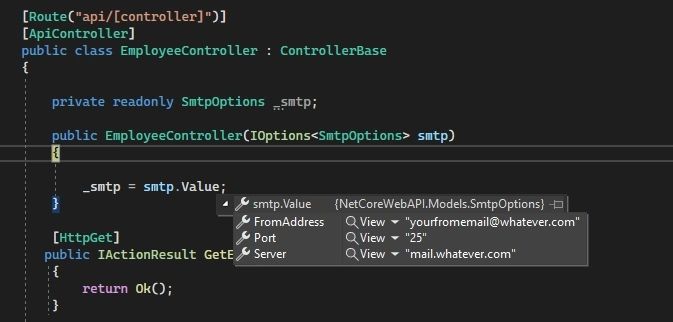
To Read the value, inject the IOption<SmtpOption> in the Controller as shown below.
 [Route("api/[controller]")]
 [ApiController]
 public class EmployeeController : ControllerBase
 {
     private readonly SmtpOptions _smtp;

     public EmployeeController(IOptions<SmtpOptions> smtp)
     {

         _smtp = smtp.Value;
     }

     [HttpGet]
    public IActionResult GetEmployee()
     {
         return Ok();
     }

 }
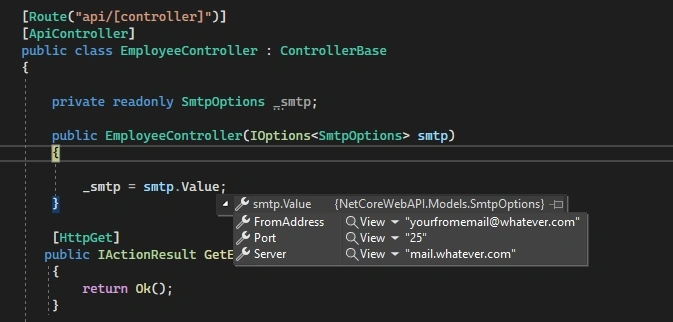
Now try to run the application, and when this Employee Controller hits, we can see we are able to read and validate the app settings; at this time, our configuration is valid, so it won't throw any exception.
Now let's change the configuration intentionally, from Port to Port1, to see whether validation is happening or not.
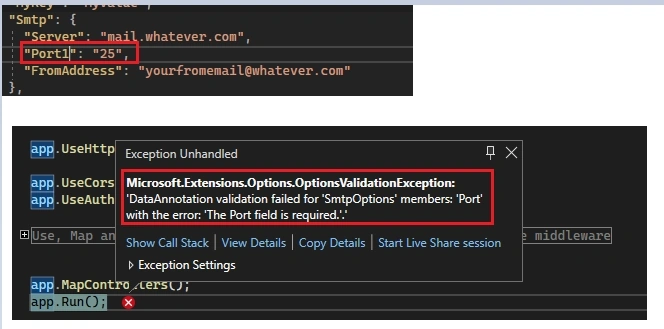
When the application starts at that time, it will throw an above exception as the Port key is not available in the configuration as it is marked required in the configuration class.
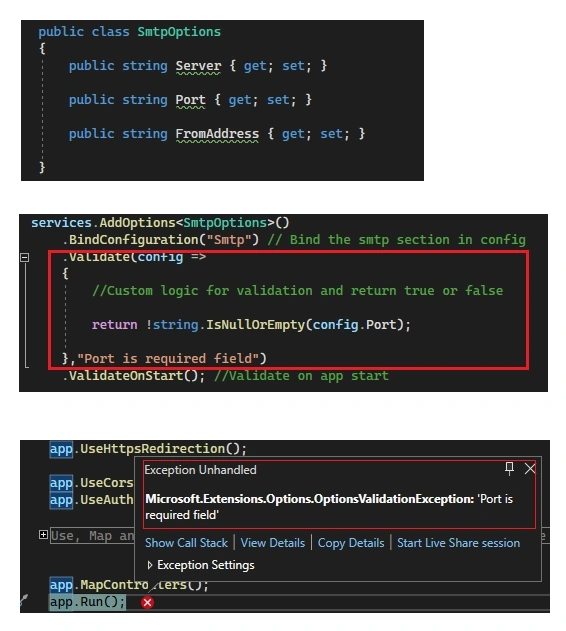
Now, we will see the second approach with Options Validation using Delegates.
The third approach is with IValidationOptions, which we can use for any complex validation, and the code can be placed outside of the Program. cs. For this, we need to create a Class SmtpConfigurationValidation which implements IValidateOptions<SmtpOptions> and this interface has a method called Validate; we can write our custom validation logic and return ValidationResult as shown in the code snippet below.
public class SmtpConfigurationValidation : IValidateOptions<SmtpOptions>
{
    public ValidateOptionsResult Validate(string? name, SmtpOptions options)
    {
        if (string.IsNullOrEmpty(options.Port))
        {
            return ValidateOptionsResult.Fail("Port is required field");
        }
        if(string.IsNullOrEmpty(options.Server))
        {
            return ValidateOptionsResult.Fail("Server is required field");
        }
        if (string.IsNullOrEmpty(options.FromAddress))
        {
            return ValidateOptionsResult.Fail("FromAddress is required field");
        }
        return ValidateOptionsResult.Success;
    }
}
Now we need to add this class to the DI container, as shown below. Bind the SMTP section and ValidateOnStart code.
services.TryAddSingleton<IValidateOptions<SmtpOptions>, SmtpConfigurationValidation>();

services.AddOptions<SmtpOptions>()
    .BindConfiguration("Smtp") // Bind the smtp section in config
    .ValidateOnStart(); //Validate on app start
Now try to run the code, and here we can see it's throwing an error as we have changed key Port to Port1.
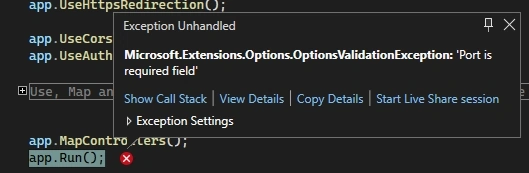
Now we will change Port1 to Port so that the configuration is valid, and it should read the configuration value as expected.
git commit id. Configuration Validation Code
Summary
In this article, we learn about app settings configuration validation using Data Annotation, using Delegate, and IValidationOption interface.
I hope you enjoyed this article. Thanks for reading.
Join the conversation! Your thoughts help the community grow.