
Introduction
+"((([0-1]?[0-9]{1,2}|25[0-5]|2[0-4][0-9])\\.([0-1]?"
+"[0-9]{1,2}|25[0-5]|2[0-4][0-9])\\."
+"([0-1]?[0-9]{1,2}|25[0-5]|2[0-4][0-9])\\.([0-1]?"
+"[0-9]{1,2}|25[0-5]|2[0-4][0-9])){1}|"
+"([a-zA-Z]+[\\w-]+\\.)+[a-zA-Z]{2,4})$";
Step 1
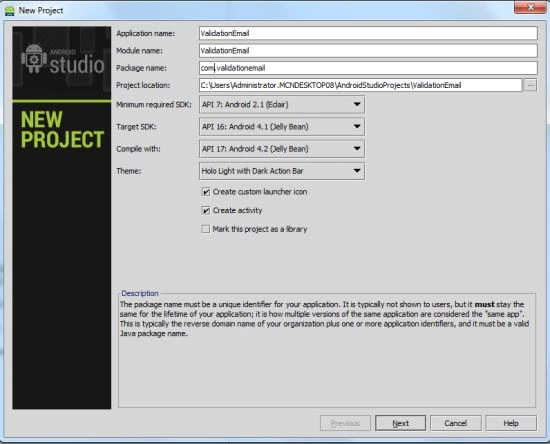
Create a new project:
 Step 2
Open your XML file and use an element like this:
- <RelativeLayout xmlns:android="http://schemas.android.com/apk/res/android"
- xmlns:tools="http://schemas.android.com/tools"
- android:layout_width="match_parent"
- android:layout_height="match_parent"
- android:paddingLeft="@dimen/activity_horizontal_margin"
- android:paddingRight="@dimen/activity_horizontal_margin"
- android:paddingTop="@dimen/activity_vertical_margin"
- android:paddingBottom="@dimen/activity_vertical_margin"
- tools:context=".MainActivity">
- <TextView
- android:layout_width="wrap_content"
- android:layout_height="wrap_content"
- android:text="Email_Id"
- android:id="@+id/textView"
- android:layout_marginLeft="13dp"
- android:layout_marginTop="27dp"
- android:layout_alignParentTop="true"
- android:layout_alignParentLeft="true"/>
- <EditText
- android:id="@+id/emailEditText"
- android:layout_width="250dp"
- android:layout_height="wrap_content"
- android:ems="10"
- android:layout_alignTop="@+id/textView"
- android:layout_alignParentRight="true"
- />
- <Button
- android:id="@+id/sendButton"
- android:layout_height="wrap_content"
- android:layout_width="wrap_content"
- android:text="SEND"
- android:layout_marginTop="38dp" android:layout_below="@+id/emailEditText"
- android:layout_centerHorizontal="true"/>
- <TextView
- android:layout_width="wrap_content"
- android:layout_height="wrap_content"
- android:textAppearance="?android:attr/textAppearanceLarge"
- android:text=""
- android:id="@+id/textViewmessage"
- android:layout_marginTop="32dp"
- android:layout_below="@+id/sendButton"
- android:layout_centerHorizontal="true"/>
- </RelativeLayout>
Open the Java file and write this:
- package com.emailvalidation;
- import android.os.Bundle;
- import android.app.Activity;
- import android.view.Menu;
- import android.view.View;
- import android.widget.Button;
- import android.widget.EditText;
- import android.widget.TextView;
- public class MainActivity extends Activity {
- Button emailButton;
- EditText emailEdittext;
- TextView textviewMessage;
- @Override
- protected void onCreate(Bundle savedInstanceState) {
- super.onCreate(savedInstanceState);
- setContentView(R.layout.activity_main);
- emailButton=(Button)findViewById(R.id.sendButton);
- emailEdittext=(EditText)findViewById(R.id.emailEditText);
- textviewMessage=(TextView)findViewById(R.id.textViewmessage);
- emailButton.setOnClickListener(new View.OnClickListener() {
- @Override
- public void onClick(View view) {
- String getText=emailEdittext.getText().toString();
- String Expn =
- "^(([\\w-]+\\.)+[\\w-]+|([a-zA-Z]{1}|[\\w-]{2,}))@"
- +"((([0-1]?[0-9]{1,2}|25[0-5]|2[0-4][0-9])\\.([0-1]?"
- +"[0-9]{1,2}|25[0-5]|2[0-4][0-9])\\."
- +"([0-1]?[0-9]{1,2}|25[0-5]|2[0-4][0-9])\\.([0-1]?"
- +"[0-9]{1,2}|25[0-5]|2[0-4][0-9])){1}|"
- +"([a-zA-Z]+[\\w-]+\\.)+[a-zA-Z]{2,4})$";
- if (getText.matches(Expn) && getText.length() > 0)
- {
- textviewMessage.setText("valid email");
- }
- else
- {
- textviewMessage.setText("invalid email");
- }
- }
- public void beforeTextChanged(CharSequence s, int start, int count, int after) {}
- public void onTextChanged(CharSequence s, int start, int before, int count) {}
- });
- }
Step 4
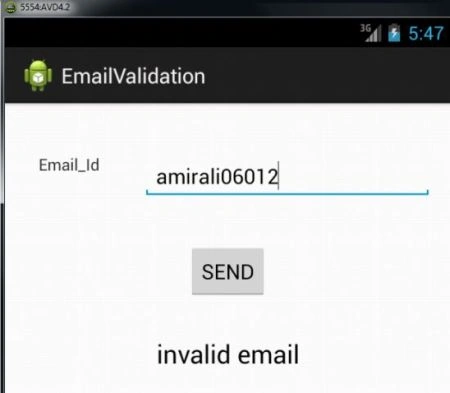
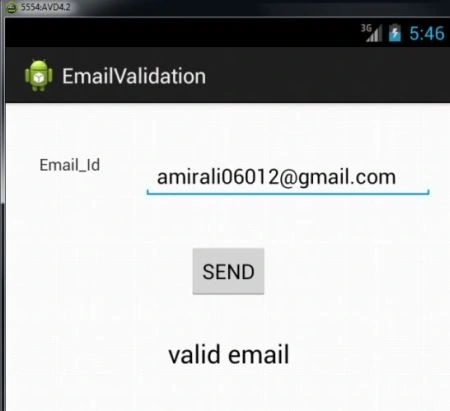
See the output.
When we enter an invalid Email_id:
Natalie CookePosted Aug 29, 2017, 11:23 PM
Finally, email validation that works! Thank you for your talent Amir!
Ioannis BatsiosPosted Jul 28, 2015, 1:18 AM
Thank you, thank you!