

Introduction
The most common control used in any website or any web application is a GridView. The GridView will subsequently have various controls inside it such as TextBox and drop down lists. You will generally encounter a requirement that each row should be validated independently of other rows.
Scenario
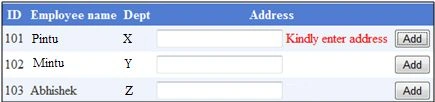
You have a GridView that displays data of an employee and has a TextBox that accepts an employee address. Please find the screenshot for reference.

If you simply add a button and a required field validator to validate against the address TextBox, a single button will validate against all the rows.
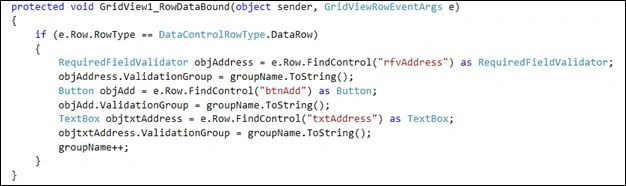
The logic used to perform the validation will assign a unique validation group for each row. Now to decide where to set this group validation is the event where the binding of the grid happens. The binding of the grid happens on the RowDataBound Event, that is why we assign a validation group to the controls present in each row inside in the RowDataBound event.
The implementation logic is explained below using a workflow below:

Step 1: An Employee class is created that will, in turn, be used for populating the GridView:
- public class Employee
- {
- string id;
- public string Id
- {
- get { return id; }
- set { id = value; }
- }
- string empName;
- public string EmpName
- {
- get { return empName; }
- set { empName = value; }
- }
- string deptName;
- public string DeptName
- {
- get { return deptName; }
- set { deptName = value; }
- }
- string address;
- public string Address
- {
- get { return address; }
- set { address = value; }
- }
- public Employee(string id,string name,string dept)
- {
- Id = id;
- EmpName = name;
- DeptName = dept;
- }
- }
Step 2: Declare a variable for storing ValidationGroup as in the following:
- int groupName;
Step 3: On the Page_Load event write the following code:
- if (!IsPostBack)
- {
- Employee empObj1 = new Employee("101", "Ravi ", "ENR");
- Employee empObj2 = new Employee("102", "Sanoj ", "RCL");
- Employee empObj3 = new Employee("103", "Abhishek", "FSI");
- List<Employee> lstEmp = new List<Employee>();
- lstEmp.Add(empObj1);
- lstEmp.Add(empObj2);
- lstEmp.Add(empObj3);
- gvEmployee.DataSource = lstEmp;
- gvEmployee.DataBind();
- }
- groupName = 0;
Step 4: On the Gridview's RowDataBound event write the following code:
- if (e.Row.RowType == DataControlRowType.DataRow)
- {
- RequiredFieldValidator objAddress = e.Row.FindControl("rfvAddress") as RequiredFieldValidator;
- objAddress.ValidationGroup = groupName.ToString();
- Button objAdd = e.Row.FindControl("btnAdd") as Button;
- objAdd.ValidationGroup = groupName.ToString();
- TextBox objtxtAddress = e.Row.FindControl("txtAddress") as TextBox;
- objtxtAddress.ValidationGroup = groupName.ToString();
- groupName++;
- }
Reference(s)
rupesh yadavPosted Jan 12, 2018, 4:00 AM
How to use RegularExpressionValidator GridView Fields in ASP.Net
Balu HydPosted Apr 8, 2015, 7:46 AM
hi while execution this code with gridview the gvEmployee name gettin error this gvEmployee does