

Introduction
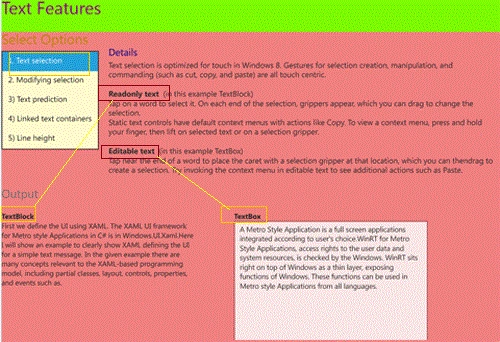
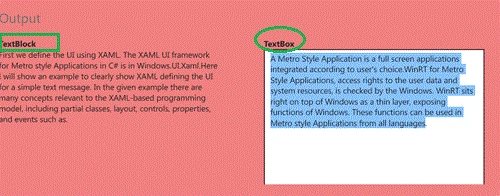
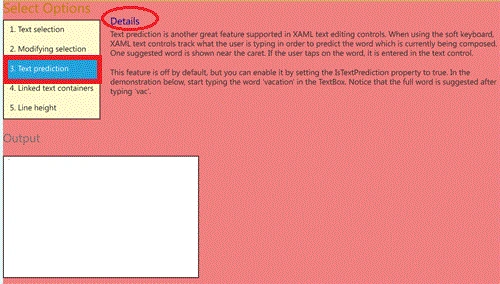
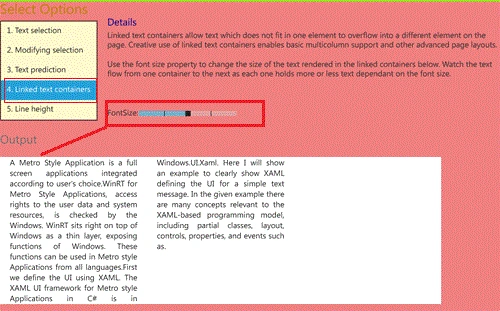
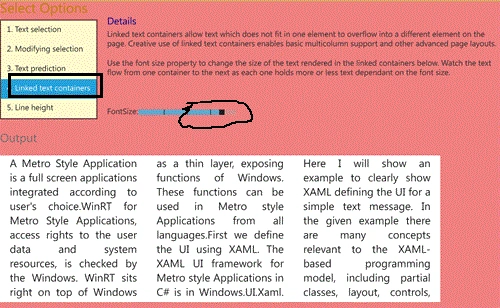
In this section we will describe text formatting. This example describes how to work with text in your application. Specifically, this example explains the Text selection, Modifying a selection, Text prediction, Linked text containers Modifying line heights. In Windows 8 we have to learn Metro Style applications and working with different samples. So, here we will present a sample example in which explains the different text features in this application with the help of this example.
So, we have to follow these steps as given below.
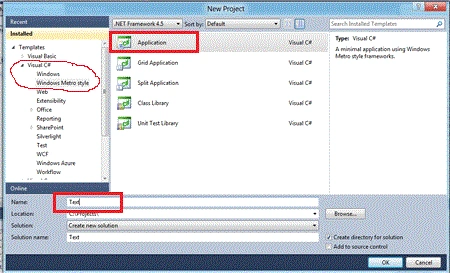
Step 1 : First of all you have to create a new Metro Style Application; let us see the description with images of how you will create it.
- Open Visual Studio 2011
- File -> New -> Project
- Choose Template -> Visual C# -> Windows Metro Style -> Application
- Rename this Application
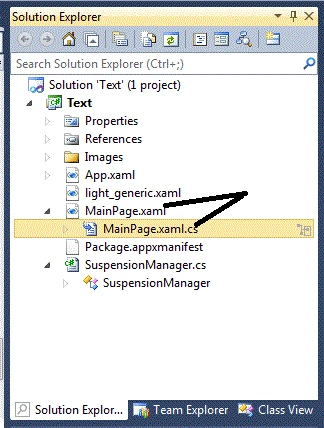
Step 2 : In the Solution Explorer there are two files that we will primarily work with; MainPage.xaml and MainPage.xaml.cs files. In the images folder add any image to the application.
Step 3 : The MainPage.xaml file is as below with the following code.
Code : Let us see the code which is given below.
<Grid x:Name="LayoutRoot" Background="LightCyan">
<!--App Orientation States-->
<VisualStateManager.VisualStateGroups>
<VisualStateGroup x:Name="OrientationStates">
<VisualState x:Name="Full"/>
<VisualState x:Name="Fill">
<Storyboard>
<ObjectAnimationUsingKeyFrames Storyboard.TargetProperty="(FrameworkElement.Margin)" Storyboard.TargetName="ContentRoot">
<DiscreteObjectKeyFrame KeyTime="0">
<DiscreteObjectKeyFrame.Value>
<Thickness>35,20,35,20</Thickness>
</DiscreteObjectKeyFrame.Value>
</DiscreteObjectKeyFrame>
</ObjectAnimationUsingKeyFrames>
<ObjectAnimationUsingKeyFrames Storyboard.TargetProperty="(StackPanel.Orientation)" Storyboard.TargetName="InputPanel">
<DiscreteObjectKeyFrame KeyTime="0">
<DiscreteObjectKeyFrame.Value>
<Orientation>Horizontal</Orientation>
</DiscreteObjectKeyFrame.Value>
</DiscreteObjectKeyFrame>
</ObjectAnimationUsingKeyFrames>
<ObjectAnimationUsingKeyFrames Storyboard.TargetProperty="(FrameworkElement.MaxWidth)" Storyboard.TargetName="Description">
<DiscreteObjectKeyFrame KeyTime="0" Value="700">
</DiscreteObjectKeyFrame>
</ObjectAnimationUsingKeyFrames>
</Storyboard>
</VisualState>
<VisualState x:Name="Portrait">
<Storyboard>
<ObjectAnimationUsingKeyFrames Storyboard.TargetProperty="(FrameworkElement.Margin)" Storyboard.TargetName="ContentRoot">
<DiscreteObjectKeyFrame KeyTime="0">
<DiscreteObjectKeyFrame.Value>
<Thickness>40,20,40,20</Thickness>
</DiscreteObjectKeyFrame.Value>
</DiscreteObjectKeyFrame>
</ObjectAnimationUsingKeyFrames>
<ObjectAnimationUsingKeyFrames Storyboard.TargetProperty="(FrameworkElement.MaxWidth)" Storyboard.TargetName="Description">
<DiscreteObjectKeyFrame KeyTime="0" Value="700">
</DiscreteObjectKeyFrame>
</ObjectAnimationUsingKeyFrames>
</Storyboard>
</VisualState>
<VisualState x:Name="Snapped">
<Storyboard>
<ObjectAnimationUsingKeyFrames Storyboard.TargetProperty="(FrameworkElement.Margin)" Storyboard.TargetName="ContentRoot">
<DiscreteObjectKeyFrame KeyTime="0">
<DiscreteObjectKeyFrame.Value>
<Thickness>20,20,20,20</Thickness>
</DiscreteObjectKeyFrame.Value>
</DiscreteObjectKeyFrame>
</ObjectAnimationUsingKeyFrames>
<ObjectAnimationUsingKeyFrames Storyboard.TargetProperty="(StackPanel.Orientation)" Storyboard.TargetName="InputPanel">
<DiscreteObjectKeyFrame KeyTime="0">
<DiscreteObjectKeyFrame.Value>
<Orientation>Vertical</Orientation>
</DiscreteObjectKeyFrame.Value>
</DiscreteObjectKeyFrame>
</ObjectAnimationUsingKeyFrames>
<ObjectAnimationUsingKeyFrames Storyboard.TargetProperty="(FrameworkElement.MaxWidth)" Storyboard.TargetName="Description">
<DiscreteObjectKeyFrame KeyTime="0" Value="250">
</DiscreteObjectKeyFrame>
</ObjectAnimationUsingKeyFrames>
<ObjectAnimationUsingKeyFrames Storyboard.TargetProperty="(FrameworkElement.Margin)" Storyboard.TargetName="LegalPanel">
<DiscreteObjectKeyFrame KeyTime="0">
<DiscreteObjectKeyFrame.Value>
<Thickness>0,0,10,0</Thickness>
</DiscreteObjectKeyFrame.Value>
</DiscreteObjectKeyFrame>
</ObjectAnimationUsingKeyFrames>
</Storyboard>
</VisualState>
</VisualStateGroup>
</VisualStateManager.VisualStateGroups>
<Grid x:Name="ContentRoot" Background="LightCoral" Margin="100,20,100,20">
<Grid.RowDefinitions>
<RowDefinition Height="Auto"/>
<RowDefinition Height="*"/>
<RowDefinition Height="Auto"/>
</Grid.RowDefinitions>
<!-- Content -->
<ScrollViewer VerticalScrollBarVisibility="Auto" HorizontalScrollBarVisibility="Auto" Grid.Row="1" ZoomMode="Disabled">
<StackPanel x:Name="ContentPanel">
<StackPanel x:Name="InputPanel" Orientation="Horizontal" HorizontalAlignment="Left">
<StackPanel>
<TextBlock Text="Select Options" FontSize="28" Foreground="DarkGoldenrod" Style="{StaticResource H3Style}"/>
<ListBox x:Name="ScenarioList" Margin="0,0,20,0" HorizontalAlignment="Left" Background="LemonChiffon">
<ListBox.ItemTemplate>
<DataTemplate>
<TextBlock Text="{Binding Name}"/>
</DataTemplate>
</ListBox.ItemTemplate>
<ListBoxItem x:Name="Scenario1">
<TextBlock Style="{StaticResource ListBoxTextStyle}" Text="1. Text selection" />
</ListBoxItem>
<ListBoxItem x:Name="Scenario2">
<TextBlock Style="{StaticResource ListBoxTextStyle}" Text="2. Modifying selection" />
</ListBoxItem>
<ListBoxItem x:Name="Scenario3">
<TextBlock Style="{StaticResource ListBoxTextStyle}" Text="3. Text prediction" />
</ListBoxItem>
<ListBoxItem x:Name="Scenario4">
<TextBlock Style="{StaticResource ListBoxTextStyle}" Text="4. Linked text containers" />
</ListBoxItem>
<ListBoxItem x:Name="Scenario5">
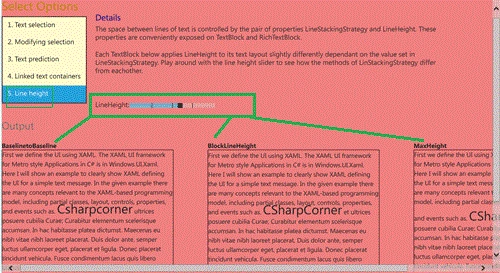
<TextBlock Style="{StaticResource ListBoxTextStyle}" Text="5. Line height" />
</ListBoxItem>
</ListBox>
</StackPanel>
<StackPanel Margin="0,31,0,0" >
<TextBlock Text="Details" FontSize="20" Foreground="DarkBlue" Style="{StaticResource H3Style}"/>
<StackPanel x:Name="Description" MaxWidth="800">
<!-- Scenario 1 -->
<StackPanel x:Name="Scenario1Input">
<TextBlock Style="{StaticResource DescriptionTextStyle}" TextWrapping="Wrap"
Text="Text selection is optimized for touch in Windows 8.Gestures for selection creation, manipulation, and commanding (such as cut, copy, and paste) are all touch centric." />
<TextBlock Style="{StaticResource DescriptionTextStyle}" TextWrapping="Wrap" Margin="0,20,0,0">
<Run FontWeight="Bold" Text="Readonly text" />
<Run Text=" (in this example TextBlock)" />
</TextBlock>
<TextBlock Style="{StaticResource DescriptionTextStyle}" TextWrapping="Wrap"
Text="Tap on a word to select it. On each end of the selection, grippers appear, which you can drag to change the selection." />
<TextBlock Style="{StaticResource DescriptionTextStyle}" TextWrapping="Wrap"
Text="Static text controls have default context menus with actions like Copy. To view a context menu, press and hold your finger, then lift on selected text or on a selection gripper." />
<TextBlock Style="{StaticResource DescriptionTextStyle}" TextWrapping="Wrap" Margin="0,20,0,0">
<Run FontWeight="Bold" Text="Editable text" />
<Run Text=" (in this example TextBox)" />
</TextBlock>
<TextBlock Style="{StaticResource DescriptionTextStyle}" TextWrapping="Wrap"
Text="Tap near the end of a word to place the caret witha selection gripper at that location,
which you can thendrag to create a selection. Try invoking the context menu in editable text to see additional actions such as Paste." />
</StackPanel>
Join the conversation! Your thoughts help the community grow.