

Introduction
Rust, a modern systems programming language, includes a powerful built-in testing framework. This framework helps developers create thorough test suites and supports test-driven development (TDD), where tests guide the coding process. Testing ensures code works correctly and remains reliable over time. Rust's testing tools are integrated into the language, making it easy to write, organize, and run tests.

Testing Module in Rust
Rust uses the '#[cfg(test)]' attribute for testing. This means test code is only included during test runs, not in the final production build. This approach keeps test-specific code separate from the main codebase, preventing it from affecting the final executable.
Setting up a New Rust Project with Testing Support
Setting up a new Rust project with testing support is straightforward. When creating a new Rust project using Cargo, the Rust package manager, the project structure automatically includes support for testing. Now create a new project by running the following command.
cargo new test_project
This command creates a new directory named `test_project` with the following structure.
test_project/
├── Cargo.toml
└── src
    └── main.rs
The 'Cargo.toml' file contains the project metadata, and 'src/main.rs' is where your main application code resides. Let's add some tests to this project.
Writing Basic Tests
To write tests in Rust, you place your test functions within a module annotated with '#[cfg(test)]'. This module is usually placed at the bottom of your source file. Here's an example of how to write a basic test.
// src/main.rs

fn add(a: i32, b: i32) -> i32 {
    a + b
}

fn subtract(a: i32, b: i32) -> i32 {
    a - b
}

fn multiply(a: i32, b: i32) -> i32 {
    a * b
}

fn divide(a: i32, b: i32) -> Option<i32> {
    if b == 0 {
        None
    } else {
        Some(a / b)
    }
}

#[cfg(test)]
mod tests {
    use super::*;

    #[test]
    fn test_add() {
        assert_eq!(add(2, 3), 5);
        assert_eq!(add(-1, 1), 0);
    }

    #[test]
    fn test_subtract() {
        assert_eq!(subtract(5, 3), 2);
        assert_eq!(subtract(2, 2), 0);
    }

    #[test]
    fn test_multiply() {
        assert_eq!(multiply(2, 3), 6);
        assert_eq!(multiply(-2, 3), -6);
    }

    #[test]
    fn test_divide() {
        assert_eq!(divide(6, 3), Some(2));
        assert_eq!(divide(1, 0), None);
    }

    #[test]
    #[should_panic]
    fn test_add_panic() {
        assert_eq!(add(2, 2), 5); // This test will panic because the assertion fails
    }

    #[test]
    #[should_panic]
    fn test_divide_panic() {
        let result = divide(1, 0).unwrap(); // This should panic because we are unwrapping a None
        assert_eq!(result, 0);
    }
}
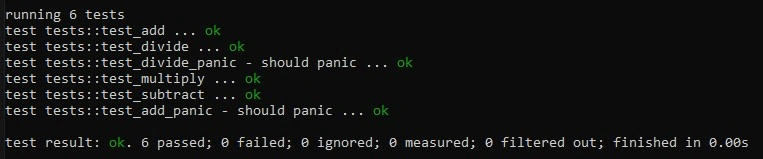
In this example, we define a simple 'add' function and two tests for it. The '#[test]' attribute marks a function as a test function. The '#[should_panic]' attribute indicates that the test should panic.
Join the conversation! Your thoughts help the community grow.