

Introduction
This article explains how to create a SQL database in the ASP .NET Web API.
Step 1
First we create the MVC4 Web API application.
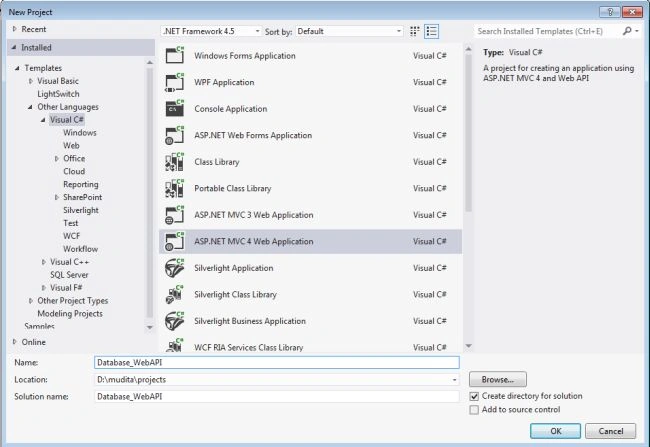
- Start Visual Studio 2012.
- Select "File" -> "New" -> "Project...".
- In the New Project window select "Visual C#" -> "Web"
- Now select "ASP .NET MVC4 Web Application".
- Change the name of application to "Database_WebAPI".
- Click the "OK" button.
Step 2
After performing Step 1, the New ASP .NET MVC4 Project Window is opened; then:
- Select "Web API" from the "ASP .NET MVC4 Project" window.
- Click on "OK" button.

Step 3
Now to add the SQL Server Compact 4.0 Local Database. Follow these steps:
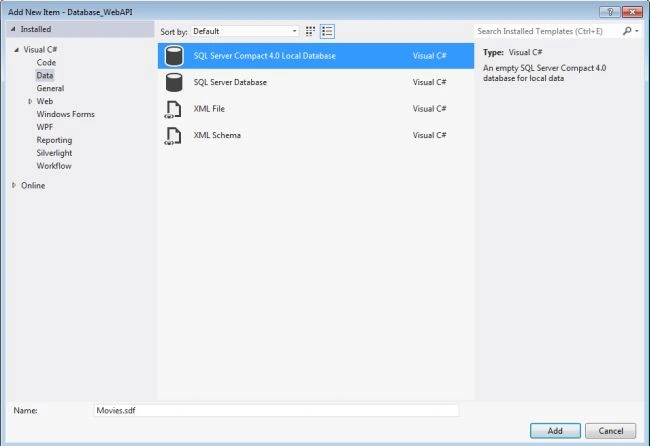
- In the Solution Explorer, right-click the "App_Data" folder
- Select "Add" -> "Add New Item".
- In the template window select "Visual C#" -> "Data".
- Then select "SQL Server Compact 4.0 local database".
- Change the name to "Movies.sdf".
- Click on the "OK" button.
Step 4
Now we create the table in the database using the following:
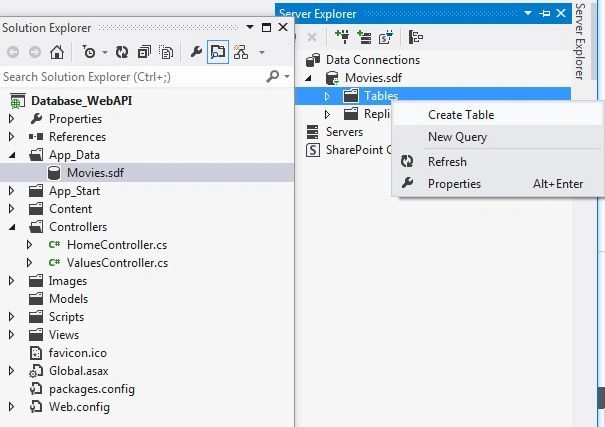
- Select the "App_Data" folder. The Movies.sdf database is showing.
- Double-click on "Movies.sdf". Open a Server Explorer window.
- In the Server Explorer window right-click on "Tables" -> "Create table".
- Now open the New table window.


Step 5
Now we add the Field in the table.

After adding the field in the table it is looks like this.
Step 6
Add the record in the table.
- In the Solution Explorer, double click on the Movies.sdf.
- Open a Server Explorer.
- In the Server Explorer click on the table folder then select Movies.sdf.
- Right-click on Movies.sdf then select "Show the table data".

Now we add the record in the table.

Step 7
Now we add the <connectionStrings> element to the Web.config file.
- In the Solution Explorer double-click on the Web.config file.
- Add the <connectionStrings> element and add the following code.

<add name="DefaultConnection" providerName="System.Data.SqlClient" connectionString="Data Source=(LocalDb)\v11.0;Initial Catalog=aspnet-Database_WebAPI-20130530090816;Integrated Security=SSPI;AttachDBFilename=|DataDirectory|\aspnet-Database_WebAPI-20130530090816.mdf" />
Join the conversation! Your thoughts help the community grow.