

Here I will show how you can use csv file as data source of gridview.
Demo.csv file
firstname,lastname
hiren,soni
kirtan,patel
sanjay,parmar
ghanu,nayak
Output:
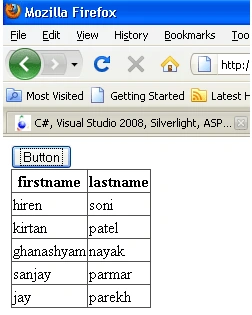
Code and explanation:
// get all lines of csv file
string[] str =
File.ReadAllLines(Server.MapPath("demo.csv"));
// create new datatable
DataTable dt =
new DataTable();
// get the column header means first line
string[] temp = str[0].Split(',');
// creates columns of gridview as per the header name
foreach(string
t in temp)
{
dt.Columns.Add( t , typeof(string));
}
// now retrive the record from second line and add it
to datatable
for(int
i=1;i<str.Length;i++)
{
string[] t = str[i].Split(',');
dt.Rows.Add(t);
}
// assign gridview datasource property by datatable
GridView1.DataSource = dt;
// bind the gridview
GridView1.DataBind();
Hope you understand it.
Thank You.
sasi kumarPosted Sep 12, 2018, 12:36 AM
GirdView To Excel Export, Tamil Fonts Will Not Displayed Correctly in Excel Sheet.
Ndidi EdmundPosted Aug 29, 2010, 11:53 PM
pls can you expand this solution to address csv file with double quote. tnx.