

Introduction
Web SQL is very interesting feature, even though it isn't part of the HTML 5 specification. But it is a separate specification and it can still help for developing web applications. Web SQL is used to manipulate a client-side database. Since I am saying that it is good to use, there is a disclaimer for its use; it is risky because it stores data at the client-side, not on the server-side. So always remember, don't store information sensitive to the server inside it.
Note
A Web SQL database only works in the latest versions of Safari, Google Chrome, and Opera browsers.
Core Methods of Web SQL
The following are the 3 core methods of Web SQL that I will cover in this article:
- openDatabase
- transaction
- executeSql
Creating and Opening Databases
Using the openDatabase method you can create an object for the database. If the database doesn't exist then it will be created and then an object for that database will be created. You also don't need to worry about closing the connection with the database.
To create and open the database you need to use the following syntax.
var dbObj = OpenDatabase('[Database_Name]', '[Version_Number]', '[Text_Description]', '[size]', '[Creation_Callback]')
Example
The following example describes how to create a database or its object.
- First, create a button in your HTML 5 page as in the following:
- <!DOCTYPE html>
- <html>
- <head>
- <title>Open Database</title>
- </head>
- <body>
- <button id="btnCreateDB">Create Database</button>
- </body>
- </html>
-
Now create a JavaScript function to create the database as in the following:
- function CreateDB() {
- var Database_Name = 'MyDatabase';
- var Version = 1.0;
- var Text_Description = 'My First Web-SQL Example';
- var Database_Size = 2 * 1024 * 1024;
- var dbObj = openDatabase(Database_Name, Version, Text_Description, Database_Size, OnSuccessCreate());
- }
- function OnSuccessCreate() {
- alert('Database Created Sucessfully');
- }
-
Now bind this JavaScript function to the onclick event of the btnCreateDB button. The complete code is given below:
- <!DOCTYPE html>
- <html>
- <head>
- <title>Open DataBase</title>
- <script>
- function CreateDB() {
- var Database_Name = 'MyDatabase';
- var Version = 1.0;
- var Text_Description = 'My First Web-SQL Example';
- var Database_Size = 2 * 1024 * 1024;
- var dbObj = openDatabase(Database_Name, Version, Text_Description, Database_Size, OnSuccessCreate());
- }
- function OnSuccessCreate() {
- alert('Database Created Sucessfully');
- }
- </script>
- </head>
- <body>
- <button id="btn1" onclick="CreateDB()">Create Database</button>
- </body>
- </html>
-
Now open this file, I am opening it in Google Chrome. By default the output will be:
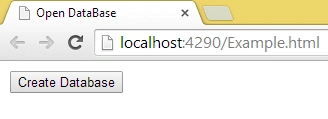
-
Now press the F12 function key and open the Google Chrome developer tool and open the Resource tab where you will get a Web SQL database.
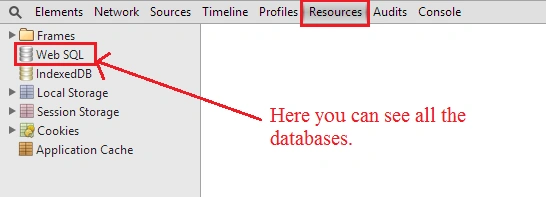
-
Now click on the Create Database button and you will get the following output.
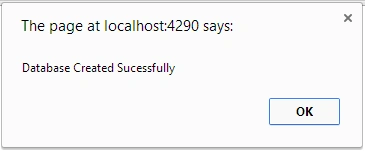 And inside the developer tool, you will get the database.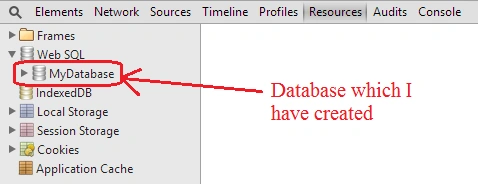
Since you saw how to create and open the database in Web SQL, so by using the openDatabase function we can create a database in Web SQL and open the database. There are 5 parameters that are accepted by this openDatabase function that is
- Database name
This argument provides the name of the database that is mandatory to be provided, otherwise, you will get an exception. - Version number
the Version number is also required; some database may be in version 2.0 and may be in 1.0 so if you know the version number of the database then only you can open it. - Text description
This argument describes the database and provides information about the database. - Size of database
This argument decides the size of the database. - Creation callback
This argument is optional, if you do not provide any value then the database will also be created but if you want to perform some action after the creation of the database then you can use this, so if the database is created successfully then this work will be done.
Transactions
After opening our database we can create transactions. This provides the rollback and commits facility. This means inside the transaction we can fire more than one query. If a transaction fails at any point in time or a query has an error then it will be rolled back including all the queries and if all the queries successfully executed then the transaction will be committed.
A transaction is the same as a function that contains more than one query statement.
Example
- function CreateDB() {
- var Database_Name = 'MyDatabase';
- var Version = 1.0;
- var Text_Description = 'My First Web-SQL Example';
- var Database_Size = 2 * 1024 * 1024;
- var dbObj = openDatabase(Database_Name, Version, Text_Description, Database_Size);
- dbObj.transaction(function (tx) {
- //Code of the transaction
- //will goes here
- });
- }
executeSql
This method performs a very important role in the Web SQL database. This method is used to execute read and write statements which include SQL injection projection and provides a call back method to process the result of any queries. Once if we have a transaction object then we can call the executeSql method.
Example
The following example also explains how to create a table in Web SQL.
- <!DOCTYPE html>
- <html>
- <head>
- <title>Open DataBase</title>
- <script>
- function CreateDB() {
- var Database_Name = 'MyDatabase';
- var Version = 1.0;
- var Text_Description = 'My First Web-SQL Example';
- var Database_Size = 2 * 1024 * 1024;
- var dbObj = openDatabase(Database_Name, Version, Text_Description, Database_Size);
- dbObj.transaction(function (tx) {
- tx.executeSql('CREATE TABLE IF NOT EXISTS Employee_Table (id unique, Name, Location)');
- });
- }
- </script>
- </head>
- <body>
- <button id="Create_DB_n_Table" onclick="CreateDB()">Create Database & Table</button>
- </body>
- </html>
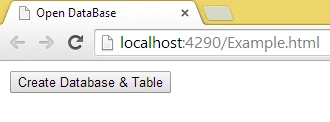
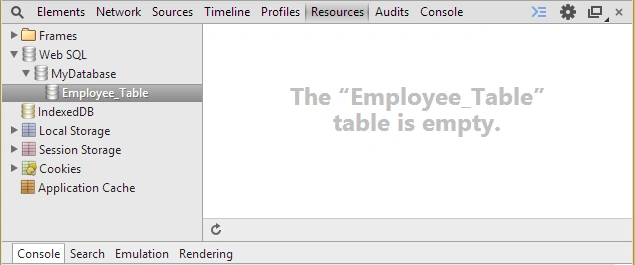
- When the page is loaded:
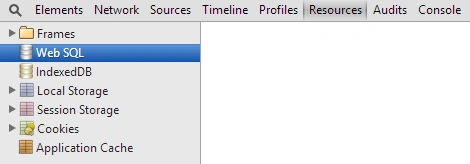
- If you then open the developer tool of Google Chrome then you will get the following output:
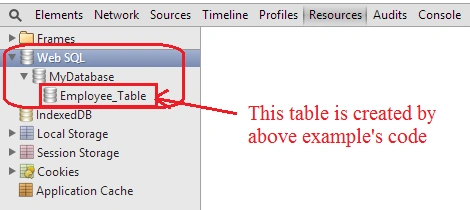
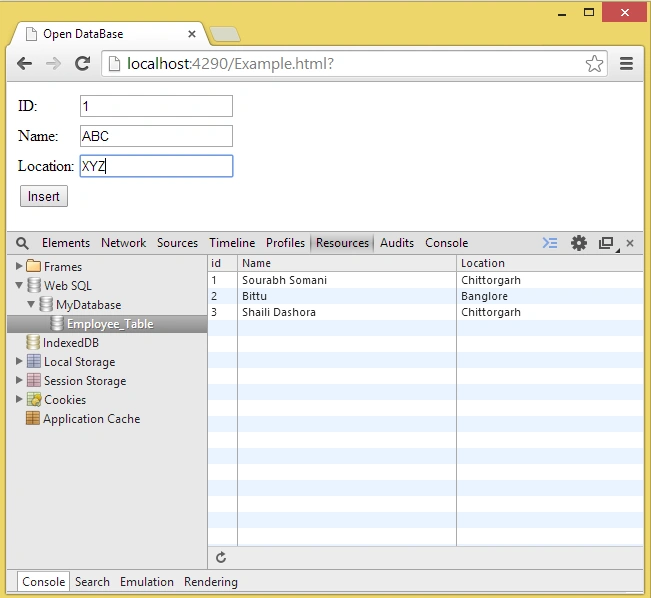
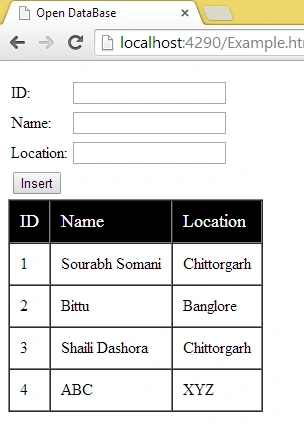
- After clicking on the button:
Noufal kpPosted May 2, 2019, 1:54 AM
Is it possible to copy the All data from SQL server Table to Websql Table, because in my Project each field is automatically filled when page is loaded from SQL Server Database Table, but i need to Load the Data from websql while copying the entire table from SQL server to websql..is it possible?
Noufal kpPosted May 1, 2019, 11:47 PM
How can i store data from websql database to SQL Server Database for permanently ? i mean how can i synchronize websql with SQL server?
张俊采 张俊采Posted Jul 20, 2018, 3:04 AM
Websql After querying, memory will not be released, resulting in memory leaks. How do I deal with such matters?
George GabrielPosted Apr 5, 2017, 7:18 AM
Hi Mr Sourabh how can i get those code , can you please give me a link
kalu singh raoPosted Jul 4, 2016, 2:19 AM
Nice...
trainee 6Posted Nov 3, 2015, 11:25 PM
need code to update and delete
Ankit KandoliyaPosted Aug 24, 2015, 6:19 AM
Can we save/transfer all that data to server ?? If yes then how please suggest.
Sourabh SomaniPosted Jul 15, 2015, 9:22 PM
xmen roma :)
xmen romaPosted Jul 15, 2015, 9:17 PM
Thank you very much. This topic very undertand and very nice.
Masum BillahPosted Jul 2, 2015, 2:24 AM
Very good example.Thx bro.
ramzi saadehPosted Feb 5, 2015, 2:10 AM
Very nice articel. But I have a question ,you said that the web sql is create client side so where the data or the web sql will be saved physically; I mean if I create the web sql (database and tables and data) and close the browser and then reopen the browser so in this case the web sql database will be deleted. that's right?
Sanjukta PearlPosted Jul 15, 2014, 1:36 AM
good article... Something new for me....Keep writing Sourabh...!!!!
Lakshmanan Sethu SankaranarayanPosted Jul 8, 2014, 8:00 AM
Nice Article Indeed. A small clairfication required. if it stores in client side, its stores data in c drive or where?
Prerana TiwariPosted Jul 8, 2014, 4:45 AM
Well explained.............
Khan Abrar AhmedPosted Jul 3, 2014, 3:41 AM
very nice artical
KK SrinivasanPosted Jun 27, 2014, 5:53 AM
I got it what I was looking so many days....Really you saved my time to easily understand the things.
Pankaj BajajPosted Jun 25, 2014, 5:34 AM
very informative article.
Sanjay SinghPosted Jun 9, 2014, 11:36 PM
very nice saurabh sir... well explained
Nimit JoshiPosted Jun 9, 2014, 11:28 PM
Very well explained..
Mahesh ChandPosted Jun 9, 2014, 10:33 PM
Very nice Saurabh. I learned something new today. Thank you!
Sanjay KumarPosted Jun 9, 2014, 5:49 AM
Nice article..
Saineshwar BageriPosted Jun 9, 2014, 4:58 AM
Nice article
Former memberPosted Jun 9, 2014, 4:30 AM
nice article
Praveen Raveendran PillaiPosted Jun 5, 2014, 12:55 AM
Excellent..!!!