Introduction
HISTORY
IBM sowed the seed of HTML in the early 1980s. Initially, it was known by the name General Markup Language (GML). It was a powerful language that aimed at creating a document in which one could mark the title, text, heading and much more.
In 1986, the concept of GML became standardized by the ISO. The standardized GML is called Standard Generalized Markup Language (SGML). In 1989, Sir Tim Berners Lee and his team designed HyperText Markup Language (HTML) as an SGML application in which:
- HYPERTEXT means a complete code package that allows the user to create WebPages that includes text and graphics and also you can add links to your WebPages
- MARKUP means highlighting the text by underlining or displaying it with colors
- LANGUAGE refers to the mode of communications among the webpages
Necessary HTML Tags
(Note that upper-case/lower-case is not important,)
The "guts" of every HTML file must look like this:
- <html>
- <head>
- <title>Document's name which appears in the heading, not on the page</title>
- </head>
- <body>
- Type in the information you want to appear on the page here
- </body>
- </html>
Basic HTML Structure
HTML (<HTML> .. </HTML>)
The HTML documents starts with <HTML> tags and ends with the </HTML> tag. Each document is considered to be a single page. Everything is written within these tags. If the commands are not enclosed in tags then the web browser will assume the commands as simple text. The HTML is divided into two parts: the header <HEAD> and the body <BODY>.
HEAD (<HEAD> .. </HEAD>)
A header is a place where you put the information about the web pages. The <HEAD> contains no text within itself.
TITLE (<TITLE> .. </TITLE>)
The <TITLE> tag must be given within the <HEAD> tag. It contains the title of the document.
BODY (<BODY> .. </BODY>)
Within the <body> tag (command), you may use other HTML tags to add images and/or sounds, link your page to other pages (URLs) on the web, highlight your text by bolding or italicizing it, or change the font size.
Note that all tags must be invoked by typing the tag between two brackets (in other words, <body>). Type the tag in brackets again with a slash in front of it (in other words, </body>) to negate the effect.
Example
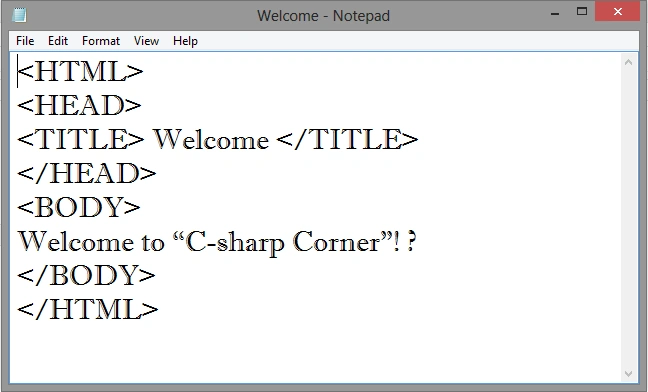
Here's a basic HTML code (just write it in any text editor like Notepad and so on):
- <HTML>
- <HEAD>
- <TITLE> Welcome </TITLE>
- </HEAD>
- <BODY>
- Welcome to “C-sharp Corner”!
- </BODY>
- </HTML>
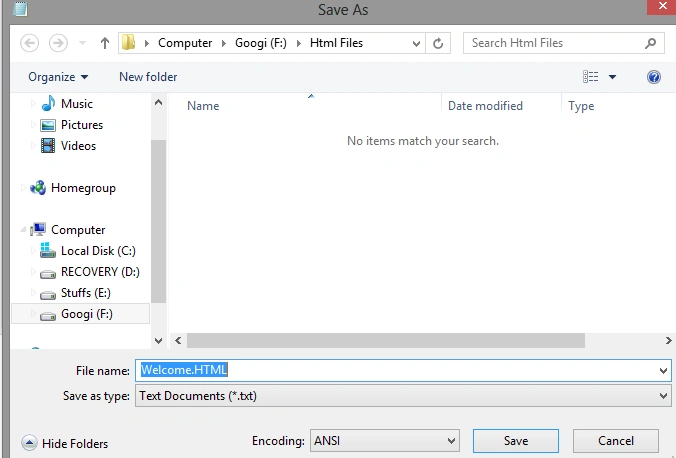
Then save it as you please. In my case it is Welcome.HTML.
Output




Shresthi JaiswalPosted Sep 23, 2016, 3:02 AM
Thanks Sir :)
SubashPosted Sep 23, 2016, 12:30 AM
Nice work
Shresthi JaiswalPosted Jun 13, 2015, 4:05 PM
Thanks !! :-)
Mohammad AliPosted Jun 8, 2015, 8:21 AM
very good
Shresthi JaiswalPosted Jun 5, 2015, 4:40 AM
Thanq :)
Narendran NPosted May 21, 2015, 7:08 AM
Great Start........anyone can be easily understood
Santhakumar MunuswamyPosted Apr 1, 2015, 11:56 PM
Thanks for good start
Karthik Muthu KaruppanPosted Mar 31, 2015, 11:00 AM
good start
Shresthi JaiswalPosted Mar 30, 2015, 12:46 PM
THANKEW ! :)
Abhishek YadavPosted Mar 30, 2015, 12:24 PM
Welcome Shresthi Jaiswal... Good start, keep it up... :)
Shresthi JaiswalPosted Mar 30, 2015, 10:15 AM
thankew ! :)
Gowtham RajamanickamPosted Mar 30, 2015, 10:10 AM
good..
Shresthi JaiswalPosted Mar 30, 2015, 9:50 AM
yeah ! always :)
Abhishek JaiswalPosted Mar 30, 2015, 9:22 AM
Kudos.. keep up that good work! :)
Shresthi JaiswalPosted Mar 30, 2015, 8:45 AM
ok fine ! and thankq :)
Sanjay SinghPosted Mar 30, 2015, 7:26 AM
nice start... make it large with series of articles... !!!
Ayush JaiswalPosted Mar 30, 2015, 4:34 AM
Great information :-)
Shresthi JaiswalPosted Mar 30, 2015, 3:33 AM
Thank you for your kind words! :)
Sam HobbsPosted Mar 30, 2015, 3:18 AM
Welcome to C# Corner. I am impressed that you know about GML. You know, I actually used it back in the 1980s. Really.