

New Input Types in HTML5
In HTML5 several new input types have been added and these new input types are sliders, number spinners, popup calendars, color choosers, autocompleting suggestion boxes, and more.
This article covers the new input types:
- color
- date
- datetime
- month
- number
- range
- search
- tel
- time
- URL
- week
In order to define all these new input types the "<input>" Tag is used.
1. Input type Color
Description
This input type allows the collection of color of the form. If a browser supports this input type then the intention is that clicking in the textfield will result in a color chooser popping up.
The input element with a type attribute whose value is "
color" represents a color-well control, for setting the element's value to a string representing a simple color.Note: Color keywords (for example, strings such as "red" or "green") are not allowed.
Syntax
<input type="color" name="some-name"/>
Browser Support
The Color input type is supported in Chrome and Opera only. It is not supported by Internet Explorer, Safari and Firefox.
Attribute
- value: The initial value. The intention is that if a browser pops up a color chooser, the initial selection will match the current value.
Example of color input type
Output

2. Input type Date
Description
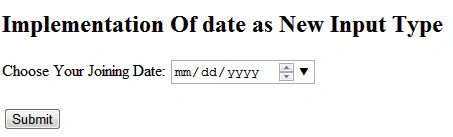
The date type allows the user to select a date. The input element with a type attribute whose value is "
date" represents a control for setting the element's value to a string representing a date. Or in simple words, we can say that this input type allows the collection of date.Syntax
<input type="date" name="some-name"/>
Browser Support
The Date input type is supported in Chrome, Safari and Opera only. It is not supported by Internet Explorer and Firefox.
Attribute
- value: The initial value. The format is "yyyy-mm-dd".
- step: The step size in days. The default is 1.
- min, max: The smallest and largest dates that can be selected, formatted as date strings of the form "yyyy-mm-dd".
Example of date input type
- <!DOCTYPE html>
- <html lang="en" xmlns="http://www.w3.org/1999/xhtml">
- <head>
- <meta charset="utf-8" />
- <title>Date</title>
- </head>
- <body>
- <h2>Implementation Of date as New Input Type</h2>
- <form action="form.asp">
- Choose Your Joining Date:
- <input type="date" name="jdate"><br>
- <br>
- <input type="submit">
- </form>
- </body>
- </html>
Output
3. Input type DateTime
Description
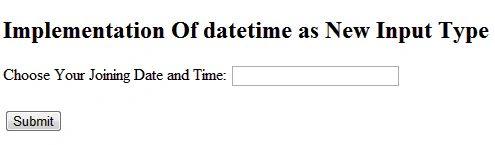
The datetime type allows the user to choose a date and time (with time zone).The input element with a type attribute whose value is "
datetime" represents a control for setting the element's value to a string representing a global date and time (with timezone information).Syntax
<input type="datetime" name="some-name"/>
Browser Support
The DateTime input type is supported in Safari and Opera only. It is not supported by Internet Explorer, Chrome and Firefox.
Example of datetime input type
- <!DOCTYPE html>
- <html lang="en" xmlns="http://www.w3.org/1999/xhtml">
- <head>
- <meta charset="utf-8" />
- <title>DateTime</title>
- </head>
- <body>
- <h2>Implementation Of datetime as New Input Type</h2>
- <form action="form.asp">
- Choose Your Joining Date and Time:
- <input type="datetime" name="jdatetime"><br>
- <br>
- <input type="submit">
- </form>
- </body>
- </html>
Output
4. Input type Email
Description
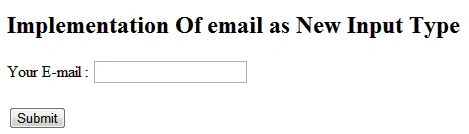
The email type is used for input fields that should contain an e-mail address. A field for entering the e-mail address(es).This input type allows the collection of an email address. If the "list" attribute is not specified, then the intention is that the browser supplies some help in entering a legal email address (e.g., the iPhone browser uses an email-optimized keyboard) and/or validation on submission.
If the "list" attribute is specified, then the intention is that the browser lets the user choose among a set of email addresses defined separately with the "datalist" element. Your browser (Firefox 16 on Windows) does support this input element.
Syntax
- <input type="email" name="some-name"/>
- <input type="email" list="email-choices" name="some-name"/>
- <datalist id="email-choices">
- <option label="First Person" value="[email protected]">
- <option label="Second Person" value="[email protected]">
- <option label="Third Person" value="[email protected]">
- ...
- </datalist>
Browser Support
The Email input type is supported in Firefox, Chrome, and Opera only. It is not supported by Internet Explorer and Safari.
Attributes
- value: The initial value (a legal email address).
- list: The id of a separate "datalist" element that defines a list of email addresses for the user to choose among.
Example of email input type
- <!DOCTYPE html>
- <html lang="en" xmlns="http://www.w3.org/1999/xhtml">
- <head>
- <meta charset="utf-8" />
- <title>Email</title>
- </head>
- <body>
- <h2>Implementation Of email as New Input Type</h2>
- <form action="form.asp">
- Your E-mail :
- <input type="email" name="user-email"><br>
- <br>
- <input type="submit">
- </form>
- </body>
- </html>
Output
5. Input type number
Description
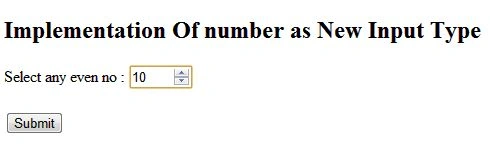
The number type is for input fields that should contain a numeric value. This input type allows the collection of a number (either integer or floating-point). In other words, input type number means picking a number.
The input element with a type attribute whose value is "
number" represents a precise control for setting the element's value to a string representing a number.
Syntax
<input type="number" min="0" max="20" step="2" value="10" name="some-name"/>
Browser Support
The email input type is supported in Safari, Chrome, and Opera only. It is not supported by Internet Explorer and Firefox.
Attributes
- value: The initial value. If omitted, the field is initially blank, but the internal value is not consistent across browsers.
- step: How much to change the value when you click on the up or down arrows of the control. The default is 1.
- min, max: The smallest and largest values that can be selected with the up/down arrows.
Example of number input type
- <!DOCTYPE html>
- <html lang="en" xmlns="http://www.w3.org/1999/xhtml">
- <head>
- <meta charset="utf-8" />
- <title>Number</title>
- </head>
- <body>
- <h2>Implementation Of number as New Input Type</h2>
- <form action="form.asp">
- Select any even no :
- <input type="number" min="0" max="20" step="2" value="10" name="num" /><br>
- <br>
- <input type="submit">
- </form>
- </body>
- </html>
Output
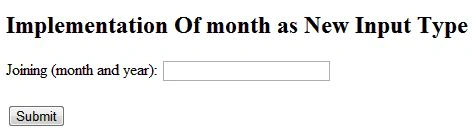
6. Input type month
Description
The month type allows the user to choose a full month and year.
The input element with a type attribute whose value is "
month" represents a control for setting the element's value to a string representing a month.Syntax
<input type="month" name="some-name"/>
Browser Support
The month input type is supported in Safari, Chrome, and Opera only. It is not supported by Internet Explorer and Firefox.
Example of month input type
Sam HobbsPosted Feb 26, 2013, 5:41 PM
Apparently IE 10 supports the range type.