
Introduction
Step 1
Create a project like this:
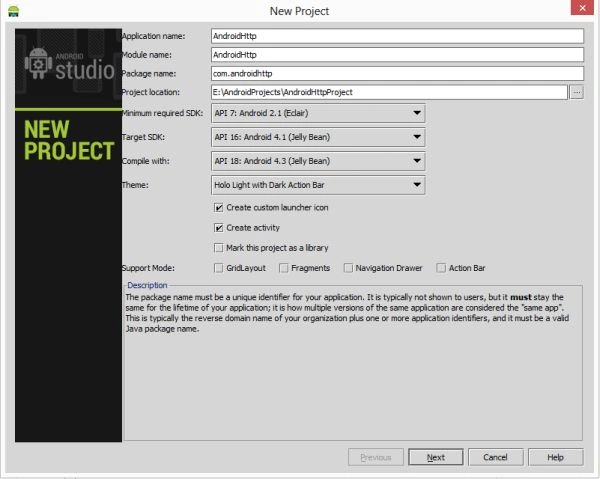
Step 2
Create a an XML file and write this
- <RelativeLayout xmlns:android="http://schemas.android.com/apk/res/android"
- xmlns:tools="http://schemas.android.com/tools"
- android:layout_width="match_parent"
- android:layout_height="match_parent"
- android:paddingLeft="@dimen/activity_horizontal_margin"
- android:paddingRight="@dimen/activity_horizontal_margin"
- android:paddingTop="@dimen/activity_vertical_margin"
- android:paddingBottom="@dimen/activity_vertical_margin"
- tools:context=".MainActivity">
- <TextView
- android:layout_width="wrap_content"
- android:layout_height="wrap_content"
- android:text="@string/hello_world" />
- </RelativeLayout>
Step 3
Create a Java class file with the following:
Step 4
- package com.androidhttpclient;
- import java.io.IOException;
- import java.io.UnsupportedEncodingException;
- import java.util.ArrayList;
- import java.util.List;
- import org.apache.http.HttpResponse;
- import org.apache.http.NameValuePair;
- import org.apache.http.StatusLine;
- import org.apache.http.client.ClientProtocolException;
- import org.apache.http.client.HttpClient;
- import org.apache.http.client.entity.UrlEncodedFormEntity;
- import org.apache.http.client.methods.HttpPost;
- import org.apache.http.impl.client.DefaultHttpClient;
- import org.apache.http.message.BasicNameValuePair;
- import android.annotation.TargetApi;
- import android.app.Activity;
- import android.os.Build;
- import android.os.Bundle;
- import android.os.StrictMode;
- import android.util.Log;
- public class MainActivity extends Activity {
- @TargetApi(Build.VERSION_CODES.GINGERBREAD)
- @Override
- public void onCreate(Bundle savedInstanceState) {
- super.onCreate(savedInstanceState);
- setContentView(R.layout.activity_main);
- if (android.os.Build.VERSION.SDK_INT > 9) {
- StrictMode.ThreadPolicy policy = new StrictMode.ThreadPolicy.Builder().permitAll().build();
- StrictMode.setThreadPolicy(policy);
- }
- // Creating HTTP client
- HttpClient Client = new DefaultHttpClient();
- // Creating HTTP Post
- HttpPost Post = new HttpPost(
- "http://androidexample.com/media/webservice/httppost.php");
- Log.d("HTTPPSt",""+Post);
- // Building post parameters
- // key and value pair
- List<NameValuePair> nameValuePair = new ArrayList<NameValuePair>(2);
- nameValuePair.add(new BasicNameValuePair("name", "username"));
- nameValuePair.add(new BasicNameValuePair("word","8090509239"));
- // Url Encoding the POST parameters
- try {
- Post.setEntity(new UrlEncodedFormEntity(nameValuePair));
- } catch (UnsupportedEncodingException e) {
- // writing error to Log
- e.printStackTrace();
- }
- // Making HTTP Request
- try {
- HttpResponse response = Client.execute(Post);
- StatusLine statusLine=response.getStatusLine();
- // writing response to log
- Log.d("Http Response:", response.toString());
- Log.d("statusline:", ""+statusLine);
- } catch (ClientProtocolException e) {
- // writing exception to log
- e.printStackTrace();
- } catch (IOException e) {
- // writing exception to log
- e.printStackTrace();
- }
- }
- }
- <?xml version="1.0" encoding="utf-8"?>
- <manifest xmlns:android="http://schemas.android.com/apk/res/android"
- package="com.androidhttpclient"
- android:versionCode="1"
- android:versionName="1.0" >
- <uses-sdk
- android:minSdkVersion="7"
- android:targetSdkVersion="16" />
- <application
- android:allowBackup="true"
- android:icon="@drawable/ic_launcher"
- android:label="@string/app_name"
- android:theme="@style/AppTheme" >
- <activity
- android:name="com.androidhttpclient.MainActivity"
- android:label="@string/app_name" >
- <intent-filter>
- <action android:name="android.intent.action.MAIN" />
- <category android:name="android.intent.category.LAUNCHER" />
- </intent-filter>
- </activity>
- </application>
- <uses-permission android:name="android.permission.INTERNET"></uses-permission>
- </manifest>

Join the conversation! Your thoughts help the community grow.