
Today we are going to play around with the Identity function in SQL Server. The Identity function is used to automatically insert a value in a specified column. In this article I describe the Identity function, how to add an identity to an existing column and how to remove an identity from the existing column.
Identity:
Identity is used to assign an auto number to a column. The data type of that column should be int, bigint, smallint or decimal. It takes two arguments; the first shows the initial value and the second shows the increment on that value.
Syntax:
ColumnName Type identity(a,b)
Here the columnName is the name of the column, Type is the data type of that column and a,b represents the numeric value. The value of "a" specifies the initial value and "b" specifies the increment on that value.
Example:
In this example we create a table named emp and use an identity on the empId column:
create table emp(empId int identity(10,1),empName varchar(15))
Insertion of data:
insert into emp
select ('d')union all
select ('e')union all
select ('e')union all
select ('p')union all
select ('a')union all
select ('k')
Output: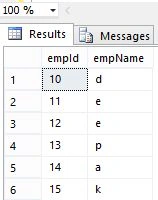
We can't insert data explicitly in the identity field, as in:
insert into emp
select 1,'d' union all
select 2,'e'
Output:
Adding identity to an existing table:
First we create a table named emp1 than we add an identity on that table.
Creation of table:
create table emp1(empName varchar(15))
Altering table to add identity:

Join the conversation! Your thoughts help the community grow.