

Introduction
Today we will create an image sliding function using JavaScript in a Metro Style Application. The sliding images action occurs automatically after a fixed duration of time. The JavaScript slide function is called at the time of loading the body of the HTML file. We can use both internal and external types of JavaScript files but here we will use a simple internal JavaScript file.
In the following we are including the entire code of the HTML file and the JavaScript file to create this mini application.
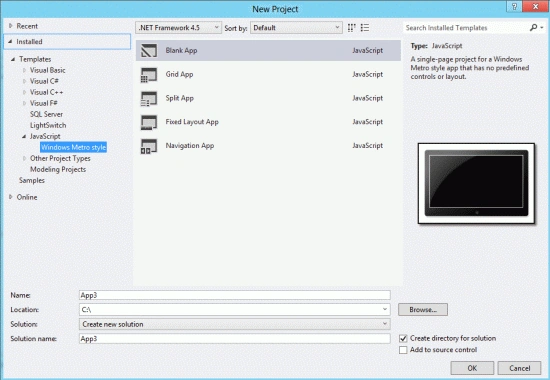
Step 1 : First, you will create a new Metro Style Application. Let us see the description with images of how to create it.
- Open Visual Studio 2012
- File -> New -> Project
- Choose Template -> JavaScript -> Metro Style Application
- Rename the application
Step 2 : In the Solution Explorer there are two files that we will primarily work with; the Default.Html file:
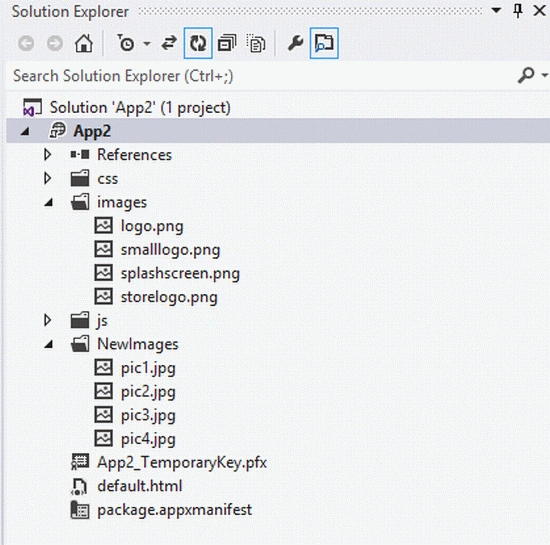
Step 3 : The Default.Html file is as in the following code:
Code :
<!DOCTYPE html>
<html>
<head>
<meta charset="utf-8" />
<title>App2</title>
</head>
<body onload="javascript:slide();" style="background-color:#fff">
<h2 style="font-weight:bold; color:#f00">Automatic Image Slideing</h2>
<br />
<br />
<img id="myimage" src=" NewImages/pic1.jpg" width="500" height="400" />
<br />


Join the conversation! Your thoughts help the community grow.