
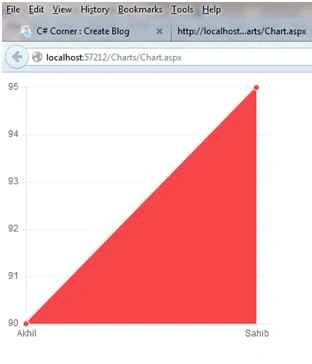
This article shows how to implement charts using chart.js in ASP.NET by creating an Angular.js web service. The following is the procedure.
Step 1. First open Visual Studio select File >> New Website then name it as you wish, I named mine Charts.
Step 2. Now create a table named Marks as in the following.

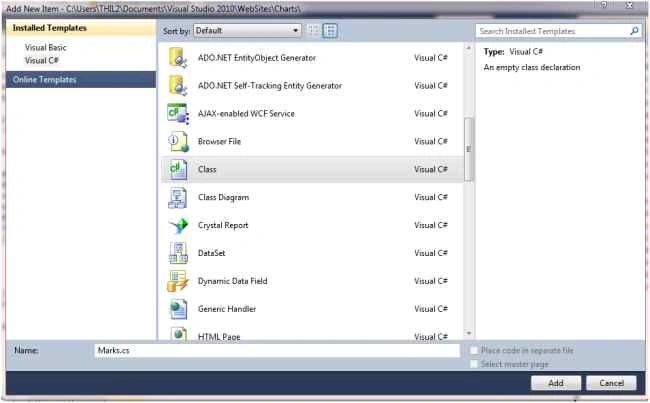
Step 3. Add an Entity Class for the Marks table and name it Marks.
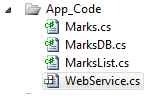
In the app Folder.

Step 4. Add the code given below.
using System;
using System.Collections.Generic;
using System.Linq;
using System.Web;

/// <summary>
/// Summary description for Organisation
/// </summary>
public class Marks {

    #region(PRIVATE DATA MEMBERS)

    private int _ID;
    private string _Name;
    private string _Subjects;
    private string _Marks;

    #endregion

    #region(PUBLIC DATA MEMBERS)

    public int ID {
        get {
            return _ID;
        }
        set {
            _ID = value;

        }
    }
    public string Name {
        get {
            return _Name;
        }
        set {
            _Name = value;
        }

    }
    public string Subject {
        get {
            return _Subjects;
        }
        set {
            _Subjects = value;
        }

    }
    public string Mark {

        get {
            return _Marks;
        }
        set {
            _Marks = value;
        }

    }

    #endregion

}
Step 5. Now add another class MarksDB.
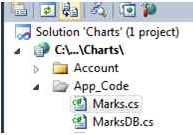
Add the following code to it.
using System;
using System.Collections.Generic;
using System.Linq;
using System.Web;
using System.Data;
using System.Data.SqlClient;

/// <summary>
/// Summary description for MarksDB
/// </summary>
public class MarksDB {
    public MarksDB() {
        //
        // TODO: Add constructor logic here
        //
    }

    #region(GET Marks LIST)

    public static MarksList GetOrganisations() {
        MarksList oMarksList = new MarksList();
        //Change the connection string according to you.
        using(SqlConnection con = new SqlConnection("Data Source=.\\sqlexpress;Initial Catalog=ak Integrated Security=true")) {
            con.Open();
            SqlCommand cmd = new SqlCommand("select * from Marks", con);
            using(SqlDataReader rdr = cmd.ExecuteReader()) {
                while (rdr.Read()) {
                    oMarksList.Add(FillOragnisation(rdr));
                }
            }
        }


        return oMarksList;
    }

    #endregion

    #region(FILL Marks)

    public static Marks FillOragnisation(IDataRecord rdr) {

        Marks org = new Marks();

        if (rdr.GetValue(rdr.GetOrdinal("ID")) != DBNull.Value) {
            org.ID = rdr.GetInt32(rdr.GetOrdinal("ID"));
        } else {
            org.ID = -1;
        }
        if (rdr.GetValue(rdr.GetOrdinal("Name")) != DBNull.Value) {
            org.Name = rdr.GetString(rdr.GetOrdinal("Name"));
        } else {
            org.Name = string.Empty;
        }
        if (rdr.GetValue(rdr.GetOrdinal("Subject")) != DBNull.Value) {
            org.Subject = rdr.GetString(rdr.GetOrdinal("Subject"));
        } else {
            org.Subject = string.Empty;
        }
        if (rdr.GetValue(rdr.GetOrdinal("Marks")) != DBNull.Value) {
            org.Mark = rdr.GetString(rdr.GetOrdinal("Marks"));
        } else {
            org.Mark = string.Empty;
        }

        return org;

    }

    #endregion
}

(SqlConnection con = new SqlConnection("Data Source=.\\sqlexpress;Initial Catalog=ak Integrated Security=true")).
Change the connection string according to yo
Step 6. Now add another class that will return a list of Marks table and name it MarksList.
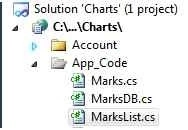
And add the following code to it.
using System;
using System.Collections.Generic;
using System.Linq;
using System.Web;

/// <summary>
/// Summary description for OragnisationList
/// </summary>
public class MarksList : List<Marks> {

}
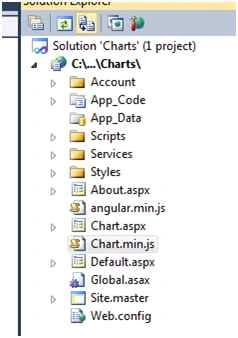
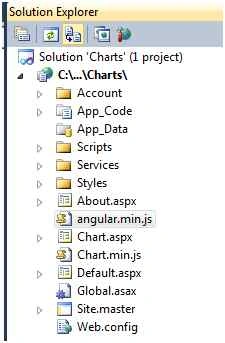
Step 7. Now add a WebService to your website go to Solution Explorer select Add New Folder and name it Services then right-click select Add new item and add a WebService. I named it WebService.asmx.
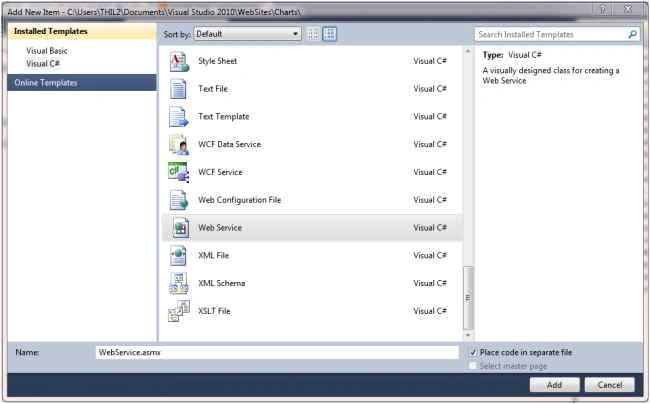
After adding the Web Service to your project you will have two files.
WebService.asmx and WebService.cs.


Santhakumar MunuswamyPosted Jul 19, 2015, 8:17 AM
Good one
Sibeesh VenuPosted Jul 18, 2015, 10:46 AM
Nice Share
Nilesh JadavPosted Jul 18, 2015, 9:09 AM
Nice article sir
Debasis SahaPosted Jul 18, 2015, 2:10 AM
Nice Artile..
Gopi ChandPosted Jul 18, 2015, 1:06 AM
Great work
Nilesh JadavPosted Jul 18, 2015, 12:01 AM
Thank you for sharing this information
SharadPosted Jul 17, 2015, 11:36 PM
one more js...
Chervine BhiwooPosted Jul 17, 2015, 11:27 PM
Very useful! Thanks for sharing!