

Introduction
Paging is very helpful for presenting a huge amount of data in the page because this helps speeding up the loading performance of the page and provides a friendlier UI to end users in terms of data presentation. For this example, I will highlight how to implement custom paging in a GridView control using the power of LINQ and will show you some tips to maximize the performance of a paged grid.
For those who are not familiar with LINQ, here's a short overview. Language-Integrated Query (LINQ) is a set of features introduced in .NET Framework 3.5 that extends powerful query capabilities to the language syntax of C# and Visual Basic. LINQ introduces standard, easily-learned patterns for querying and updating data and the technology can be extended to support potentially any kind of data store. For more details please read the official documentation here.
To get started let's go ahead and fire up Visual Studio and then select new web application / website project. Add a new page and then set up your page by adding a GridView and a Repeater control. The HTML markup should look something like this:
- <h2>GridView Custom Paging with LINQ</h2>
- <asp:GridView ID="grdCustomer" runat="server" AutoGenerateColumns="false">
- <Columns>
- <asp:BoundField DataField="Company" HeaderText="Company" />
- <asp:BoundField DataField="Name" HeaderText="Name" />
- <asp:BoundField DataField="Title" HeaderText="Title" />
- <asp:BoundField DataField="Address" HeaderText="Address" />
- </Columns>
- </asp:GridView>
- <asp:Repeater ID="rptPager" runat="server">
- <ItemTemplate>
- <asp:LinkButton ID="lnkPage" runat="server"
- Text='<%#Eval("Text") %>'
- CommandArgument='<%#Eval("Value") %>'
- Enabled='<%#Eval("Enabled") %>'
- OnClick="Page_Changed"
- ForeColor="#267CB2"
- Font-Bold="true" />
- </ItemTemplate>
- </asp:Repeater>
Keep in mind that in this example I used Northwind.mdf as my database that you can download that from here and I used Entity Framework so that I can work on the conceptual model. I will not elaborate more about the details on how to pull data from a database using EF. If you are new to Entity Framework then you can have a look at my previous article that outlined the details of EF:
- Entity Framework – Inserting Data to Database
- Entity Framework – Fetching and Populating the data in the Form
- Entity Framework – Editing, Updating and Deleting data in the Form
Here's the code behind for the entire stuff:
- using System;
- using System.Collections.Generic;
- using System.Linq;
- using System.Web.UI.WebControls;
- namespace WebFormsDemo
- {
- public class Customer
- {
- public string Company { get; set; }
- public string Name { get; set; }
- public string Title { get; set; }
- public string Address { get; set; }
- }
- public partial class GridViewPagingWithLINQ : System.Web.UI.Page
- {
- private DB.NORTHWNDEntities northWindDB = new DB.NORTHWNDEntities();
- private List<Customer> GetCustomerEntity()
- {
- var customer = from c in northWindDB.Customers
- select new Customer {
- Company = c.CompanyName,
- Name = c.ContactName,
- Title = c.ContactTitle,
- Address = c.Address
- };
- return customer.ToList();
- }
- private void BindCustomerListGrid(int pageIndex)
- {
- int totalRecords = GetCustomerEntity().Count;
- int pageSize = 10;
- int startRow = pageIndex * pageSize;
- grdCustomer.DataSource = GetCustomerEntity().Skip(startRow).Take(pageSize);
- grdCustomer.DataBind();
- BindPager(totalRecords, pageIndex, pageSize);
- }
- private void BindPager(int totalRecordCount, int currentPageIndex, int pageSize)
- {
- double getPageCount = (double)((decimal)totalRecordCount / (decimal)pageSize);
- int pageCount = (int)Math.Ceiling(getPageCount);
- List<ListItem> pages = new List<ListItem>();
- if (pageCount > 1)
- {
- pages.Add(new ListItem("FIRST", "1", currentPageIndex > 1));
- for (int i = 1; i <= pageCount; i++)
- {
- pages.Add(new ListItem(i.ToString(), i.ToString(), i != currentPageIndex + 1));
- }
- pages.Add(new ListItem("LAST", pageCount.ToString(), currentPageIndex < pageCount - 1));
- }
- rptPager.DataSource = pages;
- rptPager.DataBind();
- }
- protected void Page_Changed(object sender, EventArgs e)
- {
- int pageIndex = Convert.ToInt32(((sender as LinkButton).CommandArgument));
- BindCustomerListGrid(pageIndex - 1);
- }
- protected void Page_Load(object sender, EventArgs e)
- {
- if (!IsPostBack) {
- BindCustomerListGrid(0);
- }
- }
- }
- }
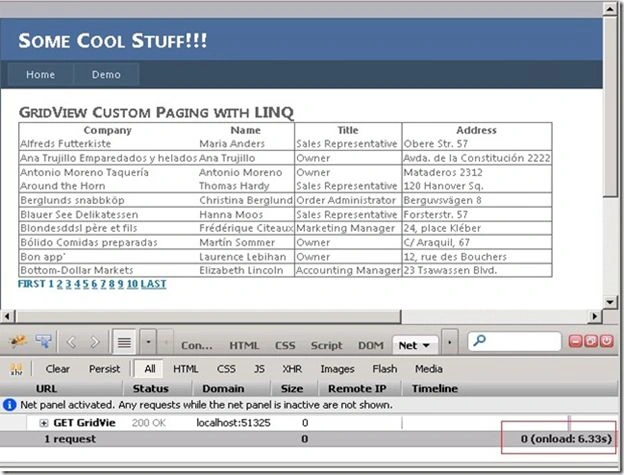
Running the code above will show something as in the following:
On initial load
After paging

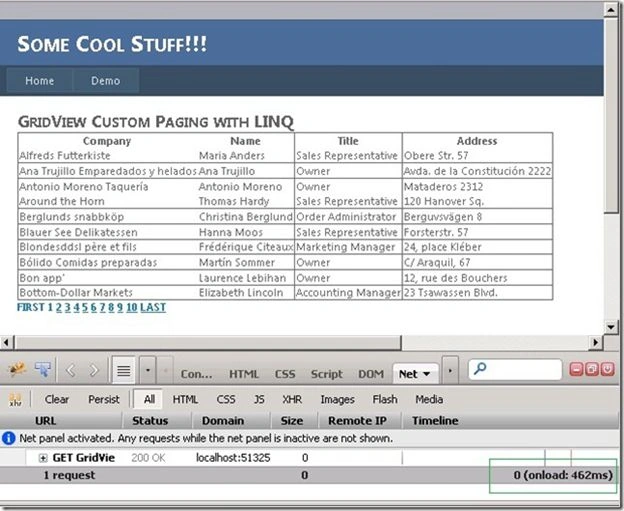
Using firebug, you can see the number of milliseconds the page was rendered on initial page load and after paging. Now let's improve the BindCustomerListGrid() method to speed up more our paging functionality using Application variable and Caching. Here's the modified method below:
- private void BindCustomerListGrid(int pageIndex)
- {
- int totalRecords = 0;
- int pageSize = 10;
- int startRow = pageIndex * pageSize;
- if (Convert.ToInt32(Application["RowCount"]) == 0)
- {
- totalRecords = GetCustomerEntity().Count();
- Application["RowCount"] = totalRecords;
- }
- else
- {
- totalRecords = Convert.ToInt32(Application["RowCount"]);
- }
- List<Customer> customerList = new List<Customer>();
- if (Cache["CustomerList"] != null)
- {
- customerList = (List<Customer>)Cache["CustomerList"];
- }
- else
- {
- customerList = GetCustomerEntity();
- Cache.Insert("CustomerList", customerList, null, DateTime.Now.AddMinutes(3), TimeSpan.Zero);
- }
- grdCustomer.DataSource = customerList.Skip(startRow).Take(pageSize);
- grdCustomer.DataBind();
- BindPager(totalRecords, pageIndex, pageSize);
- }
The following show the output when running the code.
On initial load
After paging
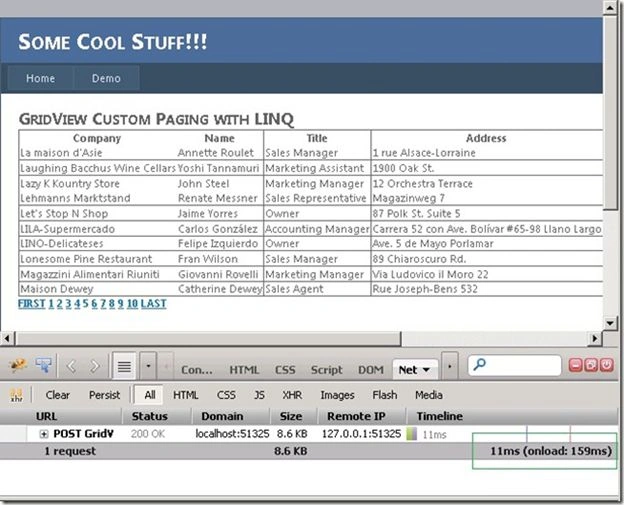
As you see, there's a big change on the performance of page loading time and on subsequent requests. That's it. I hope someone finds this article useful!
Vijay ChikkanaragundPosted Apr 14, 2020, 3:50 AM
Lets say i want to show 50 records and 10 records per page, then do we need to show all 50 pages in the repeater below. how can we modify this code to show only 10 pages first, then once they click on next again 11th-20th page repater will be shown. Thanks in advance.
Tushar BeniwalPosted May 5, 2015, 3:02 PM
hi what if customer table has more than 100000 records ,repeater used for pagination will show links to all records which will make the view not good ,do advise
Karthik Muthu KaruppanPosted May 4, 2015, 2:02 PM
nice
Vincent Maverick DuranoPosted May 2, 2015, 11:30 PM
Thanks guys
Tom MohanPosted May 2, 2015, 11:45 AM
Cool Stuff !!!
NitinPosted May 2, 2015, 5:48 AM
nice
Gowtham RajamanickamPosted May 2, 2015, 4:47 AM
good one..
Santhakumar MunuswamyPosted May 2, 2015, 4:12 AM
Thanks for nice article