SuiteLinksDelegate
It is a new delegate control introduced in SharePoint 2013. If you are looking to add a new link just next to “Sites, NewsFeed, SkyDrive” etc, on the top bar of your SharePoint site you can now do that with a new delegate control "SuiteLinksDelegate". The SuiteLinksDelegate control will allow us to modify the default links,
For Example: To add our own links, in the "suit links".
Header before

Step 1: Create One Empty SharePoint Project and provide the Solution Name and choose the Solution Path and click OK.
Step 2: Deploy the Solution as Farm Solution. Provide the Url in next screen and validate the connection.
Step 3: Add New UserControl to the Project from the Templates and provide a Name to it, in our case it is “MyCustomSuiteLinksDelegate”

Now our Solution Explorer looks as follows,

Step 4: Add reference to Microsoft.SharePoint.Portal dll.
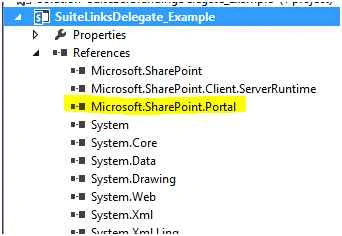
Ensure your control inherits from MySuiteLinksUserControl like this:
public partial class MyCustomSuiteLinksDelegate: MySuiteLinksUserControl
Step 5: Code snippet for the ascx.cs file.
- using System;
- using System.Web.UI;
- using System.Web.UI.WebControls;
- using System.Web.UI.WebControls.WebParts;
- using Microsoft.SharePoint;
- using Microsoft.SharePoint.Utilities;
- using Microsoft.SharePoint.WebControls;
- using System.Globalization;
- using System.IO;
- using System.Collections;
- using Microsoft.SharePoint.Portal;
- using Microsoft.SharePoint.Portal.WebControls;
- namespace SuiteBarBrandingDelegate_Example.ControlTemplates.SuiteLinksDelegate_Example
- {
- public partial class MyCustomSuiteLinksDelegate: MySuiteLinksUserControl
- {
- protected void Page_Load(object sender, EventArgs e)
- {}
- protected override void Render(HtmlTextWriter writer)
- {
- writer.RenderBeginTag(HtmlTextWriterTag.Style);
- writer.Write(".ms-core-suiteLinkList {display: inline-block;}");
- writer.RenderEndTag();
- writer.AddAttribute(HtmlTextWriterAttribute.Class, "ms-core-suiteLinkList");
- writer.RenderBeginTag(HtmlTextWriterTag.Ul);
- RenderSuiteLink(writer, "http://AboutUs/", "About Us", "lnkSearchLink", false);
- RenderSuiteLink(writer, "http://ContactUs/", "Contact Us", "lnkSearchLink", false);
- RenderSuiteLink(writer, "http://Feedback", "Requisition Manager", "lnkSearchLink", false);
- writer.RenderEndTag();
- base.Render(writer);
- }
- }
- }
Add Elements.xml file to the Solution, provide the name and click Add.
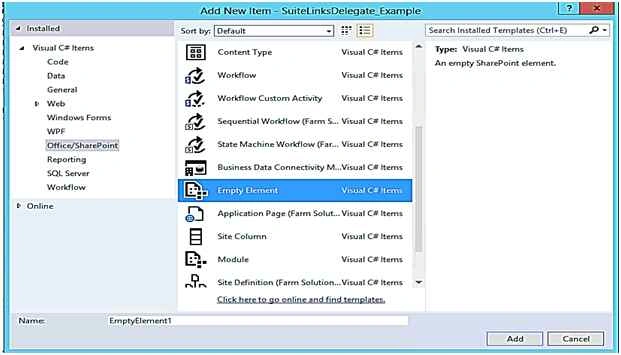 Step 7:
 Click on elements.xml file and paste the following code snippet inside the elements tag.
- <?xml version="1.0" encoding="utf-8"?>
- <Elements xmlns="http://schemas.microsoft.com/sharepoint/">
- <!-- Adding DelegateControl reference to our custom SuiteSuiteLinksDelegate Control -->
- <Control ControlSrc="/_controltemplates/15/SuiteLinksDelegate_Example\MyCustomSuiteSuiteLinksDelegate.ascx" Id="SuiteLinksDelegate" Sequence="90" /> </Elements>
Final step is to build and deploy, then the SharePoint text will override with the Text of the portal.
The final outcome will look as in the following,



Mohammed IbrahimPosted Dec 3, 2015, 7:37 PM
nice
Humayun Kabir MamunPosted Dec 3, 2015, 7:37 AM
Nice...
Santhakumar MunuswamyPosted Nov 29, 2015, 11:46 PM
Good one
Raja TPosted Nov 29, 2015, 11:08 PM
Nice,Thanks for sharing
Ankur MistryPosted Nov 29, 2015, 4:05 AM
Nice article
Mukesh KumarPosted Nov 29, 2015, 3:19 AM
Nice Share