

Introduction
In the fast-changing world of software development, it's important that applications work well and are safe. Azure DevOps is a great tool for handling the whole process of creating software. One cool thing in Azure DevOps is the Environment Approvals system. This article discusses why these approvals are important, looks at how people use them, explains the steps to set them up, and explains why they're better than the old way of doing things, called the classic release pipeline.
Use Cases
Environment approvals are really important in different situations, making sure that any changes made in the development process follow specific rules before moving forward. Here are some common situations where they come in handy.
- Making Sure Code is Good in QA: We use approvals to check that the changes to the code have passed tough testing in the QA (Quality Assurance) stage before going to the next step.
- Checking for Security: Approvals help us do security checks at certain points to make sure our application follows security rules and standards.
- Following Industry Rules: Approvals make sure we're following the rules set by the industry and complying with regulations at important points in the development process.
- Controlling Code Releases: We use approvals to control how we release code to different stages, preventing any mistakes or unauthorized releases.
- More Control Over Deployments: When we compare environment approvals to the older way of doing things called the classic release pipeline, there are some advantages. With environment approvals, we have better control over releasing our code. We can set specific rules for each environment to make sure everything goes smoothly.
Step by Step process to implement Environment Approvals
Step 1. Create Environments
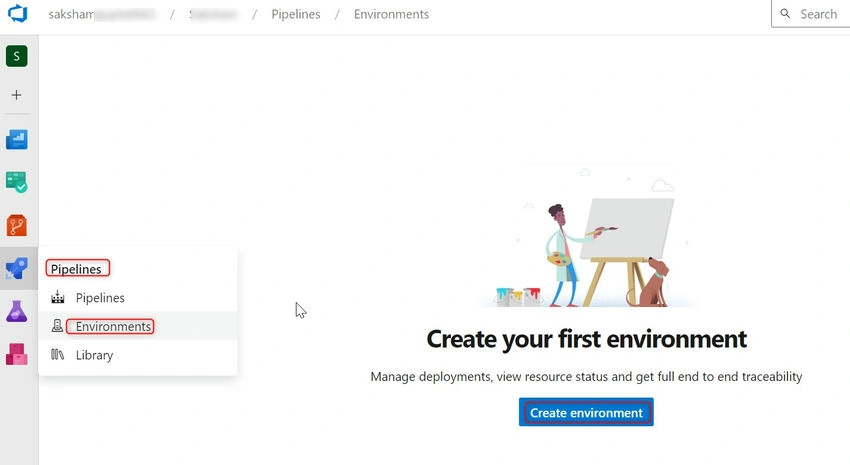
- Within your Azure DevOps project, navigate to the 'Pipelines' section. Click on 'Environments' and create the environment button, as shown below.
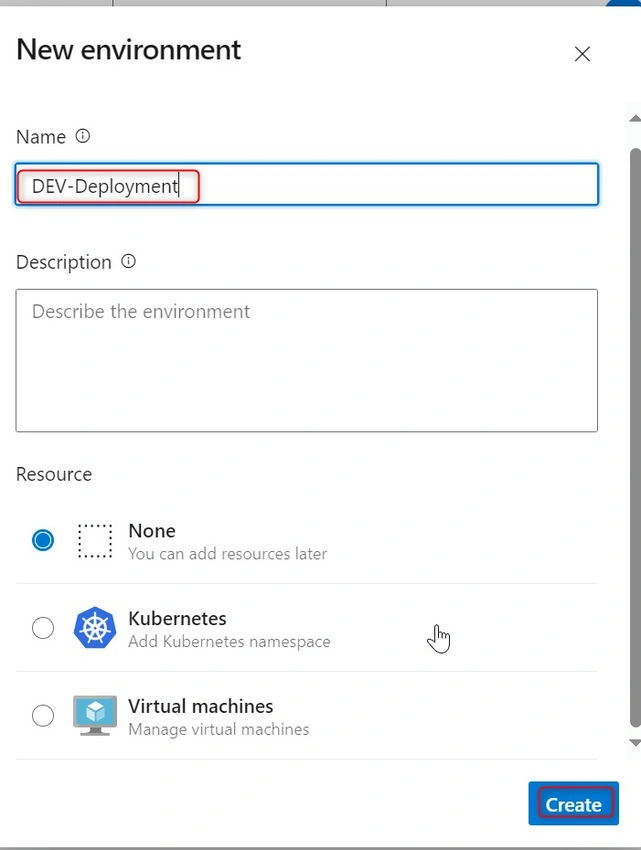
- A window will open on the left-hand side. Enter the environment name and click on Create, as shown below.
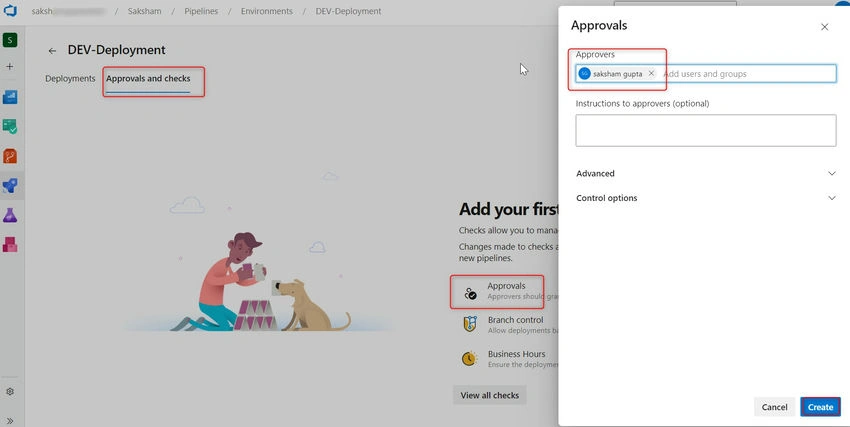
- Now, we need to add approvals. Go to Approval and Checks -> Approvals -> In the Approvers field, add approver(s) -> Click on Create as shown below.
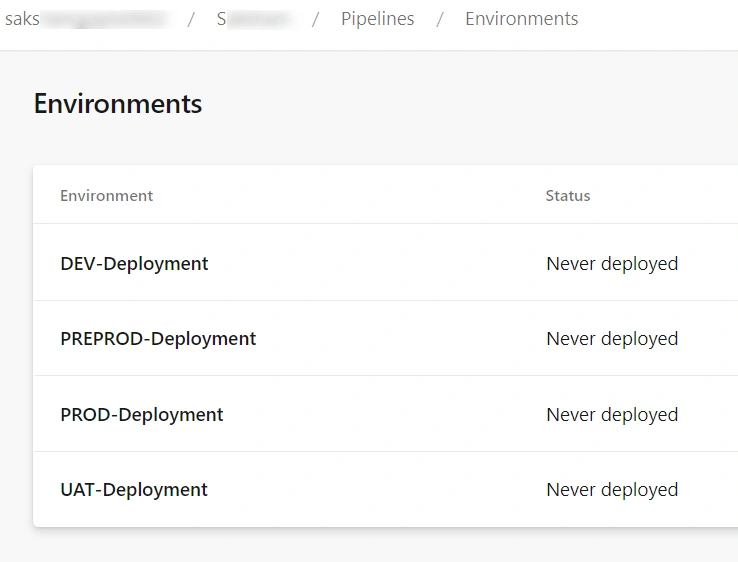
- Similarly, we can create multiple environments based on our requirements, as shown below.
Step 2. Create a multi-stage YAML pipeline.
Pre-requisites
- Power Platform Build Tools Extension should be installed in Azure DevOps Organization.
- Below YAML code will create a multi-stage pipeline, for UAT, PREPROD, and PROD environments. It is a sample pipeline, and we are only testing connections to the target environment. More tasks can be added based on requirements.
trigger:
- none  #none (No trigger specified, meaning manual triggering is required)
parameters:
  - name: 'Environments' #Environments -> An object-type parameter with default values 'UAT', 'PREPROD', and 'PROD'.
    type: object
    default:
     - 'UAT'
     - 'PREPROD'
     - 'PROD'

stages:
- ${{ each env in parameters.Environments }}: #Loop through each environment specified in the 'Environments' parameter.
  - stage: ${{ env }}
    jobs:
    # Deployment Pipeline
    - deployment: DeploymentPipeline
      pool:
        vmImage: 'windows-latest'
        timeoutInMinutes: 0
        cancelTimeoutInMinutes: 0
      environment: ${{ env }}-Deployment
      strategy:
       runOnce:
        deploy:
         steps:
         - checkout: self

         - task: PowerPlatformToolInstaller@2 #This task will install dependencies realted to Power Platform Build Tools
           inputs:
             DefaultVersion: true

         - task: PowerPlatformWhoAmi@2   #Thi stask will check the connection to target environment
           inputs:
             authenticationType: 'PowerPlatformSPN'
             PowerPlatformSPN: '${{ env }}'
Step 3. Run the YAML pipeline.
- Once the pipeline is created and saved, click on the run pipeline. A pop-up will appear, as shown in the image below.
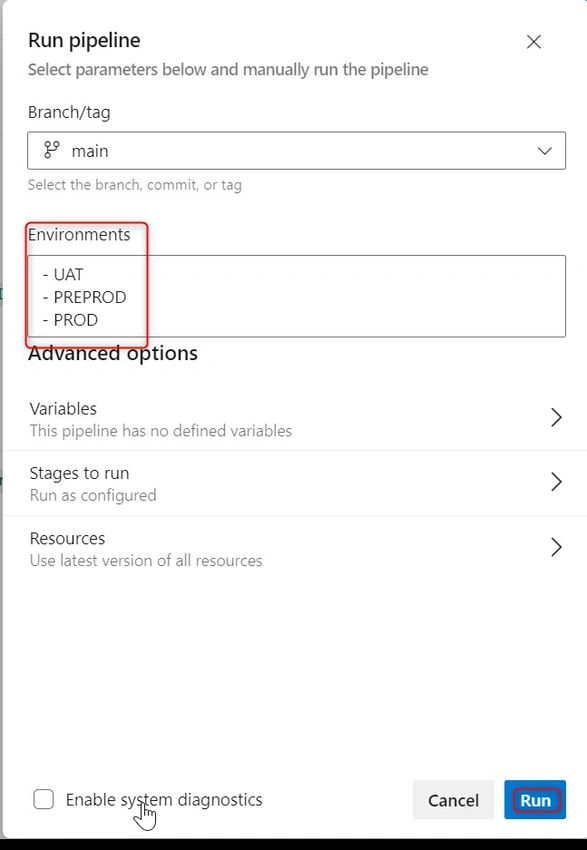
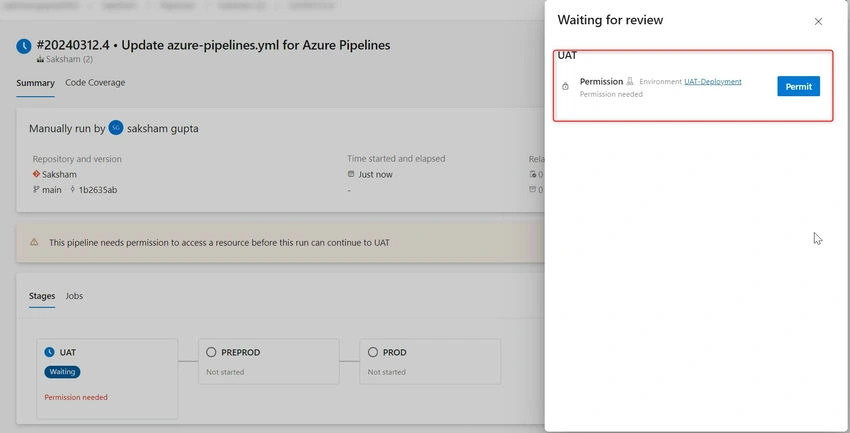
- In the image above, we can change environments at runtime as well and click on Run. Once the user has clicked on the Run option, the pipeline will ask for permission to use the UAT deployment environment. This pop-up will only appear for first-time use only. Click on the Permit option, as shown below.
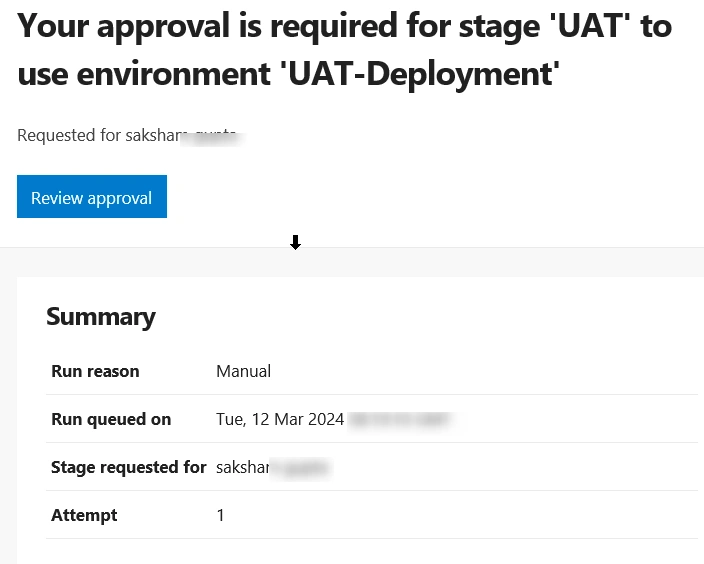
- Once the pipeline is permitted to use the environment, the UAT stage will wait for approval from the approver, who will have received an email in the format below. Once the approver approves it, the stage will start its execution.
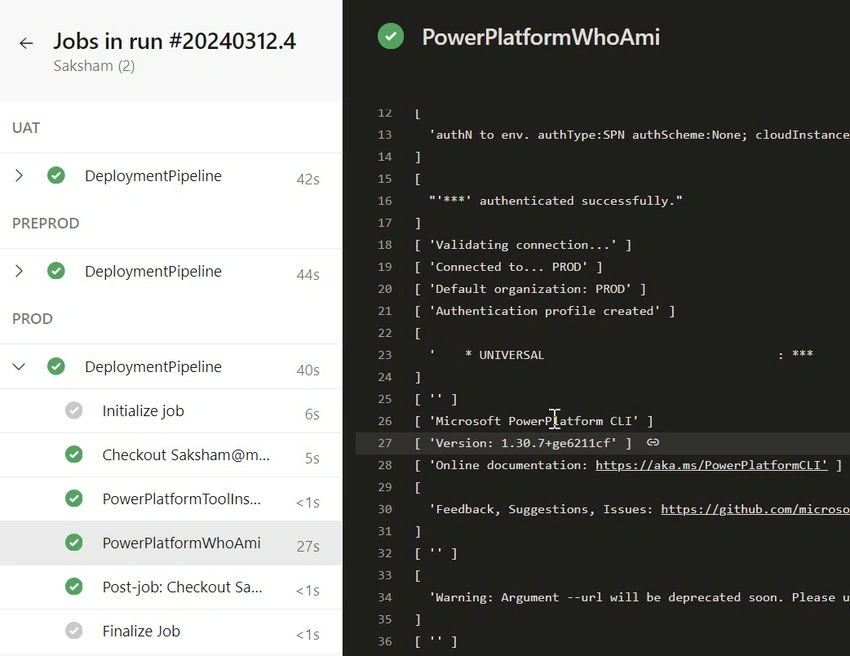
- Similarly, after the successful completion of each stage, approval will be requested for the next stage. Based on the deployment schedule, the approver will approve it. After a successful deployment run, the Multi-Stage flow will look as shown in the image below.
Conclusion
Using environment approvals in Azure DevOps is a smart step for making development smoother and more dependable. Compared to the old way, these approvals give teams more control, flexibility, and visibility. This helps improve the quality and security of software. With environment approvals, Azure DevOps helps teams tackle modern development challenges with ease and speed. Please feel free to reach out with any concerns.
Join the conversation! Your thoughts help the community grow.