

Introduction
This article explains how to implement Facebook likes, shares and comment boxex for your ASP.NET website. Let's start step-by-step to implement Facebook likes, shares and comment boxex for your ASP.NET website.
This article explains how to implement Facebook likes, shares and comment boxex for your ASP.NET website. Let's start step-by-step to implement Facebook likes, shares and comment boxex for your ASP.NET website.
Step 1
First open https://developers.facebook.com/
Step 2
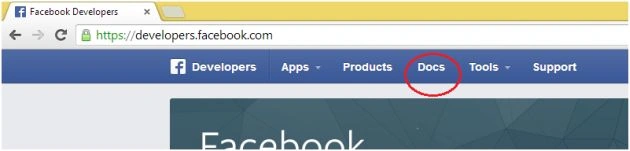
Now click on the Docs Tab.
Step 3
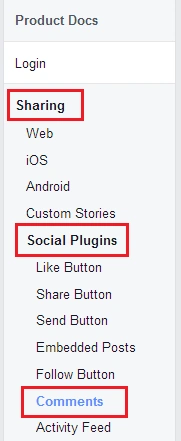
In the left menu click on "Product Docs" > "Sharing" > "Social Plugins" > "Comments".
Step 4
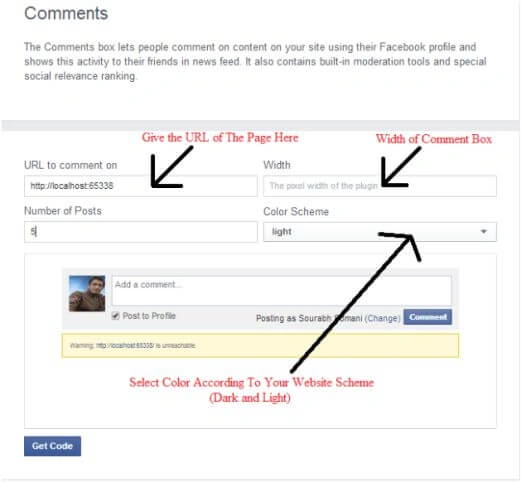
After that you will see the following page: In this you need to provide the following things:
- URL: Web page URL where you want to add a comment box.
- Width: Comment Box Size (in pixels).
- Number of Post: Provide here the number how many posts to be seen at a time on one page.
- Color Scheme: Which color's comment box you want if your website is dark then use dark otherwise black.
Step 5
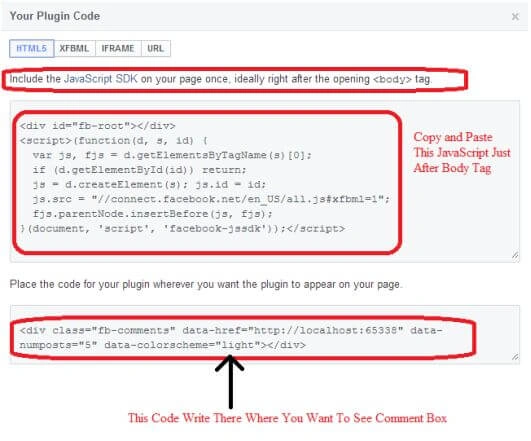
Click on the Get Code button, and you will see the following code generated.
Click on the Get Code button, and you will see the following code generated.
- From which you need to place the first (Java-Script) code just after the body tag. The code is as follows:
- <div id="fb-root"></div>
- <script>(function(d, s, id) {
- var js, fjs = d.getElementsByTagName(s)[0];
- if (d.getElementById(id)) return;
- js = d.createElement(s); js.id = id;
- js.src = "//connect.facebook.net/en_US/all.js#xfbml=1";
- fjs.parentNode.insertBefore(js, fjs);
- }(document, 'script', 'facebook-jssdk'));</script>
- In the second code you need to specify where you want to show your Comments Box.
- <div class="fb-comments" data-href="http://localhost:65338/default.aspx" data-numposts="5" data-colorscheme="light"></div>
Step 6
Create a new project or application of ASP.NET in Visual Studio.
Step 7
Add a new WebForm and like Default.aspx and write the following code like this in the body.
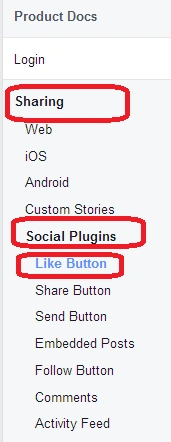
Go to Docs and click on "Sharing" > "Social Plugins" then click the "Like Button" Tab.
Step 11
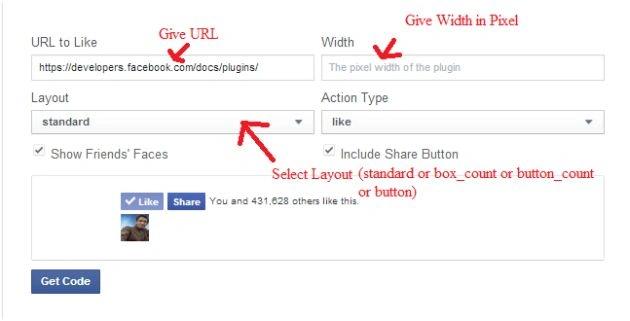
You will then see a page in which you need to apply the following property for.
Step 12
Then after clicking on Get Code, you will get the following code in which the first code, the JavaScript code, will be similar to that we saw for the comment box so don't copy that and copy the like button code and put it inside where you want to show the like button. The code will be like the following,
From which you need to place the first (JavaScript) code just after the body tag. The code is as in the following:
(Note: If you have already provided it for the comments box then don't do that again, because the code is same.)
The second code you need to provide determines where you want to show your Like Button:
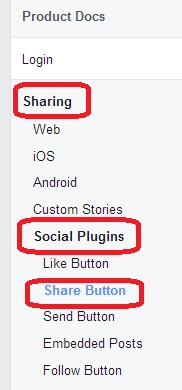
Go to Docs, and click on "Sharing" > "Social Plugins" then click on the "Share Button" Tab.
Create a new project or application of ASP.NET in Visual Studio.
Step 7
Add a new WebForm and like Default.aspx and write the following code like this in the body.
- <%@ Page Language="C#" AutoEventWireup="true" CodeFile="Default.aspx.cs" Inherits="_Default" %>
- <!DOCTYPE html>
- <html xmlns="http://www.w3.org/1999/xhtml">
- <head runat="server">
- <title></title>
- </head>
- <body>
- <!--#############################-->
- <!-- Facebook generated Java Script Code-->
- <script>(function (d, s, id) {
- var js, fjs = d.getElementsByTagName(s)[0];
- if (d.getElementById(id)) return;
- js = d.createElement(s); js.id = id;
- js.src = "//connect.facebook.net/en_US/all.js#xfbml=1";
- fjs.parentNode.insertBefore(js, fjs);
- }(document, 'script', 'facebook-jssdk'));</script>
- <!--End Facebook JS-->
- <!--#############################-->
- <form id="form1" runat="server">
- <div>
- <h1>Hello C-Sharp Corner</h1>
- <!--#############################-->
- <!--Comment Box Code Goes Here-->
- <div class="fb-comments" data-href="http://localhost:65338/default.aspx" data-numposts="5" data-colorscheme="light"></div>
- <!--#############################-->
- </div>
- </form>
- </body>
- </html>
Step 8
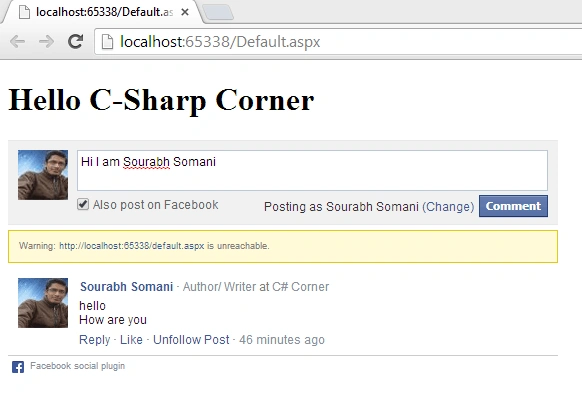
Now build the project and run it. You will see output like this:
Note
If you want to do the same thing on different pages dynamically then modify the "data-href attribute" in the comments box code as in the following:

Step 9
For the like button at the https://developers.facebook.com/
Step 10
For the like button at the https://developers.facebook.com/
Step 10
Go to Docs and click on "Sharing" > "Social Plugins" then click the "Like Button" Tab.
Step 11
You will then see a page in which you need to apply the following property for.
- URL
- Width in Pixel
- Layout: There are 4 types of like buttons available: Standard, box_count, button_count and button.
- Action Type: For the select button you need to select like.
Step 12
Then after clicking on Get Code, you will get the following code in which the first code, the JavaScript code, will be similar to that we saw for the comment box so don't copy that and copy the like button code and put it inside where you want to show the like button. The code will be like the following,
- <div id="fb-root"></div>
- <script>(function(d, s, id) {
- var js, fjs = d.getElementsByTagName(s)[0];
- if (d.getElementById(id)) return;
- js = d.createElement(s); js.id = id;
- js.src = "//connect.facebook.net/en_US/all.js#xfbml=1";
- fjs.parentNode.insertBefore(js, fjs);
- }(document, 'script', 'facebook-jssdk'));</script>
- <div class="fb-like" data-href="http://localhost:65338/Default.aspx" data-layout="box_count" data-action="like" data-show-faces="true" data-share="true"></div>
Suppose you have the same page default.aspx, then you can write inside it such as in the following:
Step 13
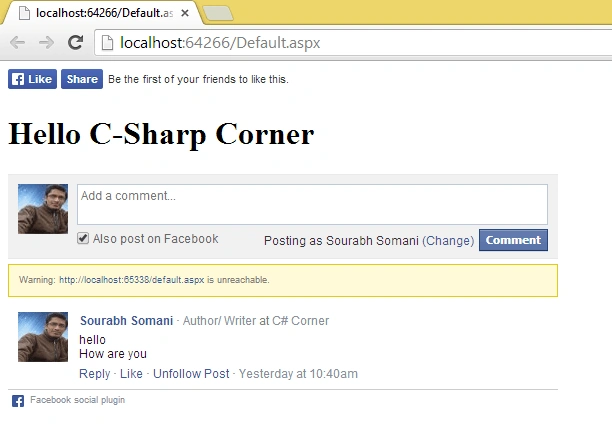
Output of the code above will be:
Note
If you want to do same thing on multiple pages dynamically then modify the "data-href attribute" of the like button division.
- <%@ Page Language="C#" AutoEventWireup="true" CodeFile="Default.aspx.cs" Inherits="_Default" %>
- <!DOCTYPE html>
- <html xmlns="http://www.w3.org/1999/xhtml">
- <head runat="server">
- <title></title>
- </head>
- <body>
- <!--#############################-->
- <!-- Facebook generated Java Script Code-->
- <script>(function (d, s, id) {
- var js, fjs = d.getElementsByTagName(s)[0];
- if (d.getElementById(id)) return;
- js = d.createElement(s); js.id = id;
- js.src = "//connect.facebook.net/en_US/all.js#xfbml=1";
- fjs.parentNode.insertBefore(js, fjs);
- }(document, 'script', 'facebook-jssdk'));</script>
- <!--End Facebook JS-->
- <!--#############################-->
- <form id="form1" runat="server">
- <div>
- <!--#############################-->
- <!--Like Button Code-->
- <div class="fb-like" data-href="http://localhost:65338/Default.aspx" data-layout="standard" data-action="like" data-show-faces="true" data-share="true"></div>
- <!--#############################-->
- <h1>Hello C-Sharp Corner</h1>
- <!--#############################-->
- <!--Comment Box Code-->
- <div class="fb-comments" data-href="http://localhost:65338/default.aspx" data-numposts="5" data-colorscheme="light"></div>
- <!--#############################-->
- </div>
- </form>
- </body>
- </html>
Output of the code above will be:
Note
If you want to do same thing on multiple pages dynamically then modify the "data-href attribute" of the like button division.
Step 14
For Share button at the https://developers.facebook.com/
Step 15
For Share button at the https://developers.facebook.com/
Step 15
Go to Docs, and click on "Sharing" > "Social Plugins" then click on the "Share Button" Tab.
Step 16
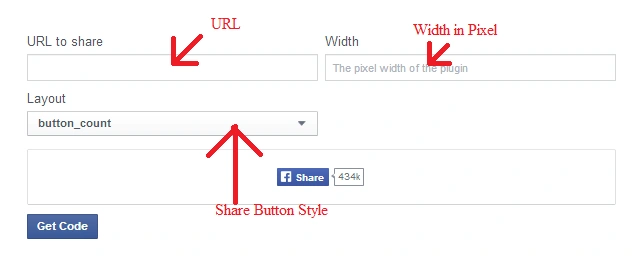
You will then see a page in which you need to apply the following property for:
You will then see a page in which you need to apply the following property for:
- URL
- Width in Pixel
- Layout: There are 6 types of share button is available: button_count, box_count, button, icon_link, icon, link.
Step 17
Then click on "Get Code," you will get the following code in which the first code is JavaScript code that will be similar to what we saw for the comments box and the like button so don't copy that, copy the like button code and put it inside there where you want to show the like button, the code will be as in the following:
Then click on "Get Code," you will get the following code in which the first code is JavaScript code that will be similar to what we saw for the comments box and the like button so don't copy that, copy the like button code and put it inside there where you want to show the like button, the code will be as in the following:
- From which you need to place First (Java-Script) code just after body tag. The code is as in the following:(Note: If you have already provided a comments box or like then don't do this again, because the code is the same.)
- <div id="fb-root"></div>
- <script>(function(d, s, id) {
- var js, fjs = d.getElementsByTagName(s)[0];
- if (d.getElementById(id)) return;
- js = d.createElement(s); js.id = id;
- js.src = "//connect.facebook.net/en_US/all.js#xfbml=1";
- fjs.parentNode.insertBefore(js, fjs);
- }(document, 'script', 'facebook-jssdk'));</script>
- The second code you need to provide there determines where you want to show your Share Button:
- <div class="fb-share-button" data-href="http://localhost:65338/Default.aspx" data-type="button_count"></div>
Suppose you have the same page default.aspx, then you can write inside it such as in the following:
Step 18
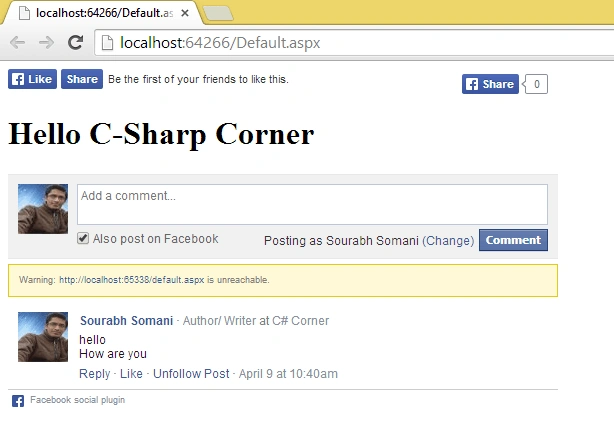
The output of the code above will be:
- <%@ Page Language="C#" AutoEventWireup="true" CodeFile="Default.aspx.cs" Inherits="_Default" %>
- <!DOCTYPE html>
- <html xmlns="http://www.w3.org/1999/xhtml">
- <head runat="server">
- <title></title>
- </head>
- <body>
- <!--#############################-->
- <!-- Facebook generated Java Script Code-->
- <script>(function (d, s, id) {
- var js, fjs = d.getElementsByTagName(s)[0];
- if (d.getElementById(id)) return;
- js = d.createElement(s); js.id = id;
- js.src = "//connect.facebook.net/en_US/all.js#xfbml=1";
- fjs.parentNode.insertBefore(js, fjs);
- }(document, 'script', 'facebook-jssdk'));</script>
- <!--End Facebook JS-->
- <!--#############################-->
- <form id="form1" runat="server">
- <div>
- <!--#############################-->
- <!--Like Button Code-->
- <div class="fb-like" data-href="http://localhost:65338/Default.aspx" data-layout="standard" data-action="like" data-show-faces="true" data-share="true"></div>
- <!--#############################-->
- <!--#############################-->
- <!--Share Button Code-->
- <div class="fb-share-button" data-href="http://localhost:65338/Default.aspx" data-type="button_count"></div>
- <!--#############################-->
- <h1>Hello C-Sharp Corner</h1>
- <!--#############################-->
- <!--Comment Box Code-->
- <div class="fb-comments" data-href="http://localhost:65338/default.aspx" data-numposts="5" data-colorscheme="light"></div>
- <!--#############################-->
- </div>
- </form>
- </body>
- </html>
The output of the code above will be:
corny linesPosted Mar 5, 2018, 11:55 AM
Great Article. Now, we can let my friends know about all these 16 steps because they really wanted to know how we can implement facebook comment on our ASP.NET web page.
Vinay GuptaPosted Jan 17, 2018, 11:25 PM
Nice Article....For Posting Legal Comments on any website
sa pPosted Jan 16, 2018, 3:42 AM
Http://www.c-sharpcorner.com/UploadFile/75a48f/implement-facebook-comment-like-share-in-your-asp-net-web/
Zahid ZnPosted Dec 15, 2017, 5:52 AM
How to implement different counter for like and share.
Satish kelodiyaPosted Dec 14, 2017, 5:01 AM
Sir it does not work on my visual studio 2008,need to apply some other api's ???
Sher The ProtectorPosted Jun 4, 2017, 8:08 PM
Hi bro, good post loved d way u composed it... I want to upgrade my website shertheprotector.com any suggestions?? plz suggest what else I can do to make it better.
eda aduraPosted Apr 26, 2017, 2:19 AM
Hi, im workin on doing the red notifications alert like facebook (the red circle), can you guide me on doing that? thank you so much sir.
wafa katawazaiPosted Mar 18, 2017, 2:09 PM
And also how to add send button plugins to our web site send me code [email protected]
wafa katawazaiPosted Mar 18, 2017, 2:08 PM
Verey nice and help full post thanks alot
Edwards .Posted Nov 4, 2016, 8:06 AM
Sir i just want to take all the list of likes,shares,comments,groups,saved etc made by me in asp.net
Anu VPosted Oct 5, 2016, 2:09 AM
Nice..
Upendra Pratap ShahiPosted Jun 22, 2015, 4:40 AM
very nice demonstration
Praveen ChouhanPosted Jun 10, 2015, 8:12 AM
Nice post, This post is really helpful thanks a lot and keep going.
star techPosted Apr 27, 2015, 7:22 AM
how to get the facebook command ,like
eswar raoPosted Apr 11, 2015, 10:22 AM
and also how to get fb comments like below comment using facebook.. on this page..
eswar raoPosted Apr 11, 2015, 10:20 AM
how to add Google plus comments to asp.net
Ahmet DoğuluPosted Apr 3, 2015, 10:05 AM
Hello;I would like to receive information about the commenting system . I will add to the page , but for different topics in detail page that comes to review the entire page. I would like to receive the comments of each page separately Can you help with this? [email protected]
Sagar GawandePosted Mar 2, 2015, 8:55 AM
i tryied this code but post are not displayed on facebook commented using facebook comment plugin it only visible on my website want solution...
sanket sriPosted Feb 8, 2015, 11:00 AM
like this page. means like this current page in which i am commenting... if you can tell me please mail me at [email protected]
sanket sriPosted Feb 8, 2015, 10:56 AM
sir i want to make a comment box like facebook. but the problem is that i am not able to understand to to link comments to that particular topic or article..
ajay rajPosted Dec 2, 2014, 12:16 PM
It's not working simply displaying blank page, please help me .. I am running it on local host.
yogesh jadonPosted Jun 28, 2014, 3:22 AM
Thank you so much...Great Post!!! Can you write same type articles for Google and Twitter Implement Comments, Likes, Shares in ASP .NET Website.
Shaili DashoraPosted May 6, 2014, 9:32 AM
nice sourabh...
Harminder SinghPosted May 6, 2014, 8:13 AM
hello sir i want to upload a particular image on facebook like we have in santabanta.com in which we upload different images which we have save in our database. please help me out from this problem