

Introduction
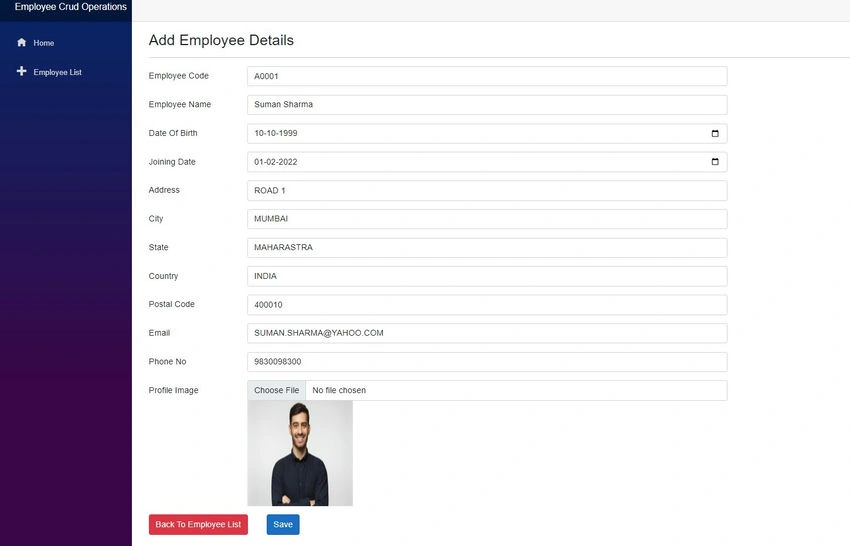
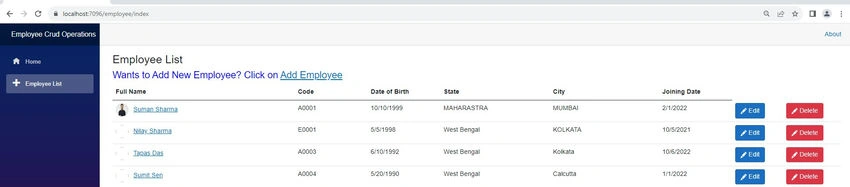
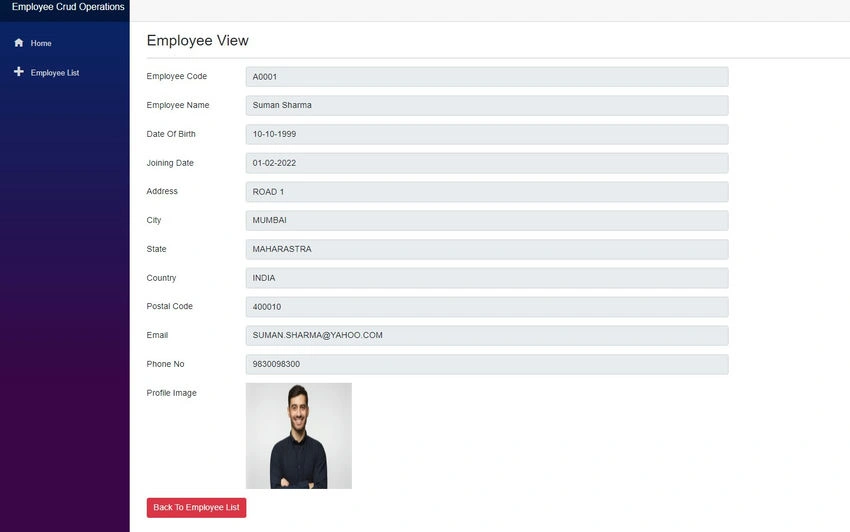
The previous article discussed performing the CRUD-based operation in a Blazor Web Assembly-based application. In that article, we generate a complete UI-based component related to Employees. In that demo, we have seen how to populate the list of employees and create new Employees and other operations. This article will discuss the file uploader functionality in the Blazor Web Assembly. We will upload the employee profile picture-related file and then demonstrate those details in the Employee List and other related segments.

If you want to read the previous article related to the CRUD operation in Blazor Web Assembly, use the below links: CRUD Operations with EF Core 7 in Blazor WebAssembly (c-sharpcorner.com)
Github Repo Links for the entire code sample:- debasis-saha/blazor_wasm_employee_crud_ops (github.com)
Create a Database Structure to store Employee Profile Picture information
Before coding into the Blazor Application, we must implement the Database structure changes related to the employee profile pictures. So, related that create the below table in the database.
CREATE TABLE [dbo].[EmployeeProfilePics]
(
	[Id] [int] IDENTITY(1,1) NOT NULL,
	[EmployeeId] [int] NULL,
	[ImageType] [varchar](50) NULL,
	[Thumbnail] [text] NOT NULL,
	[ImageUrl] [varchar](200) NOT NULL,
	CONSTRAINT [PK_EmployeeProfilePics] PRIMARY KEY CLUSTERED ([Id] ASC) ON [PRIMARY],
	CONSTRAINT [FK_EmployeeProfilePics_Employees] FOREIGN KEY([EmployeeId]) REFERENCES [dbo].[Employees] ([Id])
)
GO
Add Employee Profile Image into the Employee Add/Update Operation
We have already created the Database structure to capture the Employee Profile Information. Now, we first need to make the related model class. So, Add a new class file called EmployeeProfilePic within the Model folder and add the below code into that file.
public class EmployeeProfilePic
{
    public int Id { get; set; }

    [ForeignKey("EmployeeId")]
    [Required]
    public int EmployeeId { get; set; }

    public string ImageType { get; set; }

    public string? Thumbnail { get; set; }

    public string? ImageUrl { get; set; }

    public virtual Employee? EmployeeInfo { get; set; }
}
Now, open the Employee.cs model class from the Model folder and add the below properties at the end related to capturing the profile file information.
[NotMapped]
public int? EmployeeProfilePicId { get;set; }

[NotMapped]
public string? thumbnail { get; set; }

[NotMapped]
public string? ImageType { get; set; }
Now, open the EmployeeInfo.razor component file. In that file, after the Phone, no Section, add the below file uploader-related code.
<div class="row mb-3">
     <label for="inputPhone" class="col-sm-2 col-form-label">Profile Image</label>
     <div class="col-sm-10">
         <InputFile class="form-control" id="empphone" hidden=@ReadOnlyMode OnChange="@OnInputFileChange" />
         <div>
             <img src="@Employee.thumbnail" height="200px" width="200px">
         </div>
     </div>
 </div>
Now, in the same EmployeeInfo.razor file, add the below code into the @code section related to reading the uploaded file, and convert the file information to base64 format.
private async Task OnInputFileChange(InputFileChangeEventArgs e)
{
    IBrowserFile imgFile = e.File;
    var buffers = new byte[imgFile.Size];
    await imgFile.OpenReadStream().ReadAsync(buffers);
    string imageType = imgFile.ContentType;
    string fileName = imgFile.Name;
    Employee.thumbnail = $"data:{imageType};base64,{Convert.ToBase64String(buffers)}";
    Employee.ImageType = imageType;
}
Now, open the EmployeeController.cs File and relace the SaveEmployee() related code with the below one.
[Route("SaveEmployee")]
[HttpPost]
public async Task<IActionResult> SaveEmployee(Employee employee)
{
    try
    {
        if (_dbContext.Employees == null)
        {
            return Problem("Entity set 'AppDbContext.Employee'  is null.");
        }

        if (employee != null)
        {
            _dbContext.Add(employee);
            await _dbContext.SaveChangesAsync();

            if (!string.IsNullOrEmpty(employee.thumbnail) && employee.Id>0)
            {
                EmployeeProfilePic employeeProfilePic = new EmployeeProfilePic();
                employeeProfilePic.Id = Employee.EmployeeProfilePicId > 0 ? (int) Employee.EmployeeProfilePicId : 0;
                employeeProfilePic.ImageType = Employee.ImageType;
                employeeProfilePic.Thumbnail = employee.thumbnail;
                employeeProfilePic.EmployeeId = employee.Id;
                employeeProfilePic.ImageUrl = "localhost";

                _dbContext.Add(employeeProfilePic);
                await _dbContext.SaveChangesAsync();
            }

            return Ok("Save Successfully!!");
        }
    }
    catch (Exception ex)
    {
        throw (ex);
    }

    return NoContent();
}
Join the conversation! Your thoughts help the community grow.