

Introduction
This article is the last and final part of the three-part article series "Implement Insert, Update and Delete Functionality in the WebGrid". In my previous two articles I explained how to work on the Controller and Model classes, so now we will work on the View part, in other words the design part of our application.
You can access my previous articles from here:
- Implement Insert, Update and Delete Functionality in the WebGrid: Part 1.
- Implement Insert, Update and Delete Functionality in the WebGrid: Part 2.
The View is main part of our application because here I will show how to declare a webgrid, how to bind data with it and how to apply Ajax calls so that Update, Delete and Save Record of the Controller Class can be executed.
Use the following procedure to create the complete process.
Step 1
First of all you need to add a View Class to the View folder, for this right-click on the View Folder and choose "Add a View".
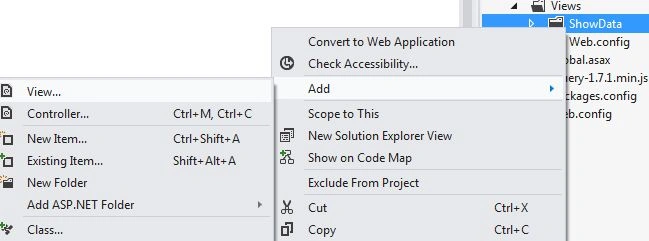
Here first I added a new folder in the View folder and then added the View class in it.
Step 2
Now we will start writing our code, first of all you need to call the Model on which the WebGrid is to work, if you remember I had added a class in the Model Class of our application named "PagedStudentModel" in which the IT_Student class was called, I had called the same class there like:
- @model MvcApplication30.Models.PagedStudentModel
- @{
- ViewBag.Title = "WebGrid CRUD Operations";
- WebGrid grid = new WebGrid(rowsPerPage: Model.PageSize);
- grid.Bind(Model.It_Student,
- autoSortAndPage: false,
- rowCount: Model.TotalRows
- );
- }
After calling the Model class I had called the WebGrid, here you can see that I had bound it with the object of the IT_Student class that was created in the PagedStudentModel Class, secondly I had not allowed the sorting and paging but if you remember I had allowed the paging on ID of a student in my previous articles so sorting will be allowed on the ID of the student but not on others, the number of rows will be calculated by the Controller class and then directed to the Model class from where the View will use it.
Don't forget to call the Jquery-1.7.1.min.js in this View class:
- <script src="@Url.Content("~/jquery-1.7.1.min.js")" type="text/javascript"></script>
Step 3
Now we will create the main things of this WebGrid, in other words binding the columns with various data and much more. For that you need to add this code:
- <div id="divmsg" style="color: green; font-weight: bold"></div>
- <a href="#" class="add">Add New Student</a>
- <br />
- <br />
- @grid.GetHtml(
- htmlAttributes: new { id = "grid" },
- fillEmptyRows: false,
- mode: WebGridPagerModes.All,
- firstText: "<< First",
- previousText: "< Prev",
- nextText: "Next >",
- lastText: "Last >>",
- columns: new[] {
- grid.Column("Student_ID",
- header: "ID", canSort: true),
- grid.Column(header: "Student_Name",format: @<span>
- <span id="[email protected]_ID">@item.Student_Name</span> @Html.TextBox("Student_Name_"+(int)item.Student_ID,(string)item.Student_Name,new{@style="display:none"})</span>),
- grid.Column(header: "Branch",format: @<span>
- <span id="[email protected]_ID">@item.Student_Branch</span>
- @Html.TextBox("Student_Branch_"+(int)item.Student_ID,(string)item.Student_Branch,new{@style="display:none"})</span>),
- grid.Column(header: "City",format: @<span>
- <span id="[email protected]_ID">@item.Student_City</span>
- @Html.TextBox("Student_City_"+(int)item.Student_ID,(string)item.Student_City,new{@style="display:none"})</span>),
- grid.Column(header: "State",format: @<span>
- <span id="[email protected]_ID">@item.Student_State</span>
- @Html.TextBox("Student_State_"+(int)item.Student_ID,(string)item.Student_State,new{@style="display:none"})</span>),
- grid.Column(header: "Action",format:@<text>
- <a href="#" id="[email protected]_ID" class="edit">Edit</a>
- <a href="#" id="[email protected]_ID" style="display:none" class="update">Update</a><a href="#" id="[email protected]_ID" style="display:none" class="cancel">Cancel</a>
- <a href="#" id="[email protected]_ID" class="delete">Delete</a></text>)
- })
Here first I took a Div that will successfully add a new row of data, then a Link label is used for Textboxes in the Grid so that the user can enter values in them. In the Grid Columns I had bound the ID of the student to the first column, the Name of the student with the second column, the Branch of the student with the third column, the City with the fourth and the State with the fifth.
But you can see that after the first column I took some span and TextBoxes from the second column, these spans and Textboxes are bound to similar data but the difference is that whenever a Span is visible then at that time the TextBox will be hidden and when the TextBox is shown then the time span will be hidden.
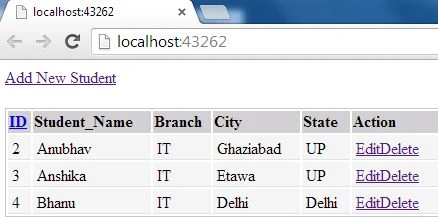
Now if I run my code then the data available in the database will be shown in the Grid like this:
Step 4
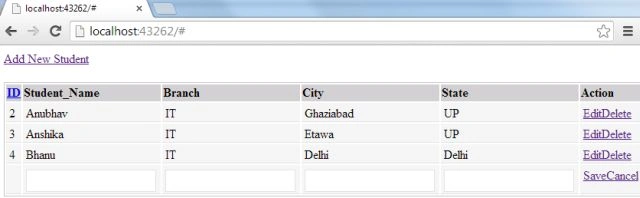
Now we will work on the Ajax calls and JavaScript code to call the JSON result classes, switch between Span and TextBox, adding a new row on the click of an Add link, cancel the add and update of data.
Write this code just below where you added the jquery-1.7.1.min.js
- <script src="@Url.Content("~/jquery-1.7.1.min.js")" type="text/javascript"></script>
- <script type="text/javascript">
- $(".add").live("click", function () {
- var existrow = $('.save').length;
- if (existrow == 0) {
- var index = $("#grid tbody tr").length + 1;
- var Student_Name = "Student_Name_" + index;
- var Student_Branch = "Student_Branch_" + index;
- var Student_City = "Student_City_" + index;
- var Student_State = "Student_State_" + index;
- var Save = "Save_" + index;
- var Cancel = "Cancel_" + index;
- var tr = '<tr class="alternate-row"><td></td><td><span> <input id="' + Student_Name + '" type="text" /></span></td>' +
- '<td><span> <input id="' + Student_Branch + '" type="text" /></span></td>' +
- '<td><span> <input id="' + Student_City + '" type="text" /></span></td>' +
- '<td><span> <input id="' + Student_State + '" type="text" /></span></td>' +
- '<td> <a href="#" id="' + Save + '" class="save">Save</a>
- <a href="#" id="' + Cancel + '" class="icancel">Cancel</a></td>' +
- '</tr>';
- $("#grid tbody").append(tr);
- }
- else {
- alert('First Save your previous record !!');
- }
- });
- $(".icancel").live("click", function () {
- var flag = confirm('Are you sure to cancel');
- if (flag) {
- $(this).parents("tr").remove();
- }
- });
Here first I created the function for adding a new row, this function will count the number of rows and then add one more to the total, at this new number one TextBox will be created for each of the Name, Branch, City and State but not for the ID because as I said our Student ID should be Auto Incremented, then I created the function for canceling the add of any data, this function will simply remove the row that was currently added by the add function. Since you were adding a new row for new data it will ask you whether you are sure not to insert any other data. If yes then the function will start it's work.
Step 5
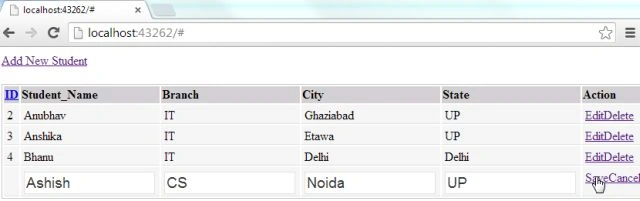
Now we will work on how to call the save class of the controller through Ajax and also how to pass data, for that you need to write the following code:
- $(".save").live("click", function () {
- var id = $("#grid tbody tr").length;
- var Student_Name = $("#Student_Name_" + id).val();
- var Student_Branch = $("#Student_Branch_" + id).val();
- var Student_City = $("#Student_City_" + id).val();
- var Student_State = $("Student_State_" + id).val();
- if (id != "") {
- $.ajax({
- type: "GET",
- contentType: "application/json; charset=utf-8",
- url: '@Url.Action("SaveRecord", "ShowData")',
- data: { "Student_Name": Student_Name, "Student_Branch": Student_Branch, "Student_City": Student_City, "Student_State": Student_State },
- dataType: "json",
- beforeSend: function () { },
- success: function (data) {
- if (data.result == true) {
- $("#divmsg").html("Record has been saved successfully !!");
- setTimeout(function () { window.location.replace("WebGridCRUD"); }, 2000);
- }
- else {
- alert('There is some error');
- }
- }
- });
- }
- });
In this function we first created some variables in which the value of the textboxes are passed, then I used the Ajax call. In this we need to pass the type that can be either Get or Post, the content type and then comes the most important thing, passing the URL of the Controller Class that must be called from here, here SaveRecord is called that is available under the ShowData Controller.
The value of these variables are passed into some other variables that will be called in the Controller class, on the successful addition of data a message will be shown through the div that was created in the third step.
Step 6
Now we will work on the Edit function of our application, this function will change the Span into the TextBox, write this code for the Edit function:
- $(".edit").live("click", function () {
- var str = $(this).attr("id").split("_");
- id = str[1];
- var Student_Name = "#Student_Name_" + id;
- var spanStudent_Name = "#spanStudent_Name_" + id;
- var Student_Branch = "#Student_Branch_" + id;
- var spanStudent_Branch = "#spanStudent_Branch_" + id;
- var Student_City = "#Student_City_" + id;
- var spanStudent_City = "#spanStudent_City_" + id;
- var Student_State = "#Student_State_" + id;
- var spanStudent_State = "#spanStudent_State_" + id;
- $(Student_Name).show();
- $(spanStudent_Name).hide();
- $(Student_Branch).show();
- $(spanStudent_Branch).hide();
- $(Student_City).show();
- $(spanStudent_City).hide();
- $(Student_State).show();
- $(spanStudent_State).hide();
- $(this).hide();
- $("#Update_" + id).show();
- $("#Cancel_" + id).show();
- });
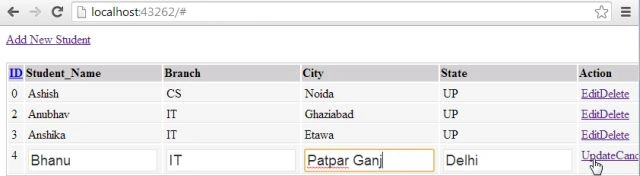
Here separate variables are created for each TextBox and for each Span, the click of Edit will show the Textboxes.
If the user clicks on the Update or Cancel button then the Textboxes will be hidden and the Span will be shown.
Step 7
Now we will create a function for updating the data, for this you need to write the following code:
- $(".update").live("click", function () {
- var str = $(this).attr("id").split("_");
- id = str[1];
- var Student_Name = $("#Student_Name_" + id).val();
- var spanStudent_Name = $("#spanStudent_Name_" + id).val();
- var Student_Branch = $("#Student_Branch_" + id).val();
- var spanStudent_Branch = $("#spanStudent_Branch_" + id).val();
- var Student_City = $("#Student_City_" + id).val();
- var spanStudent_City = $("#spanStudent_City_" + id).val();
- var Student_State = $("#Student_State_" + id).val();
- var spanStudent_State = $("#spanStudent_State_" + id).val();
- if (id != "") {
- $.ajax({
- type: "GET",
- contentType: "application/json; charset=utf-8",
- url: '@Url.Action("UpdateRecord", "ShowData")',
- data: { "id": id, "Student_Name": Student_Name, "Student_Branch": Student_Branch, "Student_City": Student_City, "Student_State": Student_State },
- dataType: "json",
- beforeSend: function () {//alert(id);
- },
- success: function (data) {
- if (data.result == true) {
- $("#Update_" + id).hide();
- $("#Cancel_" + id).hide();
- $("#Edit_" + id).show();
- var Student_Name = "#Student_Name_" + id;
- var spanStudent_Name = "#spanStudent_Name_" + id;
- var Student_Branch = "#Student_Branch_" + id;
- var spanStudent_Branch = "#spanStudent_Branch_" + id;
- var Student_City = "#Student_City_" + id;
- var spanStudent_City = "#spanStudent_City_" + id;
- var Student_State = "#Student_State_" + id;
- var spanStudent_State = "#spanStudent_State_" + id;
- $(Student_Name).hide();
- $(spanStudent_Name).show();
- $(Student_Branch).hide();
- $(spanStudent_Branch).show();
- $(Student_City).hide();
- $(spanStudent_City).show();
- $(Student_State).hide();
- $(spanStudent_State).show();
- $(spanStudent_Name).text($(Student_Name).val());
- $(spanStudent_Branch).text($(Student_Branch).val());
- $(spanStudent_City).text($(Student_City).val());
- $(spanStudent_State).text($(Student_State).val());
- }
- else {
- alert('There is some error');
- }
- }
- });
- }
- });
Here also, first variables are declared for each Span and TextBox, then the Ajax call is executed.
In this Ajax call UpdateRecord of ShowData is called and some variables are passed through the data that will be utilized in the Controller class.
On successful completion of data, the Edit button will become visible again and Cancel, Edit will be hidden.
Step 8
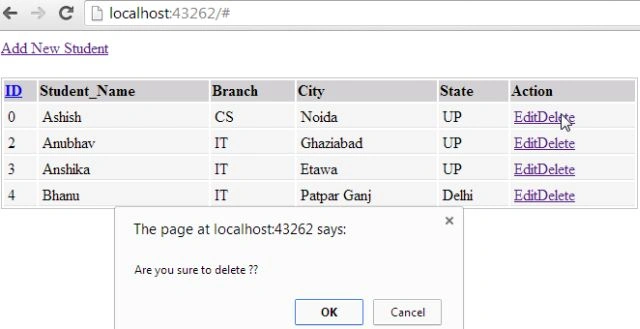
Now we will work on the final Ajax call that will be for deleting the data.
- $(".delete").live("click", function () {
- var str = $(this).attr("id").split("_");
- id = str[1];
- var flag = confirm('Are you sure to delete ??');
- if (id != "" && flag) {
- $.ajax({
- type: "GET",
- contentType: "application/json; charset=utf-8",
- url: '@Url.Action("DeleteRecord", "ShowData")',
- data: { "id": id },
- dataType: "json",
- beforeSend: function () { },
- success: function (data) {
- if (data.result == true) {
- $("#Update_" + id).parents("tr").remove();
- }
- else {
- alert('There is some error');
- }
- }
- });
- }
- });
- /script>
In this function I had passed the URL of DeleteRecord that is available in the ShowData Controller class, this will simply work on the Id of the Student and will pass the Id to the Controller whose work was explained in the last article.
Now your application is ready to be executed.
keval patelPosted Nov 29, 2016, 10:30 AM
You have specified the action method method for the view page. so view error is present in it
Ravi PatelPosted Sep 27, 2016, 3:41 AM
Nice explanation
kalu singh raoPosted Jul 13, 2016, 1:45 AM
Nice...
ketan mevadaPosted Mar 28, 2016, 3:58 AM
i try it but i am getting error inside this code ViewBag.Title = "WebGrid CRUD Operations"; WebGrid grid = new WebGrid(rowsPerPage: Model.PageSize); grid.Bind(Model.It_Student, autoSortAndPage: false, rowCount: Model.TotalRows ); Main page popup i am inserted code like this <div class="modal-dialog"> @Html.Partial("~/Views/showdata.cshtml"); <!-- /.modal-content --> </div>
ketan mevadaPosted Mar 28, 2016, 3:56 AM
hello friends if i want use this grid view inside another page like inside popup or partial view then what i do?
zwe thun aungPosted Aug 19, 2015, 6:19 AM
Hi Bro, I would like to know what is that mean // setTimeout(function () { window.location.replace("WebGridCRUD"); }, 2000); // And I especially want to know about ("WebGridCRUD") coded in save script. I have trouble around above code. After save, raise error.
Gopi ChandPosted Jul 26, 2015, 2:31 AM
Great
Mehmet GocergiPosted Feb 3, 2015, 6:11 PM
Hi, How can i add @Html.DropDownList value in dynamic html table? I tried like below '<td><span>'+ '@Html.DropDownList("aa",new SelectList(ViewBag.TransUnits, "Id","UnitName"))' + '</span></td>'+ ... But it gives error in console '<td><span>'+ '<select id="aa" name="aa"><option value="3">Su Gideri</option> </select>' + Uncaught SyntaxError: Unexpected token ILLEGAL error.
Anubhav ChaudharyPosted Jul 22, 2014, 1:01 AM
It is working fine on my system, how can I identify why u are getting this problem!! Download my source code and run it, after this compare both the code and this will let u know why u are getting the error, or use the "Debugger", debugger is the main weapon to identify the bugs.
Bilal AhmedPosted Jul 21, 2014, 3:15 AM
Exactly same error, kindly help out
Siraj Ahmed MujahidPosted Jun 11, 2014, 5:56 AM
Line 5: Layout = "~/Views/Shared/_Layout.cshtml";Line 6: Line 7: WebGrid grid = new WebGrid(rowsPerPage: Model.PageSize); Line 8: grid.Bind(Model.Total_Vouchers, Line 9: autoSortAndPage: false,
Siraj Ahmed MujahidPosted Jun 11, 2014, 5:54 AM
Hi, I followed all the steps described in ur tutorial, but when i trying to run the application, its giving me an error "Object reference not set to an instance of an object" An exception of type 'System.NullReferenceException' occurred in App_Web_zv4gjlbp.dll but was not handled in user code Additional information: Object reference not set to an instance of an object.