

In this article we will cover the following,
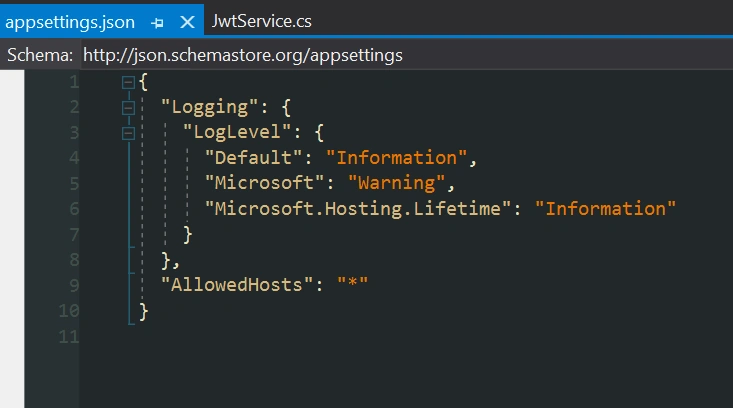 We now have the secret and the expiration data points needed by the JwtService class.
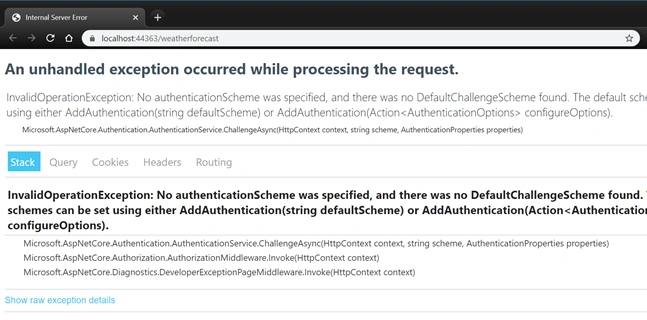
 When I ran the project I got the error below. The error means that ASP.NET Core sees the [Authorize] attribute but doesnt know how to handle that, because we haven't configured a middleware to do so. Let's go ahead a take care of that.
 Now that we have the middleware built we need to hook it up to our services.

- Creating the method to generate the JWT token
- Creating the middleware needed to validate the token
- Decorating the API controller
- Testing our API with Fiddler
First things first, let's start with a brand new project. I am using VS 2019 Community Edition.
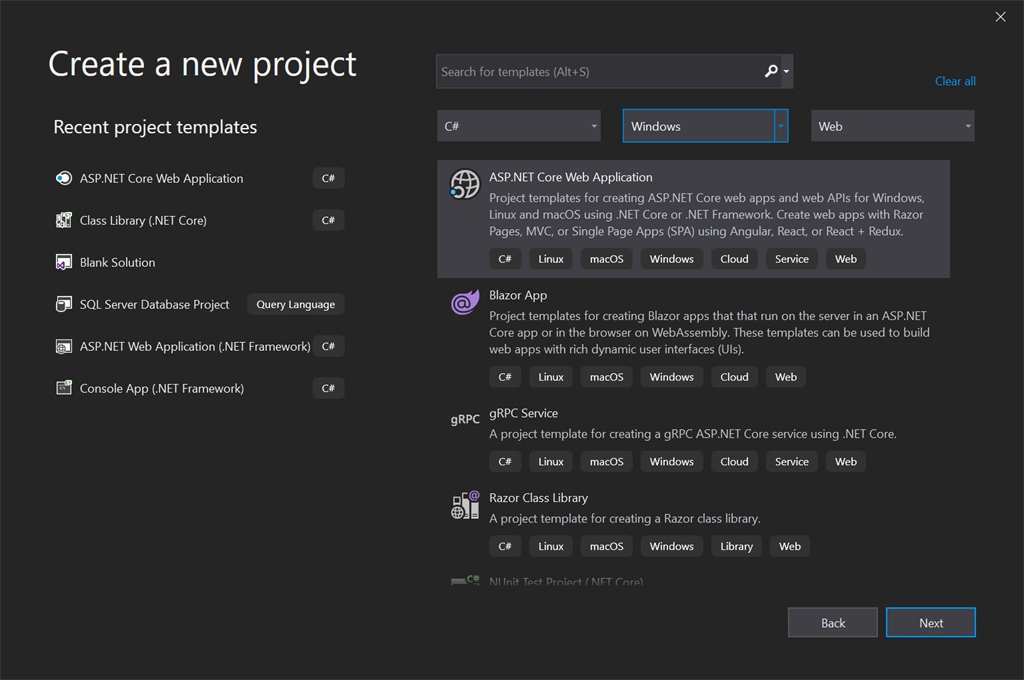
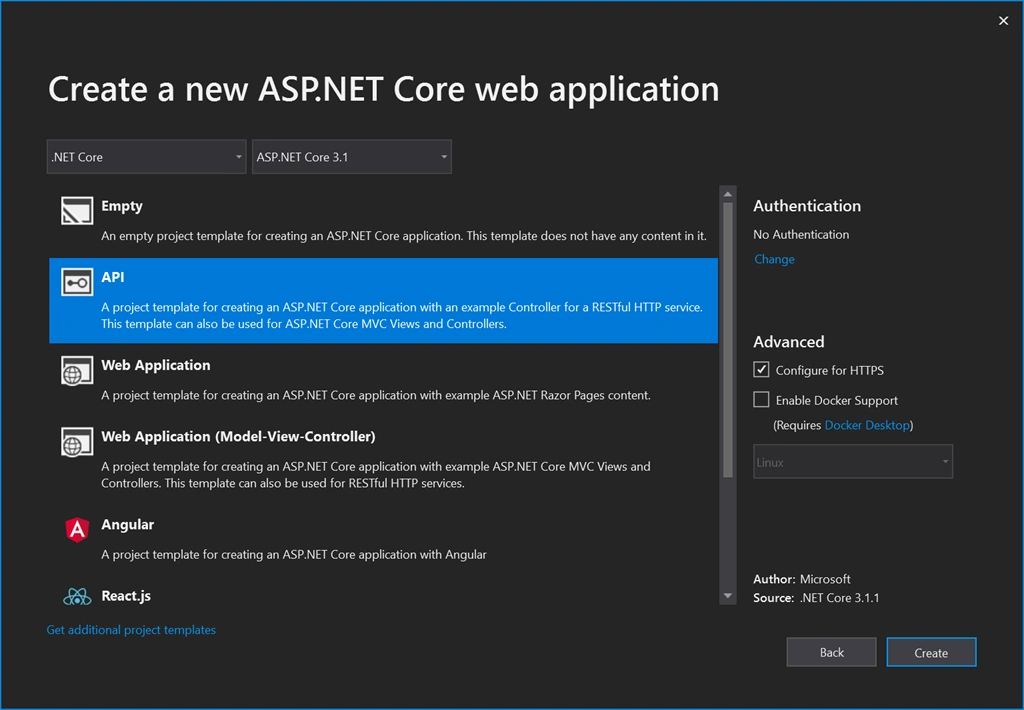
Create a new ASP.NET Core Web Application. Choose the API with no authentication template.
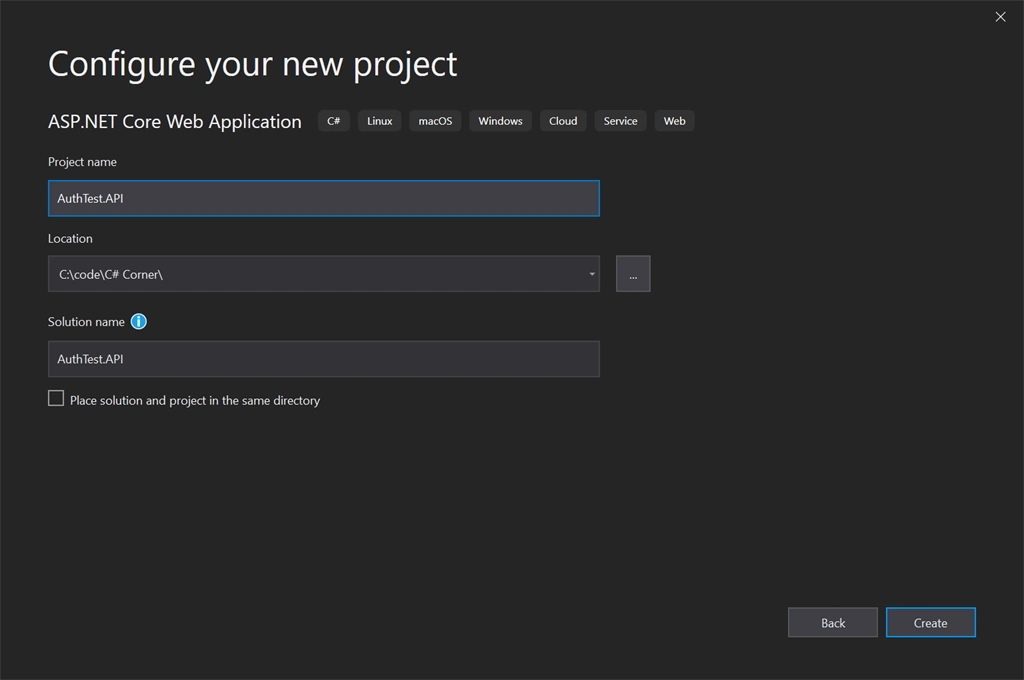
I am calling my project AuthTest.API
IMPORTANT. I highly suggest you name your project, folders and classes the same as the article below, or you will find yourself having to track down and clean up the namespaces.
If you want the source code you can get it from github.
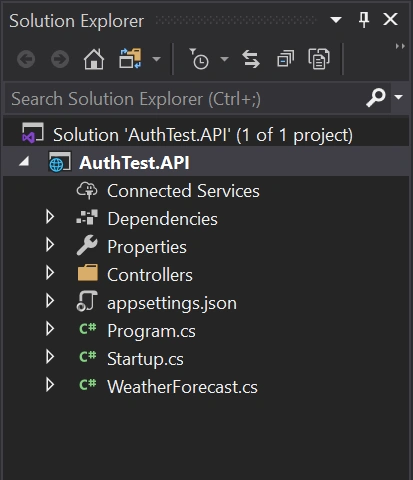
Good! Now let's do some coding. I am adding two folders to the project: Services and Middleware just for organization purposes.
In the Services folder add a class called JwtServices.cs
We also need some Nuget packages. Right-click Dependencies -> Manage Nuget Packages... on the Browse tab search and install both of these packages:
- System.IdentityModel.Tokens.Jwt
- Microsoft.IdentityModel.Tokens
Let's fill in the JwtService class.
- using System;
- using System.Text;
- using System.Security.Claims;
- using Microsoft.IdentityModel.Tokens;
- using System.IdentityModel.Tokens.Jwt;
- using Microsoft.Extensions.Configuration;
- namespace AuthTest.API.Services
- {
- public class JwtService
- {
- private readonly string _secret;
- private readonly string _expDate;
- public JwtService(IConfiguration config)
- {
- _secret = config.GetSection("JwtConfig").GetSection("secret").Value;
- _expDate = config.GetSection("JwtConfig").GetSection("expirationInMinutes").Value;
- }
- public string GenerateSecurityToken(string email)
- {
- var tokenHandler = new JwtSecurityTokenHandler();
- var key = Encoding.ASCII.GetBytes(_secret);
- var tokenDescriptor = new SecurityTokenDescriptor
- {
- Subject = new ClaimsIdentity(new[]
- {
- new Claim(ClaimTypes.Email, email)
- }),
- Expires = DateTime.UtcNow.AddMinutes(double.Parse(_expDate)),
- SigningCredentials = new SigningCredentials(new SymmetricSecurityKey(key), SecurityAlgorithms.HmacSha256Signature)
- };
- var token = tokenHandler.CreateToken(tokenDescriptor);
- return tokenHandler.WriteToken(token);
- }
- }
- }
In the construtor I am pulling some data out of the appsettings.json, but we haven't added those settings yet. Don't worry - we will right after this.
The reason for it is that the JWT generator needs some kind of secret string, some kind of password if you will, and an expiration date to generate the token.
The secret can be anything you want, just like a random password. I just typed in some random letters and numbers, and I decided the expiration is 1440 minutes (24hrs).
That means, the users for my API will have to get a new token every 24 hrs. It can be anything you want. You could choose to only expire the token if the user logs out (not recommended) or you could renew the token every so often. I am not covering that here.
Pay special attention to the Subject property line 27 through 30.
I am passing in an email to the function, GenerateSecurityToken(string email) and storing that email in the token. You could pass in some a user object GenerateSecurityToken(User user) for example and store a lot more information by adding new claims. This way you don't need to take trips to the DB to get that data, when the user makes a call into the system.
Example
Something like this...
- public string GenerateSecurityToken(User user){
- ...
- Subject = new ClaimsIdentity(new[]
- {
- new Claim(ClaimTypes.Email, user.Email),
- new Claim(ClaimTypes.Name, user.Name),
- new Claim(ClaimTypes.Role, user.Role),
- new Claim(ClaimTypes.DateOfBirth, user.DOB),
- })
- ...
- }
We went on a bit of a tangent, let's get back to the appsettings.config. In the appsettings.json we need to add a new configuration. This is what my appsettings.config looks like right now.
This is what it looks like after adding the JwtConfig section.
The JWT generation,
- {
- "Logging": {
- "LogLevel": {
- "Default": "Information",
- "Microsoft": "Warning",
- "Microsoft.Hosting.Lifetime": "Information"
- }
- },
- "AllowedHosts": "*",
- "JwtConfig": {
- "secret": "PDv7DrqznYL6nv7DrqzjnQYO9JxIsWdcjnQYL6nu0f",
- "expirationInMinutes": 1440
- }
- }
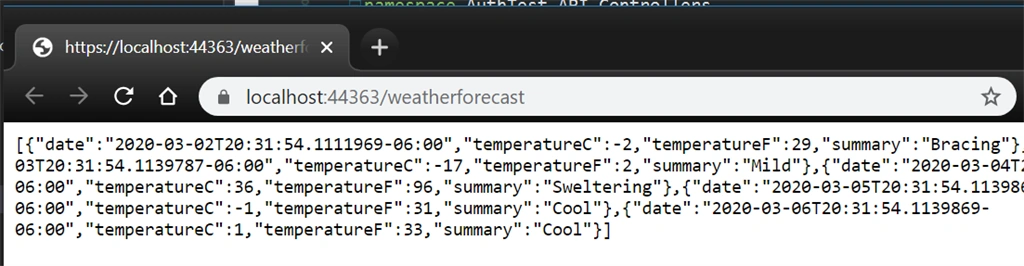
Go ahead and run your app right now. If Microsoft hasn't changed the template by the time you are following this article, you should probably get some fake weather json data on your browser.
This means the app is working and currenlty not requiring any kind of authentication to serve up data. Let's go ahead and mess that up! :)
Go head add the [Authorize] attribute, you will need to bring in the Microsoft.AspNetCore.Authorization and try running the project again.
- using System;
- using System.Collections.Generic;
- using System.Linq;
- using Microsoft.AspNetCore.Authorization;
- using Microsoft.AspNetCore.Mvc;
- using Microsoft.Extensions.Logging;
- namespace AuthTest.API.Controllers
- {
- [ApiController]
- [Authorize]
- [Route("[controller]")]
- public class WeatherForecastController : ControllerBase
- {
- private static readonly string[] Summaries = new[]
- {
- "Freezing", "Bracing", "Chilly", "Cool", "Mild", "Warm", "Balmy", "Hot", "Sweltering", "Scorching"
- };
- private readonly ILogger<WeatherForecastController> _logger;
- public WeatherForecastController(ILogger<WeatherForecastController> logger)
- {
- _logger = logger;
- }
- [HttpGet]
- public IEnumerable<WeatherForecast> Get()
- {
- var rng = new Random();
- return Enumerable.Range(1, 5).Select(index => new WeatherForecast
- {
- Date = DateTime.Now.AddDays(index),
- TemperatureC = rng.Next(-20, 55),
- Summary = Summaries[rng.Next(Summaries.Length)]
- })
- .ToArray();
- }
- }
- }
Back to the project go ahead and create a new class inside the Middleware folder, let's call this one AuthenticationMiddleware
Before we make any changes to this new class we need to bring one more Nuget package:
- Microsoft.AspNetCore.Authentication.JwtBearer
Browse and install the above package, and update the AuthenticationMiddleware class with the code below
- using System.Text;
- using Microsoft.IdentityModel.Tokens;
- using Microsoft.Extensions.Configuration;
- using Microsoft.Extensions.DependencyInjection;
- using Microsoft.AspNetCore.Authentication.JwtBearer;
- namespace AuthTest.API.Middleware
- {
- public static class AuthenticationExtension
- {
- public static IServiceCollection AddTokenAuthentication(this IServiceCollection services, IConfiguration config)
- {
- var secret = config.GetSection("JwtConfig").GetSection("secret").Value;
- var key = Encoding.ASCII.GetBytes(secret);
- services.AddAuthentication(x =>
- {
- x.DefaultAuthenticateScheme = JwtBearerDefaults.AuthenticationScheme;
- x.DefaultChallengeScheme = JwtBearerDefaults.AuthenticationScheme;
- })
- .AddJwtBearer(x =>
- {
- x.TokenValidationParameters = new TokenValidationParameters
- {
- IssuerSigningKey = new SymmetricSecurityKey(key),
- ValidateIssuer = true,
- ValidateAudience = true,
- ValidIssuer = "localhost",
- ValidAudience = "localhost"
- };
- });
- return services;
- }
- }
- }
Open the Startup.cs class, find the ConfigurationServices, and the Configure functions and update with the code below.
You will have to import the reference to the namespace where the AuthenticationExtension is located
- using AuthTest.API.Middleware;
- using Microsoft.AspNetCore.Builder;
- using Microsoft.AspNetCore.Hosting;
- using Microsoft.Extensions.Configuration;
- using Microsoft.Extensions.DependencyInjection;
- using Microsoft.Extensions.Hosting;
- namespace AuthTest.API
- {
- public class Startup
- {
- public Startup(IConfiguration configuration)
- {
- Configuration = configuration;
- }
- public IConfiguration Configuration { get; }
- // This method gets called by the runtime. Use this method to add services to the container.
- public void ConfigureServices(IServiceCollection services)
- {
- services.AddControllers();
- services.AddTokenAuthentication(Configuration);
- }
- // This method gets called by the runtime. Use this method to configure the HTTP request pipeline.
- public void Configure(IApplicationBuilder app, IWebHostEnvironment env)
- {
- if (env.IsDevelopment())
- {
- app.UseDeveloperExceptionPage();
- }
- app.UseHttpsRedirection();
- app.UseRouting();
- app.UseAuthentication();
- app.UseAuthorization();
- app.UseEndpoints(endpoints =>
- {
- endpoints.MapControllers();
- });
- }
- }
- }
Cool! Let's go ahead a run a quick test! Go ahead and just start your app again.
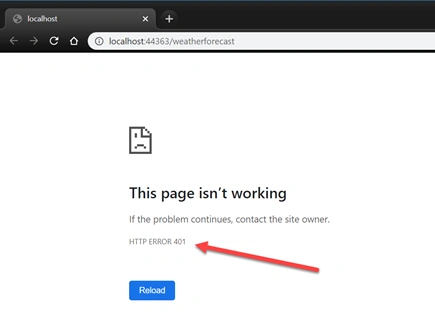
Did you get a "This page isn't working" - If you did, good job! That's exactlyy what we are lookin for. No more exceptions!
If you look closely you will see the server is displaying a 401 error - which means... drum roll... Unauthorized: https://httpstatuses.com/401
Our app now understands what we are looking for and since it didnt see a token in the request it returned an 401 - Unathorized error.
Stop the app and let's go ahead and create a new controller. Name this one TokenController
Right-click the Controllers folder and choose Add -> Controller...
Pick the API Controller - Empty template and click Add
- using AuthTest.API.Services;
- using Microsoft.AspNetCore.Mvc;
- using Microsoft.Extensions.Configuration;
- namespace AuthTest.API.Controllers
- {
- [Route("api/[controller]")]
- [ApiController]
- public class TokenController : ControllerBase
- {
- private IConfiguration _config;
- public TokenController(IConfiguration config)
- {
- _config = config;
- }
- [HttpGet]
- public string GetRandomToken()
- {
- var jwt = new JwtService(_config);
- var token = jwt.GenerateSecurityToken("[email protected]");
- return token;
- }
- }
- }
Restart the app, and navigate to https://localhost:44363/api/token, your port number may vary.
Hopefully you got a token like me,
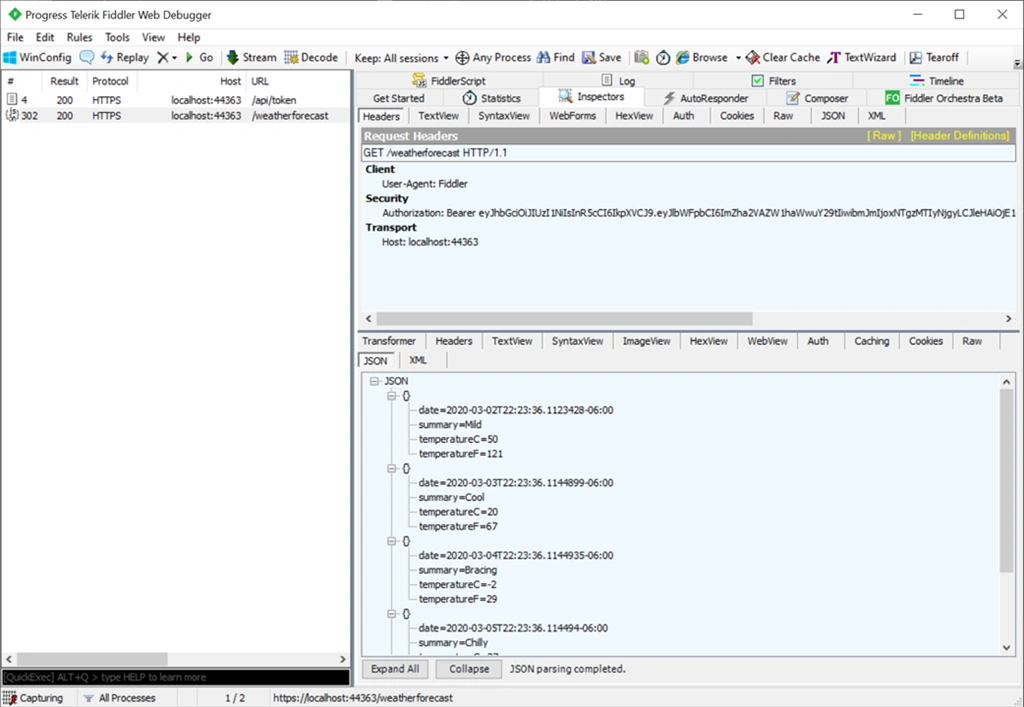
Now with Postman or Fiddler whichever tool you prefer, let's try to call into the WeatherForecastController and see if we can get through.
With the app running let's go ahead and make a call into the token endpoint to get a fresh token and then let's use that token to call into the weather forecast service.
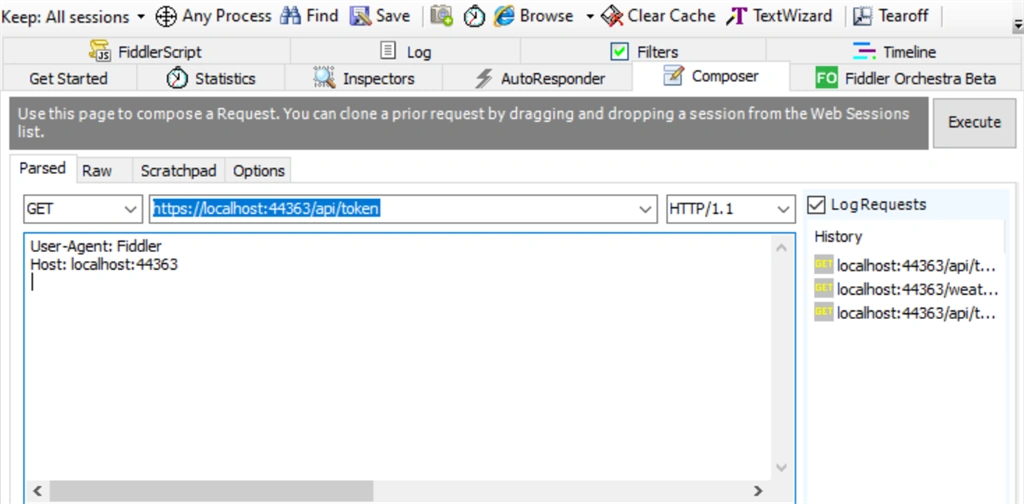
Make sure your app is running end do a GET on .../api/token
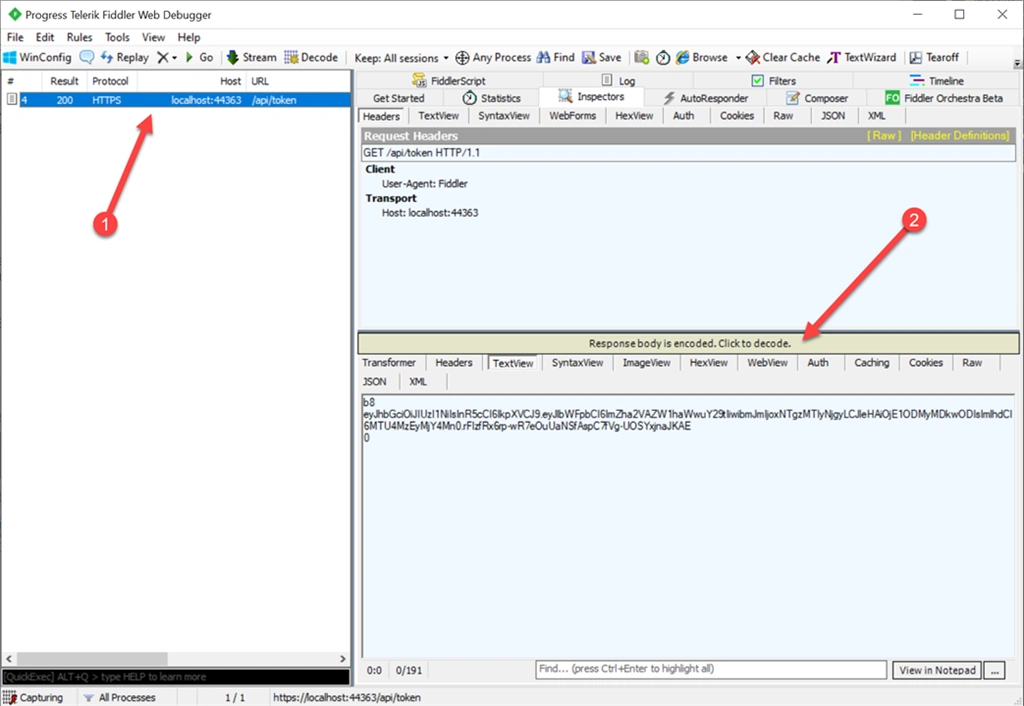
This is what fiddler looks like.
On the Composer tab choose GET from the dropdown and type in your URL, then click the Execute button.
Double click the result on the left and then click on decode, to see your actual token.
Important: This is only happening because I am running my app in HTTPS. If I was running in HTTP, I would not need to decode the result.
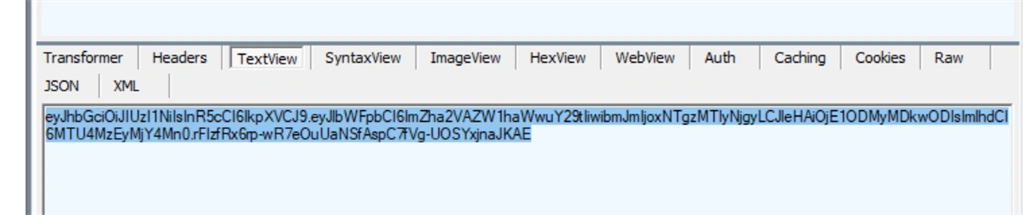
After decoding the yellow text goes away and you can copy the token:
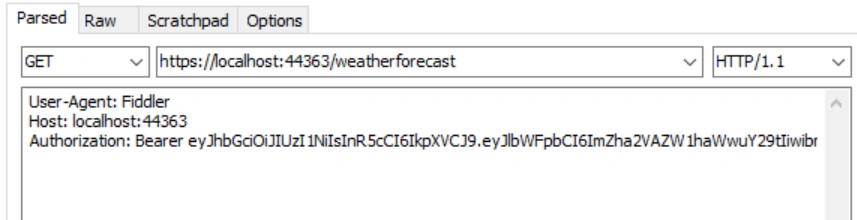
Let's compose another call into the WeatherForecast endpoint.
GET
header area:
User-Agent: Fiddler
Host: localhost:44363
Authorization: Bearer YOUR TOKEN GOES HERE
Click the Execute button:
There it is - data!
In the next article I will cover actually creating a login control with Create Account and Log in so we can further learn about security.
Thank you for reading and comment below if you ran into any issues, or if you have suggestions.
Thank you again.
Tanmay SarkarPosted Nov 15, 2022, 7:36 AM
Can anyone send me screenshot of postman of using token and sending post request of controller because I am getting unauthorize error
Manoj MauryaPosted Aug 6, 2022, 5:47 PM
Hi, package Microsoft.AspNetCore.Authentication.JwtBearer(version 3.1.6 ) is working in ASP.NET Core 3.1.
Byron ByronPosted Dec 29, 2021, 2:00 AM
Hi Fabio, thanks a lot for the article. Please what is the link to: "In the next article I will cover actually creating a login control with Create Account and Log in so we can further learn about security."
Harrie ThijssenPosted May 11, 2021, 11:51 PM
I'm using Net5.0 and had to add 'Audience = "localhost"; Issuer" = "localhost";' to GenerateSecurityToken(). Luckily the 401 response had excellent error messaging directing me to make these changes.
Sushil GuptaPosted Apr 14, 2021, 6:08 PM
Good article. Can you also extend this solution to implement refreshtoken.
StevePosted Feb 24, 2021, 8:09 PM
Does C# .NET have something equivalent to JwtBearer? I'm researching Auth0 to implement SSO in a C# .NET app and one way of using Auth0 requires Microsoft.AspNetCore.Authentication.JwtBearer.
sadiqabbas hiraniPosted Oct 23, 2020, 8:07 AM
Thanks for this nice info, but i am getting this error.Bearer error="invalid_token", error_description="The audience 'empty' is invalid"
Paulo AssunçãoPosted Aug 17, 2020, 9:57 AM
Hi Fabio, thanks a lot for the article. You mentioned that we could save user data in the token, using the identity claims. How can we then access that data in actions throughout the api?
Ahmed ezzatPosted Aug 3, 2020, 11:38 AM
Thanks for the article, I did every step by after add the token to the api calls, it keep returning unauthorized 401
Samuel IyomerePosted Jul 13, 2020, 4:09 PM
Thank you for this article. I tried it and it worked very well. I would have loved to use it in a .netstandard project though but had issues installing Microsoft.AspNetCore.Authentication.JwtBearer so I had to use an API project.
Leszek PiePosted Jul 8, 2020, 11:09 AM
Hi, nice article.
Daniela Yepes GaviriaPosted Apr 24, 2020, 10:25 AM
I fount an error in the code, I followed the step by step (I didn't clone the repo), when I tested the application I was having this error: Bearer error="invalid_token", error_description="The audience 'empty' is invalid". I cloned the repo and checked what was the difference and I found these two fields differents: ValidateIssuer and ValidateAudience in the AuthenticationMiddleware.cs, in the tutorial they set them in true, but when I cloned the demo, they set them in false, I changed them and it works.
Joshua RoutinPosted Apr 9, 2020, 9:20 AM
Thanks for the walkthrough. When I follow the steps in the article, postman checks fail to retrieve the dataset. When I clone from git, postman checks succeed. The difference is in ValidateIssuer = false and ValidateAudience = false within AuthenticationMiddleware.cs. Why is it set to true in the article and postman does not function, and why does changing it to false to match the git project succeed?
Ano MepaniPosted Mar 22, 2020, 3:01 PM
What is validity of token? and in client side where it can be stored if we use in react or angular app? Do you recommend any security ?
mmsggPosted Mar 5, 2020, 8:36 AM
Bearer error="invalid_token", error_description="The audience 'empty' is invalid"