

Lazy loading is a nice and very important concept in the programming world. Sometimes it helps to improve performance and adapt best practices in application design. Let's discuss why lazy loading is useful and how it helps to develop a high performance application.
Lazy loading is essential when the cost of object creation is very high and the use of the object is vey rare. So, this is the scenario where it's worth implementing lazy loading. The fundamental idea of lazy loading is to load object/data when needed.
At first we will implement a traditional concept of loading (it's not lazy loading) and then we will try to understand the problem in this. Then we will implement lazy loading to solve the problem.
Have a look at the following code.
using System;
using System.Collections.Generic;
using System.Linq;
using System.Text;
using System.Threading.Tasks;
namespace ConsoleAPP
{
    public class PersonalLoan
    {
        public string AccountNumber { get; set; }
        public string AccounHolderName { get; set; }
        public Loan LoanDetail { get; set; }
        public PersonalLoan(string accountNumber)
        {
            this.AccountNumber = accountNumber;
            this.AccounHolderName = "Sourav";
            this.LoanDetail = new Loan(this.AccountNumber);
        }
    }
    public class Loan
    {
        public string AccountNumber { get; set; }
        public float LoanAmount { get; set; }
        public bool IsLoanApproved { get; set; }
        public Loan(string accountNumber)
        {
            Console.WriteLine("Loan loading started");
            this.AccountNumber = accountNumber;
            this.LoanAmount = 1000;
            this.IsLoanApproved = true;
            Console.WriteLine("Loan loading started");
        }
    }
    class Program
    {
        static void Main(string[] args)
        {
            PersonalLoan p = new PersonalLoan("123456");
            Console.ReadLine();
        }
    }
}
This is not lazy loading since we are seeing that the LoadDetail property is being populated at the time of PersonalLoan object creation. If object creation of LoanDetail is very costly then it will be a very time and resource intensive operation to create an object of a PersonalLoad class.
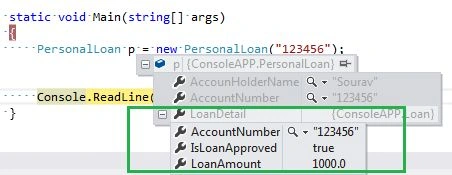
Ok, somehow we will implement a mechanism to populate the LoadDetail property in delay, I mean if needed we will populate the property otherwise not.
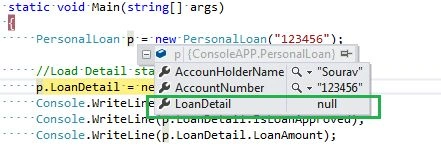
It can solve our problem and obviously it will improve performance in the application. Have a look at the following example. We can see that the LoanDetail property will not be populated when an object of the PersonalLoan class is created.
using System;
using System.Collections.Generic;
using System.Linq;
using System.Text;
using System.Threading.Tasks;
namespace ConsoleAPP
{
    public class PersonalLoan
    {
        public string AccountNumber { get; set; }
        public string AccounHolderName { get; set; }
        public Loan LoanDetail { get; set; }
        public PersonalLoan(string accountNumber)
        {
            this.AccountNumber = accountNumber;
            this.AccounHolderName = "Sourav";
        }
    }
    public class Loan
    {
        public string AccountNumber { get; set; }
        public float LoanAmount { get; set; }
        public bool IsLoanApproved { get; set; }
        public Loan(string accountNumber)
        {
            Console.WriteLine("Loan loading started");
            this.AccountNumber = accountNumber;
            this.LoanAmount = 1000;
            this.IsLoanApproved = true;
            Console.WriteLine("Loan loading started");
        }
    }
    class Program
    {
        static void Main(string[] args)
        {
            PersonalLoan p = new PersonalLoan("123456");
            //Load Detail started to load
            p.LoanDetail = new Loan("123456");
            Console.WriteLine(p.LoanDetail.AccountNumber);
            Console.WriteLine(p.LoanDetail.IsLoanApproved);
            Console.WriteLine(p.LoanDetail.LoanAmount);
            Console.ReadLine();
        }
    }
}
So, we are seeing that the LoanDetail Property is still null. As soon as we load the property in our code , it will be populated.
Finally
Lazy loading is a nice feature of application development, the developer should implement it wisely to enhance performance and reduce the cost of application execution.
Implement lazy loading using Lazy<T> class
As we know, lazy loading is a nice feature of applications, not only to improve the performance of the application but also it helps to manage memory and other resource efficiently. Basically we can use lazy initialization when a large object is created or the execution of a resource- intensive task in particular when such creation or execution might not occur during the lifetime of the program.
And there are many choices to implement lazy initialization. We can use our own implementation to delay object population or we can use the Lazy<T> class of the .NET library to do it.
To prepare for lazy initialization, you create an instance of Lazy<T>. The type argument of the Lazy<T> object that you create specifies the type of the object that you want to initialize lazily. The constructor that you use to create the Lazy<T> object determines the characteristics of the initialization. Lazy initialization occurs the first time the Lazy<T>.Value property is accessed.
The Lazy<T> class contains two properties by which we can detect the status of the lazy class.
IsValueCreated
This property will tell us whether or not the value is initializing in a lazy class.
Value
It gets the lazy initialized value of the current Lazy<T> instance.
Fine. We will now implement one simple class and we will see how lazy<T> works with it. Have a look at the following example.
using System;
using System.Collections.Generic;
using System.Linq;
using System.Text;
namespace ConsoleAPP
{
    public class Test
    {
        private List<string> list = null;
        public Test()
        {
            Console.WriteLine("List Generated:");
            list = new List<string>() {
                "Sourav","Ram"
            };
        }
        public List<string> Names
        {
            get
            {
                return list;
            }
        }
    }
    class Program
    {
        static void Main(string[] args)
        {
            Lazy<Test> lazy = new Lazy<Test>();
            Console.WriteLine("Data Loaded : " + lazy.IsValueCreated);
            Test t = lazy.Value;
            foreach (string tmp in t.Names)
            {
                Console.WriteLine(tmp);
            }
            Console.ReadLine();
        }
    }
}
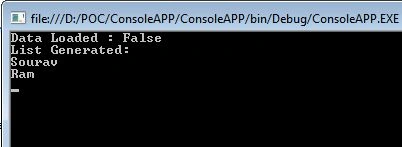
The Test class has been declared and the instance (lazy) has created a Lazy<T> class. We are then checking whether the value is populated or not in the Test class. In the output we are seeing the value is “False” so, the value is still not populated.
Whenever the line “Test t = lazy.Value” executes, the value will be populated in the Test class and this is how the Test class will initialize lazily.
In the next line we are accessing the property of the test class that will return a string array and we are printing it. Here is sample output in the following.
The question may occur to you, is lazy<T> thread safe?
By default, all public and protected members of the Lazy<T> class are thread safe and may be used concurrently from multiple threads. These thread-safety guarantees may be removed optionally and per instance, using parameters to the type's constructors.
Thanks for reading, Happy learning. In the next article we will see how to implement lazy loading in Entity Framework.
Sujit PrabhakaranPosted Mar 20, 2024, 6:53 AM
Hi Sourav, Your Entity or Class Names are bit confusing. Why have you created a Loan Object inside the Personal Loan? A Personal Loan or Loan is normally associated with a Savings Account, is that correct? Can you rename the PersonalLoan class as Savings Account. I believe that will make more sense and will be easy to understand.
Shailendar NaiduPosted Dec 30, 2019, 1:36 AM
Hi Sourav, Lazy loading nothing but it is a technique which loads the data on demand or when it is required like when we scroll the page the page data will be load. But here your saying different. I am really confused with your blog. Please let me know what exactly lazy loading.
Hetram LakheraPosted Sep 18, 2019, 10:17 AM
Hi Sourav Lazy loading by using as class member not working as expected
Ali QambarPosted Aug 8, 2018, 4:36 AM
Very helpful article.Thanks
Dhiraj BarnwalPosted Apr 24, 2016, 8:29 AM
Nice Efforts!But i have a doubt. If we write below line Lazy<Test> lazy = new Lazy<Test>(); Test t = lazy.Value; then data is loaded. So, i think it is just like below code as traditionally we do: Test t = new Test(); List<string> w= t.list; So, my questuion is that where does Lazy loading happens? Both the way, we are loading the value when we write Either Test t = lazy.Value; or List<string> w= t.list; If the point is just that , by writting below line we are avoiding Eager loading Lazy<Test> lazy = new Lazy<Test>(); then what is the use of this line. I mean when i need to load , i have to write Lazy<Test> lazy = new Lazy<Test>(); Test t = lazy.Value; We are already doing that by below lines. When we need to load the values. Test t = new Test(); List<string> w= t.list;
Dhiraj BarnwalPosted Apr 24, 2016, 8:16 AM
Lazy<Test> lazy = new Lazy<Test>(); Console.WriteLine("Data Loaded : " + lazy.IsValueCreated); Test t = lazy.Value;
Sudhir goswamiPosted Sep 4, 2015, 1:54 AM
Hi Sourav, I have one question If I have parametrized constructor then How will implement Lazy Loading.
Sudhir goswamiPosted Sep 4, 2015, 1:53 AM
Hi Sourav,
Upendra Pratap ShahiPosted Apr 22, 2015, 2:44 AM
nice..
Vineet KumarPosted Oct 20, 2014, 9:51 PM
Regards, Vineet Yadav
Vineet KumarPosted Oct 20, 2014, 9:50 PM
Thanks Sourav, Its really good explained....
Anupam SinghPosted May 21, 2014, 10:00 AM
Hi Sourav .. it is really very informative .. Actually we always forget that complex type may consume much memory. coz of just a silly initialization (common mistake)...
Prerana TiwariPosted May 20, 2014, 12:48 PM
Really very nice article