

I am new to WPF applications and I went to develop using MDI in a WPF application. I went to many websites and did not find any articles or examples that implement MDI in WPF.
So I decided to write an article on MDI with a menu control in WPF. I hope you like this article.
I have used the open source project code DLL in my project. You can visit it at: http://wpfmdi.codeplex.com/
What is MDI in WPF?
- MDI stands for "Multiple Document Interface" (it does not stand for "Multiple Window Interface").
- In Windows Applications there is a MDI Parent Form. But in the case of WPF there is no Parent window.
- You can implement MDI in two ways in WPF; they are:
- Tab control
- Menu control
- WPF MDI includes two themes, Luna (XP) and Aero (Vista & 7) as well as support for custom themes. The themes are used depending on the operating system, although a theme can be set at compile and/or run time also.
MDI implementation in WPF using a "Tab control"
I am not explaining the "Tab Control" in this article. You can refer to the "Tab Control" in the following link:
http://www.technologymaterial.com/articles/wpftabbedmdi.aspx?cat=wpf&aid=1
MDI implementation in WPF using "Menu control"
REQUIREMENTS
For implementing the MDI in WPF, you need to download "WPF.MDI.dll". You can download "WPF.MDI.dll" from this article attachment or from the following link:
http://wpfmdi.codeplex.com/releases/view/35620
CREATE WPF APPLICATION AND PARENT WINDOW
- Open Visual Studio 2008.
- Click on "File" -> "New" -> "Project...". That will open the "New Project" window, as in:
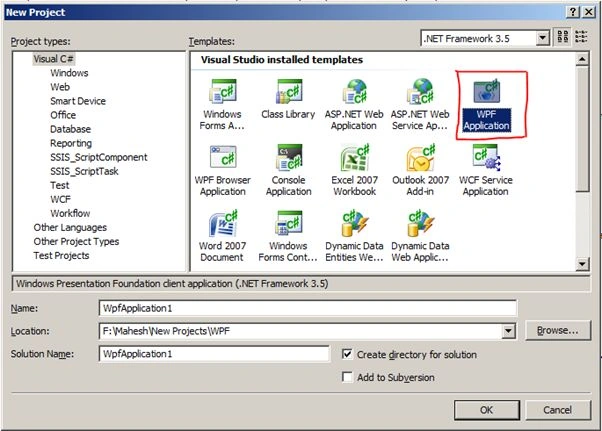
- From the "Templates", select "WPF Application" and give the Name and Location for the application. I am giving the project the name "WCF_MDI". Click on the "OK" button.
- It will open a WCF project. The project folder structure is given below.
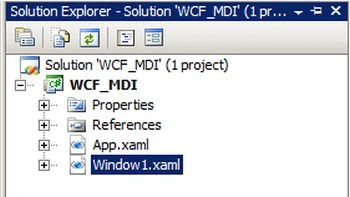
- Delete the "Window1.xaml" file.
- In the Solution Explorer, right-click on the project and choose Add -> Window..
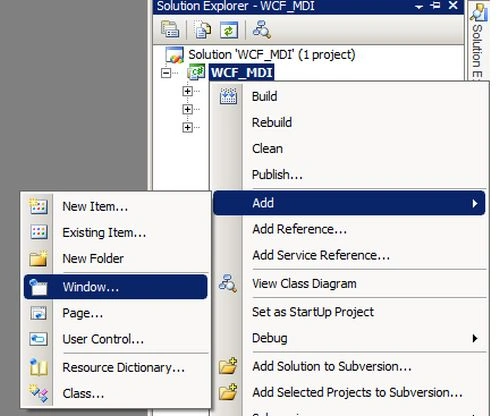
- It will open an "Add New Item - WCF_MDI" window. Rename the file from "Window1.xaml" to "mainWindow.xaml". Click on the "Add" button.
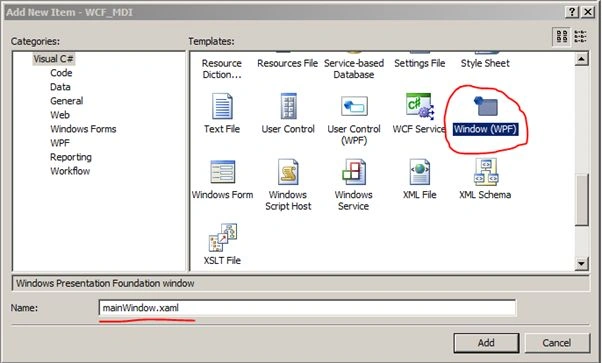
- It will add a new window to the project.
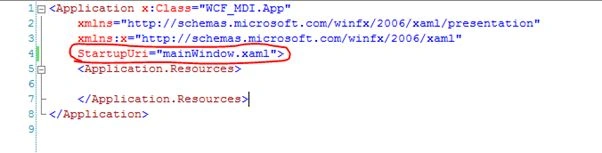
- Open the "App.xaml" file and change the StartupUri from "Window1.xaml" to mainWindow.xaml.
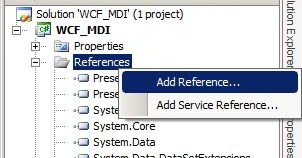
- In the Solution Explorer, right-click on the References and choose "Add Reference...".
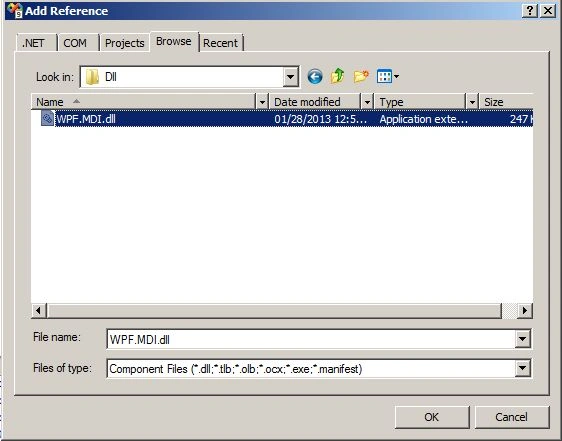
- Select the "WPF.MDI.dll" location from the Browse tab and click on the "Ok" button.
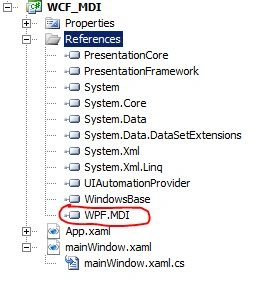
- It will add a "WPF.MDI" reference to the project.
- To use the control in XAML, add the DLL as a reference in the project and add the following line to the top of your XAML file underneath the xmlns declarations. (In other words open the "mainWindow.xaml" file and add the following code.:
xmlns:mdi="clr-namespace:WPF.MDI;assembly=WPF.MDI"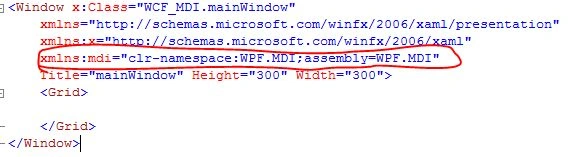
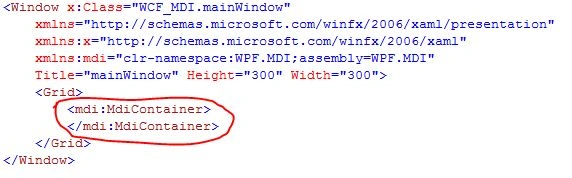
- To create a container add the following code, it works much like a grid or panel does:
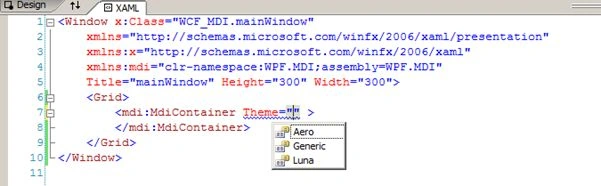
- Optionally, you could specify a theme here too.
- To add a child to the container, add an MdiChild control inside the MdiContainer, as in:
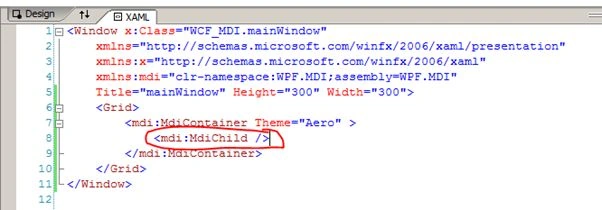
- For example, the following will set the title of the window to "Child Window". To prevent the user from resizing the window, disable the minimize button and make the background of the window "Green".
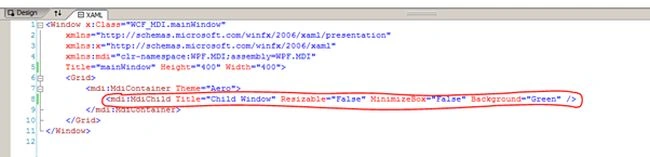
If you run the project the output window will be: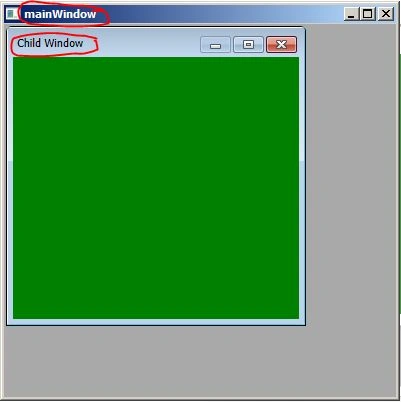
- Now we will create a simple menu bar. The code is given below:
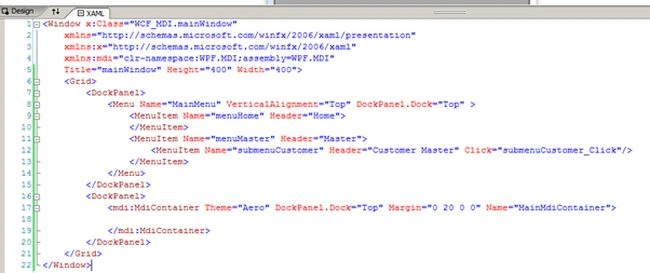
Or
<Window x:Class="WCF_MDI.mainWindow"
xmlns="http://schemas.microsoft.com/winfx/2006/xaml/presentation"
xmlns:x="http://schemas.microsoft.com/winfx/2006/xaml"
xmlns:mdi="clr-namespace:WPF.MDI;assembly=WPF.MDI"
Title="mainWindow" Height="400" Width="400">
<Grid>
<DockPanel>
<Menu Name="MainMenu" VerticalAlignment="Top" DockPanel.Dock="Top" >
<MenuItem Name="menuHome" Header="Home">
</MenuItem>
<MenuItem Name="menuMaster" Header="Master">
<MenuItem Name="submenuCustomer" Header="Customer Master" Click="submenuCustomer_Click"/>
</MenuItem>
</Menu>
</DockPanel>
<DockPanel>
<mdi:MdiContainer Theme="Aero" DockPanel.Dock="Top" Margin="0 20 0 0" Name="MainMdiContainer">
</mdi:MdiContainer>
</DockPanel>
</Grid>
</Window>
- If you run the application, you will get the following output window:
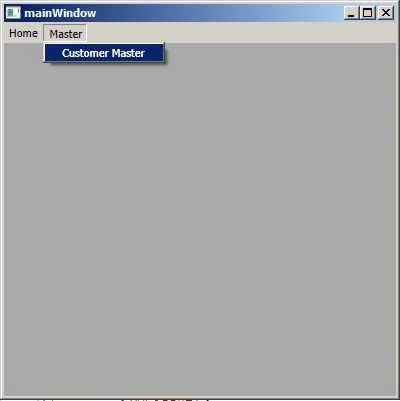
- You have successfully added the MDI parent window with a menu on it in a WPF application.
CREATE A CHILD WINDOW
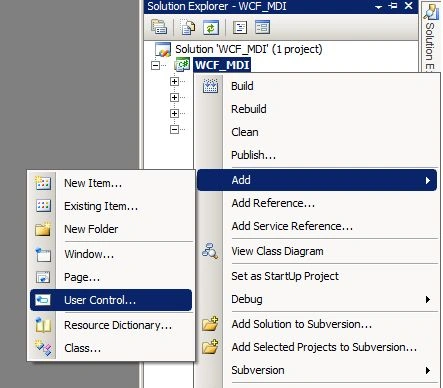
- In the Solution Explorer, right-click on the project and choose Add -> User Control.
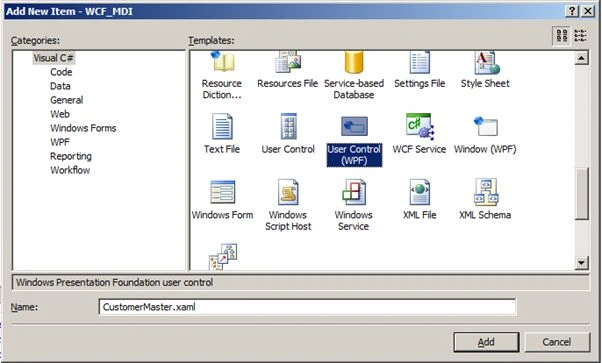
- It will open an "Add New Item - WCF_MDI" window. Select the User Control (WPF) and give the name as "CustomerMaster.xaml" and click on the "Add" button.
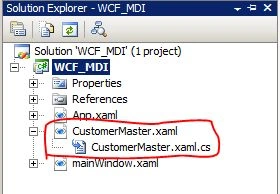
- It will add a new Customer Master control to the project.
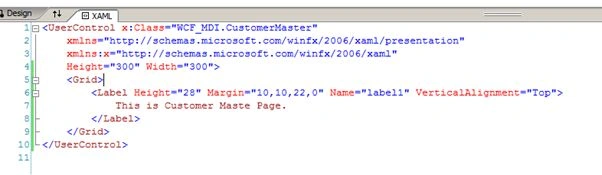
- Design the Customer Master Page as needed. I have added the test "".
<UserControl x:Class="WCF_MDI.CustomerMaster"
xmlns="http://schemas.microsoft.com/winfx/2006/xaml/presentation"
xmlns:x="http://schemas.microsoft.com/winfx/2006/xaml"
Height="300" Width="300">
<Grid>
<Label Height="28" Margin="10,10,22,0" Name="label1" VerticalAlignment="Top">
This is Customer Maste Page.
</Label>
</Grid>
</UserControl>
Or
- Now open the "mainWindow.xaml " page and add the click event to menu item.
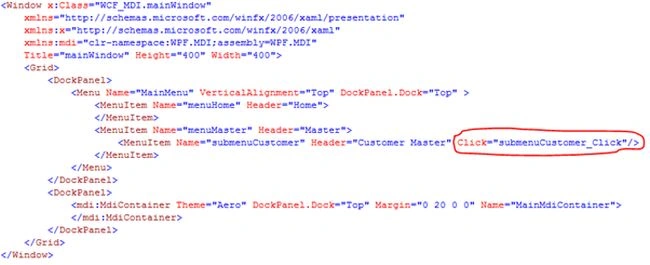
Or
<Window x:Class="WCF_MDI.mainWindow"
xmlns="http://schemas.microsoft.com/winfx/2006/xaml/presentation"
xmlns:x="http://schemas.microsoft.com/winfx/2006/xaml"
xmlns:mdi="clr-namespace:WPF.MDI;assembly=WPF.MDI"
Title="mainWindow" Height="400" Width="400">
<Grid>
<DockPanel>
<Menu Name="MainMenu" VerticalAlignment="Top" DockPanel.Dock="Top" >
<MenuItem Name="menuHome" Header="Home">
</MenuItem>
<MenuItem Name="menuMaster" Header="Master">
<MenuItem Name="submenuCustomer" Header="Customer Master" Click="submenuCustomer_Click"/>
</MenuItem>
</Menu>
</DockPanel>
<DockPanel>
<mdi:MdiContainer Theme="Aero" DockPanel.Dock="Top" Margin="0 20 0 0" Name="MainMdiContainer">
</mdi:MdiContainer>
</DockPanel>
</Grid></Window>
- Now open the "mainWindow.xaml .cs" page and add the following code to the click event:
privatevoid submenuCustomer_Click(object sender, RoutedEventArgs e)
{
MainMdiContainer.Children.Add(new MdiChild()
{
Title = " Child Window",
Height = 300,
Width = 300,
//Here CustomerMaster is the class that you have created for mainWindow.xaml user control.
Content = newCustomerMaster()
});
}Or
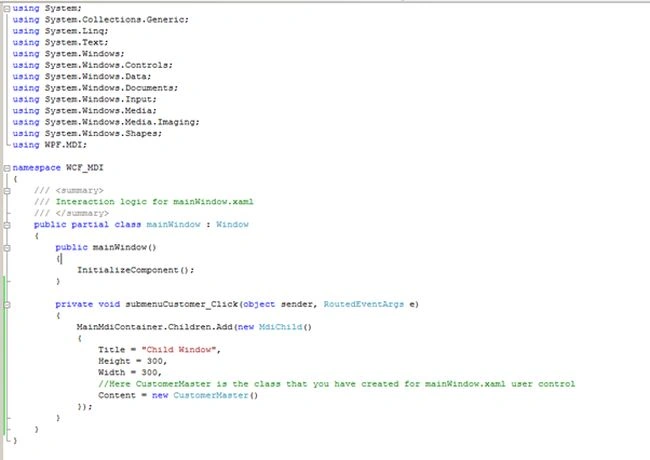
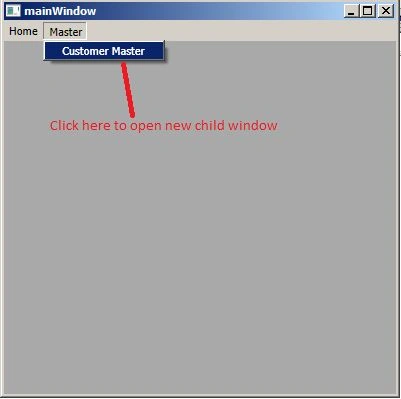
- When you run the application it will open your parent window with all the menu links created.
- Once you click on the "Customer Master" menu, it will open a child window within the parent.
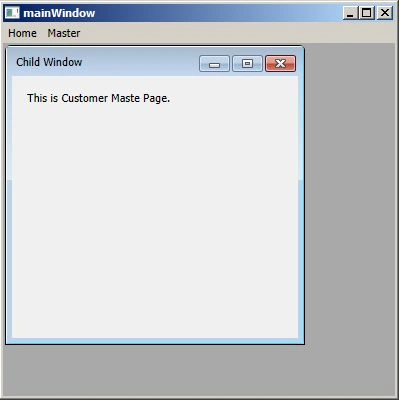
- That's it. Your MDI application in WPF is ready.
NOTE: You can't create "window (WPF)" as a child window. For creating child windows, you need to add "User Control (WPF)".
I hope you will enjoy the article. Thank you.
Gautam SolankiPosted Feb 5, 2018, 7:28 AM
Hi I am implementing WPF MDI in my sample. I used User control to load into MDI Container. But I am getting Border and Header of that user control inside container. So can anyone help me to remove that border and header portion of that user control?
gaurav raiPosted Sep 27, 2017, 3:11 AM
How can we use window.xmal to create MDI..?
Mohammad TalhaPosted Apr 3, 2017, 2:34 AM
Error is that namespace does not contain MdiContainer
Mohammad TalhaPosted Apr 3, 2017, 2:19 AM
I am facing their an error in XAML of mainWindow "<mdi:MdiContainer............. ".
lin liuPosted Sep 30, 2015, 11:51 PM
You can try LinsUIWPF(http://goldcing.blogspot.com/2012/07/introduction-to-linsuiwpf-suite.html) which support MDI technique.
Eric MoreauPosted Aug 24, 2015, 2:16 PM
I found an issue using this control when using Validation. Can you please look at https://wpfmdi.codeplex.com/workitem/13413 if you are experimenting the same issue?
mohd. nadeemshaikhPosted Aug 18, 2015, 5:55 AM
I have Implemented same in my Project, can anyone tell me how do I close only that child user control on click of button which is presenr on user control(Child)?
Pankaj KadamPosted May 31, 2015, 10:27 AM
Can i bind that Menu item as per login user rights dynamically ?please help me
Hitesh VaghasiyaPosted Feb 27, 2014, 1:41 AM
Nice ...
AdamPosted Jul 20, 2013, 6:51 PM
Dear Mahesh Alle: You created User Control, it works. I create WPF Window1.xaml it does not work; please help !
AdamPosted Jul 20, 2013, 6:49 PM
Dear Mahesh Alle:
Sam HobbseditedPosted Jan 28, 2013, 1:38 PMEdited Jan 28, 2013, 1:39 PM
Beginners must be warned that MDI was absolutely not designed as a simple way to provide multiple windows. MDI is a Windows API thing. WPF has many ways to provide multiple windows and WPF is more modern and flexible. Beginners often think that MDI is an easy way to make multiple child windows and then they struggle to get it to do what they need to do. WPF prorammers should use WPF controls to provide multiple windows, not MDI; MDI is older technology.