

Keeping your users' data in a secure environment is very important step while building an application, especially when you are dealing with sensitive information, such as - Emails, Passwords, and E-Payment information (Bank Accounts, Payment cards, .etc.), and also when your application sends and receives the data over a network.In these situations, you have to be sure that no one can tamper with the data or steal it; and make your users feel comfortable while they are using your application because they know that their data is secure.
In this article, I’ll try to explain the differences between symmetric and asymmetric algorithms and how you can implement these algorithms in your app using C# programming language.
So, what are symmetric and asymmetric algorithms?
Before I start with symmetric and asymmetric algorithms, I’ll explain Cryptography in general.
Cryptography is about encrypting and decrypting data. With encryption, you convert a plain text (that’s human readable) into a random array of bytes. Decryption is the opposite process, you convert the random array of bytes into a plain text.
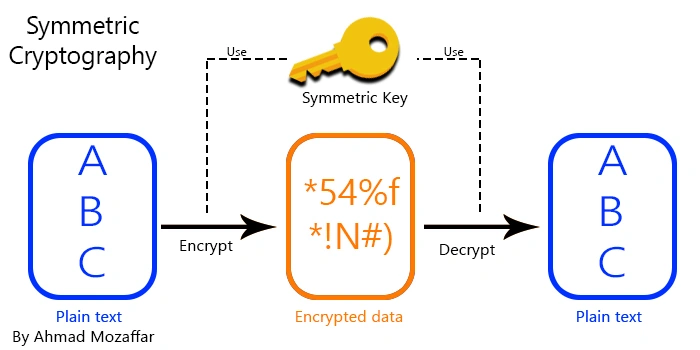
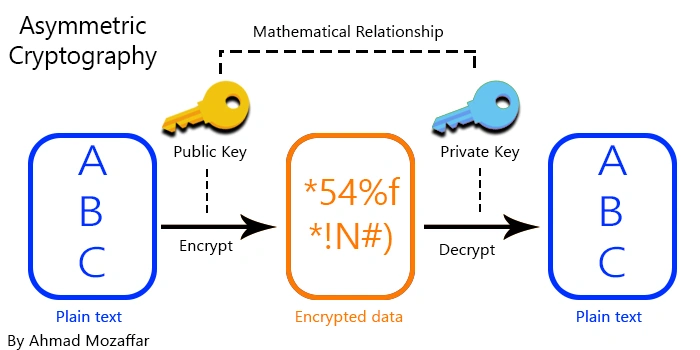
Encrypting any piece of plain text needs a key to do the operation and also, the decrypting process needs a key to convert encrypted data into a plain text. A key is the controller of the encryption process that is used by an algorithm. Actually, here is the main difference between symmetric and asymmetric strategies. A symmetric algorithm uses one key to encrypt and decrypt your data, however, the asymmetric algorithms use two different keys which are mathematically related to each other. One of these keys is public and can be used by everyone. The other key is private and it should be used only by you and never shared with anyone.
Another difference between symmetric and asymmetric algorithms is the performance and size. Symmetric encryption is faster and used to encrypt a large data sets. Asymmetric is well suited for encrypting a small messages. But using these two strategies lead you to implement a robust security system in your application.
Implementing symmetric cryptography in your C# application
One of the most popular symmetric algorithms is AES (Advanced Encryption Security). You can find all the cryptography classes in System.Security.Cryptography namespace. In this tutorial, I will use AES algorithm to encrypt a piece of plain text and save it into a file and also read this file and decrypt its content to a plain text.
Note
In this tutorial, I will use Console Application to concentrate only on the encryption code without event handlers and something like this.
Open Visual Studio (I use Visual Studio 2017) and click on "New project".

Choose console application and name the project as you want.

Inside the program.cs file, write the following code. The code is self-explanatory.
- using System;
- using System.Security.Cryptography;
- using System.IO;
- namespace SymmetricTutorial
- {
- class Program
- {
- static void Main(string[] args)
- {
- // Create a new instance of the AES algorithm
- SymmetricAlgorithm aes = new AesManaged();
- byte[] key = aes.Key; // Key propery contains the key of the aes algorithm you can create your own
- Console.WriteLine("Enter your message here to encrypt:");
- string message = Console.ReadLine();
- // Call the encryptText method to encrypt the a string and save the result to a file
- EncryptText(aes, message, "encryptedData.dat");
- // Call the decryptData method to get the encrypted text from the file and print it
- Console.WriteLine("Decrypted message: {0}", DecryptData(aes, "encryptedData.dat"));
- }
- // Method to encrypte a string data and save it in a specific file using an AES algorithm
- static void EncryptText(SymmetricAlgorithm aesAlgorithm,string text,string fileName)
- {
- // Create an encryptor from the AES algorithm instance and pass the aes algorithm key and inialiaztion vector to generate a new random sequence each time for the same text
- ICryptoTransform encryptor = aesAlgorithm.CreateEncryptor(aesAlgorithm.Key, aesAlgorithm.IV);
- // Create a memory stream to save the encrypted data in it
- using (MemoryStream ms = new MemoryStream())
- {
- using (CryptoStream cs = new CryptoStream(ms,encryptor,CryptoStreamMode.Write))
- {
- using (StreamWriter writer = new StreamWriter(cs))
- {
- // Write the text in the stream writer
- writer.Write(text);
- }
- }
- // Get the result as a byte array from the memory stream
- byte[] encryptedDataBuffer = ms.ToArray();
- // Write the data to a file
- File.WriteAllBytes(fileName, encryptedDataBuffer);
- }
- }
- // Method to decrypt a data from a specific file and return the result as a string
- static string DecryptData(SymmetricAlgorithm aesAlgorithm, string fileName)
- {
- // Create a decryptor from the aes algorithm
- ICryptoTransform decryptor = aesAlgorithm.CreateDecryptor(aesAlgorithm.Key, aesAlgorithm.IV);
- // Read the encrypted bytes from the file
- byte[] encryptedDataBuffer = File.ReadAllBytes(fileName);
- // Create a memorystream to write the decrypted data in it
- using (MemoryStream ms = new MemoryStream(encryptedDataBuffer))
- {
- using (CryptoStream cs = new CryptoStream(ms, decryptor, CryptoStreamMode.Read))
- {
- using (StreamReader reader = new StreamReader(cs))
- {
- // Reutrn all the data from the streamreader
- return reader.ReadToEnd();
- }
- }
- }
- }
- }
- }
Alex DsouzaPosted Jul 6, 2021, 3:38 PM
Ok thanks,it worked.
Alex DsouzaPosted Oct 22, 2020, 11:41 AM
Is file encryption and decryption possible using rsa algorithm in webforms?..yes or no?... if yes, then share links or code
Daniel VasilevPosted Apr 20, 2020, 10:38 AM
How can i send the encrypted data using tcp. I mean do i need to encode it some how?
Usha RajeshPosted May 29, 2019, 11:17 PM
In asymmetric encryption logic, to decrypt encrypted text, do we need both private key and public keys or private key alone is enough ?. In code, you used private key to decrypt encrypted text. Please advise
Tridip BhattacharjeePosted Dec 15, 2017, 3:07 AM
Does it mean when we use assyemtric encryption then two party must have private and public key?
Tridip BhattacharjeePosted Dec 11, 2017, 3:26 AM
I read your article. nice one. in Asymmetric cryptography public key is used to encrypt data and private key is used to decrypt data. it means both party should have two keys to encrypt and decrypt data ?