The article is designed from the very beginning of Cross Origin Resource Sharing (CORS) implementation.
What is CORS?
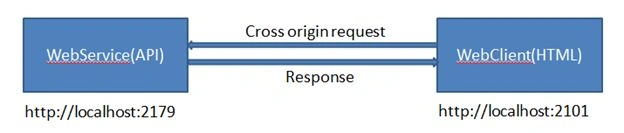
The major concept of CORS is getting data from a WEB API which has been hosted to another server. Firstly, we imagine two applications- WebClient and WebService and both of these are not in the “same origin” (We’ll discuss about same origin and different origin below). In this situation if we send a request from the WebClient to WebService in order to get some response data then we’ll receive some invalid request warning. It happens because two different application from two different origin cannot communicate frequently with each other. We can handle this issue through implementing CORS. It allow us to send request and get response between two applications which are of different origin.
Same Origin- If the two url have identical schemes, hosts and port then they have the same origin.
These two url have the same origin-
http://localhost:2179
http://localhost:2179/Contact/Dashboard
And these two url have the different origin-
http://localhost:2101
http://localhost:2179
Implementation
Step 1: In Visual Studio create a Web API project.

Step 2: Add a class named User with the following properties.
- public class User
- {
- public int ID { get; set; }
- public string Name { get; set; }
- public string Email { get; set; }
-
- }
Add an API controller with the following code.
- using ClientApp.Models;
- using System.Collections.Generic;
- using System.Net;
- using System.Net.Http;
- using System.Web.Http;
-
- namespace WebServiceApp.Controllers
- {
- public class UserController : ApiController
- {
- public HttpResponseMessage GetInfo()
- {
- var res = new List<User>() {
- new User { ID = 1, Name = "Gopal", Email = "[email protected]" },
- new User { ID = 2, Name = "Nayan", Email = "[email protected]" },
- new User { ID = 3, Name = "Shuvo", Email = "[email protected]" }
- };
- return Request.CreateResponse(HttpStatusCode.OK, res);
- }
- }
- }
Now we can run the application locally. In order to verify the Web API is working I navigated to the following URL: http://localhost:8595/api/User in my localhost and got the document tree of User object as response.
- <ArrayOfUser xmlns:i="http://www.w3.org/2001/XMLSchema-instance" xmlns="http://schemas.datacontract.org/2004/07/ClientApp.Models">
- <User>
- <Email>[email protected]</Email>
- <ID>1</ID>
- <Name>Gopal</Name>
- </User>
- <User>
- <Email>[email protected]</Email>
- <ID>2</ID>
- <Name>Nayan</Name>
- </User>
- <User>
- <Email>[email protected]</Email>
- <ID>3</ID>
- <Name>Shuvo</Name>
- </User>
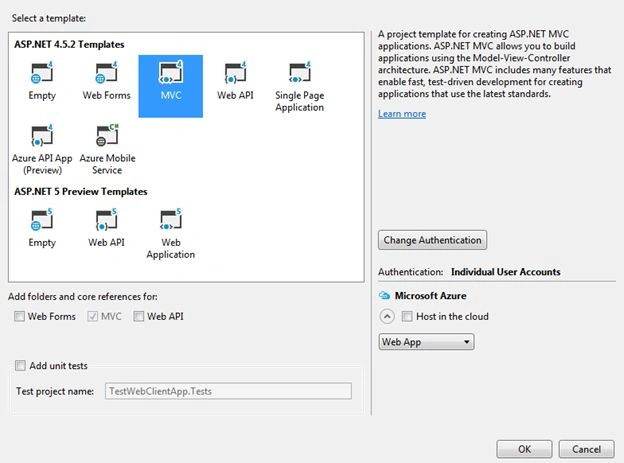
Step 4: Now create another Web Application. Here I have created an MVC application.
 Step 5:
 Install AngularJS using nuget package manager console.
Install-Package angularjs Step 6: Now replace the Index.cshtml view under Home by the following code.
- <script src="~/Scripts/angular.min.js"></script>
- <div class="row" ng-app="myApp" ng-controller="userCtrl">
- <br />
- <div class="col-md-12">
- <nav class="navbar navbar-default">
- <div class="container-fluid">
- <div class="navbar-header">
- <div class="container">
- <br />
- <button class="btn btn-danger" ng-click="sendRequest()">Get Response</button>
- </div>
- <div class="container">
- <h2>CORS Response</h2>
- <table class="table table-bordered">
- <thead>
- <tr>
- <th>ID</th>
- <th>Name</th>
- <th>Email</th>
- </tr>
- </thead>
- <tbody>
- <tr ng-repeat="u in users">
- <td>{{u.ID}}</td>
- <td>{{u.Name}}</td>
- <td>{{u.Email}}</td>
- </tr>
- </tbody>
- </table>
- </div>
- </div>
- </div>
- </nav>
- </div>
- </div>
-
- <script>
- var app = angular.module('myApp', []);
- app.controller('userCtrl', function ($scope, $http) {
- $scope.sendRequest = function () {
- $http.get("http://localhost:8595/api/User/GetInfo")
- .success(function (response) {
- $scope.users = response;
- }).error(function (jqXHR, textStatus, errorThrown) {
- console.log(jqXHR.responseText || textStatus);
- });
- };
- });
- </script>
Set both the application as Startup project.
Run the project and press the Get Response button. This time we’ll get the following js error.
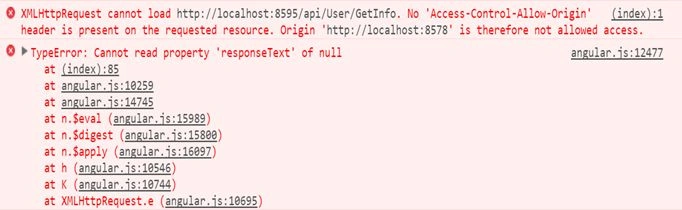
CORS is not implemented yet to the API project and also it’s header is not defined.
Step 8: Using package manager console install CORS to the API project.
Install-Package Microsoft.Asp.Net.WebApi.Cors Step 9: Open the App_Start/WebApiConfig.cs file and add the following code to the WebApiConfig.Register method.
- using System.Web.Http;
-
- namespace WebServiceApp
- {
- public static class WebApiConfig
- {
- public static void Register(HttpConfiguration config)
- {
-
- config.EnableCors();
-
-
-
- config.MapHttpAttributeRoutes();
-
- config.Routes.MapHttpRoute(
- name: "DefaultApi",
- routeTemplate: "api/{controller}/{id}",
- defaults: new { id = RouteParameter.Optional }
- );
- }
- }
- }
Add the [EnableCors] attribute to the UserController.
- using ClientApp.Models;
- using System.Collections.Generic;
- using System.Net;
- using System.Net.Http;
- using System.Web.Http;
- using System.Web.Http.Cors;
-
- namespace WebServiceApp.Controllers
- {
- [EnableCors(origins: "http://localhost:8578", headers: "*", methods: "*")]
- public class UserController : ApiController
- {
- public HttpResponseMessage GetInfo()
- {
- var res = new List<User>() {
- new User { ID = 1, Name = "Gopal", Email = "[email protected]" },
- new User { ID = 2, Name = "Nayan", Email = "[email protected]" },
- new User { ID = 3, Name = "Shuvo", Email = "[email protected]" }
- };
- return Request.CreateResponse(HttpStatusCode.OK, res);
- }
- }
- }
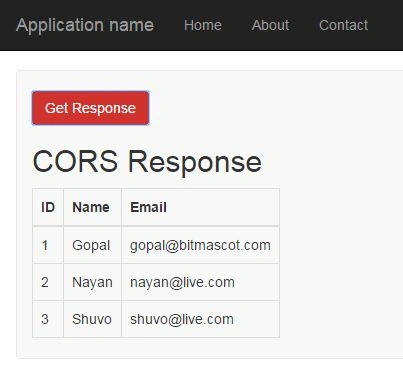
Now run the project once again and get the desired response.
In my next article I’ll show how CORS works with its different implementations.


Tanvir RahmanPosted Dec 17, 2015, 7:46 AM
Very Good, Dada.
Humayun Kabir MamunPosted Nov 11, 2015, 6:59 AM
Nice...
Santhakumar MunuswamyPosted Nov 11, 2015, 2:35 AM
Good one
Sibeesh VenuPosted Nov 11, 2015, 12:38 AM
Nice Share
Pradeep SahooPosted Nov 10, 2015, 8:33 AM
Nice Information .Thanks for sharing .
Mukesh KumarPosted Nov 10, 2015, 2:23 AM
Good One