

Introduction
JSPDF is an open-source library for generating PDF documents using nothing but JavaScript.
There are certain predefined functions in JSPDF for implementing graphics, like drawing a line, a circle or triangle and so on.
How to draw a Line?
- doc.line(x1, y1,x2,y2);
It will draw a line with starting coordinates (x1,y1) and ending coordinates (x2,y2).
- doc.setLineWidth(n);
It is used to get a line of width “n”.
Code Example
- function demoLine() {
- var doc = new jsPDF();
- doc.line(15, 15, 50, 15); // horizontal line
- doc.setLineWidth(0.5);
- doc.line(15, 20, 50, 20);
- doc.setLineWidth(1);
- doc.line(15, 25, 50, 25);
- doc.setLineWidth(1.5);
- doc.line(15, 30, 50, 30);
- doc.setDrawColor(255, 0, 0); // draw red lines
- doc.setLineWidth(0.1);
- doc.line(90, 15, 90, 50); // vertical line
- doc.setLineWidth(0.5);
- doc.line(95, 15, 95, 50);
- doc.setLineWidth(1);
- doc.line(105, 15, 100, 50);
- doc.setLineWidth(1.5);
- doc.line(110, 15, 105, 50);
- doc.save('graphics.pdf');
- }
Output

How to draw a Circle and Ellipse?
- doc.circle(x, y, r,style):
“x” is the coordinate of the left edge.
“y” is the coordinate of the top edge.“r” is the radius of the circle.“style” is a string specifying if stroke, fill or both are to be applied. - doc.ellipse(x, y, rx, ry, style):
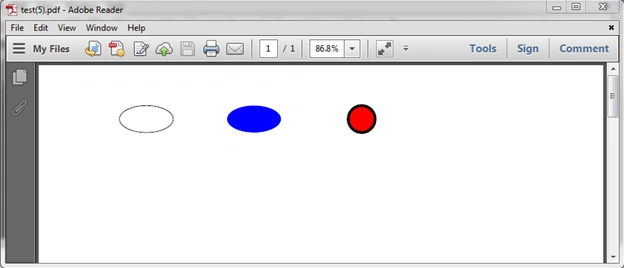
“x”, “y” and “style” are the same as for a circle.“rx” is the radius along the x-axis.“ry” is the radius along the y-axis.
Code Example
- function demoCircleEllipse() {
- var doc = new jsPDF();
- doc.ellipse(35, 35, 15, 5); //empty ellipse
- doc.setFillColor(0, 0, 255); //select color to fill the ellipse
- doc.ellipse(90, 35, 10, 5, 'F'); //filled ellipse
- doc.setLineWidth(1);
- doc.setDrawColor(0);
- doc.setFillColor(255, 0, 0);
- doc.circle(135, 35, 5, 'FD'); //filled red circle with black border
- doc.save('test.pdf');
- }
How to draw a triangle?
- doc.triangle(x1, y1, x2, y2, x3, y3, ‘style’);
It will draw a triangle with the three points (x1,y1), (x2,y2) and (x3,y3).
Code Example
- function demoTriagle() {
- var doc = new jsPDF();
- doc.triangle(70, 110, 70, 130, 90, 120, 'FD');
- doc.setLineWidth(1);
- doc.setDrawColor(255, 0, 0);
- doc.setFillColor(0, 0, 255);
- doc.triangle(110, 110, 120, 110, 130, 140, 'FD');
- doc.save('Test.pdf');
- }

How to draw a Rectangle?
- doc.rectangle(x, y, w, h, ‘style’);
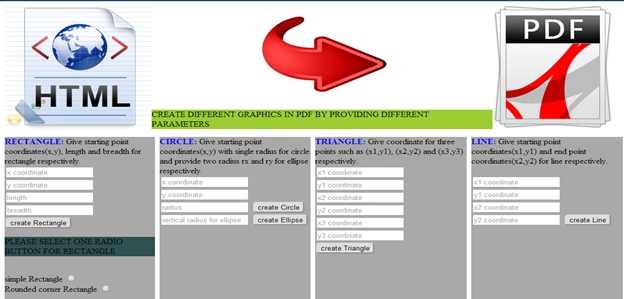
It will draw a rectangle with starting co-ordinate (x,y), width ”w” and height “h”.
Code example

Junaid KhanPosted Sep 4, 2017, 5:08 AM
Can we draw a dotted line in jdpdf Gaurav Katara
Gaurav KataraPosted Jul 23, 2014, 12:16 AM
thanku... :)
Gopi ChandPosted Jul 22, 2014, 6:17 AM
Excellent topic exploration..Gaurav..
Abhijeet SinghPosted Jul 22, 2014, 6:16 AM
nice explaination of jspdf ... keep it up. :)
Gaurav KataraPosted Jul 22, 2014, 4:42 AM
thanku... :)
RAVINDER SINGH NEGIPosted Jul 22, 2014, 1:28 AM
nice article :-)