

Here I am sharing with you all, how to implement Event Handler Feature in sharepoint and how to activate it.
Below example shows how to add a simple event handler that prevents items from being deleted from a list. Two procedures are involved in this task:
- Creating an event handler in Microsoft Visual Studio
- Adding the event handler as a Feature in SharePoint
To create the event handler in Visual Studio
- Create a new project in Visual Studio by clicking File, pointing to New, and then clicking Project.
- In the New Project dialog box, select Visual C# in the Project types box, select Class Library in the Templates box, type DeletingEventHandler in the Name box, and then click OK.
- In Solution Explorer, select DeletingEventHandler, and click Add Reference on the Project menu.
- In the Add Reference dialog box, select Microsoft.SharePoint on the .NET tab and then click OK.
- In the Code Editor, import the Microsoft.SharePoint namespace as follows.
Change the name of the class like DeleteItemEvent and Inherit it from the SPItemEventReceiver class, as follows.
public class DeleteItemEvent : SPItemEventReceiver
Now add code within the class to override the ItemDeleting method given Belowe.
public class DeleteItemEvent : SPItemEventReceiver
{
public override void ItemDeleting(SPItemEventProperties properties)
{
properties.Cancel = true;
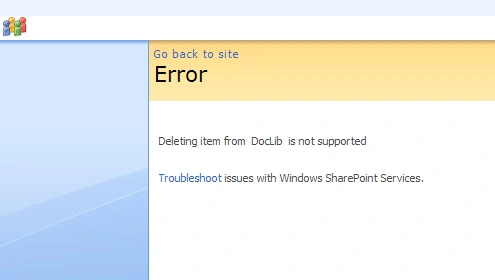
properties.ErrorMessage = "Deleting item from" + " " + properties.ListTitle + " " + "is not supported";
}
}
Now go to Project menu in visual studio, in this last option is DeleteItemEvent Properties click the Signing tab, select Sign the assembly, select Choose a strong name key file, and then click <New...>.
In the Create Strong Name Key dialog box, type DeletingEventHandler.snk in the Key file name box, optionally specify a password for the key, and then click OK.
To build the project, click Build Solution on the Build menu, or press CTRL+SHIFT+B.
Find the \DeletingEventHandler\bin\Debug folder in the Visual Studio Projects folder, and drag the DeletingEventHandler.dll file to Local_Drive:\WINDOWS\assembly to place the DLL in the global assembly cache.
To add the event handler as a Windows SharePoint Services Feature
- Create a folder in Local_Drive:/Program Files/Common Files/Microsoft Shared/web server extensions/12/TEMPLATE/FEATURES called DeletingEventHandler.
- Create a Feature.Xml file in this folder like the following that identifies the Feature and its element manifest file and sets the Feature scope to Web site.
<Feature Scope="Web"
Title="Deleting Event Handler"
Id="GUID"
xmlns="http://schemas.microsoft.com/sharepoint/">
<ElementManifests>
<ElementManifest Location="Elements.xml"/>
</ElementManifests>
</Feature>
nitingupta4uPosted Feb 6, 2012, 5:17 AM
http://code.google.com/p/sharepoint-eventhandlers-manager/ SharePoint Event Handlers Manager allows admins to browse, add, edit and remove SharePoint event handlers from any list or web. This SharePoint solution provides two features that enables admins to play with event handlers from within SharePoint interface. It is very simple to use and doesn't require any configuration to start. Just download and install, and you are all set.
RamyaPosted Jun 22, 2010, 5:11 AM
Hi, Is there any option to activate the feature to a particular list?
Shweta AgrawaleditedPosted Apr 21, 2010, 2:54 AMEdited Apr 21, 2010, 3:02 AM
using System; using System.Runtime.InteropServices; using System.Web.UI; using System.Web.UI.WebControls; using System.Xml.Serialization; using Microsoft.SharePoint; using Microsoft.SharePoint.WebControls; using Microsoft.SharePoint.WebPartPages; using System.Diagnostics; namespace SiteCollectionLists { [Guid("47bb4600-1a80-42c8-95a4-dd0c8b2722b9")] [CLSCompliant(false)] public class SiteCollectionLists : WebPart { TreeView tvListnLib; public SiteCollectionLists() { } protected override void RenderWebPart(HtmlTextWriter output) { try { tvListnLib.RenderControl(output); } catch (Exception Ex) { EventLog.WriteEntry(Ex.Message.ToString(), "", EventLogEntryType.Error); } } protected override void CreateChildControls() { try { // TODO: add custom rendering code here. tvListnLib = new TreeView(); tvListnLib.ShowLines = true; tvListnLib.EnableViewState = true; tvListnLib.CollapseAll(); tvListnLib.ID = "lstname"; PopulateList(); Controls.Add(tvListnLib); } catch (Exception Ex) { EventLog.WriteEntry(Ex.Message.ToString(), "", EventLogEntryType.Error); } } public void PopulateList() { SPWeb objWeb = SPControl.GetContextSite(Context).RootWeb; try { TreeNode nodeRoot = null; tvListnLib.Nodes.Clear(); if ((objWeb.Exists) && (objWeb.Title != null) && (objWeb.Url != null)) { nodeRoot = new TreeNode(objWeb.Title); tvListnLib.NodeStyle.CssClass = "ms-input"; tvListnLib.Nodes.Add(nodeRoot); nodeRoot.NavigateUrl = objWeb.Url + "/default.aspx"; FillWeb(objWeb, nodeRoot); SPListCollection lstColForCurrSite = objWeb.GetListsOfType(SPBaseType.GenericList); FillList(lstColForCurrSite, nodeRoot, "List"); SPListCollection DLColForCurrSite = objWeb.GetListsOfType(SPBaseType.DocumentLibrary); FillList(DLColForCurrSite, nodeRoot, "Document Library"); } } catch (Exception Ex) { EventLog.WriteEntry(Ex.Message.ToString(), "", EventLogEntryType.Error); } } public void FillWeb(SPWeb webCurr, TreeNode objTreeNode) { SPListCollection lstColForCurrSite = null; SPListCollection DLColForCurrSite = null; try { foreach (SPWeb objWeb in webCurr.GetSubwebsForCurrentUser()) { TreeNode newTreeNode = null; try { if (objWeb.Exists) { newTreeNode = new TreeNode(objWeb.Title); objWeb.Lists.ListsForCurrentUser = true; objTreeNode.ChildNodes.Add(newTreeNode); newTreeNode.NavigateUrl = objWeb.ServerRelativeUrl+"/default.aspx"; newTreeNode.CollapseAll(); lstColForCurrSite = objWeb.GetListsOfType(SPBaseType.GenericList); FillList(lstColForCurrSite, newTreeNode, "List"); DLColForCurrSite = objWeb.GetListsOfType(SPBaseType.DocumentLibrary); FillList(DLColForCurrSite, newTreeNode, "Document Library"); } } catch (Exception Ex) { EventLog.WriteEntry(Ex.Message.ToString(), "", EventLogEntryType.Error); } FillWeb(objWeb, newTreeNode); //call recurcive function for all subsite. } } catch (Exception Ex) { EventLog.WriteEntry(Ex.Message.ToString(), "", EventLogEntryType.Error); } finally { if (webCurr != null) webCurr.Dispose(); } } public void FillList(SPListCollection lstColCurrWeb, TreeNode newTreeNode, string Type) { try { int lstCount = 0; SPList lstNode; TreeNode ListNode = new TreeNode(Type); newTreeNode.ChildNodes.Add(ListNode); if (Type == "List") ListNode.NavigateUrl = lstColCurrWeb.Web.Url + "/_layouts/viewlsts.aspx?BaseType=0"; else ListNode.NavigateUrl = lstColCurrWeb.Web.Url + "/_layouts/viewlsts.aspx?BaseType=1"; TreeNode tnNewList = null; for (lstCount = 0; lstCount < lstColCurrWeb.Count; lstCount++) { lstNode = lstColCurrWeb[lstCount]; tnNewList = new TreeNode(lstNode.Title, lstNode.ParentWebUrl); ListNode.ChildNodes.Add(tnNewList); tnNewList.NavigateUrl = lstNode.DefaultViewUrl; tnNewList.CollapseAll(); } } catch (Exception Ex) { EventLog.WriteEntry(Ex.Message.ToString(), "", EventLogEntryType.Error); } } } }