

In enterprise AI, autonomy is a spectrum. While we want agents to operate independently, high-stakes decisions—especially in regulated industries like banking—require a human touch. If an AI agent hallucinates a policy exception and approves a $5 million fraudulent wire transfer, the consequences are catastrophic.
This is where Human-in-the-Loop (HITL) becomes non-negotiable.
In LangGraph, HITL isn't just an afterthought; it is a first-class citizen. LangGraph allows you to "pause" a running graph, persist its exact state to a database, wait for a human to review and modify the state, and then "resume" execution seamlessly.
In this end-to-end guide, we will build a Bank Policy RAG System where AI agents analyze a high-value transaction, but the final execution is strictly gated by a Human Loan Officer via LangGraph's interrupt mechanism.
The Real-World Use Case: TechBank High-Value Wire Transfer
Imagine TechBank’s automated transaction monitoring system. A corporate client requests a $2,000,000 international wire transfer to a new vendor in a high-risk jurisdiction.
The system uses a Multi-Agent RAG workflow:
The Policy Retriever (RAG): Searches the bank's AML (Anti-Money Laundering) and Wire Transfer policy manuals.
The Risk Assessor: Evaluates the transaction against the retrieved policies.
The Human Gate (HITL): The graph pauses. A UI presents the Risk Assessor's findings to a human Loan Officer. The human must type "APPROVE" or "REJECT".
The Executor: If approved, the graph resumes and triggers the actual wire transfer API.
Why LangGraph's HITL is Superior
Traditional systems use complex webhooks or external databases to track "pending approval" states. LangGraph handles this natively. The graph's execution is literally frozen in time, its state saved to a Checkpointer, and resumed exactly where it left off.
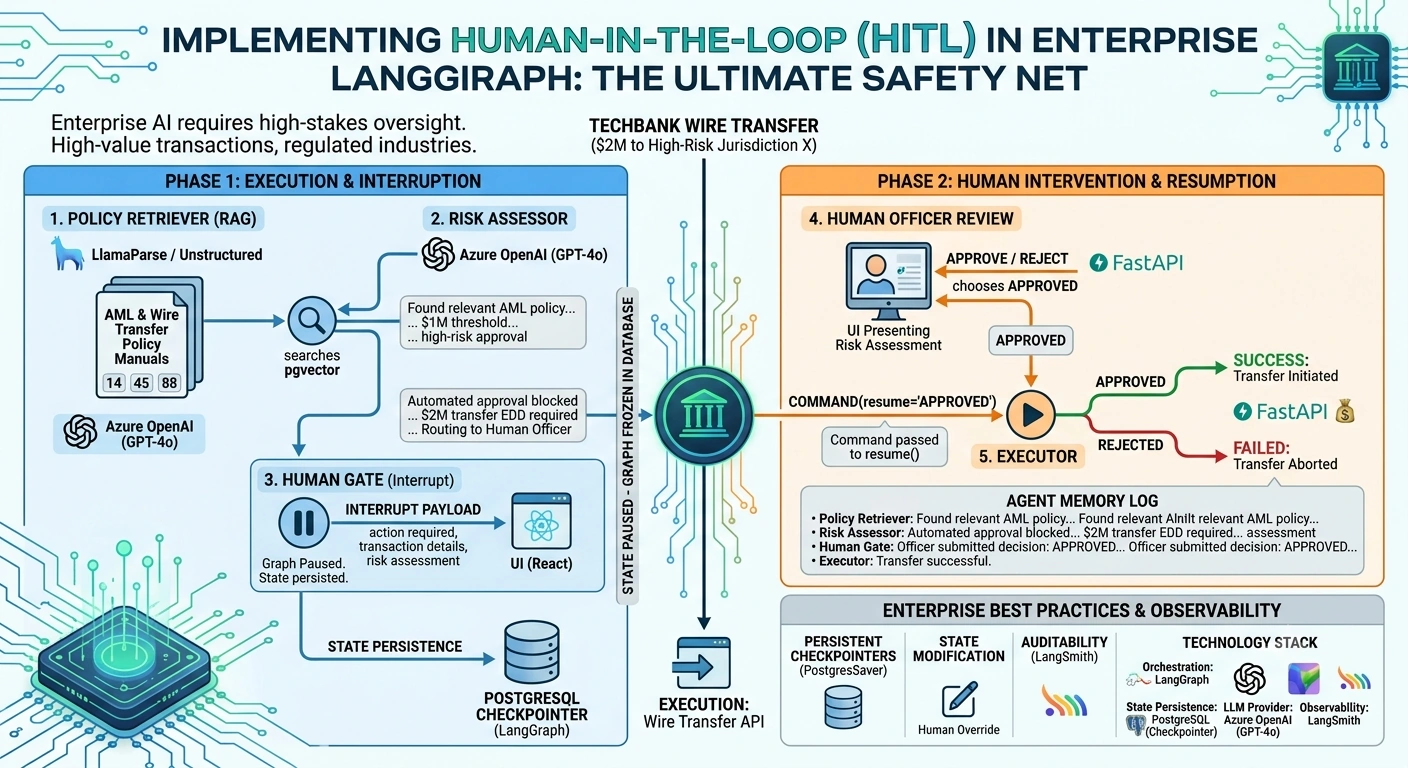
Technology Stack
| Component | Technology | Role in Architecture |
|---|---|---|
| Orchestration | LangGraph | Manages the workflow, state, and HITL interrupts. |
| State Persistence | PostgreSQL (via LangGraph Checkpointer) | Saves the graph state during the human pause. |
| LLM Provider | Azure OpenAI (GPT-4o) | Powers the RAG retrieval and risk assessment. |
| Vector Database | pgvector (PostgreSQL) | Stores the bank's policy documents for RAG. |
| API / UI | FastAPI + React | Serves the graph and provides the UI for the human approver. |
| Observability | LangSmith | Audits the exact state at the moment of human intervention. |
End-to-End Implementation
We will use LangGraph's modern interrupt() function, which allows a node to dynamically pause the graph and request input from the outside world.
Step 1: Define the Enterprise State
Our state must track the transaction details, the RAG context, the agent's memory, and the human's decision.
from typing import TypedDict, List, Annotated, Optionalimport operator
from langgraph.graph import StateGraph, END
from langgraph.checkpoint.memory import MemorySaver # Use PostgresSaver in productionfrom langgraph.types import interrupt, Command

class WireTransferState(TypedDict):
    # Memory: Tracks the conversation and agent actions
    messages: Annotated[List[str], operator.add]

    # Transaction Data
    transaction_details: dict

    # RAG & Assessment Data
    policy_context: str
    risk_assessment: str

    # HITL Data
    human_decision: Optional[str] # "APPROVED" or "REJECTED"

    # Execution Data
    execution_status: str
Step 2: Build the Agent Nodes
Node 1: Policy Retriever (RAG)
def policy_retriever(state: WireTransferState) -> WireTransferState:
    print("🔍 [Policy Retriever] Searching AML and Wire Transfer manuals...")

    # Simulating RAG retrieval from pgvector
    policy_text = (
        "POLICY 88.2: International wires over $1,000,000 require Enhanced Due Diligence (EDD). "
        "Transfers to high-risk jurisdictions require explicit Human Loan Officer approval."
    )

    return {
        "policy_context": policy_text,
        "messages": ["Policy Retriever: Found relevant AML policy for high-value international wires."]
    }
Node 2: Risk Assessor
def risk_assessor(state: WireTransferState) -> WireTransferState:
    print("⚖️ [Risk Assessor] Evaluating transaction against policy...")

    # Simulating LLM reasoning
    assessment = (
        "Transaction amount ($2M) exceeds $1M threshold. Destination is a high-risk jurisdiction. "
        "EDD is required. AUTOMATED APPROVAL IS BLOCKED. HUMAN INTERVENTION REQUIRED."
    )

    return {
        "risk_assessment": assessment,
        "messages": ["Risk Assessor: Automated approval blocked. Routing to Human Officer."]
    }
Node 3: The Human Gate (The Interrupt)
This is the magic node. It uses LangGraph's interrupt() function to pause the graph and send a payload to the user interface.
def human_approval_gate(state: WireTransferState) -> WireTransferState:
    print("⏸️ [Human Gate] Pausing graph. Waiting for Human Loan Officer...")

    # The interrupt() function pauses the graph and sends this data to the client
    human_input = interrupt({
        "action_required": "Review and approve/reject wire transfer",
        "transaction": state["transaction_details"],
        "risk_assessment": state["risk_assessment"]
    })

    # When the graph is resumed, human_input will contain the human's response
    return {
        "human_decision": human_input,
        "messages": [f"Human Gate: Officer submitted decision: {human_input}"]
    }
Node 4: The Executor
def executor_node(state: WireTransferState) -> WireTransferState:
    print("💸 [Executor] Processing wire transfer...")

    if state["human_decision"] == "APPROVED":
        return {
            "execution_status": "SUCCESS: Wire transfer of $2,000,000 initiated.",
            "messages": ["Executor: Transfer successful."]
        }
    else:
        return {
            "execution_status": "FAILED: Transfer rejected by Human Officer.",
            "messages": ["Executor: Transfer aborted."]
        }
Step 3: Compile the Graph with a Checkpointer
To pause and resume a graph, you must use a Checkpointer. This saves the state to a database when the interrupt occurs.
def build_hitl_graph():
    workflow = StateGraph(WireTransferState)

    workflow.add_node("policy_retriever", policy_retriever)
    workflow.add_node("risk_assessor", risk_assessor)
    workflow.add_node("human_gate", human_approval_gate)
    workflow.add_node("executor", executor_node)

    workflow.set_entry_point("policy_retriever")
    workflow.add_edge("policy_retriever", "risk_assessor")
    workflow.add_edge("risk_assessor", "human_gate")
    workflow.add_edge("human_gate", "executor")
    workflow.add_edge("executor", END)

    # CRITICAL: A checkpointer is required for HITL
    # In production, use PostgresSaver.from_conn_string("...")
    checkpointer = MemorySaver()

    return workflow.compile(checkpointer=checkpointer)

app = build_hitl_graph()
Running the System: The HITL Flow
Let's execute the graph. We will use a thread_id to track this specific transaction.
Phase 1: Execution and Interruption
config = {"configurable": {"thread_id": "wire-transfer-9942"}}

initial_state = {
    "messages": [],
    "transaction_details": {"amount": 2000000, "currency": "USD", "destination": "Jurisdiction X"},
    "policy_context": "",
    "risk_assessment": "",
    "human_decision": None,
    "execution_status": ""
}

print("--- Starting Workflow ---")
# Invoke the graph. It will stop at the interrupt() function.
result = app.invoke(initial_state, config)

print("\n--- Graph Paused ---")
print(f"Current Execution Status: {result.get('execution_status', 'Not yet executed')}")
print(f"Interrupt Payload sent to UI: {result.get('__interrupt__')}")
Output of Phase 1:
--- Starting Workflow ---
🔍 [Policy Retriever] Searching AML and Wire Transfer manuals...
⚖️ [Risk Assessor] Evaluating transaction against policy...
⏸️ [Human Gate] Pausing graph. Waiting for Human Loan Officer...

--- Graph Paused ---
Current Execution Status: Not yet executed
Interrupt Payload sent to UI: [{'value': {'action_required': '...', 'transaction': {...}}, ...}]
At this exact moment, the graph is frozen. The state is saved in the Checkpointer. The UI displays the risk assessment to the human.
Phase 2: Human Intervention and Resumption
The human Loan Officer reviews the UI. They see the $2M transfer to a high-risk zone. They decide to APPROVE it (perhaps the client provided the required EDD documents).
We resume the graph by passing the human's decision back into the interrupt() point using LangGraph's Command(resume=...).
print("\n--- Human Officer Reviews and Submits Decision ---")

# The human approves the transfer. We resume the graph using Command.# The value passed to resume() becomes the return value of the interrupt() function.
human_decision = "APPROVED"

print("--- Resuming Workflow ---")
final_result = app.invoke(Command(resume=human_decision), config)

print("\n--- Final State ---")
print(f"Execution Status: {final_result['execution_status']}")
print("\nAgent Memory Log:")
for msg in final_result["messages"]:
    print(f"• {msg}")
Output of Phase 2:
--- Human Officer Reviews and Submits Decision ---
--- Resuming Workflow ---
💸 [Executor] Processing wire transfer...

--- Final State ---
Execution Status: SUCCESS: Wire transfer of $2,000,000 initiated.

Agent Memory Log:
• Policy Retriever: Found relevant AML policy for high-value international wires.
• Risk Assessor: Automated approval blocked. Routing to Human Officer.
• Human Gate: Officer submitted decision: APPROVED
• Executor: Transfer successful.
Enterprise Best Practices for HITL in LangGraph
Use Persistent Checkpointers: Never use
MemorySaverin production. UsePostgresSaverorSqliteSaver. If the server restarts while a human is reviewing a $10M transfer, the graph state must survive the reboot.Implement Timeouts: Humans go to lunch. Implement a background task that checks for interrupted graphs older than X hours. If a human hasn't responded, automatically route the graph to an "Escalation" or "Auto-Reject" node to prevent state bloat in your database.
State Modification (Human Override): Sometimes a human doesn't just want to approve; they want to change the data. Before resuming, you can use
app.update_state(config, {"transaction_details": {...updated_data...}})to modify the blackboard before the Executor node runs.Auditability with LangSmith: Every interrupt and resume is a distinct trace in LangSmith. You can prove to regulators exactly what data the human saw, when they saw it, and what decision they made, creating an unbroken chain of custody for the transaction.
Conclusion
Human-in-the-Loop is not a bottleneck; it is the ultimate safety valve for enterprise AI. By leveraging LangGraph’s native interrupt() and Checkpointer mechanisms, you can build systems that combine the speed and analytical power of LLM-driven RAG with the judgment, accountability, and regulatory compliance of human experts.
For TechBank, this means they can automate 95% of their transaction monitoring, while maintaining 100% human control over the 5% that truly matters.
Join the conversation! Your thoughts help the community grow.