

Introduction
JSON Web Tokens (JWT) have become a popular way to handle authentication and authorization in modern web applications. In this article, we will walk through how to implement JWT authentication in a Python Flask API, step by step.
What is JWT?
JWT (pronounced "jot") is a compact way to securely transmit information between parties as a JSON object. Think of it as a digital ID card that your API can check to verify who's making a request.
A JWT consists of three parts.
- Header: type of token and signing algorithm
- Payload: contains claims like the user data
- Signature: verifies the token hasn't been tampered with using the encoded header, encoded payload, and a secret key.
Setting Up Our Flask API
Let's start setting up our flask API.
Step 1. Initial Setup
Let's import the basic packages required for our project.
from flask import Flask, request, jsonify, make_response, render_template
import jwt
from datetime import datetime, timedelta
from functools import wraps
Here, we have imported our basic packages.
Now, we can set up our Flask app and add a secret key to generate jwt token. This secret is crucial - it's used to sign our JWTs so we can verify them later.
from flask import Flask
app = Flask(__name__)
app.config["SECRET_KEY"] = "a322444343443434"
I am storing this here for demo purposes; it's better to store them separately in an env file to keep it safe. Also, we should always use a strong secret key to make our process stronger.
Step 2. Store data in memory
Since we are currently not using any external database, we are going to store the data in our project like below.
users_db = {
    "admin": {
        "username": "admin",
        "password": "admin123",
        "role": "admin"
    }
}
Here, we're using a simple dictionary to store users. In a real application, you'd use a proper database.
Step 3. Token Verification
Now, let's create logic for token verification.
from functools import wraps
from flask import request, jsonify
import jwt

def token_required(func):
    @wraps(func)
    def decorated(*args, **kwargs):
        token = None

        if 'Authorization' in request.headers:
            token = request.headers['Authorization'].split(" ")[1]

        if not token:
            return jsonify({'message': "Token is missing!"}), 401  # Unauthorized
        try:
            payload = jwt.decode(token, app.config['SECRET_KEY'], algorithms=['HS256'])
        except jwt.ExpiredSignatureError:
            return jsonify({'message': "Token has expired"}), 403  # Forbidden
        except jwt.InvalidTokenError:
            return jsonify({'message': "Invalid token"}), 403
        return func(*args, **kwargs)
    return decorated
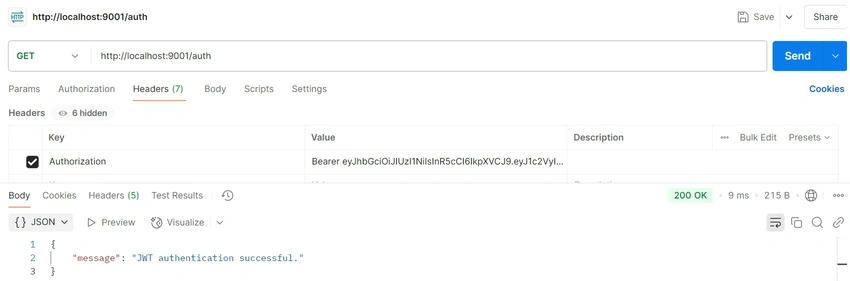
Here, the token_required decorator is a middleware that validates JWT tokens for protected routes. It first checks if a token exists in the Authorization header (in the format Bearer <token>). If no token is found, it returns a 401 Unauthorized error. If a token exists, it attempts to decode and verify it using the app's secret key. If the token is expired, it returns a 403 Forbidden error, and if the token is invalid for any other reason (e.g., tampered with), it also returns a 403. If the token is valid, the request proceeds to the original route function. This ensures only authenticated users with valid tokens can access protected endpoints.
We can use this decorator on any route that requires authentication.
Step 4. Our API Routes
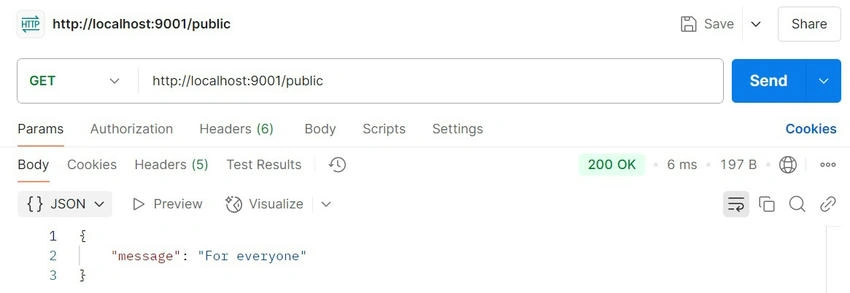
Let's create a public route, and to access this, no authentication is needed.
@app.route('/public')
def public():
    return jsonify({"message": "For everyone"}), 200
Here, this is a simple endpoint, and anyone can access it - no token is required.
Join the conversation! Your thoughts help the community grow.