In this article, we will implement basic operations in a MongoDB database using .NET and C#. We will use the MongoDB.Driver package to perform various operations. This article focuses on MongoDB operations, so we will not implement a high-level architecture for the .NET project. Instead, we will create a .NET 8 Web API project and implement all operations directly in the controller rather than creating separate service or repository classes. You can implement those architectures based on your requirements.
In this article
- What is MongoDB?
- Configure MongoDB in a .NET application
- Understand MongoDB database operations
- Understand MongoDB collection operations

What Is MongoDB?
MongoDB is a type of database that stores information in a way that's easy to read and use. It's flexible, meaning it can handle different types of data without needing a fixed structure. MongoDB works quickly and can manage a lot of information at once. It's good for storing data from websites, apps, and other digital sources because it's designed to handle large amounts of information and can be set up to work with multiple computers at the same time.
Configuring MongoDB in a .NET Application
To set up MongoDB for use in your .NET application, follow these steps.
Step 1. Install MongoDB.Driver Package
The first step is to install the MongoDB.Driver package. This package allows your .NET application to communicate with MongoDB. Here's how you can do it.
- Open your project in Visual Studio.
- Navigate to "Tools" > "NuGet Package Manager" > "Manage NuGet Packages for Solution".
- In the "Browse" tab, search for "MongoDB.Driver".
- Select the package and click "Install" to add it to your project.
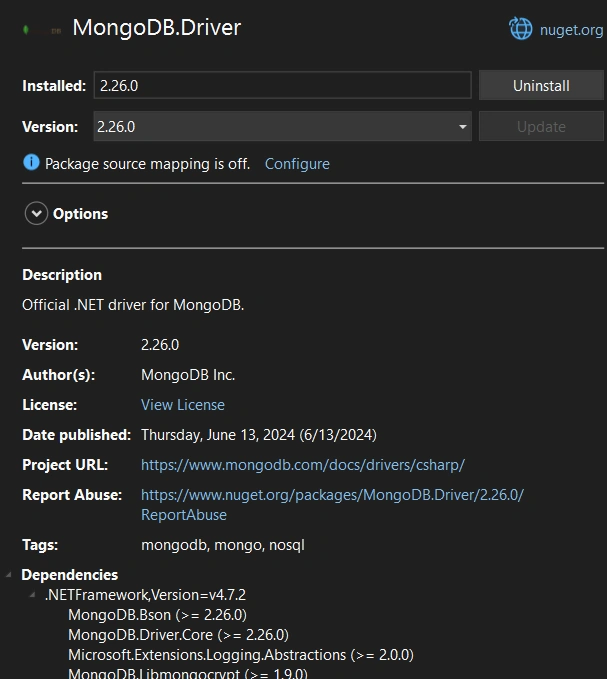
Step 2. Configure MongoDB Connection Details
Next, you need to configure the MongoDB client to connect to your MongoDB server. You'll need to specify the server's URL and the database name you want to use. These configuration details are typically stored in your application's settings file (`appsettings.json`).
Here's an example of how to configure MongoDB settings in `appsettings.json`.
{
  "MongoDbSettings": {
    "ConnectionString": "mongodb://localhost:27017",
    "DatabaseName": "MongoWithDotNet",
    "Collections": {
      "EmployeeCollection": "Employees"
    }
  }
}
In this configuration
- ConnectionString: Specifies the URL of your MongoDB server (`mongodb://localhost:27017` is the default for a local MongoDB instance).
- DatabaseName: Specify the name of the database you want to use (`MongoWithDotNet` in this example).
- Collections: Defines the collections within your database (`Employees` collection is defined here).
Step 3. Register MongoDB Client in Your Application
Now, you need to register the MongoDB client in your .NET application. This allows your application to use MongoDB services throughout its components. Typically, this registration is done in Program.cs or Startup.cs file.
Here’s how you can register the MongoDB client using Dependency Injection (DI).
    // Register MongoDB client
var connectionString = builder.Configuration.GetValue<string>("MongoDbSettings:ConnectionString");
var settings = MongoClientSettings.FromUrl(new MongoUrl(connectionString));
settings.SslSettings = new SslSettings() { EnabledSslProtocols = SslProtocols.Tls12 };
builder.Services.AddSingleton<IMongoClient>(new MongoClient(settings));
In this code
- IMongoClient: Represents the MongoDB client interface that interacts with the MongoDB server.
- MongoClientSettings: Configures settings for the MongoDB client, including the connection string and SSL settings.
- AddSingleton: Registers the MongoDB client as a singleton service, ensuring that there is only one instance throughout the application's lifetime.
By following these steps, your .NET application is configured to connect and interact with MongoDB. You can now proceed to implement MongoDB operations such as inserting, querying, updating, and deleting data within your application.
Understanding MongoDB Database Operations
We can perform database operations within C# code. The MongoDB client allows us to perform the following database operations.
- Create Collection
- Drop Collection
- Rename Collection
- List Collections
- Get Collection (Map collection with C# class)
To understand these operations, we will create a new controller where we will perform all the above-mentioned operations. We will directly use the Mongo client in our controller without creating any service or repository.
To use these database operations, we first have to create an instance of the Mongo database object. We will create it in the constructor by reading the database name from the app settings file.
private readonly IMongoDatabase _database;
public MongoDatabaseController(IMongoClient mongoClient, IConfiguration configuration)
{
    var databaseName = configuration.GetValue<string>("MongoDbSettings:DatabaseName");
    _database = mongoClient.GetDatabase(databaseName);
}
Creating a Collection
To initiate a new collection within your MongoDB database, utilize the CreateCollectionAsync method provided by the IMongoDatabase interface. Below is an example demonstrating its implementation in a controller.
[HttpPost("create-collection/{name}")]
public async Task<IActionResult> CreateCollection(string name)
{
    try
    {
        await _database.CreateCollectionAsync(name);
        return Ok($"Collection '{name}' created successfully.");
    }
    catch (Exception ex)
    {
        return StatusCode(500, $"Failed to create collection '{name}'. Error: {ex.Message}");
    }
}
Creating a collection explicitly allows you to define it in advance, although MongoDB typically creates collections automatically when you insert the first document. This approach proves beneficial for configuring collections with specific attributes like validation rules or predefined indexes. By defining collections explicitly, you can efficiently structure your database from the outset, enhancing organization and performance optimization.
Explicitly creating collections ensures that your MongoDB setup aligns with your application's requirements from the start. This proactive approach facilitates smoother data management and more efficient query handling as your application scales.
Dropping a Collection
To remove a collection and all its associated documents from your MongoDB database, utilize the DropCollectionAsync method provided by the IMongoDatabase interface. Below is an example implementation within a controller.
[HttpDelete("drop-collection/{name}")]
public async Task<IActionResult> DropCollection(string name)
{
    try
    {
        await _database.DropCollectionAsync(name);
        return Ok($"Collection '{name}' dropped successfully.");
    }
    catch (Exception ex)
    {
        return StatusCode(500, $"Failed to drop collection '{name}'. Error: {ex.Message}");
    }
}
Dropping a collection is a potent operation typically employed for cleanup or resetting purposes during application development. It effectively deletes the specified collection along with all its documents from the database.
However, exercise caution when performing this operation to avoid unintended data loss. Double-check and accurately specify the collection name before proceeding with the drop operation.
This method ensures that your MongoDB database remains organized and streamlined, allowing for efficient data management and maintenance as your application evolves.
Listing Collections
To get a list of all collections in your database, the ListCollectionNamesAsync method is used. This method returns the names of all collections as a cursor, which you can then convert to a list.
[HttpGet("list-collections")]
public async Task<IActionResult> ListCollections()
{
    try
    {
        var cursor = await _database.ListCollectionNamesAsync();
        var collectionNames = await cursor.ToListAsync();
        return Ok(collectionNames);
    }
    catch (Exception ex)
    {
        return StatusCode(500, $"Failed to retrieve collection names. Error: {ex.Message}");
    }
}
Listing collections is beneficial for dynamically inspecting the database structure, especially in applications that need to adapt to different collections. By retrieving the collection names, you can programmatically handle various collections, making your application more flexible and robust.
Renaming a Collection
Sometimes, you may need to rename an existing collection, which can be done using the RenameCollectionAsync method. This method changes the name of a collection from an old name to a new one.
[HttpPost("rename-collection/{oldName}/{newName}")]
public async Task<IActionResult> RenameCollection(string oldName, string newName)
{
    try
    {
        await _database.RenameCollectionAsync(oldName, newName);
        return Ok($"Collection '{oldName}' renamed to '{newName}' successfully.");
    }
    catch (Exception ex)
    {
        return StatusCode(500, $"Failed to rename collection '{oldName}' to '{newName}'. Error: {ex.Message}");
    }
}
Renaming a collection keeps the existing data and indexes intact while changing the collection's name. This operation is useful for refactoring or reorganizing your database without losing any data. It's also handy when you want to follow new naming conventions or improve clarity in your database structure. Ensure the new name does not conflict with an existing collection to avoid issues.
Getting a Collection
To interact with a specific collection, you retrieve it using the GetCollection<T> method. This method returns a collection object that you can use for CRUD operations.
[HttpPost("get-collection/{collectionName}")]
public IActionResult GetCollection(string collectionName)
{
    var collection = _database.GetCollection<Employee>(collectionName);
    return Ok();
}
Retrieving a collection with GetCollection<T> allows you to perform various operations, such as inserting, updating, querying, and deleting documents. The method is generic, meaning you specify the type of documents the collection holds (e.g., Employee). This ensures type safety and enables IntelliSense support in your IDE, making your code easier to write and maintain.
Understanding MongoDB Collection Operations
we will explore fundamental actions such as,
- Insert: Adding new documents to a collection.
- Find: Retrieving documents based on specified criteria.
- Replace: Substituting entire documents with updated data.
- Update: Modifying specific fields within existing documents.
- Delete: Removing documents from a collection.
- EstimatedDocumentCount: Quickly estimate the number of documents in a collection.
- CountDocuments: Obtaining the exact count of documents in a collection.
I have developed a new C# class named Employee specifically for demonstrating these operations within a controller. This class defines the structure of an employee document, including fields such as ID, Name, Age, Designation, and Salary. These operations are implemented using MongoDB.Driver package in .NET facilitates efficient data management and manipulation within MongoDB collections.
public class Employee
{
    [BsonId]
    [BsonRepresentation(BsonType.ObjectId)]
    public string Id { get; set; }
    public string Name { get; set; }
    public int Age { get; set; }
    public string Designation { get; set; }
    public decimal Salary { get; set; }
}
Initialize the MongoDB collection
public class MongoCollectionController : ControllerBase
{
    private readonly IMongoCollection<Employee> _employeeCollection;
    public MongoCollectionController(IMongoClient mongoClient, IConfiguration configuration)
    {
        var databaseName = configuration.GetValue<string>("MongoDbSettings:DatabaseName");
        var employeeCollectionName = configuration.GetValue<string>("MongoDbSettings:Collections:EmployeeCollection");
        var database = mongoClient.GetDatabase(databaseName);
        _employeeCollection = database.GetCollection<Employee>(employeeCollectionName);
    }
}
Explanation
The MongoCollectionController class initializes and manages interactions with a MongoDB collection named Employee. In the constructor.
- Dependency Injection: It receives an IMongoClient instance and IConfiguration to connect to MongoDB and retrieve configuration details from appsettings.json.
- Database and Collection Initialization: Using the IMongoClient, it connects to the MongoDB server and retrieves the specified database (MongoDbSettings: DatabaseName). Then, it initializes _employeeCollection with the collection named Employee (specified in MongoDbSettings:Collections: EmployeeCollection).
By implementing these MongoDB collection operations in your .NET application, you can efficiently manage data stored in MongoDB databases. Each operation leverages the MongoDB.Driver package to integrate seamlessly with .NET applications, providing robust capabilities for CRUD operations and data manipulation.
Inserting a Document
    [HttpPost("create")]
    public async Task<IActionResult> Create()
    {
        try
        {
            var employee = new Employee { Id = ObjectId.GenerateNewId().ToString(), Name = "John Doe", Age = 30 };
            await _employeeCollection.InsertOneAsync(employee);
            return Ok();
        }
        catch (MongoWriteException ex)
        {
            return BadRequest($"Failed to insert document: {ex.Message}");
        }
    }
Explanation
- Insert Operation: This method inserts a new Employee document into the MongoDB collection _employeeCollection using the InsertOneAsync method.
- ObjectId Generation: ObjectId.GenerateNewId().ToString() creates a unique identifier for the document, ensuring each document has a distinct ID within the collection.
- Exception Handling: If an attempt is made to insert a document with a duplicate ID, a MongoWriteException is thrown. The catch block handles this exception, returning a BadRequest response with an appropriate error message.
Note. MongoDB ensures the uniqueness of the _id field by default. If you attempt to insert a document with an ID that already exists in the collection, it will throw a MongoWriteException with a message indicating a duplicate key error. This behavior is crucial for maintaining data integrity and preventing unintended duplicates in your MongoDB collections.
Inserting Multiple Documents
[HttpPost("create-many")]
 public async Task<IActionResult> CreateMany()
 {
     var employees = new List<Employee>
     {
         new Employee { Id = ObjectId.GenerateNewId().ToString(), Name = "Test 1", Age = 25, Designation = "SSE", Salary = 15000 },
         new Employee { Id = ObjectId.GenerateNewId().ToString(), Name = "Test 2", Age = 35, Designation = "Team Leader", Salary = 105000 },
         new Employee { Id = ObjectId.GenerateNewId().ToString(), Name = "Test 3", Age = 35, Designation = "Test", Salary = 151022},
         new Employee { Id = ObjectId.GenerateNewId().ToString(), Name = "Test 4", Age = 35, Designation = "Demo", Salary = 1500}
     };
     await _employeeCollection.InsertManyAsync(employees);
     return Ok();
 }
Explanation
- Bulk Insert Operation: The CreateMany method inserts multiple Employee documents into _employeeCollection using InsertManyAsync, which is optimized for bulk data insertion.
- ObjectId Generation: Each Employee document is assigned a unique _id generated by ObjectId.GenerateNewId().ToString(). This ensures that each document has a distinct identifier within the collection.
Benefits of InsertMany
- Efficiency: Inserts multiple documents in a single operation, reducing overhead compared to inserting documents individually.
- Atomicity: All inserts either succeed or fail together, ensuring data integrity.
- Performance: Ideal for scenarios requiring high throughput and minimal latency when inserting large batches of data into MongoDB collections.
Get All Documents
Retrieve all documents from a collection using Find.
  [HttpGet("all")]
public async Task<IActionResult> GetAll()
{
    var employees = await _employeeCollection.Find(Builders<Employee>.Filter.Empty).ToListAsync();
    return Ok(employees);
}
Explanation
- Fetches all Employee documents from the collection using Find with an empty filter (Builders<Employee>.Filter.Empty). This method retrieves all documents without applying any specific conditions, suitable for fetching complete datasets.
Get Document by Id
Retrieve a specific document by its ID using Find with a filter.
  [HttpGet("get-by-id/{id}")]
public async Task<IActionResult> GetById([FromRoute] string id)
{
    var employee = await _employeeCollection
                        .Find(Builders<Employee>.Filter.Eq(p => p.Id, id))
                        .FirstOrDefaultAsync();
    return Ok(employee);
}
Explanation
- Retrieves a single Employee document from the collection based on the provided id using Find with an equality filter (Builders<Employee>.Filter.Eq(e => e.Id, id)). This method efficiently fetches documents by their unique identifier.
Replace Whole Document
Replace an entire document using ReplaceOne.
[HttpPut("replace/{id}")]
public async Task<IActionResult> Replace([FromRoute] string id)
{
    var filter = Builders<Employee>.Filter.Eq(p => p.Id, id);
    var employee = new Employee { Id = id, Name = "Updated Name", Age = 40 };
    var result = await _employeeCollection.ReplaceOneAsync(filter, employee);
    return Ok(result);
}
Explanation
- Replaces an existing Employee document in the collection that matches the ID with a new document (replacement) using ReplaceOne. This operation is suitable for updating entire documents with new data.
Update Particular Field in the Document
Update specific fields in a document using UpdateOne.
   [HttpPatch("update-field/{id}")]
public async Task<IActionResult> UpdateField([FromRoute] string id)
{
    var filter = Builders<Employee>.Filter.Eq(p => p.Id, id);
    var update = Builders<Employee>.Update.Set(p => p.Name, "Partially Updated Name");
    var result = await _employeeCollection.UpdateOneAsync(filter, update);
    return Ok(result);
}
Explanation
- Updates the Name field of an Employee document in the collection that matches the id using UpdateOne with the specified update definition (Builders<Employee>.Update.Set(e => e.Name, "Partially Updated Name")). This approach allows targeted updates of specific fields within documents.
Delete Document
Delete a document from the collection using DeleteOne.
  [HttpDelete("delete/{id}")]
public async Task<IActionResult> Delete([FromRoute] string id)
{
    var filter = Builders<Employee>.Filter.Eq(p => p.Id, id);
    var result = await _employeeCollection.DeleteOneAsync(filter);
    //var result = _employeeCollection.DeleteManyAsync(filter);
    return Ok(result);
}
Explanation
- Deletes an Employee document from the collection that matches the provided ID using DeleteOne. This operation removes specific documents based on their unique identifier. Or you can delete multiple records based on based condition by calling the DeleteMany method.
Get the Total Number of Documents in the Collection
Get the count of documents
  [HttpGet("count")]
public async Task<IActionResult> CountDocuments()
{
    var count = await _employeeCollection.CountDocumentsAsync(Builders<Employee>.Filter.Empty);
    return Ok(count);
}
Explanation
- Retrieves the total count of Employee documents in the collection using CountDocuments without applying any filter (Builders<Employee>.Filter.Empty). This method provides an accurate count of all documents in the collection.
Estimated Count
   [HttpGet("count/estimated")]
public async Task<IActionResult> EstimatedDocumentCount()
{
    var count = await _employeeCollection.EstimatedDocumentCountAsync();
    return Ok(count);
}
Explanation
- Retrieves an estimated count of Employee documents in the collection using EstimatedDocumentCount. This method quickly estimates the number of documents in the collection without scanning all documents, providing a faster response for large collections. The count may not be exact, but it is useful for quick insights.
- EstimatedDocumentCount in MongoDB provides a quick estimate of the number of documents in a collection based on metadata rather than an exact count. This estimation is fast and useful for scenarios where approximate data insights are sufficient, such as real-time monitoring or performance optimization in applications handling large datasets.
- This method is advantageous for its speed and efficiency, offering a rapid approximation without the computational overhead of scanning all documents. However, the count provided may not always be precise due to ongoing data operations affecting metadata.
Conclusion
By implementing MongoDB operations in a .NET application, you gain efficient management of data stored in MongoDB databases. These operations leverage MongoDB.Driver to seamlessly integrate with .NET, providing robust capabilities for data manipulation and application development.
You can access the source code of this project from my GitHub.


Join the conversation! Your thoughts help the community grow.