My previous article explained how to export data from a database table to an Excel file. This article provides a brief introduction to importing data from an Excel file to a database. There are many ways to import data from Excel to a SQL Server database and here I'm going to introduce one simple common method to import data into a data table.
To begin, you need to create a database for storing data in the data table. The design of the database table looks like the following.
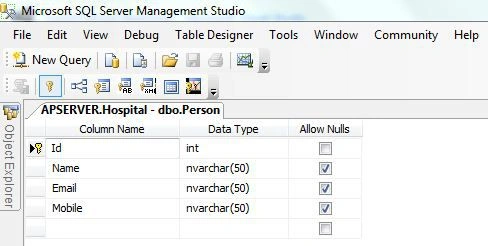
First of all open Visual Studio 2012 then select New project and click on ASP.NET MVC4 Web Application in Visual C#. Name the project ImportToExcel or whatever you like.
Create a controller named HomeController and in this controller create an Action Result method named Index.
- public ActionResult Index()
- {
- return View();
- }
Now create a view, right-click on the Indexaction method and select Add View and then click OK. Add a file uploader control to the Index.cshtml page to upload an Excel file or write the following code to the view for displaying the data.
- @{
- ViewBag.Title = "Index";
- }
-
- <h2>Index</h2>
- @using (Html.BeginForm("Index","Home", FormMethod.Post, new { enctype = "multipart/form-data" }))
- {
- <input type="file" name="file" />
- <input type="submit" value="OK" />
- }
Now create a httppost method for the Index.cshtml page for getting an uploaded file on the controller. Now write the code to read the uploaded file. Here I'm using the OledbConnection to connect to the Excel Sheet. There are two types of connection strings for an Excel file, the fist for a ”.xls” file and the second is for a “.xlsx” file.
Write the connection string for the “.xls” file as in the following:
- excelConnectionString = "Provider=Microsoft.Jet.OLEDB.4.0;Data Source=" + fileLocation + ";Extended Properties=\"Excel 8.0;HDR=Yes;IMEX=2\"";
And the connection sting for a “.xlsx” file as in the following:
- excelConnectionString = "Provider=Microsoft.ACE.OLEDB.12.0;Data Source=" + fileLocation + ";Extended Properties=\"Excel 12.0;HDR=Yes;IMEX=2\"";
Now get the data from the Excel file and insert it into the DataTable. After it inserts into the DataTable in the database, or write the following code in the httppost method.
- [HttpPost]
- public ActionResult Index(HttpPostedFileBase file)
- {
- DataSet ds = new DataSet();
- if (Request.Files["file"].ContentLength > 0)
- {
- string fileExtension =
- System.IO.Path.GetExtension(Request.Files["file"].FileName);
- if (fileExtension == ".xls" || fileExtension == ".xlsx")
- {
- string fileLocation = Server.MapPath("~/Content/") + Request.Files["file"].FileName;
- if (System.IO.File.Exists(fileLocation))
- {
- System.IO.File.Delete(fileLocation);
- }
- Request.Files["file"].SaveAs(fileLocation);
- string excelConnectionString = string.Empty;
- excelConnectionString = "Provider=Microsoft.ACE.OLEDB.12.0;Data Source=" + fileLocation + ";Extended Properties=\"Excel 12.0;HDR=Yes;IMEX=2\"";
-
- if (fileExtension == ".xls")
- {
- excelConnectionString = "Provider=Microsoft.Jet.OLEDB.4.0;Data Source=" + fileLocation + ";Extended Properties=\"Excel 8.0;HDR=Yes;IMEX=2\"";
- }
-
- else if (fileExtension == ".xlsx")
- {
- excelConnectionString = "Provider=Microsoft.ACE.OLEDB.12.0;Data Source=" + fileLocation + ";Extended Properties=\"Excel 12.0;HDR=Yes;IMEX=2\"";
- }
-
- OleDbConnection excelConnection = new OleDbConnection(excelConnectionString);
- excelConnection.Open();
- DataTable dt = new DataTable();
-
- dt = excelConnection.GetOleDbSchemaTable(OleDbSchemaGuid.Tables, null);
- if (dt == null)
- {
- return null;
- }
- String[] excelSheets = new String[dt.Rows.Count];
- int t = 0;
-
- foreach (DataRow row in dt.Rows)
- {
- excelSheets[t] = row["TABLE_NAME"].ToString();
- t++;
- }
- OleDbConnection excelConnection1 = new OleDbConnection(excelConnectionString);
-
- string query = string.Format("Select * from [{0}]", excelSheets[0]);
- using (OleDbDataAdapter dataAdapter = new OleDbDataAdapter(query, excelConnection1))
- {
- dataAdapter.Fill(ds);
- }
- }
- if (fileExtension.ToString().ToLower().Equals(".xml"))
- {
- string fileLocation = Server.MapPath("~/Content/") + Request.Files["FileUpload"].FileName;
- if (System.IO.File.Exists(fileLocation))
- {
- System.IO.File.Delete(fileLocation);
- }
-
- Request.Files["FileUpload"].SaveAs(fileLocation);
- XmlTextReader xmlreader = new XmlTextReader(fileLocation);
-
- ds.ReadXml(xmlreader);
- xmlreader.Close();
- }
- for (int i = 0; i < ds.Tables[0].Rows.Count; i++)
- {
- string conn = ConfigurationManager.ConnectionStrings["dbconnection"].ConnectionString;
- SqlConnection con = new SqlConnection(conn);
- string query = "Insert into Person(Name,Email,Mobile) Values('" + ds.Tables[0].Rows[i][0].ToString() + "','" + ds.Tables[0].Rows[i][1].ToString() + "','" + ds.Tables[0].Rows[i][2].ToString() + "')";
- con.Open();
- SqlCommand cmd = new SqlCommand(query, con);
- cmd.ExecuteNonQuery();
- con.Close();
- }
- }
- return View();
- }
Now build and run your application.
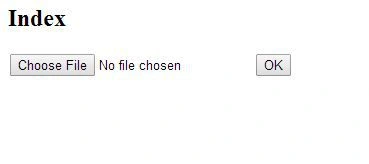
Choose an Excel file to import data into the database. Ensure that your database table columns and Excel file columns are the same.
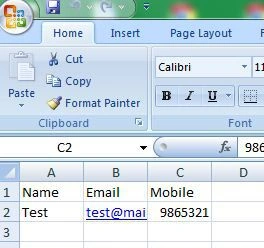
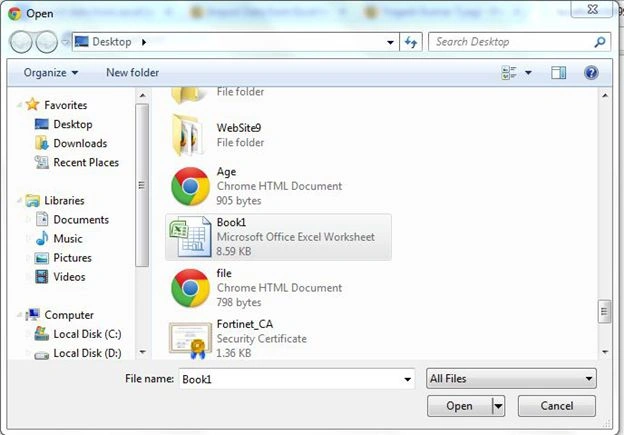
Click on the “OK” button to upload the file. If you have any issue or query then feel free to contact me.


Pratyush TiwariPosted Apr 23, 2021, 6:41 PM
Hey can you help to how to store this uploaded data into sql database using post method
Sweety DhorePosted Oct 22, 2018, 12:55 AM
Awesome,its helpful
sandeep kumarPosted Jun 1, 2018, 9:56 AM
The 'Microsoft.ACE.OLEDB.12.0' provider is not registered on the local machine. geeting error even i installed it
Ramesh RPosted Oct 27, 2015, 3:20 PM
@Yogesh,Thank you for sharing good article, In my office system there is no MS-office , In this case I'm getting error to open connection..how can we solve this error without installing MS-O?...your code is working only for MS-Office installed machines...
mahesh thakurPosted Aug 7, 2014, 5:09 AM
greate brother ....thank you .........
Vikram SinghPosted Jul 11, 2014, 1:19 AM
Server.MapPath is for local server but what is the other option to select file from any location when upload on remote server
Vikram SinghPosted Jul 11, 2014, 1:18 AM
Server.MapPath is for local server but what is the other option to select filr from any location when upload on server