

Let's start uploading excel data to Microsoft SQL Server Database.
Prerequisite :
- Microsoft SQL Server 2014
- Visual studio 2013
Figure 1: Create table as in the following,
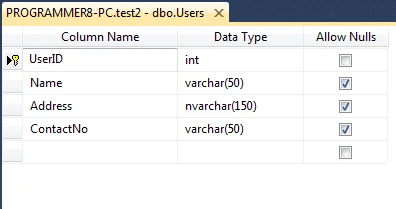
Figure 2 : Add new item ADO.NET Entity Data Model and click add button,
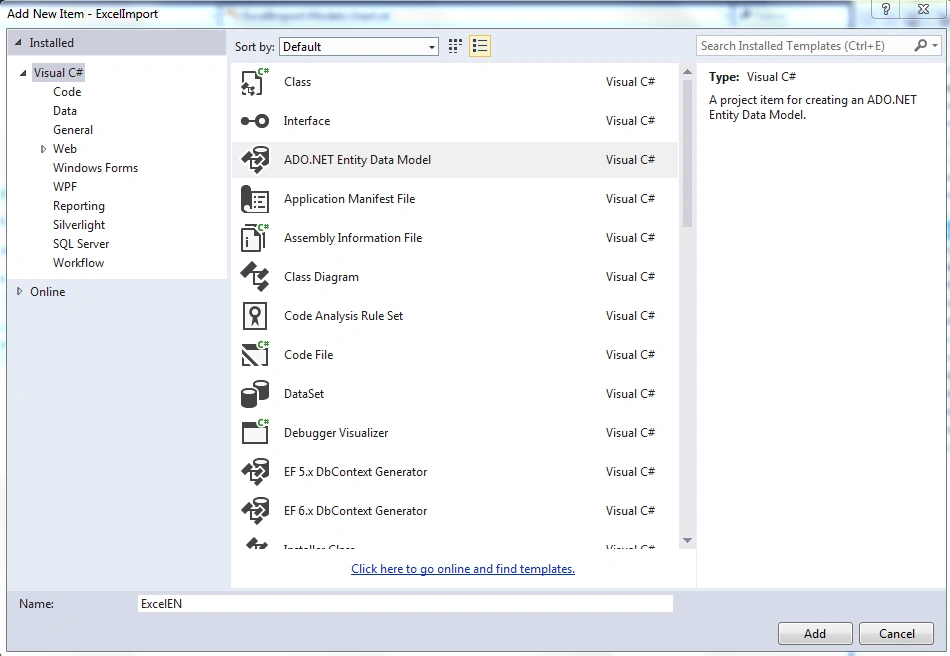
Figure 3: Choose Entity framework and click next button,
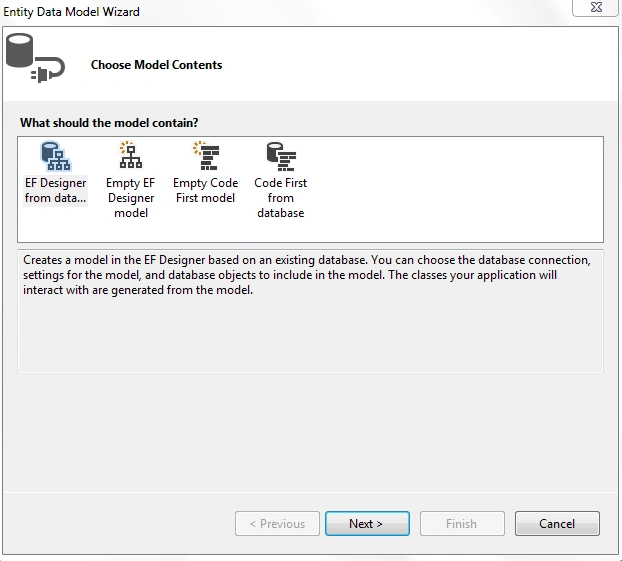
Figure 4 : Include database object from our SQL database please and select our target table Users and click finish,
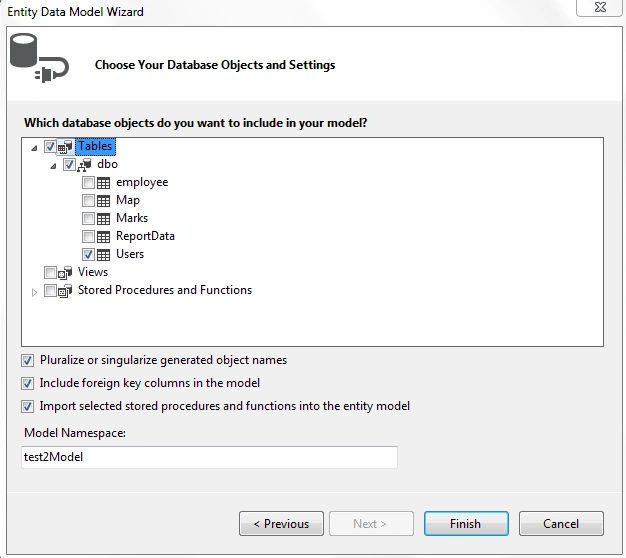
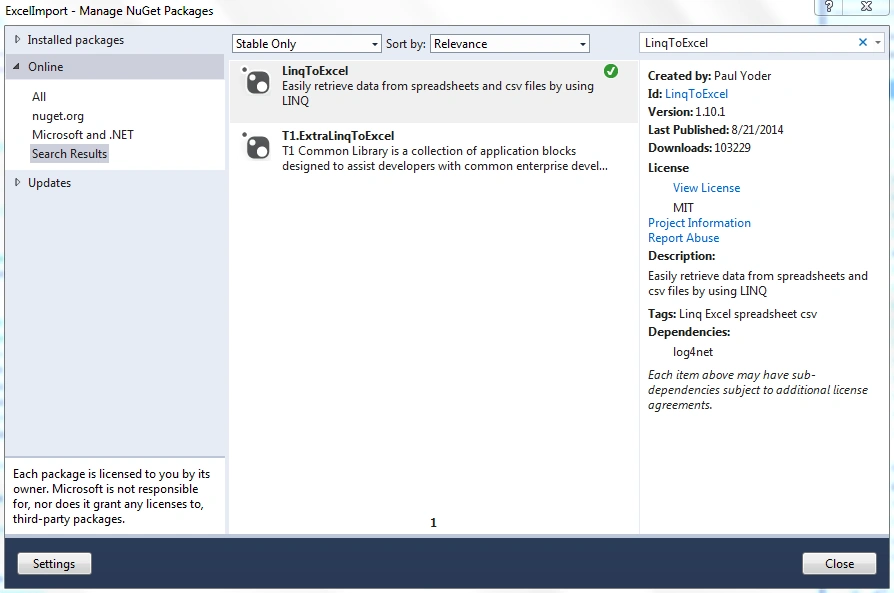
Figure 5: Install NuGet package LinqToExcel in our project,
Download Excel file format and enter your own data to this format for uploading,
In this view using FormMethod.Post "UploadExcel" function name Controller name "User",
@using (Html.BeginForm("UploadExcel", "User", FormMethod.Post, new { enctype = "multipart/form-data", onsubmit = "return myFunction()" }))
Download Excel file format href link,
<a href="/User/DownloadExcel/"><img src="~/excel.ico" width="25" height="25" title="Download Excel format" alt="excel" />
View
@{
    ViewBag.Title = "Index";
}

<h4>Add Users via Excel</h4>
<hr />
@using (Html.BeginForm("UploadExcel", "User", FormMethod.Post, new { enctype = "multipart/form-data", onsubmit = "return myFunction()" }))
{
    <div class="form-horizontal">
        <div class="form-group">
            <div class="control-label col-md-2">Download Format:</div>
            <div class="col-md-10">
                <a href="/User/DownloadExcel/"><img src="~/excel.ico" width="25" height="25" title="Download Excel format" alt="excel" /></a>
            </div>
        </div>
        <div class="form-group">
            <div class="control-label col-md-2">Excel:</div>
            <div class="col-md-10">
                <input type="file" id="FileUpload" name="FileUpload" class="" />
            </div>
        </div>
        <div class="form-group">
            <div class="col-md-offset-2 col-md-10">
                <input type="submit" value="Upload" id="btnSubmit" class="btn btn-primary" />
            </div>
        </div>
    </div>
}
Model
Userlist .cs
using System;
using System.Collections.Generic;
using System.Linq;
using System.Web;

namespace ExcelImport.Models
{
    public class UserList
    {
        public string Name { get; set; }
        public string Address{ get; set; }
        public string ContactNo { get; set; }


    }
}
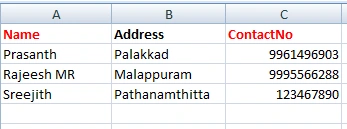
Download Excel file format and enter your own data to this format for uploading. In the doc folder here's format of sheet,
public FileResult DownloadExcel()
{
    string path = "/Doc/Users.xlsx";
    return File(path, "application/vnd.ms-excel", "Users.xlsx");
}
//deleting excel file from folder
if ((System.IO.File.Exists(pathToExcelFile)))
{
    System.IO.File.Delete(pathToExcelFile);
}
return Json("success", JsonRequestBehavior.AllowGet);
Controller Full Code: The JsonResult UploadExcel function using HttpPost return Json result,
using System;
using System.Collections.Generic;
using System.Data;
using System.Data.Entity;
using System.Data.Entity.Validation;
using System.Data.OleDb;
using System.IO;
using System.Linq;
using System.Net;
using System.Text.RegularExpressions;
using System.Web;
using System.Web.Mvc;
using ExcelImport.Models;
using LinqToExcel;
using System.Data.SqlClient;

namespace ExcelImport.Controllers
{
    public class UserController : Controller
    {
        private test2Entities db = new test2Entities();
        // GET: User
        public ActionResult Index()
        {
            return View();
        }
        /// <summary>
        /// This function is used to download excel format.
        /// </summary>
        /// <param name="Path"></param>
        /// <returns>file</returns>
        public FileResult DownloadExcel()
        {
            string path = "/Doc/Users.xlsx";
            return File(path, "application/vnd.ms-excel", "Users.xlsx");
        }

        [HttpPost]
        public JsonResult UploadExcel(User users, HttpPostedFileBase FileUpload)
        {

            List<string> data = new List<string>();
            if (FileUpload != null)
            {
                // tdata.ExecuteCommand("truncate table OtherCompanyAssets");
                if (FileUpload.ContentType == "application/vnd.ms-excel" || FileUpload.ContentType == "application/vnd.openxmlformats-officedocument.spreadsheetml.sheet")
                {
                    string filename = FileUpload.FileName;
                    string targetpath = Server.MapPath("~/Doc/");
                    FileUpload.SaveAs(targetpath + filename);
                    string pathToExcelFile = targetpath + filename;
                    var connectionString = "";
                    if (filename.EndsWith(".xls"))
                    {
                        connectionString = string.Format("Provider=Microsoft.Jet.OLEDB.4.0; data source={0}; Extended Properties=Excel 8.0;", pathToExcelFile);
                    }
                    else if (filename.EndsWith(".xlsx"))
                    {
                        connectionString = string.Format("Provider=Microsoft.ACE.OLEDB.12.0;Data Source={0};Extended Properties=\"Excel 12.0 Xml;HDR=YES;IMEX=1\";", pathToExcelFile);
                    }

                    var adapter = new OleDbDataAdapter("SELECT * FROM [Sheet1$]", connectionString);
                    var ds = new DataSet();
                    adapter.Fill(ds, "ExcelTable");
                    DataTable dtable = ds.Tables["ExcelTable"];
                    string sheetName = "Sheet1";
                    var excelFile = new ExcelQueryFactory(pathToExcelFile);
                    var artistAlbums = from a in excelFile.Worksheet<User>(sheetName) select a;
                    foreach (var a in artistAlbums)
                    {
                        try
                        {
                            if (a.Name != "" && a.Address != "" && a.ContactNo != "")
                            {
                                User TU = new User();
                                TU.Name = a.Name;
                                TU.Address = a.Address;
                                TU.ContactNo = a.ContactNo;
                                db.Users.Add(TU);
                                db.SaveChanges();
                            }
                            else
                            {
                                data.Add("<ul>");
                                if (a.Name == "" || a.Name == null) data.Add("<li> name is required</li>");
                                if (a.Address == "" || a.Address == null) data.Add("<li> Address is required</li>");
                                if (a.ContactNo == "" || a.ContactNo == null) data.Add("<li>ContactNo is required</li>");
                                data.Add("</ul>");
                                data.ToArray();
                                return Json(data, JsonRequestBehavior.AllowGet);
                            }
                        }
                        catch (DbEntityValidationException ex)
                        {
                            foreach (var entityValidationErrors in ex.EntityValidationErrors)
                            {
                                foreach (var validationError in entityValidationErrors.ValidationErrors)
                                {
                                    Response.Write("Property: " + validationError.PropertyName + " Error: " + validationError.ErrorMessage);
                                }
                            }
                        }
                    }
                    //deleting excel file from folder
                    if ((System.IO.File.Exists(pathToExcelFile)))
                    {
                        System.IO.File.Delete(pathToExcelFile);
                    }
                    return Json("success", JsonRequestBehavior.AllowGet);
                }
                else
                {
                    //alert message for invalid file format
                    data.Add("<ul>");
                    data.Add("<li>Only Excel file format is allowed</li>");
                    data.Add("</ul>");
                    data.ToArray();
                    return Json(data, JsonRequestBehavior.AllowGet);
                }
            }
            else
            {
                data.Add("<ul>");
                if (FileUpload == null) data.Add("<li>Please choose Excel file</li>");
                data.Add("</ul>");
                data.ToArray();
                return Json(data, JsonRequestBehavior.AllowGet);
            }
        }
    }
}
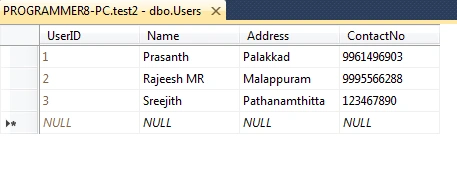
Output
Summary
We learned how to import excel data to Database using ASP.NET MVC Entity framework. I hope this article is useful for all .NET beginners.
Read more articles on ASP.NET:
Farhan AhmedPosted Oct 23, 2022, 8:43 AM
I think this function is missing onsubmit = "return myFunction()" }))C#
Madhavi VeerankiPosted Sep 15, 2022, 8:51 AM
Hi var adapter = new OleDbDataAdapter("SELECT * FROM [Sheet1$]", connectionString);Here u have given sheet name so only excel file with the same sheet name it will work, can u please make this sheet name dynamic?can u help me regarding this,i m new to MVC....thanks in advance
Чойжин АлтангэрэлPosted Apr 21, 2020, 5:48 AM
System.InvalidOperationException: 'The given ColumnName 'NAME' does not match up with any column in data source.' ???
Suraj KumarPosted Jan 4, 2019, 5:32 AM
Everything is correct and I got the help from this. Thanks. I have a minor query - You have shown UserList as class in article but in your file it is simply User. Both places it should be same.
Alice NguyenPosted Dec 14, 2018, 12:42 AM
Everything worked fine. Thank you so much.
kien phamPosted Oct 15, 2018, 5:10 AM
Hi, thank u! But how can I import in oracle database by excel with asp.net mvc 5? please help me step by step, thank alots!
Anu VPosted Sep 28, 2018, 6:35 AM
Nice article.. Thanks
Nurul HudaPosted Jun 12, 2018, 8:57 PM
Hi,i have an error show this eventhough i upload excel file "["\u003cul\u003e","\u003cli\u003eOnly Excel file format is allowed\u003c/li\u003e","\u003c/ul\u003e"]"
toper heranaPosted Jan 1, 2018, 2:40 AM
Hi, how can the error message will be view in the same page,,, i mean not to redirect to another page
toper heranaPosted Dec 17, 2017, 9:42 AM
Hi i came up with this error "Property: fname Error: The fname field is required.Property: lname Error: The lname field is required."success" " ... please reply sir thanks :)
juiyu choPosted Dec 4, 2017, 3:37 AM
Hi, I met the error message "External table is not in the expected format" on the "adapter.Fill" line when I chose xlsx file type. But it will be ok if I chose xls file type. I have verify that I have installed "Microsoft Access Runtime 2010" component. But it doesn't sill work. Could you have any advice for me about fixing this problem. Thanks.
vishal bagadiaPosted Sep 18, 2017, 10:25 AM
What is test2Entities??
Max NguyenPosted Jun 22, 2017, 9:56 PM
What about import a database to sql which have Column with DateTime and Int Format sir??
Oleg GaivoronskiiPosted May 17, 2017, 5:24 PM
Hi! Thank you for sharing! Sorry, I am rather rusty in c#. I made all things exactly that you mentioned, but still have reds on line 21 of UserController: private test2Entities db = new test2Entities(); Could you tell me, please Where could I find the proper name?
jayesh dhameliyaPosted May 16, 2017, 3:08 PM
Hiii please can you give me download sample code
Héctor Padilla FimbresPosted May 10, 2017, 1:25 PM
It works with the first row, but when it tries to insert the next one the UserID field is always set to 0, so it crashes when I try to insert new rows. I did the example described here, do you know where is the problem?
didem dalPosted Mar 14, 2017, 2:37 PM
It works but i have a large excel file, it takes too long time for loading. What can i do for fix this problem? Thanx for your help.
hardik patelPosted Feb 11, 2017, 7:48 AM
Sir i have get sollution : it was a problem of reference file version log4net
hardik patelPosted Feb 11, 2017, 7:36 AM
Sir by your example excel is uploaded but after error is occured of log4net file version :"Additional information: Could not load file or assembly 'log4net, Version=1.2.13.0, Culture=neutral, PublicKeyToken=669e0ddf0bb1aa2a' or one of its dependencies. The located assembly's manifest definition does not match the assembly reference. (Exception from HRESULT: 0x80131040)"
Manav PandyaPosted Nov 28, 2016, 11:59 AM
Clearly explained sir Prasanth Radhakrishnan sir
Grace GarayPosted Oct 18, 2016, 9:59 PM
This project really can import files from excel to database.. but when I import large files its getting an error
Grace GarayPosted Oct 18, 2016, 9:58 PM
Prasanth Radhakrishnan Thanks for sharing sir.. but what if I want to import large files? or more than 4mb to import...
Byrose AliPosted Sep 3, 2016, 4:52 AM
I am getting an error, "External table is not in the expected format". Could some one help me?
Prasanth RadhakrishnanPosted Apr 25, 2016, 2:26 AM
Thank You all :)
Bhavik PatelPosted Apr 24, 2016, 8:42 PM
Good share
Humayun Kabir MamunPosted Apr 24, 2016, 12:42 AM
Nice...
Rajeesh MenothPosted Apr 23, 2016, 12:23 AM
Good Prasanth Radhakrishnan !
NitinPosted Apr 22, 2016, 11:43 PM
Good one
Bhavik PatelPosted Apr 22, 2016, 10:46 PM
nice one
Vignesh ManiPosted Apr 22, 2016, 5:32 PM
Nice
Gowtham KPosted Apr 22, 2016, 1:01 PM
Good One, Thanks for sharing:)
Kuppurasu NagarajPosted Apr 22, 2016, 11:52 AM
Nice Sharing..
Debasis SahaPosted Apr 22, 2016, 10:15 AM
Good One..
Gowtham RajamanickamPosted Apr 22, 2016, 8:48 AM
good article..
Sr KarthigaPosted Apr 22, 2016, 7:58 AM
good one