

Introduction
This article will tell you how to import an existing database in Android.
I had a database named "Banking", that I wanted to use in another project. So we will import this database and make a copy of this database in our project. We will use a database file from the asset folder and copy it to the system database path of your application.
Step 1
Pull the database file first. Go to "Monitor (DDMS included)" -> "File Explorer" -> "Data" -> "Data" then select the project from which you want to import the database (a project whose database you want to use in some other project) then select "Pull a file from device" (on top right corner) then select "Save the file".
You can also read http://www.c-sharpcorner.com/UploadFile/e14021/know-where-database-is-stored-in-android-studio/
Step 2
Create a new project.
Open "your_project_name.iml" and read the line <option name="ASSETS_FOLDER_RELATIVE_PATH" value="/src/main/assets" />
Now open your project folder. Go to "src" -> "main". Create a folder named assets. Place the database file that you saved in step 1 (Banking in this case) here.
Step 3
"strings.xml" used in this project is:
- <?xml version="1.0" encoding="utf-8"?>
- <resources>
- <string name="app_name">DBImportFin</string>
- <string name="action_settings">Settings</string>
- <string name="hello_world">Welcome to import database...</string>
- </resources>
Step 4
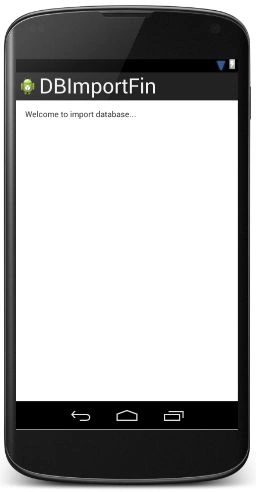
Open the "activity_main.xml" layout file and add the following code to it:
- <TextView
- android:layout_width="wrap_content"
- android:layout_height="wrap_content"
- android:text="@string/hello_world"
- android:id="@+id/txt"/>
The layout looks like:
Step 5
Right-click on your project package then select "New" -> "Java class". Name this file "DBMain" and add the following code to it:
- package com.example.dbimportfin;
- import android.content.Context;
- import android.database.Cursor;
- import android.database.SQLException;
- import android.database.sqlite.SQLiteDatabase;
- import android.database.sqlite.SQLiteException;
- import android.database.sqlite.SQLiteOpenHelper;
- import android.util.Log;
- import java.io.FileOutputStream;
- import java.io.IOException;
- import java.io.InputStream;
- import java.io.OutputStream;
- public class DBMain extends SQLiteOpenHelper {
- private static String DB_PATH= "data/data/com.example.dbimportfin/databases/";
- private static String DB_NAME = "Banking";
- private SQLiteDatabase dbObj;
- private final Context context;
- public DBMain(Context context) {
- super(context, DB_NAME , null, 3);
- this. context = context;
- }
- public void createDB() throws IOException {
- this.getReadableDatabase();
- Log.i("Readable ends....................","end");
- try {
- copyDB();
- Log.i("copy db ends....................","end");
- } catch (IOException e) {
- throw new Error("Error copying database");
- }
- }
- private boolean checkDB(){
- SQLiteDatabase checkDB = null;
- try{
- String path = DB_PATH + DB_NAME;
- Log.i("myPath ......",path);
- checkDB = SQLiteDatabase.openDatabase(path, null, SQLiteDatabase.OPEN_READONLY);
- Log.i("myPath ......",path);
- if (checkDB!=null)
- {
- Cursor c= checkDB.rawQuery("SELECT * FROM bank", null);
- Log.i("Cursor.......",c.getString(0));
- c.moveToFirst();
- String contents[]=new String[80];
- int flag=0;
- while(! c.isAfterLast())
- {
- String temp="";
- String s2=c.getString(0);
- String s3=c.getString(1);
- String s4=c.getString(2);
- temp=temp+"\n Id:"+s2+"\tType:"+s3+"\tBal:"+s4;
- contents[flag]=temp;
- flag=flag+1;
- Log.i("DB values.........",temp);
- c.moveToNext();
- }
- }
- else
- {
- return false;
- }
- }catch(SQLiteException e){
- e.printStackTrace();
- }
- if(checkDB != null){
- checkDB.close();
- }
- return checkDB != null ? true : false;
- }
- public void copyDB() throws IOException{
- try {
- Log.i("inside copyDB....................","start");
- InputStream ip = context.getAssets().open(DB_NAME+".db");
- Log.i("Input Stream....",ip+"");
- String op= DB_PATH + DB_NAME ;
- OutputStream output = new FileOutputStream( op);
- byte[] buffer = new byte[1024];
- int length;
- while ((length = ip.read(buffer))>0){
- output.write(buffer, 0, length);
- Log.i("Content.... ",length+"");
- }
- output.flush();
- output.close();
- ip.close();
- }
- catch (IOException e) {
- Log.v("error", e.toString());
- }
- }
- public void openDB() throws SQLException {
- String myPath = DB_PATH + DB_NAME;
- dbObj = SQLiteDatabase.openDatabase(myPath, null, SQLiteDatabase.OPEN_READWRITE);
- Log.i("open DB......",dbObj.toString());
- }
- @Override
- public synchronized void close() {
- if(dbObj != null)
- dbObj.close();
- super.close();
- }
- @Override
- public void onCreate(SQLiteDatabase db) {
- }
- @Override
- public void onUpgrade(SQLiteDatabase db, int oldVersion, int newVersion) {
- }
- }
The variable DB_PATH stores the path of the databases, in other words "Data" -> "Data" -> your project package -> "databases" -> name of your database.
The variable DB_NAME stores the name of your database (Banking in this case).
In createDB, "getReadableDatabases" will create an empty database in the default system path of your application. We will overwrite this database with our database.
In copyDB, context.getAssets().open(DB_NAME+".db") will get the "Banking" database file from the asset folder that we created in Step 2.
Step 6
Open "MainActivity" and add the following code to it:
- package com.example.dbimportfin;
- import android.content.Context;
- import android.database.Cursor;
- import android.database.SQLException;
- import android.database.sqlite.SQLiteDatabase;
- import android.os.Bundle;
- import android.app.Activity;
- import android.view.Menu;
- import android.widget.TextView;
- import java.io.IOException;
- public class MainActivity extends Activity {
- String DB_PATH;
- final Context context=this;
- private SQLiteDatabase mDataBase;
- private static String DB_NAME ="Banking.db";
- TextView txt;
- @Override
- protected void onCreate(Bundle savedInstanceState) {
- super.onCreate(savedInstanceState);
- setContentView(R.layout.activity_main);
- txt=(TextView)findViewById(R.id.txt);
- DBMain db;
- db = new DBMain(this);
- try {
- db.createDB();
- } catch (IOException ioe) {
- throw new Error("Database not created....");
- }
- try {
- db.openDB();
- }catch(SQLException sqle){
- throw sqle;
- }
- SQLiteDatabase db1;
- db1=openOrCreateDatabase("Banking",SQLiteDatabase.CREATE_IF_NECESSARY,null);
- Cursor c= db1.rawQuery("SELECT * FROM bank",null);
- c.moveToFirst();
- String temp="";
- while(! c.isAfterLast())
- {
- String s2=c.getString(0);
- String s3=c.getString(1);
- String s4=c.getString(2);
- temp=temp+"\n Id:"+s2+"\tType:"+s3+"\tBal:"+s4;
- c.moveToNext();
- }
- txt.setText(temp);
- }
- @Override
- public boolean onCreateOptionsMenu(Menu menu) {
- // Inflate the menu; this adds items to the action bar if it is present.
- getMenuInflater().inflate(R.menu.main, menu);
- return true;
- }
- }
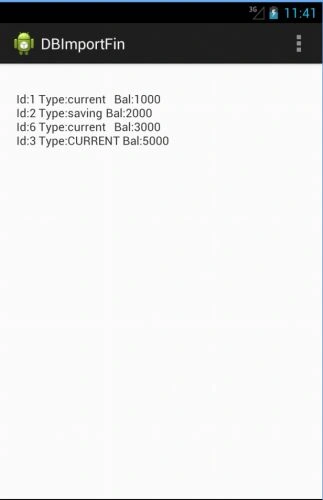
Note that in the end, we are displaying the copied database.
Output snapshots:
Thank you... Enjoy coding :)
christina maximoPosted Feb 12, 2014, 1:22 PM
not displaying :(