

.NET provides a very simple way to import, read and export .CSV files.
Now I will create an ASP.Net application where I will bind a grid with the imported .CSV file.
Then you can also export the displayed data in CSV file format.
Step 1
In Visual Studio 2013 first create a simple web application and add a web form just like “Default.aspx”.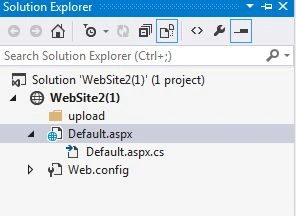
Step 2
Add a folder like “upload” for storing the imported .CSV file.
Step 3
Prepare a .CSV file for import in the following format.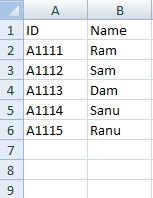
Step 4
Add the following controls to the Deafult.aspx file.
- <%@ Page Language="C#" AutoEventWireup="true" CodeFile="Default.aspx.cs" Inherits="_Default" %>
- <!DOCTYPE html>
- <html xmlns="http://www.w3.org/1999/xhtml">
- <head runat="server">
- <title>Import/Export/Read CSV file</title>
- </head>
- <body>
- <form id="form1" runat="server">
- <div>
- <div id="dvforgeneratingexcel">
- <div>
- <asp:GridView ID="wdgList" runat="server" Height="410px" AutoGenerateColumns="False"
- Style="width: 99.8%;">
- <Columns>
- <asp:BoundField DataField="ID" HeaderText="ID"></asp:BoundField>
- <asp:BoundField DataField="Name" HeaderText="Name"></asp:BoundField>
- </Columns>
- </asp:GridView>
- </div>
- <div class="pull-right">
- <asp:Button runat="server" ID="btnExport" Text="Export" OnClick="btnExport_OnClick" />
- </div>
- </div>
- <div id="dvforexcelimport">
- <asp:FileUpload Width="300" ID="FileUpload1" CssClass="form-control" runat="server" />
- <asp:Button ID="btn_import" runat="server" CssClass="btn btn-default" Text="Upload Excel sheet" OnClick="btn_import_Click" />
- </div>
- </div>
- </form>
- </body>
- </html>
- using System;
- using System.Collections.Generic;
- using System.Data;
- using System.Data.OleDb;
- using System.IO;
- using System.Linq;
- using System.Text;
- using System.Web;
- using System.Web.UI;
- using System.Web.UI.WebControls;
- public partial class _Default : System.Web.UI.Page
- {
- DataTable dt = new DataTable();
- DataTable CSVTable = new DataTable();
- protected void Page_Load(object sender, EventArgs e)
- {
- }
- /// <summary>
- /// Exporting of the .CSV file.
- /// </summary>
- /// <param name="sender"></param>
- /// <param name="e"></param>
- protected void btnExport_OnClick(object sender, EventArgs e)
- {
- try
- {
- Response.Clear();
- Response.ClearContent();
- StringBuilder sb = new StringBuilder();
- sb.AppendLine("ID,Name");
- Response.ContentType = "application/x-msexcel";
- Response.AddHeader("content-disposition", "attachment; filename=ManageList.csv");
- Response.Write(sb.ToString());
- if (ViewState["CSVTable"] != "")
- {
- dt = ViewState["CSVTable"] as DataTable;
- if ((dt != null) && (dt.Rows.Count > 0))
- {
- foreach (DataRow row in dt.Rows)
- {
- sb = new StringBuilder((string)row[0]);
- for (int i = 1; i < dt.Columns.Count; i++)
- {
- if (row[i] is DBNull)
- sb.Append(",NULL");
- else if (i == 2)
- sb.Append("," + new DateTime((long)row[i]).ToString("G"));
- else
- sb.Append("," + row[i].ToString());
- }
- sb.AppendLine();
- Response.Write(sb.ToString());
- }
- }
- }
- Response.Flush();
- Response.Close();
- Response.End();
- }
- catch (Exception ex) { }
- }
- /// <summary>
- /// Importing of .CSV file.
- /// </summary>
- /// <param name="sender"></param>
- /// <param name="e"></param>
- protected void btn_import_Click(object sender, EventArgs e)
- {
- try
- {
- if (FileUpload1.HasFile)
- {
- int flag = 0;
- string FileName = Path.GetFileName(FileUpload1.PostedFile.FileName);
- string RandomName = DateTime.Now.ToFileTime().ToString();
- string Extension = Path.GetExtension(FileUpload1.PostedFile.FileName);
- string FolderPath ="~/upload/";
- string FilePath = Server.MapPath(FolderPath + RandomName + FileName);
- string[] filenames = Directory.GetFiles(Server.MapPath("~/upload"));
- if (filenames.Length > 0)
- { foreach (string filename in filenames)
- {
- if (FilePath == filename)
- {
- flag = 1;
- break;
- }
- }
- if (flag == 0)
- {
- FileUpload1.SaveAs(FilePath);
- ReadCSVFile(FilePath);
- }
- }
- else
- {
- FileUpload1.SaveAs(FilePath);
- ReadCSVFile(FilePath);
- }
- }
- else
- {
- String msg = "Select a file then try to import";
- }
- }
- catch (Exception ex)
- {
- throw ex;
- }
- }
- /// <summary>
- /// Reading of the .CSV file.
- /// </summary>
- /// <param name="fileName"></param>
- public void ReadCSVFile(string fileName)
- {
- try {
- string connection = "Provider=Microsoft.Jet.OLEDB.4.0;Data Source={0}\\;Extended Properties='Text;HDR=Yes;FMT=CSVDelimited'";
- connection = String.Format(connection, Path.GetDirectoryName(fileName));
- OleDbDataAdapter csvAdapter;
- csvAdapter = new OleDbDataAdapter("SELECT * FROM [" + Path.GetFileName(fileName) + "]", connection);
- if (File.Exists(fileName) && new FileInfo(fileName).Length > 0)
- {
- try
- { csvAdapter.Fill(CSVTable);
- if ((CSVTable != null) && (CSVTable.Rows.Count > 0))
- {
- ViewState["CSVTable"] = CSVTable;
- wdgList.DataSource = CSVTable;
- wdgList.DataBind();
- }
- else
- {
- String msg = "No records found";
- }
- }
- catch (Exception ex)
- {
- throw new Exception(String.Format("Error reading Table {0}.\n{1}", Path.GetFileName(fileName), ex.Message));
- }
- }
- }
- catch (Exception ex) { }
- }
- }
aiz conezPosted Nov 29, 2020, 12:10 AM
Hello! Is it possible for you to provide an explanation as I have trouble knowing where to insert these codes. What I meant is that under which folders the codes are supposed to be in. For example, view, controller or etc
Mayur BhavsarPosted Aug 14, 2020, 11:36 PM
Thanks a lot for the info!How to run the application? Shall i use command prompt?
Santhakumar MunuswamyPosted Jul 23, 2015, 3:12 PM
Thanks for nice article:)
Upasana GargPosted Jul 21, 2015, 5:13 AM
good work sir....
Gopi ChandPosted Jul 21, 2015, 3:40 AM
Good start...it would be nice if explanation is also there...
Sibeesh VenuPosted Jul 21, 2015, 2:09 AM
Nice Share
SharadPosted Jul 21, 2015, 2:06 AM
nice article..
Upendra Pratap ShahiPosted Jul 21, 2015, 1:28 AM
Great sir..
Sakshi AgrawalPosted Jul 21, 2015, 1:22 AM
great work sir :)
ambrish yadavPosted Jul 21, 2015, 1:19 AM
good work..........
RakeshPosted Jul 20, 2015, 11:37 PM
Good one