

Introduction
I would like to share the usage of Response.BufferOutput to improve the performance of ASP.Net application.
Objective
We will learn about the "BufferOutput" property of the HttpResponse Class. It is basically a Boolean property.
Description
By default Respose.BufferOutput is enabled in ASP.Net, in ohter words Response.BufferOutput =true, which means that all the output from your ASP is actually sent to the browser only when the page completes its processing.
The client might need to wait until all the processing has completed on the server, because the server will send the response back to the client only when the page completes its processing.
- If the server is taking a lot of time to process the request then the client must wait a long time and that is not a good approach.
- Servers need to retain a huge amount of data in memory.
Solution
We can avoid such situations by using Response.BufferOutput =false.
Example
I created a sample application and wrote a sample code as per the following.
- Page_Load()
- {
- for (int i = 0; i < 100; i++)
- {
- Thread.Sleep(1000);
- Response.Write(i + "\n");
- }
- }
In the code above I am simply trying to display 1 to 99 on the client screen / browser.
Here the client will get the output after 100 seconds because we have used Thread.sleep(1000) = 1 sec.
So in the code above the client must wait; that is not good.
Solution
We have used Response.BufferOutPut=false at the server as in the code below.
- Page_Load()
- {
- Response.BufferOutput = false;
- for (int i = 0; i < 100; i++)
- {
- Thread.Sleep(1000);
- Response.Write(i + "\n");
- }
- }
Here from the code above, the client does not need to wait 100 seconds, the client will get the output on each and every second.
The data will be transferred to the client in chunks. We would see the updated screen after each and every second.
When I debug the Httprequest and Httpresponse, I saw that data has been transferred in chunks.
The following is a snapshot of the solution approach above. Here we can see Transfer-encoding : Chunked.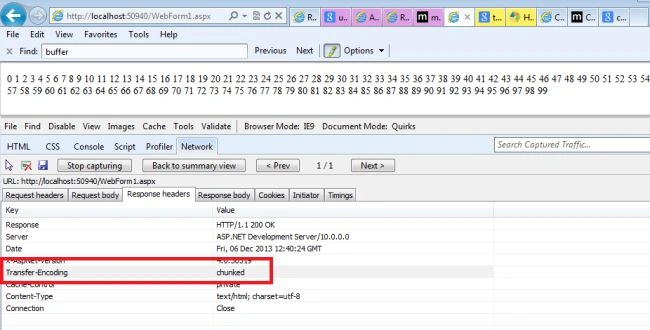
For More on HTTP debugging kindly see the following link:
Debugging HTTP Requests and HTTP Responses
Conclusion
We can improve the performance of an ASP.Net application using this technique.
References
Chapter 6 - Improving ASP.NET Performance
Mark DeraevePosted Jun 30, 2015, 3:01 AM
I fear that this could lead to performance leaks, because now every response.write will trigger a connection to the client. Imagine that 1000 users execute this code, it will result in 1000 * 100 connections in stead of 1000 connections from server to client. So If you loop over 1000 records and have 100 response.writes in the loop, your server will be blown to pieces.
Devesh OmarPosted Dec 11, 2013, 7:03 AM
http://www.c-sharpcorner.com/UploadFile/deveshomar/getting-data-in-chunks-from-Asp-Net-server/
Devesh OmarPosted Dec 11, 2013, 7:03 AM
Another way to get the data from server in chunks.link is here http://www.c-sharpcorner.com/UploadFile/deveshomar/getting-data-in-chunks-from-Asp-Net-server/
Devesh OmarPosted Dec 9, 2013, 12:24 AM
Yes Sam, you are right.
Sam HobbsPosted Dec 6, 2013, 10:23 PM
Thank you for this. I hope it helps many people. Note however that it is possible that users might be confused when they get partial results and when they are confused that is not good. So it depends on the users. Also, when there are only partial results and if the user acts on the partial results then that might cause a problem and that is not good. So I am just saying that using the default has advantages too. Which to use depends on the requirements.