


What is a Covering Index?
An index that contains all required information to resolve the query is known as a “Covering Index” – it completely covers the query. covering Index includes all the columns, the query refers to in the SELECT, JOIN, and WHERE clauses.
Key Columns and Non-Key Columns
Key columns are columns that an index (clustered or non-clustered) is created on. An index with non-key columns can significantly improve query performance.
By including non-key columns, we can create non-clustered indexes that cover more queries.
The non-key columns have the following benefits
- They can be data types that are not allowed as index key columns.
- They are not considered by the SQL Engine when calculating the number of index key columns or index key size.
What are Key Lookups and how to avoid them
When we use a non-clustered index to fetch the results of a particular query, the SQL Server query optimizer uses a ‘Key Lookup’ to retrieve any non-key data. In other words, once SQL Server optimizer has used the non-clustered index to identify each row that matches the query conditions, it then retrieves the column information for those rows from the data pages of the table.
Key Lookups can be detrimental to performance for queries that return large result sets.
By including non-key columns in non-clustered indexes, we can dramatically improve query performance. The covering index helps us to avoid the round trip to the table to satisfy the request, since all of the columns requested exist in the non-clustered index itself. This greatly reduces logical and physical reads, hence boosting performance.
Let me explain the concept of the Covering Index with an example
Suppose we execute the SQL Query below.

Generated Query Execution Plan
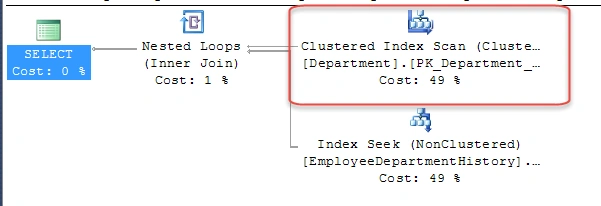

Problem Statement
The problem with the initial query was that it used to take 15ms time to execute. I just have a few records in my test table, but if we execute this query against a bigger table – it would take more time for sure. This was also one of the frequently running queries in my application & hence I wanted to fine-tune this query.
Generally, when I start doing a performance analysis, apart from looking at the Execution Plan – I also look at statistics, which will show me the amount of disk activity and time taken by the SQL Server Optimizer to execute a query.
We can turn on statistical information in SQL Server, by executing the below statements.
SET STATISTICS IO ON
SET STATISTICS TIME ON
Looking at the stats, it shows that there are 367 logical reads – which means that 367 pages were read from the data cache. The query execution time was 15ms. If we can convert the scan operation on the ‘Department’ table to a seek operation, we can bring down the logical read count & operation will be faster.
Query Cost is HIGH because we have an INDEX SCAN Operation. This operation is expensive and needs to be modified to improve performance.
Resolution
Create a new Non Clustered Index on the ‘Name’ column of the ‘Department’ table.

Query Execution Plan after non-clustered Index creation

Problem Statement
There is a Key Lookup Operation which has a cost of 33% on the Department table and can have a negative impact on query performance.
Resolution
Create a new Non-Clustered Covering Index and include the ‘GroupName’ column of the ‘Department’ table. An index with non-key columns can significantly improve query performance.

Query Execution Plan after covering index creation


We were successfully able to convert the Index Scan operation to Index Seek and also got rid of the Key LookUp operation.
The statistics show that there were just 3 logical reads (compared to 367 earlier) and the query execution time also came down to just 1 ms (compared to 15 ms earlier).
Again I just have a few records in my test table, if we execute a similar query against a bigger table – the time & CPU benefits will be very much visible.
I would suggest that you start using Covering Indexes for your frequently running SQL Queries and see the performance benefits.
Read more articles on SQL Server.
Gowtham KPosted Feb 11, 2016, 11:05 AM
Good One, Thanks for sharing
Navratna PawalePosted Feb 11, 2016, 5:37 AM
great...
Sibeesh VenuPosted Feb 11, 2016, 1:52 AM
Nice Share
Humayun Kabir MamunPosted Feb 10, 2016, 10:58 PM
Nice...
Santhakumar MunuswamyPosted Feb 10, 2016, 2:26 PM
Thanks for nice article
Ankur MistryPosted Feb 10, 2016, 12:33 PM
Very nice and helpful
Pankaj Kumar ChoudharyPosted Feb 10, 2016, 11:13 AM
Really Great Explanation.........
Raja TPosted Feb 10, 2016, 8:59 AM
Nice, Thanks for sharing
Yashwant VishwakarmaPosted Feb 10, 2016, 5:56 AM
nice article , thanks for sharing !
Shubham KumarPosted Feb 10, 2016, 5:48 AM
nice keep share
Pramod ThakurPosted Feb 10, 2016, 2:46 AM
thnx for sharing..