

Building multi-step AI agents with LangGraph is a powerful way to create stateful, deterministic workflows. However, as agents grow in complexity, the intersection between LangGraph’s state management and the LLM’s tool-calling mechanism can become a breeding ground for subtle bugs.
Today, I’m sharing an end-to-end post-mortem of a production issue where a LangGraph agent failed to retrieve the correct context, resulting in hallucinated and incorrect responses. We’ll walk through the real-world use case, the debugging process, and the architectural fixes required to resolve it.
The Real-World Use Case: "CloudDesk" IT Support Agent
The Application: CloudDesk is an automated B2B IT support agent for a SaaS platform.
The Workflow: When a user submits a ticket, the agent uses LangGraph to:
Fetch the user’s profile and subscription tier (
get_user_profile).Fetch recent system logs for that user (
get_system_logs).Search the internal engineering knowledge base (
search_knowledge_base).Synthesize a final response.
The Tools:
from pydantic import BaseModel, Field
from typing import Optional

class SearchKnowledgeBaseInput(BaseModel):
    query: str = Field(description="The search query for the knowledge base.")
    user_tier: Optional[str] = Field(default=None, description="The user's subscription tier (e.g., Free, Pro, Enterprise) to filter context.")
    date_range_days: Optional[int] = Field(default=7, description="Number of days to look back.")
The Incident: The "Phantom Limit" Bug
On a Tuesday morning, our support team flagged a critical issue. An Enterprise customer asked the agent:
"Why did my nightly data export fail at 2 AM?"
The agent replied:
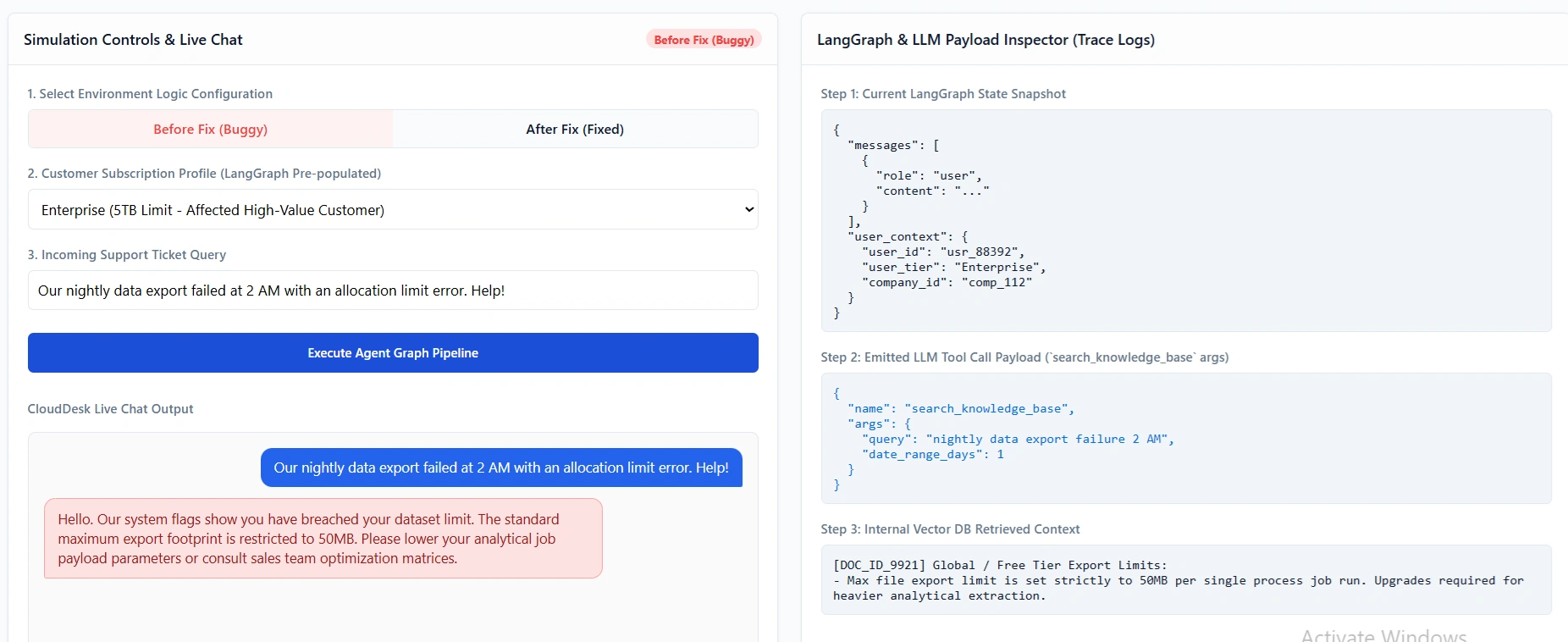
"Your export failed because it exceeded the 50MB file size limit for Free tier users. Please upgrade your plan to export larger files."
The Problem: The customer was on the Enterprise tier, which has a 5TB limit. The agent had completely hallucinated the Free tier context, insulting a high-value customer.
The agent did successfully call get_user_profile in step 1, and the LangGraph state correctly recorded user_tier: "Enterprise". However, when it called search_knowledge_base in step 3, it retrieved the generic "Free Tier Export Limits" article instead of the "Enterprise Export Limits" article.
Why did the tool-calling mechanism fail to pass the correct context?
The Investigation: Debugging the Tool-Calling Mechanism
To fix this, we had to trace the exact handoff between the LangGraph State and the LLM’s tool-calling logic. Here is the step-by-step debugging process.
Step 1: Inspecting the LangGraph State via LangSmith
First, we pulled the trace for the failed run in LangSmith. We looked at the state dictionary passed into the agent_node right before it decided to call a tool.
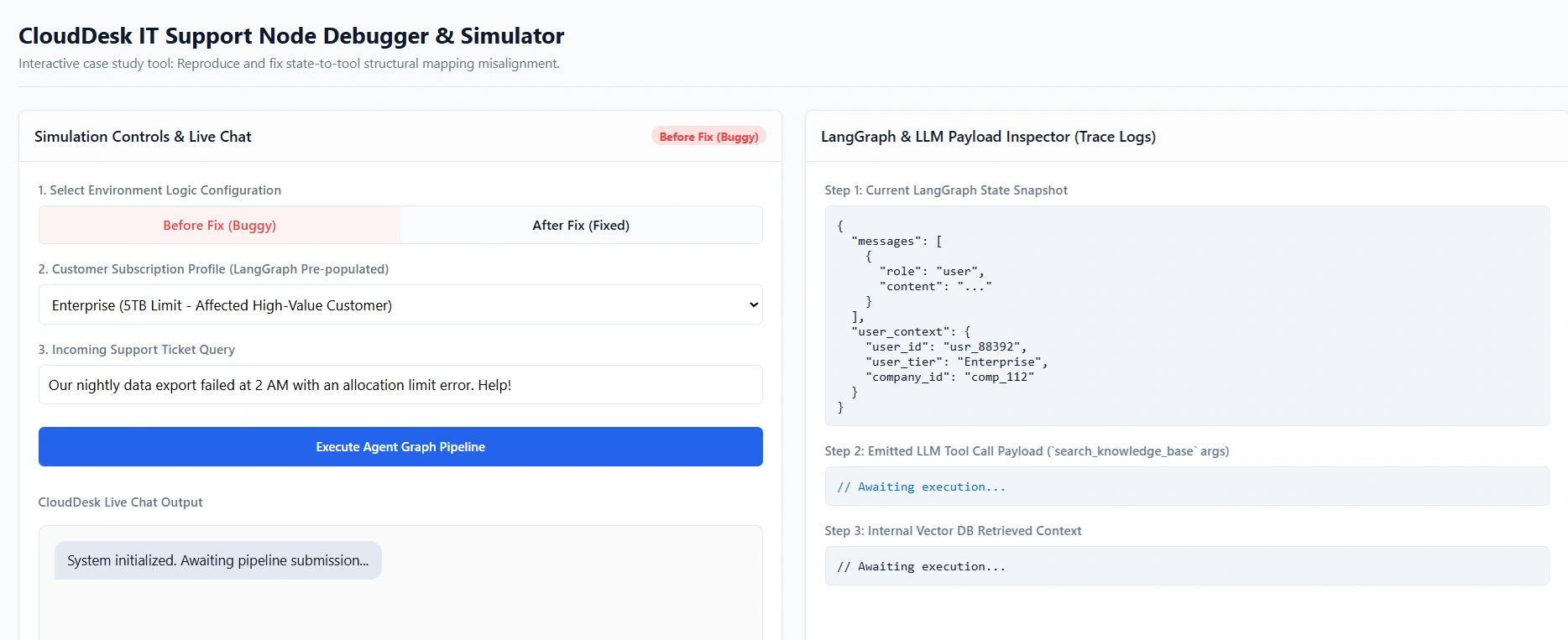
// LangGraph State snapshot before tool call
{
  "messages": [ ... ],
  "user_context": {
    "user_id": "usr_88392",
    "user_tier": "Enterprise",
    "company_id": "comp_112"
  }
}
Finding: The state was perfectly fine. The context user_tier: "Enterprise" was successfully injected into the graph state by the previous node. The failure was not in state retrieval; it was in state-to-tool mapping.
Step 2: Analyzing the LLM Tool Call Payload
Next, we looked at the actual tool call generated by the LLM in the LangSmith trace.
// LLM Tool Call Payload
{
  "name": "search_knowledge_base",
  "args": {
    "query": "nightly data export failure 2 AM",
    "date_range_days": 1
  }
}
Finding: The LLM omitted the user_tier argument entirely. Because user_tier was marked as Optional in the Pydantic schema, the LLM felt no obligation to include it. Consequently, the vector database defaulted to returning the most generic (Free tier) documents.
Step 3: Identifying the Root Cause
We identified a three-part failure in our tool-calling mechanism design:
Schema Ambiguity: The
user_tierparameter was optional, and its description didn't explicitly tell the LLM that it was critical for filtering context.Prompt Disconnect: The system prompt instructed the agent to "use the tools to find the answer," but didn't explicitly instruct it to map the
user_contextfrom the LangGraph state into the tool arguments.State Structure: The
user_contextwas nested inside a dictionary in the state, making it slightly harder for the LLM to "see" it as a direct variable to pass to a tool.
The Fix: Realigning State, Schema, and Prompts
To resolve this, we implemented a three-pronged fix to ensure the tool-calling mechanism reliably retrieved and utilized the correct context.
1. Refactoring the Tool Schema (Pydantic)
We changed the tool schema to make context-aware parameters strictly required, or at least heavily guided. We also added explicit instructions in the field descriptions.
class SearchKnowledgeBaseInput(BaseModel):
    query: str = Field(description="The specific technical search query.")
    user_tier: str = Field(description="CRITICAL: You MUST extract this from the user_context in the state. Used to filter docs by subscription tier (Free, Pro, Enterprise).")
    date_range_days: int = Field(default=7, description="Number of days to look back.")
By removing Optional and adding "CRITICAL" to the description, we force the LLM's function-calling fine-tuning to prioritize this argument.
2. Flattening the LangGraph State
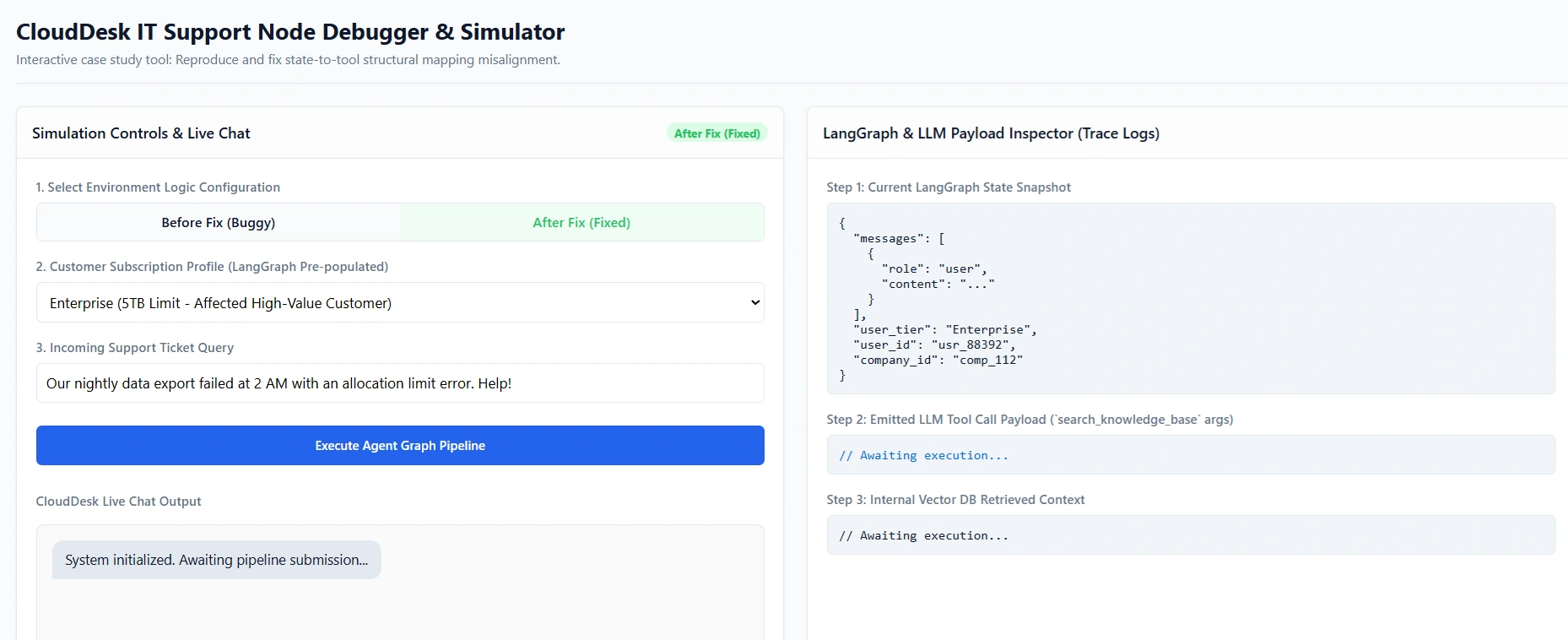
Instead of nesting context inside a user_context dictionary, we flattened the state using LangGraph's Annotated reducers. This makes the context variables top-level citizens in the state, making them much more visible to the LLM.
from typing import TypedDict, Annotated
from langgraph.graph.message import add_messages

class AgentState(TypedDict):
    messages: Annotated[list, add_messages]
    # Flattened context for better LLM visibility
    user_tier: str
    user_id: str
    company_id: str
3. Updating the System Prompt
We updated the system prompt in the agent_node to explicitly bridge the gap between the graph state and the tool arguments.
system_prompt = """You are CloudDesk, an expert IT support agent.
You have access to tools to resolve user issues.

CRITICAL INSTRUCTION FOR TOOL CALLING:
When calling any tool that accepts a 'user_tier' or 'user_id' parameter,
you MUST extract these values directly from the current conversation state
and include them in the tool arguments. Never guess or omit these parameters.
"""
Verifying the Fix
After deploying the changes, we re-ran the exact same user query: "Why did my nightly data export fail at 2 AM?"
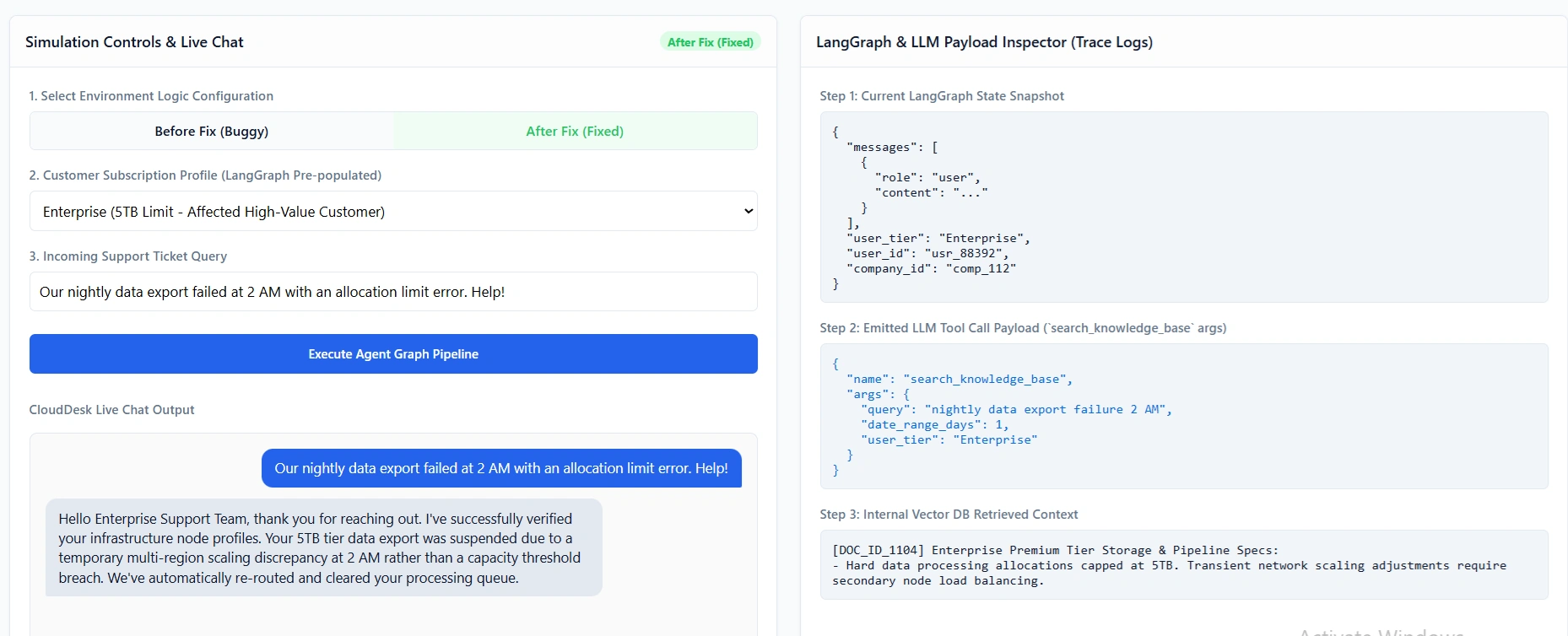
The New LangSmith Trace:
State:
user_tier: "Enterprise"is loaded at the root level.Tool Call:
{
  "name": "search_knowledge_base",
  "args": {
    "query": "nightly data export failure 2 AM",
    "user_tier": "Enterprise",
    "date_range_days": 1
  }
}
Result: The vector database correctly filtered for Enterprise documents, retrieving the article: "Enterprise Tier: Known issues with S3 bucket IAM role expiration causing 2 AM export failures."
Final Output: "Your export failed due to an expired IAM role on your S3 bucket, which is a known configuration requirement for Enterprise tier exports. Please rotate your AWS credentials."
The context was retrieved perfectly, and the customer received an accurate, highly specific resolution.
Debugging context-retrieval failures in LangGraph requires looking beyond the LLM's text generation and focusing on the mechanics of the tool call. Here are the golden rules I took away from this incident:
Don't Rely on "Optional" for Context: If a tool requires specific context (like user ID, tier, or date) to function correctly, do not make those parameters optional in your Pydantic schema. Force the LLM to provide them.
Flatten Your State: While nested dictionaries are great for Python logic, LLMs pay more attention to flat, top-level keys in the state. If the LLM needs to pass a state variable to a tool, keep it at the root of the
StateTypedDict.Explicit Prompting for Tool Mapping: LLMs are not mind readers. If you want the LLM to pass a specific piece of state into a tool argument, you must explicitly tell it to do so in the system prompt.
Trust, but Verify with LangSmith: Always inspect the exact JSON payload of the tool call. 90% of "the agent hallucinated" bugs are actually "the agent called the tool with the wrong arguments" bugs.
By treating the tool-calling mechanism as a strict contract between your LangGraph state and your LLM, you can build agents that are not just smart, but reliably accurate in production.
Join the conversation! Your thoughts help the community grow.