
SQL Server 2014 introduces new features of memory-optimized database technology for optimizing the performance of OLTP loads. Its depend on full Atomicity, Consistency, Isolation and Durability (ACID) properties. Durability in the context of SQL Server and memory-optimized tables.
Memory-Optimized Table
Memory-optimized tables are used for efficient, contention-free data access and natively compiled Stored Procedures for efficient execution of business logic.
Memory-optimized tables are the following two different kinds.
- SCHEMA_AND_DATA (durable table)
- SCHEMA_ONLY (non-durable table)
SCHEMA_AND_DATA
It provides durability of both the schema and data. The level of data durability depends on whether you commit a transaction as fully durable or with delayed durability. It will be a fully durable transactions provider for the same durability data and schema, similar to a disk-based table. You can say, It resides in memory where the data is available after a server crash, a shutdown or a restart of SQL Server. In this the table transaction data might be a good alternative. You want transactions to run as fast as possible therefore the memory-optimize type table would provide this.
SCHEMA_ONLY
Should the SQL Server crash, it does not persist the data or the instance is stopped or restarted. The non-durable table is recreated. A typical scenario for creating a non-durable table is to store transient data, such as a staging table for an ETL process. This durability avoids both transaction logging and a checkpoint that can significantly reduce I/O operations. It would be useful for a staging table in a data warehouse application.
For more details visit Memory-Optimized Table
Now I will create a test environment.
Creating a Database to Memory-Optimized Tables
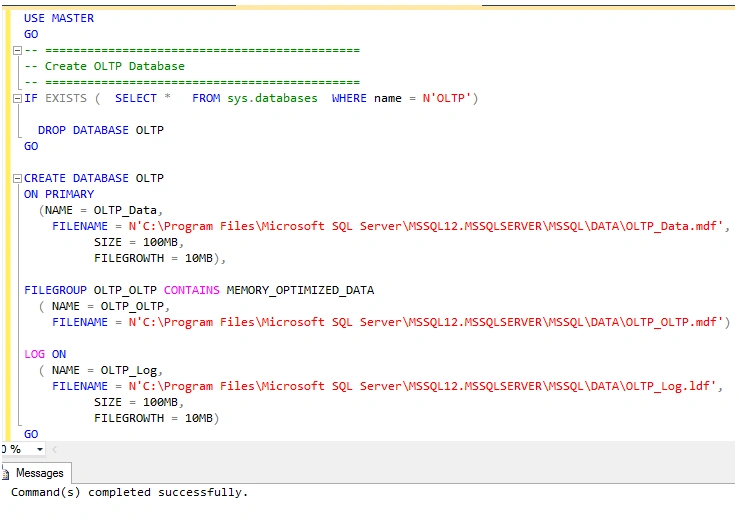
In the following examples I will be using a new database name OLTP that will contain all of my Memory-Optimized tables. I will show you how to use T- SQL or use SQL Server Management Studio to create this database. First here is the script to create this database.
Using T-SQL
Limitations
In-Memory OLTP engines have a number of restrictions.
Data type
The following data types aren't supported by memory-optimized tables:
- Image
- Ntext
- Text
- Datetimeoffset
- Geography
- Hierarchyid
- Sql_variant
- Varchar(max)
- XML
- User data types (UDTs)
The following database features aren't supported and are table limitations:
- Database snapshots aren't supported.
- DBCC CHECKDB and DBCC CHECKTABLE don't work.
- Change Data Capture (CDC) isn't supported.
- Database mirroring isn't supported.
- Data compression isn't supported.
- FILESTREAM storage isn't supported.
- IDENTITY columns aren't supported.
- FOREIGN KEY, CHECK and UNIQUE constraints aren't supported.
- Triggers aren't supported.
- Computed columns aren't supported.
- ROWGUIDCOL isn't supported.
- A maximum of 8 indexes, including the index supporting the PRIMARY KEY
- Clustered indexes aren't supported.
- Memory-optimized tables support a maximum of eight indexes.
- COLUMNSTORE indexes aren't supported.
- ALTER TABLE isn't supported. In-Memory OLTP tables must be dropped and re-created.
- The AUTO_CLOSE database option isn't supported.
- Multiple Active Result Sets (MARS) aren't supported.
- Transact-SQL Constructs Not Supported
- I could not issue a TRUNCATE TABLE statement against my Memory-Optimized tables.
- I could not do an ALTER TABLE statement against my Memory-Optimized tables.
- I could not update my primary key columns of my Memory-Optimized tables.
Note: I suggest not manually deleting any checkpoint files for In-Memory OLTP database objects. When you back up a database or log in SQL Server, it will delete all unused checkpoint files. The available space on your hard disk storage will decrease, if you don't perform backups.
For a complete list of In-Memory OLTP limitations, see MemoryOLTP Limitations.
Supported data types
- bit
- All integer types: tinyint, smallint, int, bigint
- All money types: money, smallmoney
- All floating types: float, real
- date/time types: datetime, smalldatetime, datetime2, date, time
- numeric and decimal types
- All non-LOB string types: char(n), varchar(n), nchar(n), nvarchar(n), sysname
- Non-LOB binary types: binary(n), varbinary(n)
- Uniqueidentifier
- Combined column record length must not exceed 8060.
Creating Memory-Optimized Tables
Now I will create two Memory-Optimized tables. One table will be a SCHEMA_AND_DATA table and the other will be a SCHEMA_ONLY table. I will also be creating an Employee_Normal table so I can show the performance improvements you get with Memory-Optimized tables when inserting data into these various types of tables.
My first table is the “Employee_Normal“ table.
My secound table is "Employee_Schema_And_Data".
This table will use the DURABILITY = SCHEMA_AND_DATA option.
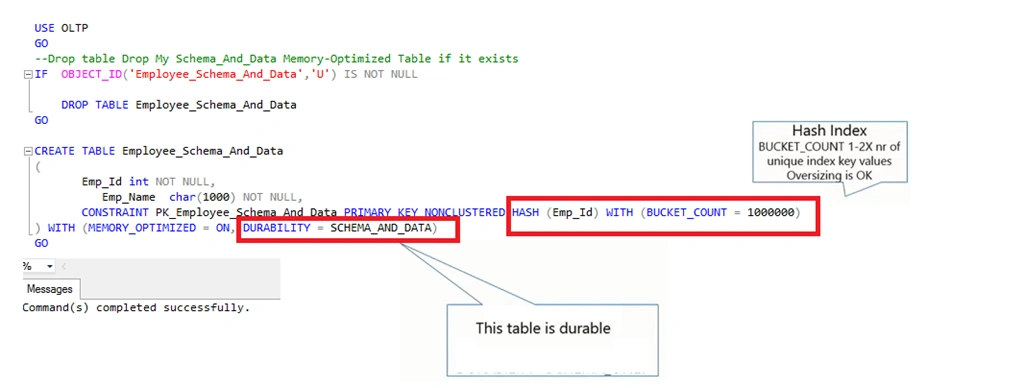
My last table is “Employee_Schema_Only”.
This table will have DURABILITY set to “SCHEMA_ONLY”.
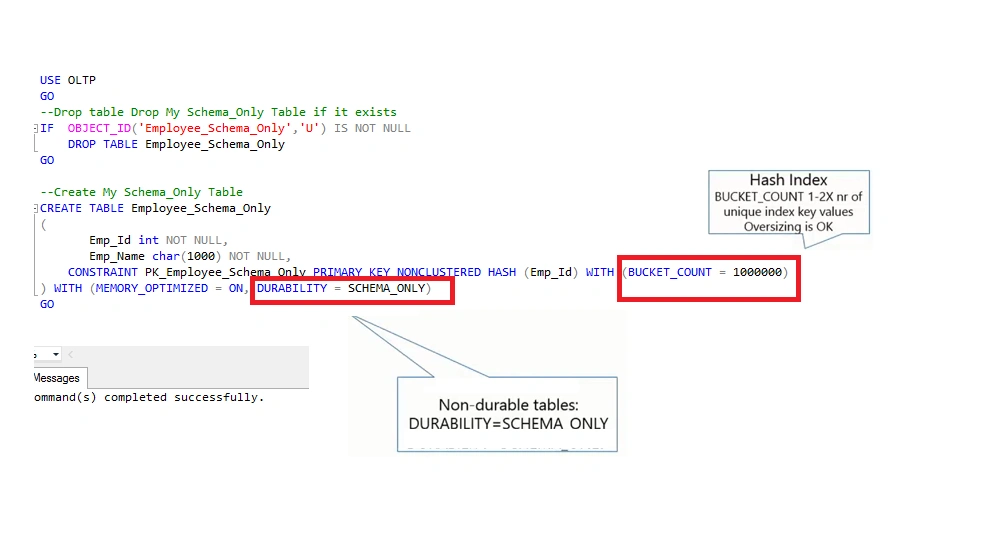
Now that all three of my tables are created I can move on to populating them with data.
Using SQL Server Management Studio
Now I will show you how to create the same database using SQL Server Management Studio.
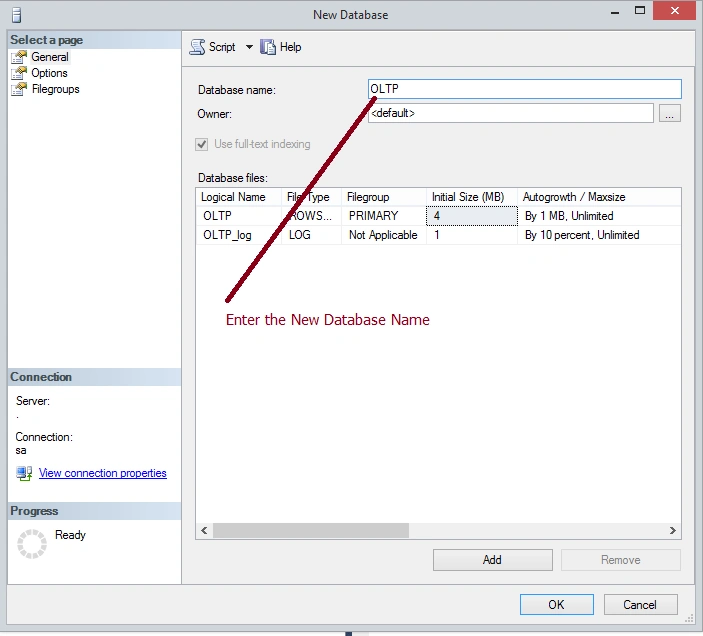
To create a database using SQL Server Management Studio I first right-click on the “Database” node, then select the “New Database” option from the menu. Doing this brings up the “New Database” window. In that window I identify the name of my OLTP database, so the window looks as in the following:
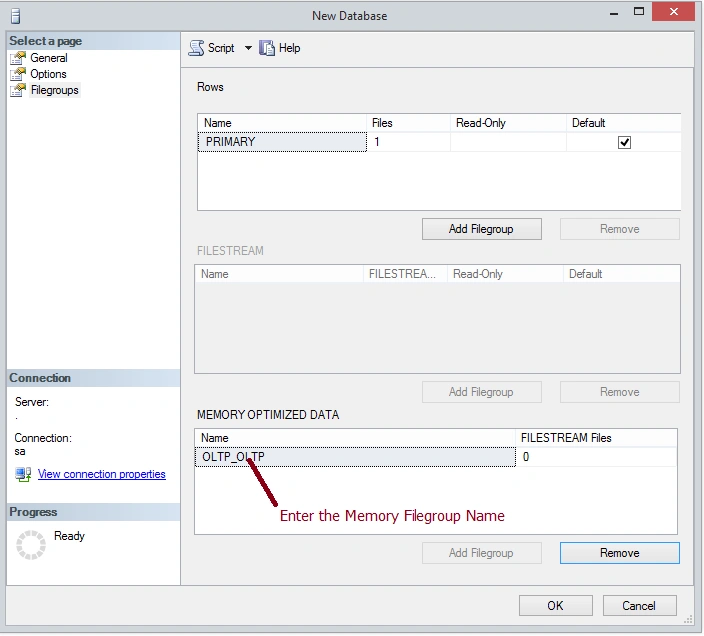
Then click on the “Filegroups” option in the left pane of this window. That brings up the filegroup window of the New Database dialog. In the filegroup window I click on the new “Add Filegroup” button under the “MEMORY_OPTIMIZE DATA” section of the right pane and then I enter the name of my new memory-optimized filegroup as shown in the screen shot below:
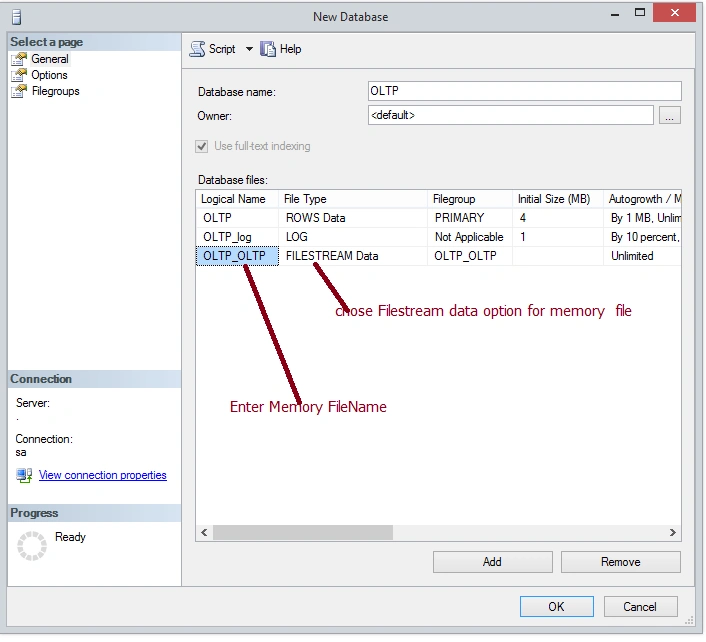
I then click on the “General” option in the left pane to add a new file in my new OLTP_OLTP filegroup. I do that by clicking on the “Add” button, then selecting a “File Type” of “FILESTREAM”, and then specifying the “Logical Name” of “OLTP_OLTP “ as shown in the screenshot below:
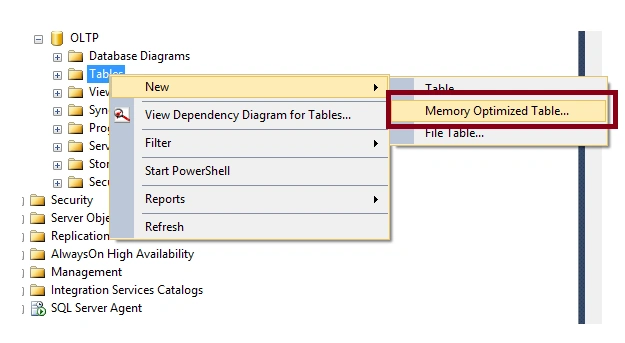
Now I will show the option to create a memory table using SQL Server Management Studio.
In the Object Explorer in SQL Server Management Studio click on the “Table” item and then hover over the “New” item that will display the “Memory Optimize Table…” option as displayed in the screenshot below:
Inserting Data into a Memory-Optimized Table
Let's start to test loading my Memory-Optimized tables. I decided to build a script that would load 100000 rows in each of my three tables. The following is the code that I used to test loading my Normal table and my two Memory-Optimized tables.
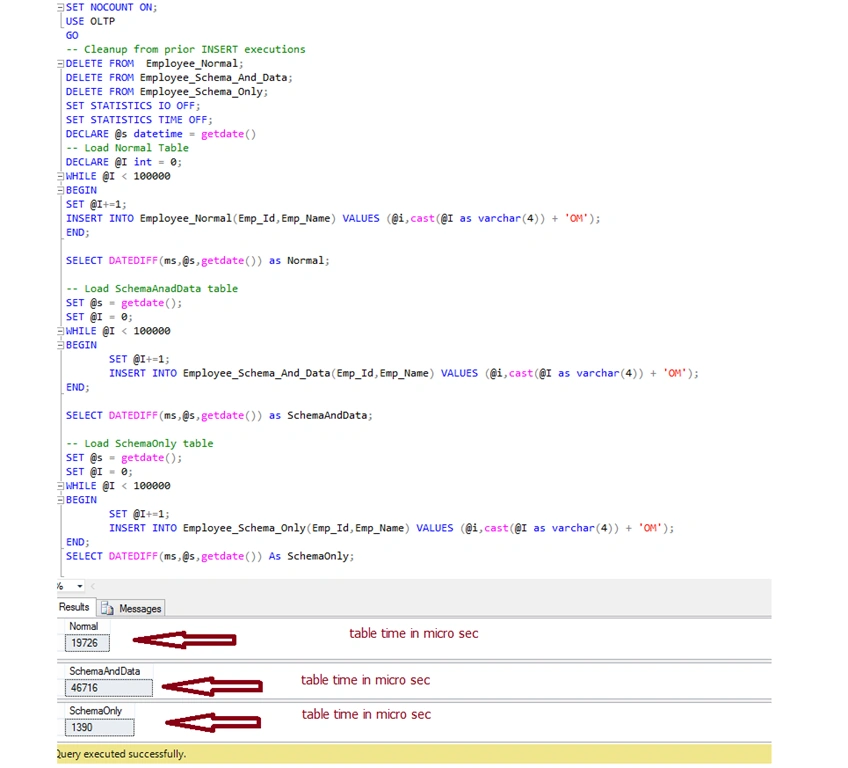
It is understandable that inserting data into my “Employee_Normal” and “Employee_Schema_And_Data” table might perform about the same. I say this because a Memory-Optimized table that has a DURABILITY mode of “SCHEMA_AND_DATA” needs to perform I/O to the checkpoint and transaction log when records are inserted, just like a normal table. This additional I/O when data is written to a table slows down the INSERT performance. This additional I/O allows for the “SCHEMA_AND_DATA” tables to be recoverable should I have a server crash or my server must be restarted. Whereas the rows inserted into my “Employee_Schema_Only” table will not be recovered should the SQL Server crash or be restarted. If inserting data into your table is important then you should consider using Memory-Optimized tables that have a DURABILTY setting of "Employee_Schema_Only”.
When SQL Server restarts or the database is brought back online the Memory-Optimized tables that are defined with the SCHEMA_AND_DATA DURABUILTY option will be read from the checkpoint and transaction log files and repopulated in memory. One thing to note is that while SQL Server repopulates memory with the SCHEMA_AND_DATA Memory-Optimized tables, your database will be in a recovering state and will be unavailable. You can see that in the following screen:
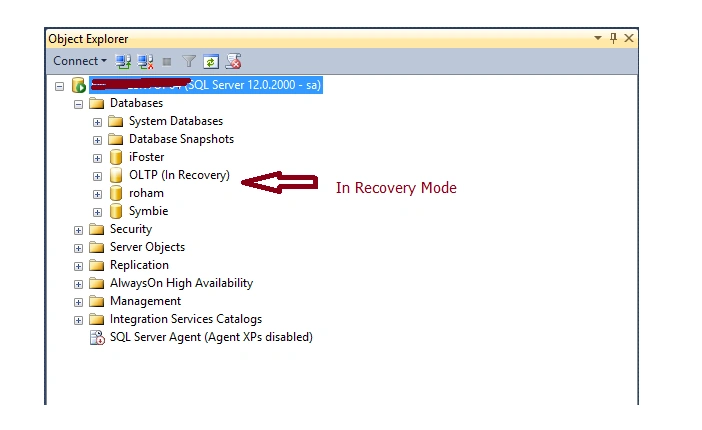
Note that my OLTP database is in the “In Recovery” state. Once all the data is loaded into memory for my Memory-Optimized tables than the database will become available.
For more details see In-Memory OLTP (In-Memory Optimization)
SummaryThis article described how to create Memory-Optimized tables in SQL Server 2014.
Nimit JoshiPosted Apr 15, 2015, 11:56 PM
Nice Article
Rahul Kumar SaxenaPosted Apr 15, 2015, 10:52 PM
Good Work...
Santhakumar MunuswamyPosted Apr 15, 2015, 2:03 PM
Good one