

Pre-requisite to understand this:
To fully grasp the concepts of inbound and outbound IPs in cloud deployments, you should have a basic understanding of networking concepts such as:
IP addressing (Public/Private IPs)
Firewalls and security groups
Network routing and Load Balancers
Cloud architecture (e.g., AWS, Azure, GCP)
Introduction
In cloud or web application deployments, the use of inbound and outbound IP addresses plays a critical role in securing the network, managing traffic, and ensuring application reliability.
Inbound IPs are associated with incoming traffic to the application (e.g., client requests), and Outbound IPs handle outgoing traffic (e.g., API calls to external services or database queries).
Cloud and web apps often need to handle large volumes of traffic across multiple sources and destinations, so using a single entry/exit point may not be the most efficient or secure solution. Therefore, designing separate pathways for inbound and outbound traffic helps in improving scalability, security, and load management.
What problem are we going to solve here?
Security risks: If all traffic (inbound and outbound) passes through a single point, it becomes a high-value target for attackers. A breach could affect both incoming requests and outgoing data.
Scalability issues: Using a single entry/exit point can become a bottleneck, limiting performance, availability, and fault tolerance.
Complex traffic management: Certain traffic types (such as API calls to external services or database queries) may have different security and performance requirements than web user traffic. A unified entry/exit point makes it difficult to apply tailored security and performance rules.
How to implement this?
Here are the general steps to implement inbound and outbound IPs in cloud/web deployments
Separation of Traffic
Use Load Balancers or API Gateways to direct inbound traffic (client requests) to application servers.
Use separate Virtual Private Cloud (VPC) or subnets to handle outbound traffic to external services or databases.
Security Configurations
Create security groups and firewall rules to limit inbound traffic based on IP, protocol, or port.
For outbound traffic, ensure that you can control the range of IPs used for egress to avoid unapproved data exfiltration.
Scaling Mechanisms
Implement Auto-Scaling Groups for inbound traffic to handle traffic surges effectively.
For outbound traffic, utilize NAT Gateways, PrivateLink, or similar cloud-specific solutions to route traffic securely while keeping IPs consistent.
Redundancy
Implement redundancy and fault tolerance with multiple entry and exit points (such as secondary load balancers and multiple NAT Gateways) to avoid a single point of failure.
Monitoring and Logging
Set up monitoring for both inbound and outbound traffic to ensure you can track performance, detect anomalies, and address any issues in real-time.
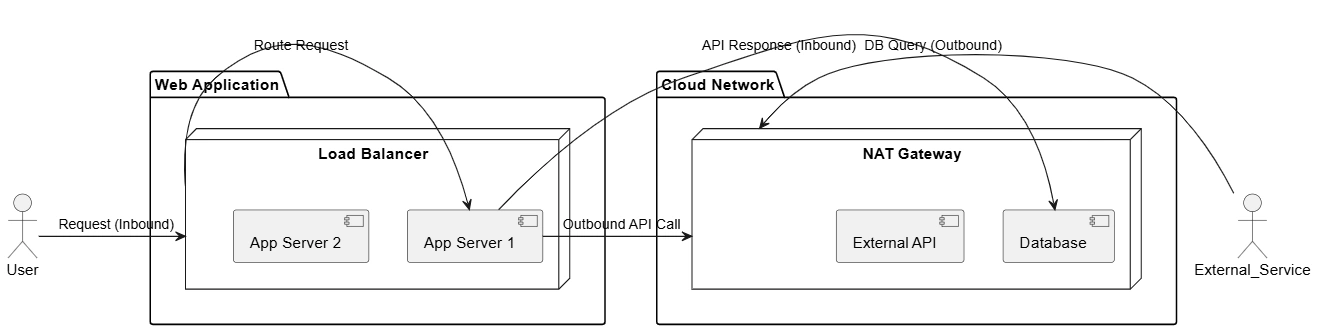
From an architecture standpoint, the diagram illustrates a well-structured cloud-native design where:
Inbound traffic is handled by a scalable ingress layer
Application workloads are isolated in private networks
Outbound traffic is centralized and governed
Trust boundaries are clearly defined
This architecture avoids single points of failure, enforces security boundaries, and supports enterprise-scale deployments.
In the above diagram
The Load Balancer is used as the dedicated ingress (inbound) component of the architecture. From an architectural standpoint, it serves as the single, controlled entry point for all external user traffic coming from the internet. The Load Balancer receives client requests, terminates SSL/TLS, performs health checks, and distributes traffic across multiple application servers. This design ensures high availability, horizontal scalability, and fault tolerance while keeping application servers isolated in private subnets without public IP addresses. By centralizing inbound access, the Load Balancer enforces security policies and prevents direct exposure of internal workloads to the public network.
The NAT Gateway, on the other hand, is used as the dedicated egress (outbound) component in the diagram. Application servers use the NAT Gateway to initiate outbound connections to databases, external APIs, or third-party services on the internet. Architecturally, the NAT Gateway translates private IP addresses of application servers into a fixed public IP, enabling secure outbound communication while blocking unsolicited inbound traffic. This separation of egress traffic allows strict control, monitoring, and IP whitelisting for external integrations, while preserving the private nature of the application tier.
Together, the Load Balancer and NAT Gateway enforce clear ingress and egress boundaries, which is a foundational best practice for secure and scalable cloud architecture.
| Concern | Single Entry/Exit | Layered Architecture |
|---|---|---|
| Security | Large attack surface | Reduced blast radius |
| Scaling | Coupled scaling | Independent scaling |
| Failure Impact | System-wide outage | Isolated failures |
| Governance | Hard to audit | Clear policy points |
| Compliance | Weak controls | Enforced boundaries |
Advantages
Improved Security: By segregating inbound and outbound traffic, you can apply more fine-grained security measures for each type, limiting exposure to threats.
Scalability: This approach ensures that your application can scale independently based on the type of traffic, improving performance under heavy load.
Fault Tolerance: Redundancy for both inbound and outbound traffic reduces the likelihood of a single point of failure affecting the application’s availability.
Traffic Management: Different traffic types can be managed with specific routes, load balancers, or VPNs for secure, optimized communication.
Compliance: In certain industries, outbound traffic needs to be controlled or monitored more rigorously. Separating traffic helps meet these compliance requirements.
Summary
Using separate inbound and outbound IPs for a cloud or web application deployment helps in increasing security, scalability, and the ability to manage traffic efficiently. Relying on a single entry or exit point could introduce risks such as bottlenecks, security vulnerabilities, and performance issues. By carefully implementing network configurations like load balancing, NAT Gateways, and tailored security rules, organizations can achieve a more resilient and efficient deployment architecture.
Join the conversation! Your thoughts help the community grow.