

Introduction
In this article, we are going to explain how to increase the number of Start Menu rows displayed in Windows 8. In Windows 8, the row number will be adjusted automatically in the Start Menu and depending on our screen resolution. The automatic row adjustment works great for up to six rows. If our screen has vertical space to spare, then the guide will help to increase the maximum number of rows displayed beyond six.
Note If our test system shows up to 12 rows, then more rows may be possible if we have access to a jumbo-tron or one of those Perceptive Pixel 82" touch PCs.
Some easiest step to increase the rows is to use the tile setting menu.
Step 1
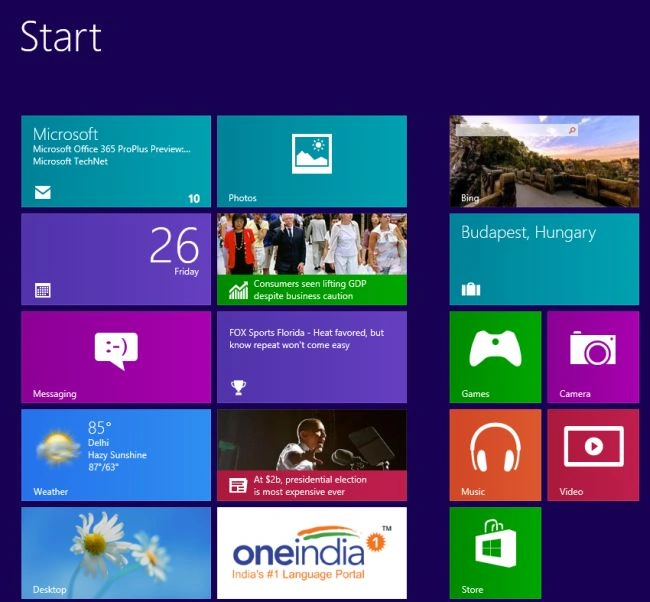
First, we open the Windows 8 Start Screen.
Step 2
Then we open the Charm Bar (press Win + C).

Step 3
Then we select the setting option in the Charm Bar.

Step 4
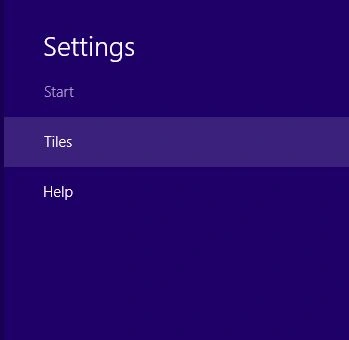
After this process, we click Tiles in the setting.
Step 5
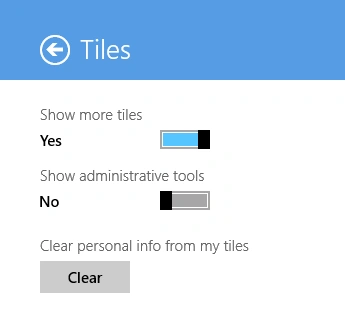
And if our screen will support showing additional tiles, an option to show more tiles will be visible.
Summary
In this article, we learned about Increase Number of Start Menu Rows Displayed in Windows 8.
Join the conversation! Your thoughts help the community grow.