Firstly, we will create a database & insert some dummy records into it. Then we will see, what are Indexes & how they work.
- CREATE Table Library (
- Book_Id int identity (1, 1),
- Book_Name varchar(100),
- Dept varchar(100),
- Subject_Id int
- );
- DECLARE @Dept varchar(20) = 'Computer_Science' DECLARE @Book_Id int = 1 DECLARE @Count int = 1 WHILE @Count >= 1
- and @Count <= 500000 BEGIN INSERT INTO Library(Book_Name, Dept, Subject_Id)
- VALUES
- (
- 'CsharpCorner_Book' + convert(
- varchar(100),
- @Book_Id
- ),
- @Dept,
- @Book_Id
- )
- SET
- @Book_Id += 1
- SET
- @Count += 1 END
Now select first two records & see the actual execution plan (you can see execution plan after running the query from menu option of SQL Server as Query => Display Estimated Execution Plan).
- select * from library where book_id = 1

- select * from library where book_id = 2
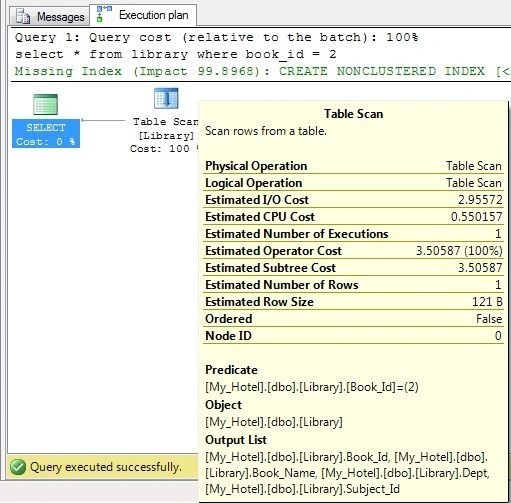
Here we can see the total cost is like the following:
Estimated Cost = Estimated I/O cost + Estimated CPU Cost Now I am going to apply Index on my Book_Name column as:
- CREATE INDEX Index_BookName
- ON Library (Book_Name)
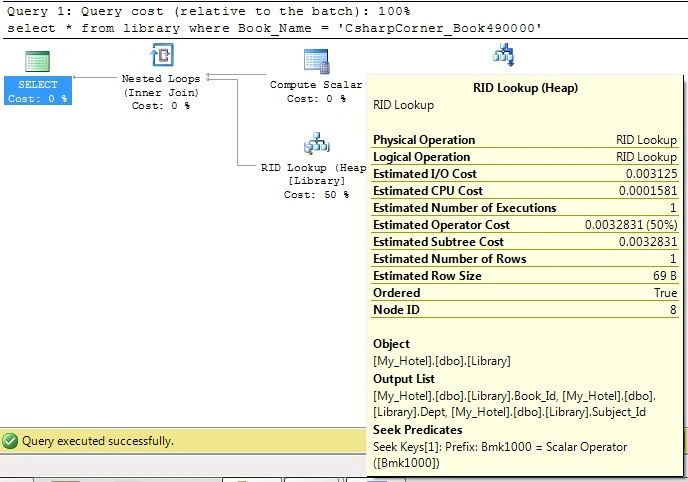
Now if we are looking for searching a record 'CsharpCorner_Book490000' from column name Book_Name then
select * from library where Book_Name = 'CsharpCorner_Book490000'
Now see the actual execution plan for above query.
 Indexes
- An index can be created in a table to find data more quickly and efficiently.
- Index is a data structure (most commonly a B- tree) that stores the values for a specific column in a table.
- B- trees are more commonly used because the data that is stored inside the B- tree can be sorted.
- When we are looking for exact value (clustered value) from table then it searches for that record.
- If we are looking for some more values like in between, less than or greater than then it will not be beneficial because when we search any single value then its directly point to row data in a table.
- Indexes with appropriate column work like an array where value is directly searched into a column. For example, if we search for the following record:
select * from library where Book_Name = 'CsharpCorner_Book490000'
- Then we are looking for 'CsharpCorner_Book490000'. This values is in our table and hence our CPU time gets divided by using Index applied on it.
Physical operator on indexes
Physical operator is an object or routine that performs an operation like Index Delete, Index Insert, Index Scan, Index Seek etc.
For more information about different indexes click here.
Real Life Example
Everyone had gone to school or college. In library if a librarian places all the books in a single shelf. Let say if any student asks for any book then it would be difficult to find because the librarian needs to search that book in the complete shelf.

Now if librarian sort these books in alphabetical order, then it would be easier to find particular book from the all the shelves.

Summary
This article will help fresher candidates to understand Indexes in SQL Server with real life example.


Ramzan Ali AbubakerPosted Nov 26, 2017, 2:15 AM
Nice Explanation and thanks a lot for sharing this article ! sir please you share about a triggers concept in sql
Rupesh KahanePosted Dec 1, 2015, 4:01 AM
Thanks a lot Ankur Mistry
Ankur MistryPosted Dec 1, 2015, 1:09 AM
Nice Explanation Rupesh...
Santhakumar MunuswamyPosted Nov 20, 2015, 9:31 AM
Good One
Rajan AroraPosted Nov 19, 2015, 12:31 AM
Good Explanation
Rupesh KahanePosted Nov 18, 2015, 11:57 AM
Thanks to Sibeesh Venu, Yashwant Vishwakarma & Banketeshvar Narayan also
Banketeshvar NarayanPosted Nov 18, 2015, 11:03 AM
Nice...
Yashwant VishwakarmaPosted Nov 18, 2015, 7:27 AM
clear, simple and easy explanation !!!
Sibeesh VenuPosted Nov 18, 2015, 7:27 AM
Nice Share