

Introduction
By default, the Azure Cosmos DB data is indexed. Azure applies its default indexing policy while creating a collection. However, the users can set their customized indexing policy as per the requirement.
Types of Index
- Hash - Supports efficient equality queries.
- Range - Supports efficient equality queries, range queries, and order by queries
- Spatial - Supports efficient spatial (within and distance) queries. The datatype can be Point, Polygon, or LineString.
The process of customizing the Indexing Policy
- Login to Azure Portal.
- Go to the Azure Cosmos DB account.
- Go to Settings.
- Select Collection
- Click on Indexing Policy.
- Update the policy as per your requirement.
Default Indexing Policy
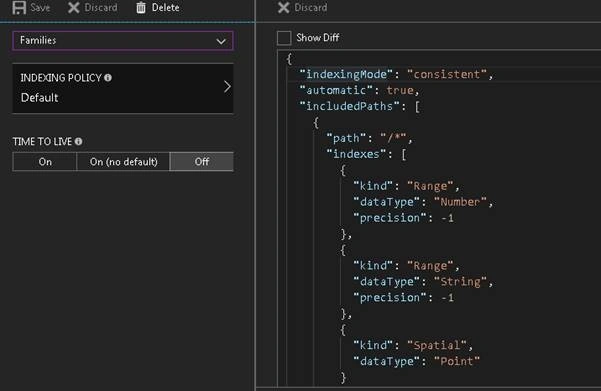
When creating a collection using the Azure portal, the Cosmos DB indexes both, strings and numeric properties, by default, with Range Index.
- String Properties - Range Indexed
- Numeric Properties - Range Indexed
- Spatial - Point Indexed
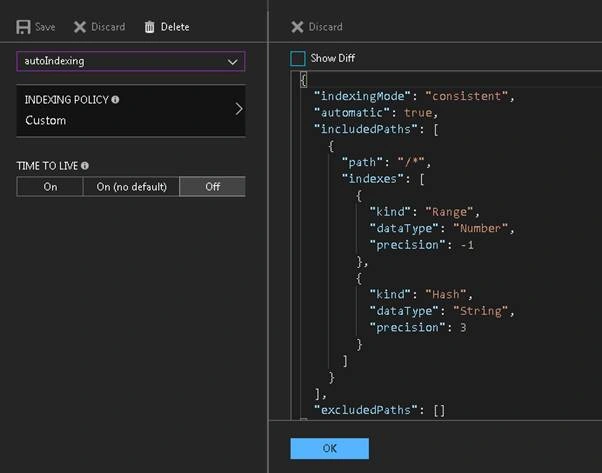
When creating a collection by code, Azure Cosmos DB, by default, indexes all the string properties within document consistently with a Hash index, and numeric properties with a Range index.
- String Properties - Hash Indexed
- Numeric Properties - Range Indexed
Indexing Modes
- Consistent
- Indexes get updated synchronously on each insert, update, and delete operation.
- Designed for “write quickly, query immediately”
- Incurs highest request unit charge per write
- Lazy
- Index updates asynchronously
- Designed for “ingest now, query later”
- Useful when data is written in a burst
- You might get inconsistent results for COUNT queries
- None
- Useful if no index is associated with the document
- Commonly used if Cosmos DB is utilized as key-value storage and documents are accessed only by their Id Property.
Index Paths
- You can choose which path must be included or excluded from indexing.
- This can offer improved write performance and lower index storage for scenarios when the query patterns are known beforehand.
- Index paths start with the root (/)
- Use (?) to refer exact path
- Use (*) to refer all paths under the specified path to be included
| Path | Description |
| / | Default path for collection. Recursive and applies to the whole document tree. |
| /prop/? | Index path required to serve queries like the following (with Hash or Range types respectively):
|
| /prop/* | Index path for all paths under the specified label. Works with the following queries
|
| /props/[]/? | Index path required to serve iteration and JOIN queries against arrays of scalars like ["a", "b", "c"]:
|
| /props/[]/subprop/? | Index path required to serve iteration and JOIN queries against arrays of objects like [{subprop: "a"}, {subprop: "b"}]:
|
| /prop/subprop/? | Index path required to serve queries (with Hash or Range types respectively):
|
Join the conversation! Your thoughts help the community grow.