

Behaviors is one of the extremely useful features in Xamarin.Forms that allows the user to add a new functionality in an already existing element in the view. Programmers just have to create a class that inherits from Behavior<T> where ‘T’ is an Element which is being extended. ListView is a control to store list of objects whose source might be static data from the web. But once in a while programmers need to get limited data time as a user scrolls (For example for news, a user might need to get 10 pieces of news at a time as news in the server may be in the thousands in number causing the app to crash). As Infinite scrolling is not a feature in ListView we have to insert a piece of code to get this functionality.
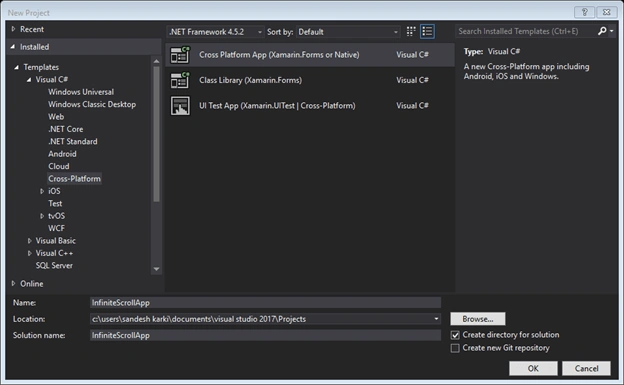
Create a new Xamarin.Forms App and select PCL(Portable Class Library),
Create a Folder named “Behaviors” and add a class InfiniteScroll inside it,
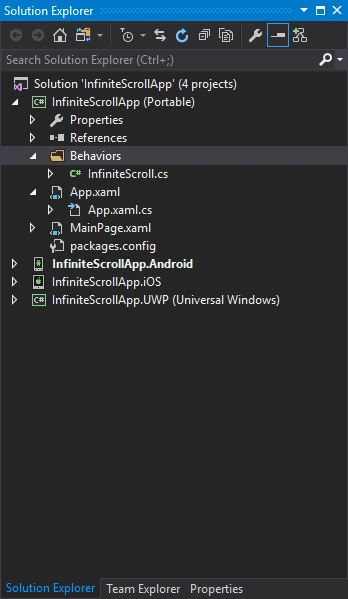
Inherit the class Behavior<ListView> which lies in namespace Xamarin.Forms and add the following codes,
- using System;
- using System.Collections;
- using System.Windows.Input;
- using Xamarin.Forms;
- namespace InfiniteScrollApp.Behaviors {
- public class InfiniteScroll: Behavior < ListView > {
- public static readonly BindableProperty LoadMoreCommandProperty = BindableProperty.Create("LoadMoreCommand", typeof(ICommand), typeof(InfiniteScroll), null);
- public ICommand LoadMoreCommand {
- get {
- return (ICommand) GetValue(LoadMoreCommandProperty);
- }
- set {
- SetValue(LoadMoreCommandProperty, value);
- }
- }
- public ListView AssociatedObject {
- get;
- private set;
- }
- protected override void OnAttachedTo(ListView bindable) {
- base.OnAttachedTo(bindable);
- AssociatedObject = bindable;
- bindable.BindingContextChanged += Bindable_BindingContextChanged;
- bindable.ItemAppearing += InfiniteListView_ItemAppearing;
- }
- private void Bindable_BindingContextChanged(object sender, EventArgs e) {
- OnBindingContextChanged();
- }
- protected override void OnBindingContextChanged() {
- base.OnBindingContextChanged();
- BindingContext = AssociatedObject.BindingContext;
- }
- protected override void OnDetachingFrom(ListView bindable) {
- base.OnDetachingFrom(bindable);
- bindable.BindingContextChanged -= Bindable_BindingContextChanged;
- bindable.ItemAppearing -= InfiniteListView_ItemAppearing;
- }
- void InfiniteListView_ItemAppearing(object sender, ItemVisibilityEventArgs e) {
- var items = AssociatedObject.ItemsSource as IList;
- if (items != null && e.Item == items[items.Count - 1]) {
- if (LoadMoreCommand != null && LoadMoreCommand.CanExecute(null)) LoadMoreCommand.Execute(null);
- }
- }
- }
- }
The above code will create a ‘LoadMoreCommandProperty’ which is a type of command and will be invoked when the last item of list is diaplayed. We use OnAttachedTo and OnDetachingFrom methods to bind our context and invoke the command when ListView ItemAppearing event is triggered on last Item. Now that our bindable property is complete we need to create a listview in MainPage to get the functionality working.
But before that add a repository class which will return data page wise,
- public class NewsRepository {
- public List < string > News {
- get;
- set;
- }
- public NewsRepository() {
- News.Add("1");
- News.Add("1");
- News.Add("1");
- News.Add("1");
- News.Add("1");
- News.Add("1");
- News.Add("1");
- News.Add("1");
- News.Add("1");
- News.Add("1");
- News.Add("2");
- News.Add("2");
- News.Add("3");
- News.Add("4");
- News.Add("1");
- News.Add("1");
- News.Add("1");
- News.Add("1");
- News.Add("1");
- News.Add("1");
- }
- public List < string > getNews(int page) {
- return News.Take(10).Skip(page - 1).ToList();
- }
- }
As we are using MVVM pattern we will create a new ViewModel which will contain a command and a List which contains the items of ListView. For this create a folder ViewModel and add class NewsViewModel. NewsViewModel will get data from the repository and notify when new data is loaded to listview.
Code in NewsViewModel
- using System.Collections.Generic;
- using System.ComponentModel;
- using System.Runtime.CompilerServices;
- using System.Windows.Input;
- using Xamarin.Forms;
- namespace InfiniteScrollApp.ViewModel {
- public class NewsViewModel: INotifyPropertyChanged {
- public event PropertyChangedEventHandler PropertyChanged;
- public List < string > News {
- get;
- set;
- }
- public ICommand LoadMore {
- get;
- set;
- }
- public NewsViewModel() {
- var repo = new NewsRepository();
- this.News = repo.getNews(1);
- OnpropertyChanged("News");
- int page = 2;
- this.LoadMore = new Command(() => {
- var newNews = repo.getNews(1);
- page += 1;
- foreach(var item in newNews) {
- News.Add(item);
- OnpropertyChanged("News");
- }
- });
- }
- void OnpropertyChanged([CallerMemberName] string propertyName = null) {
- var handler = PropertyChanged;
- if (handler != null) {
- handler(this, new PropertyChangedEventArgs(propertyName));
- }
- }
- }
- }
Now, Finally add a listview in MainPage,
- <?xml version="1.0" encoding="utf-8" ?>
- <ContentPage xmlns="http://xamarin.com/schemas/2014/forms"
- xmlns:x="http://schemas.microsoft.com/winfx/2009/xaml"
- xmlns:local="clr-namespace:InfiniteScrollApp"
- x:Class="InfiniteScrollApp.MainPage"
- xmlns:b="clr-namespace:InfiniteScrollApp.Behaviors">
- <ListView ItemsSource="{Binding News}">
- <ListView.Behaviors>
- <b:ListViewinfiniteScroll LoadMoreCommand="{Binding LoadMore}" />
- </ListView.Behaviors>
- <ListView.ItemTemplate>
- <DataTemplate>
- <ViewCell>
- <ViewCell.View>
- <Label Text="{Binding .}" />
- </ViewCell.View>
- </ViewCell>
- </DataTemplate>
- </ListView.ItemTemplate>
- </ListView>
- </ContentPage>
Now set the BindingContext to new instance of NewsViewModel.
- public MainPage() {
- InitializeComponent();
- this.BindingContext = new NewsViewModel();
- }
Now if you run the app you will get new data as you scroll and you can use rest service in place of repository in your application.
Long TiếnPosted Jul 20, 2017, 6:58 AM
It is a bad implementation. For example, if your mobile screen can display 15 items, but the first time your fetch only 10 from server, then this code will automatically load more, which is not necessary.
krunal bagadiaPosted Jul 19, 2017, 8:56 AM
Please share Project on below Email ID : [email protected]
Richard SloggettPosted May 17, 2017, 2:26 PM
Nice article. A few minor issues. 1) Your .getNews(1) call means you are always fetching the first page. 2) Your "return News.Take(10).Skip(page - 1).ToList();" statement in the repository is wrong - should be "return News.Skip(10 * (page - 1)).Take(10).ToList();". 3) You don't initialize the list in the repository - need News = new List<string>() in the constructor. 4) You cannot just add to the list in the LoadMore command handler - Xamarin is smart enough to not refresh the listview unless the list object actually changes - do "News = News.Concat(newNews).ToList();" instead of adding to the existing list (in the real world you would use an observable list and add to it). You would see most of these issues if you set incrementing numbers on the news items you add to the test repository. Not sure how Rishav "Used in my project and worked perfectly" but with these modifications it is working nicely - many thanks for this.
Rishav GautamPosted Apr 11, 2017, 5:18 AM
Great article. Used in my project and worked perfectly!!