

A Stored Procedure is the collection of logical groups of SQL Statements. Stored Procedures server an important purpose in performing a specific task. The main advantage of Stored Procedures is for increasing the performance of the database. In this article I will use a Stored Procedure and do the insert, update and delete operations using a Stored Procedure. In this article I will not use the front end, all the task I will do in the backend.
Step 1
Start the SQL Server and create a table.
- CREATE TABLE employee1
- (
- id INTEGER PRIMARY KEY,
- first_name VARCHAR(10),
- last_name VARCHAR(10),
- salary DECIMAL(10,2),
- country VARCHAR(20),
- )
Step 2
Now we need to insert the data in the table using the insert query.
- INSERT INTO emp
- VALUES
- (
- 1, 'Yaten', 'Sharma', 15000, 'India'
- );
- INSERT INTO emp
- VALUES
- (
- 2, 'Shiva', 'Sharma', 12000, 'Australia'
- );
- INSERT INTO emp
- VALUES
- (3, 'Reenna', 'Gupta', 18000, 'USA');
- INSERT INTO emp
- VALUES
- (
- 4, 'Priyanka', 'Updhayay', 16000, 'India'
- );
- INSERT INTO emp
- VALUES
- (
- 5, 'Rahul', 'Updhayay', 17000, 'India'
- );
We can check whether the data was inserted or not using the select query.
- select * from emp;
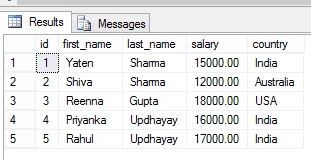
Figure 1: Select table
Step 2
After inserting the data, now we will create the Stored Procedure.
- create procedure InsertUpdate
- (
- @id INTEGER,
- @first_name VARCHAR(10),
- @last_name VARCHAR(10),
- @salary varchar(20),
- @country VARCHAR(20),
- @StatementType nvarchar(20) = ''
- )
- AS
- BEGIN
- IF @StatementType = 'Insert'
- BEGIN
- insert into emp(id,first_name,last_name,salary,country) values( @id, @first_name, @last_name, @salary, @country)
- END
- IF @StatementType = 'Select'
- BEGIN
- select * from emp
- END
- IF @StatementType = 'Update'
- BEGIN
- UPDATE emp SET
- First_name = @first_name, last_name = @last_name, salary = @salary,
- country = @country
- WHERE id = @id
- END
- end
For performing the delete operation we also need to create another procedure for performing the delete operation.
Delete Stored Procedure
- create procedure deleted
- (
- @id integer,
- @StatementType nvarchar(20) = ''
- ) as begin IF @StatementType = 'Delete' BEGIN
- DELETE FROM
- emp
- WHERE
- id = @id END end
Step 3
Now we will perform the insert operation using a Stored Procedure, for that we need to write the execute query.
Query for the insert using execute the Stored Procedure:
- exec InsertUpdateDelete @id = 6,
- @first_name = 'Shobit',
- @last_name = 'Pandey',
- @salary = 32000,
- @country = 'Canada',
- @StatementType = 'Insert'
Now we check whether the data was inserted.
- Select * from emp;
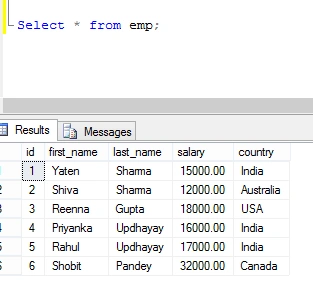
Figure 2: Insert procedure
Step 4
Now we will perform the update operation, for that we write the query to update the execute query.
The following is the Query to update using execute in a Stored Procedure:
- exec InsertUpdateDelete @id = 3,
- @first_name = 'Shobit',
- @last_name = 'Pandey',
- @salary = 32000,
- @country = 'Canada',
- @StatementType = 'Update'
Now we will check that the data is updated or not.
- Select * from emp;
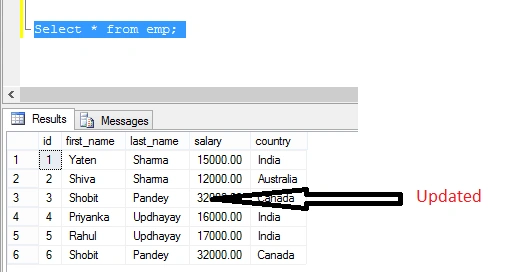
Figure 3: Updated table
Step 5
Now we need to perform the delete operation using a Stored Procedure.
- exec deleted @id = 5,
- @StatementType = 'Deleted'
Now we need to check that the data is deleted.
- Select * from emp;
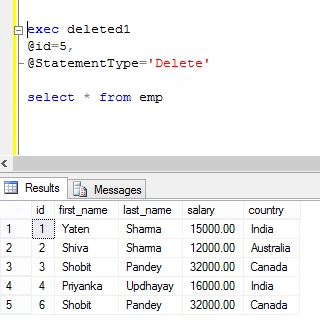
Figure 4: Delete rows
Summary
This article explained how to write a Stored Procedure for insert, update and delete operations and how to execute them using parameters.
I hope this article is helpful for beginners if they want to use Stored Procedures in SQL Server and perform the insert, update and delete operations.
Sangram PattanayakPosted Jul 12, 2019, 2:33 AM
Very Nice Article
chandrakant agalavePosted Aug 10, 2018, 1:04 AM
Nice....but more mistakess
Durgesh SinghPosted Jul 6, 2018, 3:54 AM
Fruitful article
Nithish ReddyPosted Feb 22, 2018, 8:23 AM
Nice article ! can you explain joints ?
SubashPosted Sep 15, 2016, 5:05 AM
Good one
Kartik VaghasiyaPosted Aug 5, 2015, 9:09 AM
Nice one. really use full.
Yatendra SharmaPosted Jul 21, 2015, 12:26 AM
Pankaj Kumar Choudhary thanx
Yatendra SharmaPosted Jul 21, 2015, 12:26 AM
Santhakumar Munuswamy thanx
Yatendra SharmaPosted Jul 21, 2015, 12:26 AM
Chervine Bhiwoo thanx
Pankaj Kumar ChoudharyPosted Jul 17, 2015, 8:06 PM
Nice Article Sir...........
Santhakumar MunuswamyPosted Jul 17, 2015, 4:39 PM
Thanks for nice article:)
Chervine BhiwooPosted Jul 17, 2015, 3:03 PM
Great tip!
Yatendra SharmaPosted Jul 17, 2015, 7:55 AM
Yashwant Vishwakarma thanx
Yatendra SharmaPosted Jul 17, 2015, 7:54 AM
Govinda Rajulu Yemineni thanx
Yashwant VishwakarmaPosted Jul 17, 2015, 7:44 AM
Superb :-)
Govinda Rajulu YemineniPosted Jul 17, 2015, 7:15 AM
Nice one
Yatendra SharmaPosted Jul 17, 2015, 6:09 AM
Sibeesh Venu thanx
Yatendra SharmaPosted Jul 17, 2015, 6:08 AM
Gopi Chand thanx
Sibeesh VenuPosted Jul 17, 2015, 5:55 AM
Thanks for the information
Gopi ChandPosted Jul 17, 2015, 5:46 AM
Nice
Yatendra SharmaPosted Jul 17, 2015, 4:51 AM
Rakesh Chavda thanx
RakeshPosted Jul 17, 2015, 4:17 AM
Good one
Yatendra SharmaPosted Jul 17, 2015, 4:08 AM
Debasis Saha thanx
Yatendra SharmaPosted Jul 17, 2015, 4:08 AM
Nilesh Jadav thanx
SharadPosted Jul 17, 2015, 3:32 AM
good one...
Abrar Ahmad AnsariPosted Jul 17, 2015, 3:01 AM
https://technet.microsoft.com/en-us/library/bb522522%28v=sql.105%29.aspx
Abrar Ahmad AnsariPosted Jul 17, 2015, 3:01 AM
Insert/Update/Delete operation we can do a single query in sql. learn about merge
Debasis SahaPosted Jul 17, 2015, 2:59 AM
Nice Once..
Nilesh JadavPosted Jul 17, 2015, 2:38 AM
Nice article sir