

As we all know the size of an image is large; in a database like Oracle we need to store the image in the form of Blob data type or a bfile data type, but in SQL Server we have one data type for storing the images and that is image data type. So for storing the image we need to create one table with image data type; the following is the SQL code.
create database Test
create table TestBlob
(
imPhoto image not null
)
In the above code we just created one database and within that database we created one table whose name is TestBlob which contains only one column imPhoto whose data type is image.
Now for adding the image from the front end to the back end we need to create a user interface; the design is:
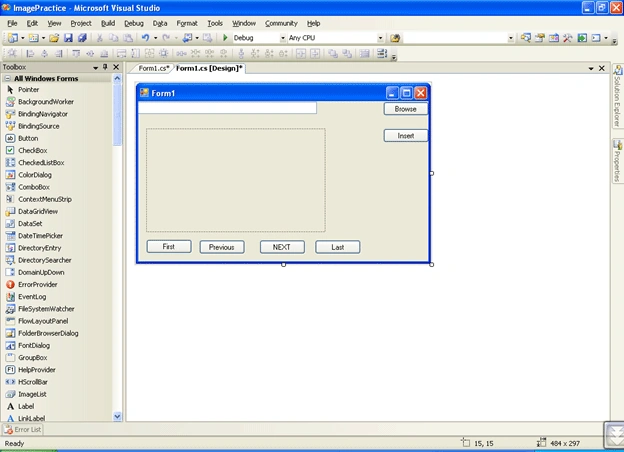
We specified the anchor property of the button to be the top and right and that of the textbox to be top and left.
We are using six buttons:
- One for browsing
- For inserting data into database
- Getting the first images from the database
- Getting the Previous image from the database
- Moving to next image
- Moving to last image.
Now the following is the coding which will add the data to the database and we can read the data as and when we need it.
using System;
using System.Collections.Generic;
using System.ComponentModel;
using System.Data;
using System.Drawing;
using System.Text;
using System.Windows.Forms;
using System.IO;
using System.Data.SqlClient;
namespace ImagePractice
{
public partial class Form1 : Form
{
SqlConnection con;
SqlCommand cmd;
SqlDataReader dr;
OpenFileDialog ofd;
SqlDataAdapter da;
DataSet ds;
int indexno = 0;
public Form1()
{
InitializeComponent();
}
//for Browing the image files from our computer.
private void button1_Click(object sender, EventArgs e)
{
ofd = new OpenFileDialog();
//ofd.InitialDirectory = @"c:\";
// for filtering the openfiledialog so that it should display only the images file
ofd.Filter = "Image Files(*.bmp;*.jpg;*.gif)|*.bmp;*.jpg;*.gif";
if (ofd.ShowDialog() == DialogResult.OK)
{
textBox1.Text = ofd.FileName;
}
else if(ofd.ShowDialog()==DialogResult.Cancel)
{
MessageBox.Show("You Clicked Cancelled");
}
}
Join the conversation! Your thoughts help the community grow.