Introduction
In the previous article, we learned how the .NET Garbage Collector (GC) organizes objects into Generation 0, Generation 1, and Generation 2 to improve performance.
But another important question remains:
How does the Garbage Collector actually know which objects to remove and which ones to keep?
Does it randomly delete objects? How does it avoid deleting objects that are still in use? And what happens to memory after unused objects are removed?
The answer lies in four important phases of the .NET Garbage Collector:
Mark
Sweep
Compact
Finalization
These phases work together to identify unused objects, reclaim memory safely, and keep your application running efficiently.
In this article, you'll explore each phase step by step and understand what happens behind the scenes whenever the Garbage Collector runs.
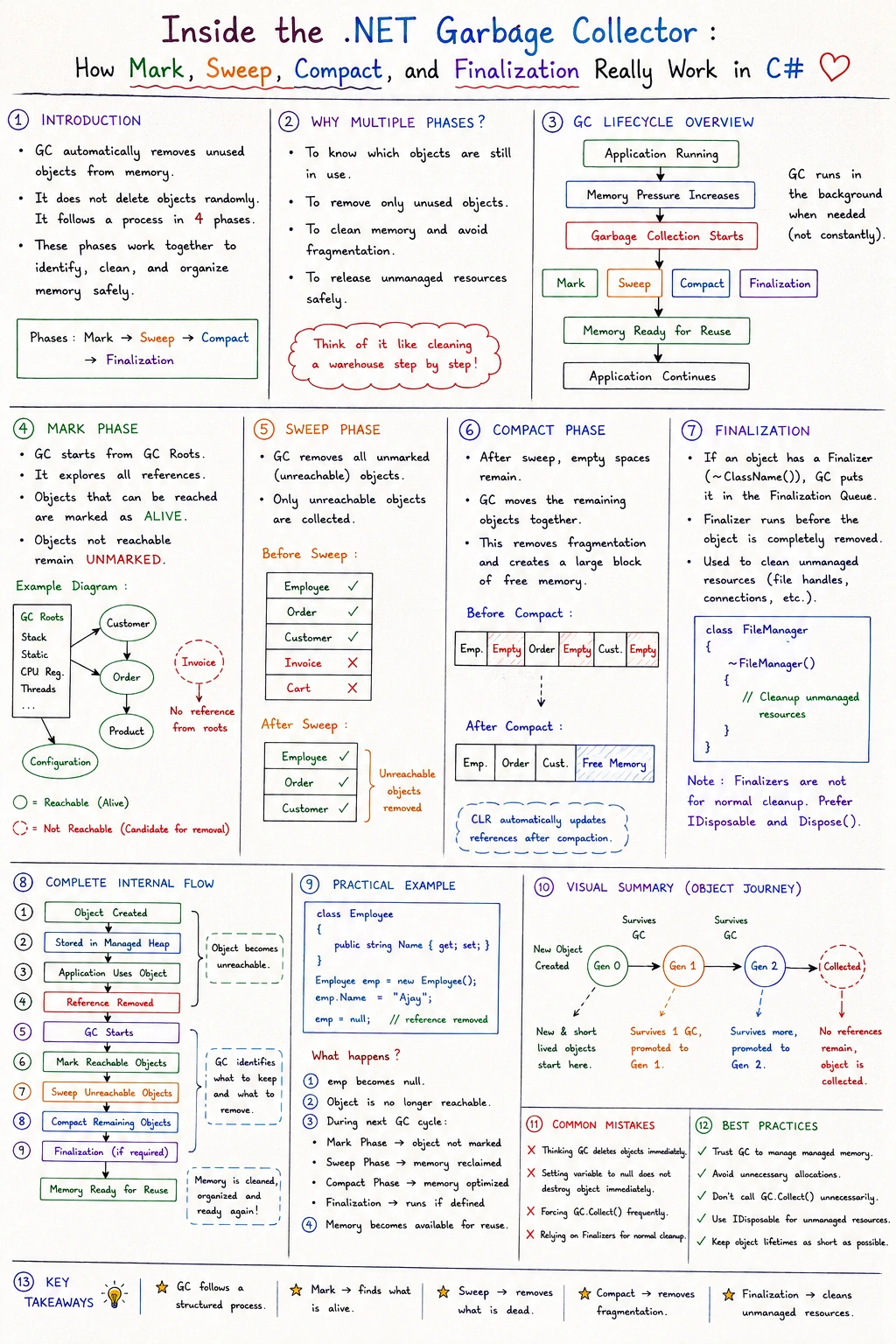
Why Does the Garbage Collector Need Multiple Phases?
Imagine cleaning a warehouse.
Before removing anything, you first identify which items are still needed. Then you remove unwanted items. Finally, you reorganize the remaining items to free up space.
The Garbage Collector follows a similar approach.
Instead of deleting everything, it performs its work in carefully planned phases to ensure that only unused objects are removed.
Overview of the GC Lifecycle
Every time the Garbage Collector runs, it follows a sequence similar to this:
Application Running
        │
        ▼
Memory Pressure Increases
        │
        ▼
Garbage Collection Starts
        │
        ▼
Mark Phase
        │
        ▼
Sweep Phase
        │
        ▼
Compact Phase
        │
        ▼
Finalization (if required)
        │
        ▼
Application Continues
Each phase has a specific responsibility.
Step 1 – Mark Phase
The first job of the Garbage Collector is to determine which objects are still being used.
It begins by identifying GC Roots.
GC Roots are starting points that represent objects the application can still reach.
Examples include:
Local variables
Static variables
Method parameters
CPU registers
Active threads
Starting from these roots, the Garbage Collector follows every reference to discover all reachable objects.
Objects that can still be reached are marked as alive.
Objects that cannot be reached remain unmarked.
Visual Flow
GC Roots
   │
   ├────────► Customer
   │              │
   │              ▼
   │           Order
   │              │
   │              ▼
   │          Product
   │
   └────────► Configuration

Invoice (No Reference)
The Invoice object has no path from any GC Root, so it becomes a candidate for collection.
Step 2 – Sweep Phase
Once marking is complete, the Garbage Collector knows exactly which objects are still needed.
Now it removes the objects that were not marked.
These objects are considered unreachable because nothing in the application references them anymore.
For example:
Managed Heap

Employee      ✓ Alive
Order         ✓ Alive
Customer      ✓ Alive
Invoice       ✗ Removed
Cart          ✗ Removed
Only unreachable objects are reclaimed.
Step 3 – Compact Phase
After removing unused objects, empty spaces appear in memory.
If left unchanged, memory becomes fragmented.
Fragmentation means free memory is scattered into many small gaps, making future allocations less efficient.
To solve this, the Garbage Collector moves the remaining live objects together.
Before Compaction
Employee
Empty
Order
Empty
Customer
Empty
After Compaction
Employee
Order
Customer
Free Memory
The free memory becomes one large continuous block, making future object allocations faster.
Note: The .NET runtime automatically updates object references after compaction, so your code continues to work without any changes.
Step 4 – Finalization
Some objects manage unmanaged resources such as:
These resources require additional cleanup before memory can be reclaimed.
If a class defines a finalizer, the Garbage Collector executes it before completely removing the object.
Example:
class FileManager
{
    ~FileManager()
    {
        // Cleanup unmanaged resources
    }
}
Finalizers are not executed immediately after an object becomes unreachable. The Garbage Collector decides when they run.
In modern .NET applications, IDisposable is usually the preferred approach for releasing unmanaged resources. We'll cover that in the next article.
Complete Internal Flow
Object Created
      │
      ▼
Stored in Managed Heap
      │
      ▼
Application Uses Object
      │
      ▼
Reference Removed
      │
      ▼
Garbage Collector Starts
      │
      ▼
Mark Reachable Objects
      │
      ▼
Sweep Unreachable Objects
      │
      ▼
Compact Remaining Objects
      │
      ▼
Run Finalizers (if needed)
      │
      ▼
Memory Ready for Reuse
Practical Example
class Employee
{
    public string Name { get; set; }
}

Employee emp = new Employee();

emp = null;
What happens?
The Employee object becomes unreachable.
During the next GC cycle, it is not marked.
The Sweep phase reclaims its memory.
If the object had a finalizer, it would run before the object is fully reclaimed.
The remaining objects may be compacted to eliminate memory gaps.
Common Mistakes
Believing the Garbage Collector deletes objects immediately
Objects are collected only when the Garbage Collector decides to run.
Thinking null destroys an object
Setting a variable to null removes only that reference. The object is collected later if no other references exist.
Ignoring fragmentation
Simply removing objects is not enough. Compaction is important because it keeps memory contiguous and efficient.
Relying on finalizers for normal cleanup
Finalizers run at a nondeterministic time. For most cleanup scenarios, implementing IDisposable is a better choice.
Best Practices
Trust the .NET Garbage Collector to manage managed memory.
Avoid unnecessary object allocations in performance-critical code.
Do not force garbage collection using GC.Collect() unless there is a well-understood reason.
Implement IDisposable when working with unmanaged resources instead of relying on finalizers.
Keep object lifetimes as short as practical to reduce memory pressure.
Key Takeaways
The Garbage Collector follows a structured process rather than deleting objects randomly.
The Mark phase identifies reachable objects.
The Sweep phase removes unreachable objects.
The Compact phase eliminates memory fragmentation by moving live objects together.
Finalization provides an opportunity to clean up unmanaged resources before an object is fully reclaimed.
Understanding these phases helps you write more efficient and memory-friendly .NET applications.


Join the conversation! Your thoughts help the community grow.