

SQL Server 2012 Reporting Services Add-in for SharePoint (2010 / 2013) brings one of the coolest features called PowerView into the SharePoint BI Stack. PowerView provides an interactive data exploration, visualization, a presentation experience and intuitive ad-hoc reporting for business users such as data analysts, business decision makers, and information personnel. They can easily create and interact with views of data from data models based on PowerPivot workbooks published in a PowerPivot Gallery, Cubes and Tabular models deployed to SQL Server 2012 Analysis Services (SSAS) instances. PowerView is a browser-based Silverlight application launched from SharePoint Server that enables users to present and share insights with others in their organization through interactive presentations. Analysis Cube is also supported in PowerView but you need to install SQL Server 2012 cumulative update 4 released after SQL Server 2012 SP1. Read more at TechNet Article PowerView (SSRS).
For installing, configuring and using PowerView in a SharePoint Farm you need to have the following things to be installed regardless of whetehr it is a SharePoint 2010 or 2013 Farm.
- SQL Server 2012 Reporting Services in SharePoint Integrated Mode.
- SQL Server 2012 Reporting Services Add-in for Microsoft SharePoint Server.
- SQL Server 2012 Cumulative Update 4 (Enable Analysis Service Cube Support).
The next important thing to understnaed is where the installation should go to in a SharePoint farm so that the right components are installed in the proper layers. 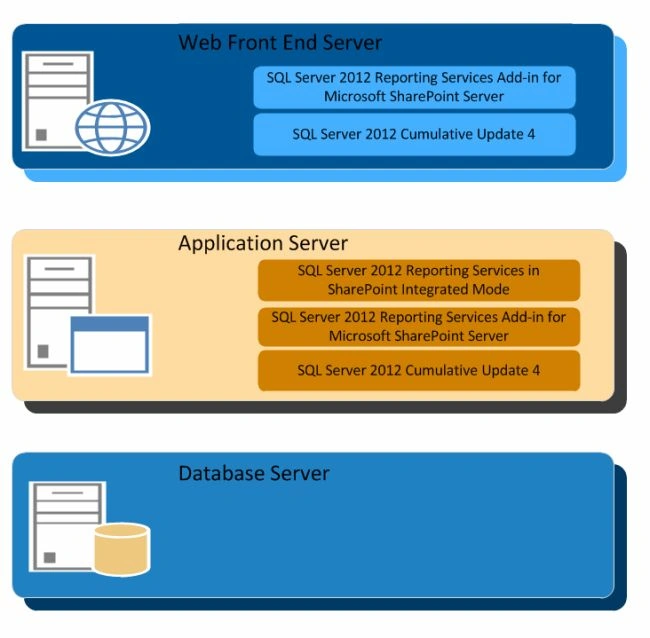
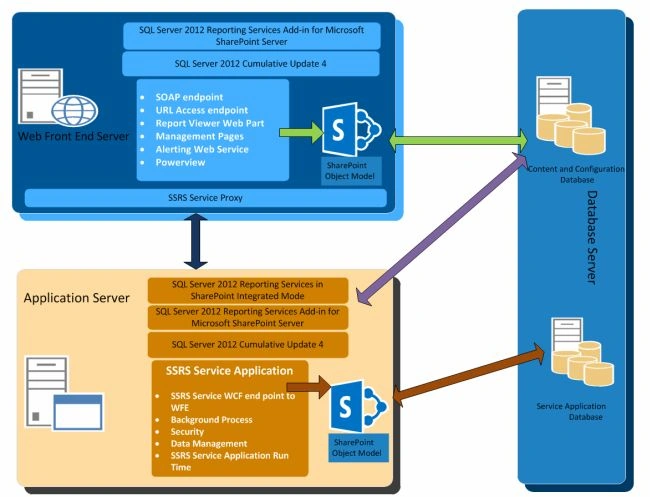
The diagram shows various layers in a SharePoint Farm that performs specific roles. In all web front-end servers we need to install the SQL Server 2012 Reporting Service Add-In and the SQL Server 2012 Cumulative update 4. Depending on the farm architecture ( SharePoint Topology Diagrams ) identify the Application Server and install the SQL Server 2012 Reporting Services in SharePoint Integrated Mode, SQL Server 2012 Reporting Service Add-In and the SQL Server 2012 Cumulative update 4. The important thing to remember here is to not change the database layer. If you are setting up PowerView in SharePoint 2010 most of the implementation uses SQL Server 2008 as the Database Server so this will raise a question, do I need to upgrade my Database Server to support PowerView? The answer is no, because there is no change required at the database layer.
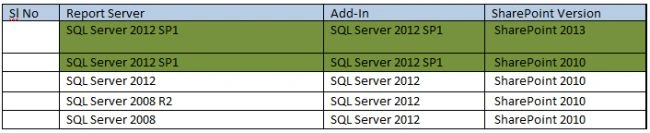
- For SharePoint 2013, you can only use the SQL Server 2012 SP1 version of the Reporting Services add-in for SharePoint.
- For SharePoint 2010, you can use either the SQL Server 2012 or the SQL Server 2008 R2 versions of the Reporting Services add-in for SharePoint 2010 products. However, if you use the SQL Server 2012 SP1 version of the add-in, then you must also use a SQL Server 2012 SP1 report server.
Join the conversation! Your thoughts help the community grow.